HelloGrowthCRM software
Built for real small-business sales teams
HelloGrowthCRM helps reps qualify faster, follow up on time, and close more deals—with practical automation in one place.
- AI lead scoring and pipeline visibility
- Built-in dialer, WhatsApp, and email automation
- Sales forecasting and RevOps-ready reporting
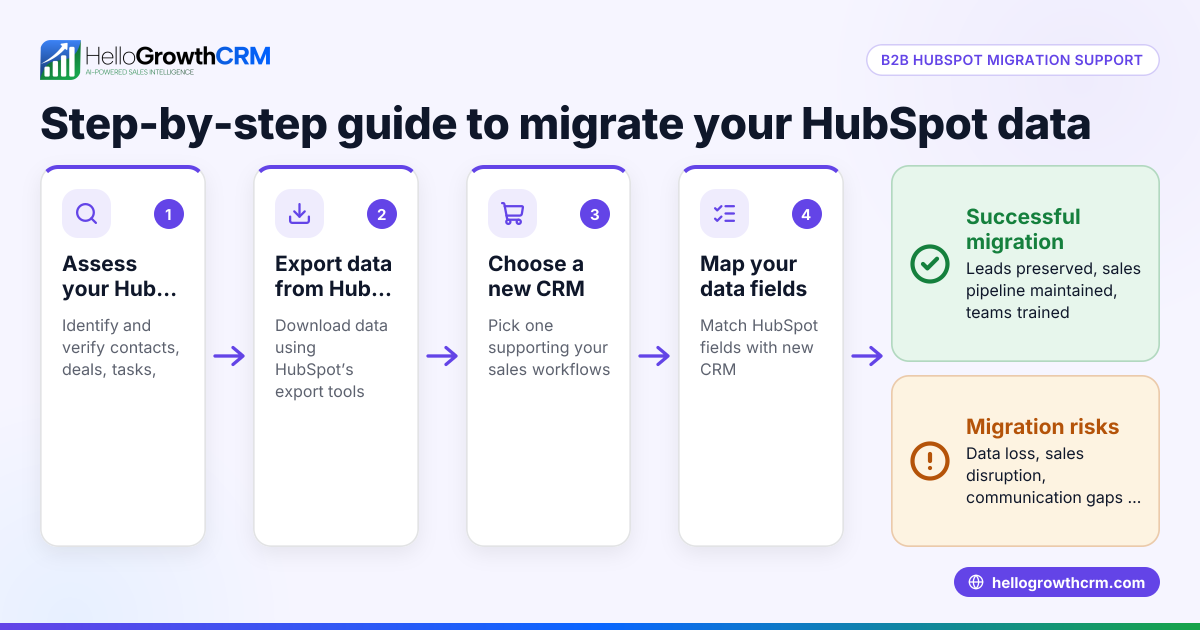
CRM migration is the process of moving your customer relationship management data, workflows, and sales tools from your current CRM to a new system. This is often necessary when your current CRM no longer fits your business needs or is too complex or costly. Migrating smoothly requires planning, data checks, and testing to avoid losing leads or disrupting sales.
Why this comes up / what goes wrong
Small and mid-sized Canadian businesses often consider CRM migration when their current system fails to keep up with growth or changes in sales processes. For example, a business might struggle with slow lead follow-up because their CRM lacks automation or integration with messaging channels like WhatsApp. Others may run sales on disconnected tools like email and spreadsheets, causing lost leads and inefficiency.
Common triggers for CRM migration include:
- Difficulty tracking leads and follow-ups reliably
- Lack of mobile-friendly or messaging-based communication
- High costs or complexity of current CRM
- Need for better sales forecasting and reporting
- Desire for AI assistance in sales tasks
Without proper migration, businesses risk data loss, duplicate records, and sales downtime.
Step-by-step
- Assess your current CRM and needs
- List what works and what doesn’t in your current CRM.
- Identify must-have features like WhatsApp integration or AI drafting.
- Check your current data quality: duplicates, missing fields, outdated info.
- Choose the right new CRM
- Compare features, pricing, and ease of use.
- Ask about data import formats supported (CSV, Excel, API).
- Confirm support for your communication channels (e.g., WhatsApp, SMS).
- Plan your data migration
- Export your data from the old CRM.
- Clean and de-duplicate data before import.
- Map fields from old CRM to new CRM carefully.
- Test the import with sample data
- Import a small batch first.
- Check for errors, missing fields, or formatting issues.
- Train your team
- Provide training on the new CRM’s features.
- Highlight new tools like AI agents or built-in dialers if available.
- Switch over and monitor
- Schedule migration during low sales activity if possible.
- Keep the old CRM accessible temporarily to verify data.
- Monitor sales activity and follow-ups closely.
- Optimize post-migration
- Adjust workflows based on team feedback.
- Set up automations and sequences for WhatsApp and SMS.
Example (fictional figures)
A bilingual insurance agency in Laval, Quebec, decides to migrate from a basic CRM to a new system on 2024-07-01.
- Current leads: 1,200
- Export cost for data cleaning service: C$500
- Estimated internal time for mapping and testing: 20 hours at C$30/hour = C$600
Migration cost estimate:
C$500 + (20 × C$30) = C$500 + C$600 = C$1,100
The agency exports data, cleans duplicates, maps fields to the new CRM, and runs a test import with 100 leads.
After successful testing, they train their two-person sales team on WhatsApp and SMS messaging features and start using AI agents to draft follow-ups after calls.
This migration reduces lost leads and improves follow-up speed.
Common mistakes
- Skipping data cleanup: Leads to duplicates and errors. Prevent by thorough cleaning before import.
- Not mapping fields correctly: Causes missing or misplaced data. Prevent by carefully matching fields and testing imports.
- Rushing training: Results in low adoption and mistakes. Prevent by scheduling sufficient training sessions.
- Migrating without backup: Risks data loss. Always backup your old CRM data before migration.
- Ignoring communication channel support: Leads to dropped messages. Confirm WhatsApp and SMS integration support before choosing.
- Not monitoring post-migration: Misses issues early. Set up monitoring and feedback loops.
Doing this with relevant CRM features
Some CRMs provide WhatsApp and SMS messaging workflows that log conversations on lead records and allow follow-ups directly as messages. AI agents (often in beta) can draft follow-up messages after calls for reps to review and send. For small teams, some offer free plans allowing pipeline management without cost until advanced calling or messaging automation is needed. These features help maintain quick, consistent contact with leads during and after migration. Learn more about WhatsApp and SMS CRM features and built-in CRM dialers to support your sales team efficiently.
Frequently asked questions
How long does CRM migration usually take? The timeline depends on data volume and complexity but typically ranges from a few days to several weeks. Testing and training add to the schedule, so plan accordingly.
Can I migrate data myself or do I need a service? Small businesses with clean data can often migrate themselves using export/import tools. For larger or complex datasets, a data migration service can reduce errors and downtime.
Will my sales team lose leads during migration? If planned carefully with backups and parallel access to old CRM, lead loss can be avoided. Monitoring post-migration is crucial to catch any issues.
What should I ask CRM vendors about migration? Ask about supported import formats, data mapping help, migration tools, training resources, and support during the switch.
How can messaging features help after migration? WhatsApp and SMS integration lets your team engage leads on channels they already use. Logging conversations on lead records ensures follow-ups are timely and consistent.
Is there a free plan to try CRM features after migration? Some CRM providers offer free plans that support small teams managing leads and pipelines at no cost, ideal for starting out before adding calling or automation.
Key takeaways
- CRM migration requires planning, data cleanup, and testing to avoid lost leads.
- Map fields carefully and run test imports before full migration.
- Train your team on new CRM features to ensure adoption.
- Backup old data and monitor sales activity post-migration.
- Confirm your new CRM supports your communication channels like WhatsApp and SMS.
- Messaging workflows and AI drafting tools can help maintain quick follow-ups.
Start your CRM migration confidently and explore CRM features by starting on the Free Forever plan (200 leads, no credit card).
Ready to put this into practice?
Set up your pipeline, WhatsApp follow-ups, and AI lead scoring in minutes — free, no credit card.
Try HelloGrowthCRM freeGet CRM tips in your inbox
Join thousands of sales professionals who get weekly insights on CRM strategy, AI automation, and pipeline optimization.

The HelloGrowthCRM team publishes guides on CRM strategy, AI sales tools, and revenue operations for small business sales teams.