HelloGrowthCRM software
Built for real small-business sales teams
HelloGrowthCRM helps reps qualify faster, follow up on time, and close more deals—with practical automation in one place.
- AI lead scoring and pipeline visibility
- Built-in dialer, WhatsApp, and email automation
- Sales forecasting and RevOps-ready reporting
A CRM with built-in calling and call logging lets your sales team make calls directly inside the software and automatically records call outcomes and histories on each lead. This article covers why small businesses look for this feature, step-by-step guidance on what to check, a realistic example, common pitfalls to avoid, and how HelloGrowthCRM supports these needs.
Why this comes up / what goes wrong
Small and mid-sized business owners often struggle with losing leads or wasting time because their sales teams rely on separate tools for calling and tracking. For example, reps might use their phones or external apps to call prospects and then manually enter notes or call results into spreadsheets or email threads. This leads to missed follow-ups, inconsistent records, and difficulty measuring sales performance. A CRM with built-in calling and call logging solves this by integrating calls and call history directly with lead and deal records, streamlining workflows and improving visibility.
Step-by-step
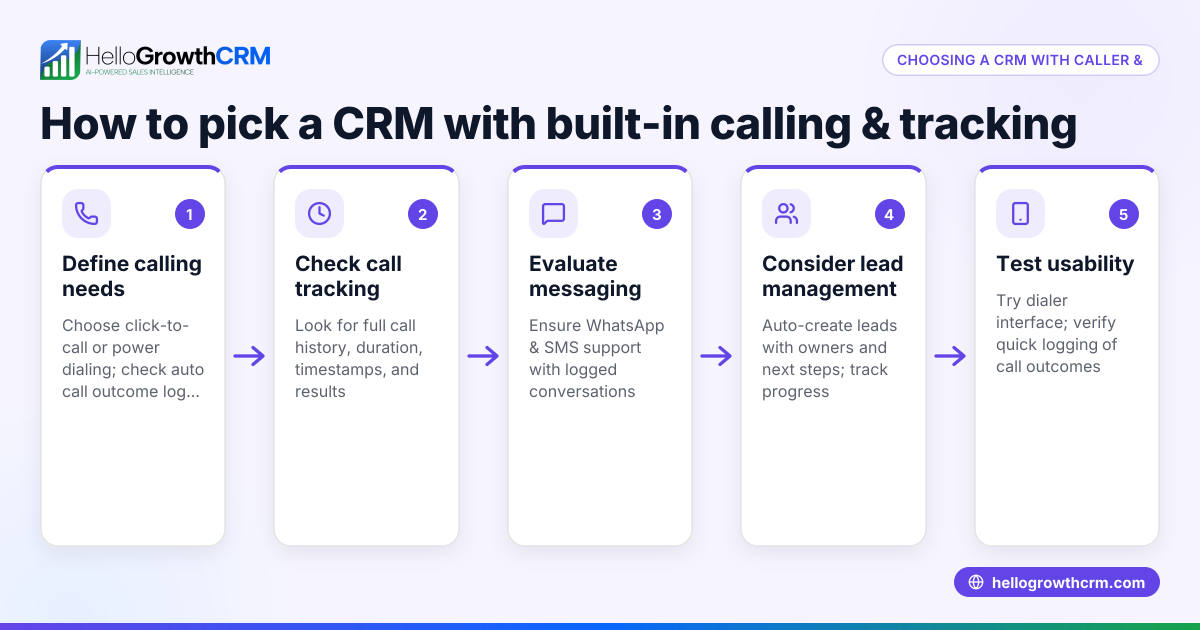
- Identify your calling needs. Decide if you need a local dialer for manual calls, a power dialer for high-volume calling, or AI-assisted call summaries. Check if the CRM supports your preferred calling method.
- Check call logging capabilities. Ensure the CRM automatically logs call outcomes and keeps full call histories tied to contacts and deals without manual entry.
- Evaluate messaging integration. See if the CRM also supports WhatsApp and SMS messaging logged on the lead record for multi-channel communication.
- Look for task and activity management. Confirm the CRM can convert follow-ups into tasks with due dates and display daily call lists to avoid memory reliance.
- Consider usability for your team. The calling and logging features should be easy for reps to use during busy calls without disrupting workflow.
- Review pricing and plans. Some dialer features may not be available on free plans; check what is included and what requires paid tiers.
- Test integrations. If you use web forms or other tools, verify the CRM can capture leads automatically and integrate calling within your sales pipeline.
Example (fictional figures)
A residential real-estate team in Phoenix, Arizona, wants to improve their lead follow-up. They have 4 agents making calls to prospective homebuyers.
- They use a CRM with a built-in local dialer.
- Each agent calls 30 leads per day.
- Average call outcome logging time saved per call: 1 minute.
- Without integrated calling, logging each call manually takes 2 minutes.
Calculations:
Calls per day = 4 agents × 30 calls = 120 calls
Time saved per call = 2 minutes manual logging - 1 minute integrated logging = 1 minute saved
Total time saved per day = 120 calls × 1 minute = 120 minutes = 2 hours saved daily
By saving 2 hours daily on call logging, the team can spend more time on new leads or closing deals, improving productivity.
Common mistakes
- Choosing a CRM without automatic call logging. Prevent by verifying the CRM logs calls and outcomes automatically to avoid manual errors.
- Ignoring multi-channel communication. Prevent by selecting a CRM that also logs WhatsApp and SMS conversations to keep all interactions in one place. See WhatsApp and SMS CRM.
- Overlooking task management for follow-ups. Prevent by using a CRM that creates tasks with due dates from calls and follow-ups, reducing missed contacts. See Activities and task boards.
- Not testing the dialer usability. Prevent by having your team try the built-in dialer to ensure it fits their calling workflow and does not slow them down. Learn more about the built-in CRM dialer.
- Assuming all dialers are on free plans. Prevent by checking which dialer features are included in which pricing tiers.
Doing this in HelloGrowthCRM
HelloGrowthCRM offers a built-in dialer where telecallers work lists inside the CRM, and each call's outcome is logged directly on the lead. WhatsApp conversations with leads are also logged, and follow-ups can be sent as messages. Each follow-up becomes a task with a due date, and the day's calls appear as a list, reducing reliance on memory. These features help small sales teams stay organized and efficient. Learn more about the built-in CRM dialer and WhatsApp and SMS CRM.
Frequently asked questions
What is a CRM with built-in calling and call logging? It is a CRM system that lets sales reps make phone calls directly inside the software and automatically records the call details and outcomes on each lead or contact record.
Why is call logging important in a CRM? Call logging ensures that all interactions with leads are tracked consistently, helping sales teams follow up on time and managers monitor performance without relying on manual notes.
Can I use WhatsApp and SMS within such a CRM? Yes, some CRMs, including HelloGrowthCRM, support WhatsApp and SMS messaging logged on the lead record, enabling multi-channel communication.
Are built-in dialers available on free CRM plans? Typically, built-in dialers are part of paid plans. For example, HelloGrowthCRM’s dialer is not available on the Free plan but included in Starter and above.
How does task management help with calling? Task management in CRM turns follow-ups into organized tasks with due dates, helping sales reps prioritize calls and avoid forgetting leads. See Activities and task boards.
Key takeaways
- A CRM with built-in calling and call logging improves sales efficiency by integrating calls and records.
- Check for automatic call outcome logging and full call history tied to leads.
- Multi-channel support for WhatsApp and SMS keeps all communication in one place.
- Task boards and activities help manage follow-ups and daily call lists.
- Verify dialer features and pricing tiers before choosing.
Start improving your sales follow-up with a CRM that includes calling and call logging. Start on the Free Forever plan (200 leads, no credit card).
Ready to put this into practice?
Set up your pipeline, WhatsApp follow-ups, and AI lead scoring in minutes — free, no credit card.
Try HelloGrowthCRM freeGet CRM tips in your inbox
Join thousands of sales professionals who get weekly insights on CRM strategy, AI automation, and pipeline optimization.

The HelloGrowthCRM team publishes guides on CRM strategy, AI sales tools, and revenue operations for small business sales teams.