HelloGrowthCRM software
Built for real small-business sales teams
HelloGrowthCRM helps reps qualify faster, follow up on time, and close more deals—with practical automation in one place.
- AI lead scoring and pipeline visibility
- Built-in dialer, WhatsApp, and email automation
- Sales forecasting and RevOps-ready reporting
Customer follow up automation means using software tools to automatically send messages or reminders to prospects and customers after your initial contact. Instead of manually remembering to call or message each lead, automation runs a planned sequence of follow-ups until the prospect responds or the sequence ends. This saves time, reduces missed leads, and improves sales efficiency.
Why this comes up / what goes wrong
Many small business owners in India rely on WhatsApp, Excel, or manual reminders to follow up with leads. This often leads to slow responses or missed follow-ups because:
- Sales teams forget to call or message on time.
- Tracking follow-ups on spreadsheets is cumbersome and error-prone.
- Manual follow-ups take too much time, reducing focus on closing deals.
- Leads lose interest or go cold due to delayed or inconsistent contact.
Without automation, sales reps juggle many tasks and lose leads due to slow or missed follow-ups.
Step-by-step
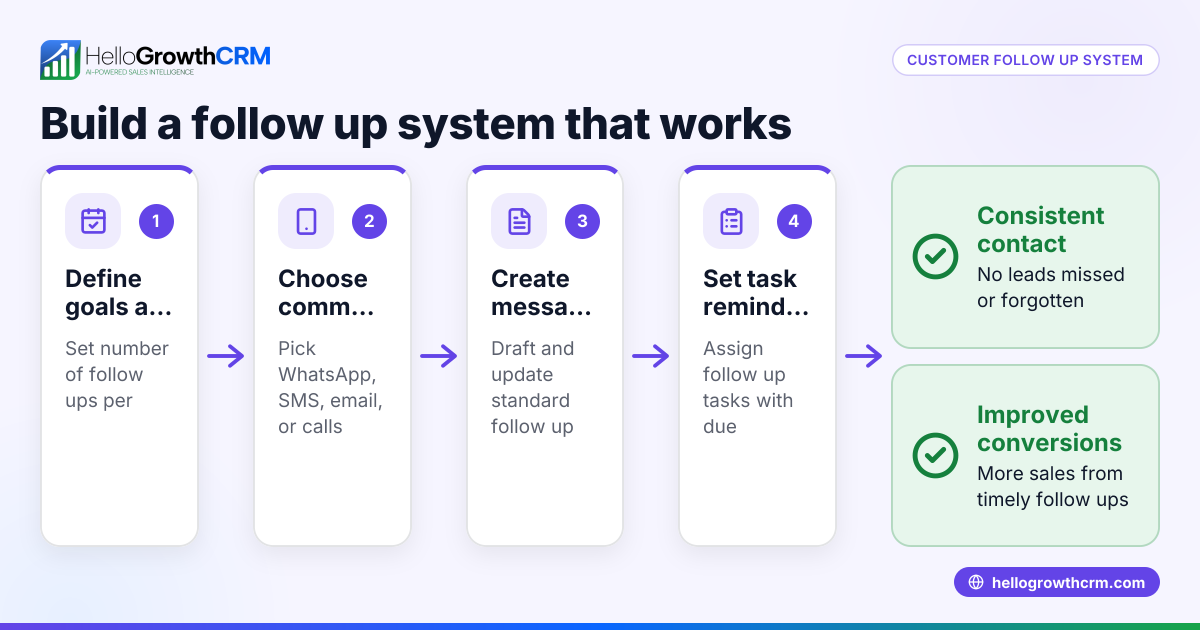
To set up customer follow up automation effectively, follow these steps:
- Collect and centralise leads: Gather leads from your sources like IndiaMART, JustDial, or your website into one place.
- Check that all lead details (name, contact, source) are correctly captured.
- Define your follow-up sequence: Plan a series of messages or calls spread over days or weeks.
- For example, a five-step follow-up over two weeks.
- Decide on the channels: WhatsApp, SMS, email.
- Set triggers and conditions: Specify when each follow-up message should be sent.
- Typically, send the next message only if the prospect hasn’t replied.
- Automate message sending: Use a CRM or automation tool to schedule and send messages.
- Ensure messages stop automatically once the prospect replies.
- Assign tasks for manual follow-ups: Create reminders or tasks for calls or meetings if needed.
- Check that tasks have due dates and are visible on a task board.
- Monitor and adjust: Track which messages get replies and tweak the sequence or timing.
- Use reports to identify bottlenecks or drop-offs.
Using a tool with integrated task boards and AI assistance can reduce manual work and improve follow-up success.
Example (fictional figures)
A Mumbai-based small business receives 100 new leads on 01/05/2024. They plan a 5-step WhatsApp and SMS follow-up over 14 days.
- Step 1 (Day 1): Send initial message.
- Step 2 (Day 3): Send reminder message if no reply.
- Step 3 (Day 6): Send offer message if no reply.
- Step 4 (Day 10): Send last chance message if no reply.
- Step 5 (Day 14): Send feedback request if no reply.
Cost per SMS/WhatsApp message assumed at ₹5.
Messages sent if no replies: 100 leads × 5 messages = 500 messages
Total messaging cost = 500 × ₹5 = ₹2,500
If 40% of leads reply by Step 3, messages stop for those leads, reducing total messages:
Messages sent by Step 3 = 100 leads × 3 messages = 300 messages
Replies received = 40 leads
Remaining leads to receive Steps 4 and 5 = 60 leads × 2 messages = 120 messages
Total messages sent = 300 + 120 = 420 messages
Total cost = 420 × ₹5 = ₹2,100
This automation helps ensure timely follow-ups while controlling messaging costs.
Common mistakes
- Not stopping follow-ups after a reply
- Prevent by automating sequences to stop immediately when a prospect responds.
- Sending too many messages too quickly
- Space messages over several days to avoid annoying prospects.
- Using only one communication channel
- Combine WhatsApp, SMS, and email to increase chances of contact.
- Failing to assign manual tasks for important calls
- Use task boards with due dates to ensure calls happen on time.
- Ignoring follow-up results and not adjusting sequences
- Regularly review and refine your follow-up steps based on response data.
Avoiding these mistakes improves your follow-up success and lead conversion.
Doing this in HelloGrowthCRM
HelloGrowthCRM offers several features to automate and manage customer follow-ups efficiently:
- Sequences and campaigns: Set up a five-step follow-up sequence over two weeks that runs automatically across WhatsApp, SMS, and email. The sequence stops as soon as the prospect replies, saving time and avoiding unnecessary messages. Learn more about email automation and sequences.
- AI agents: After a call, an AI agent drafts the next follow-up message for the sales rep to review and send, reducing manual effort. See details on the AI CRM page.
- Activities and task boards: Each follow-up action becomes a task with a due date. The sales rep sees a clear list of calls and messages to do each day, removing the need to remember every follow-up. Explore sales task boards for managing your daily sales activities.
These tools help Indian SMBs automate follow-ups while keeping control and visibility.
Frequently asked questions
What is customer follow up automation? Customer follow up automation is the use of software to send scheduled messages or reminders to leads without manual intervention. It ensures timely contact and improves chances of converting prospects.
How often should I follow up with a lead? A typical follow-up sequence spreads messages over 10-14 days with 4-5 steps. Space messages by 2-3 days and stop once the lead replies to avoid spamming.
Can I automate WhatsApp follow-ups? Yes, many CRMs including HelloGrowthCRM support automated WhatsApp message sequences combined with SMS and email.
How do I track if follow-ups are working? Use CRM reports to see response rates at each step. Adjust timing or message content based on what works best.
Is manual follow-up still needed? Automation handles routine messages, but manual calls or meetings are important for high-value prospects. Use task boards to schedule these.
Key takeaways
- Customer follow up automation sends timely, automatic messages to leads until they respond.
- Automation prevents missed or delayed follow-ups common with manual tracking.
- Set up multi-step sequences spaced over days, stopping when the prospect replies.
- Combine automated messages with manual tasks for calls using task boards.
- Avoid common mistakes like over-messaging or ignoring follow-up results.
- HelloGrowthCRM offers sequences, AI agents, and task boards to automate and manage follow-ups.
Start automating your customer follow-ups today to improve lead conversion and save time. You can Start on the Free Forever plan (200 leads, no credit card) to try HelloGrowthCRM’s automation features.
Ready to put this into practice?
Set up your pipeline, WhatsApp follow-ups, and AI lead scoring in minutes — free, no credit card.
Try HelloGrowthCRM freeGet CRM tips in your inbox
Join thousands of sales professionals who get weekly insights on CRM strategy, AI automation, and pipeline optimization.

The HelloGrowthCRM team publishes guides on CRM strategy, AI sales tools, and revenue operations for small business sales teams.