HelloGrowthCRM software
Built for real small-business sales teams
HelloGrowthCRM helps reps qualify faster, follow up on time, and close more deals—with practical automation in one place.
- AI lead scoring and pipeline visibility
- Built-in dialer, WhatsApp, and email automation
- Sales forecasting and RevOps-ready reporting
A customer follow up tracker Excel template USA is a practical tool for US small and mid-sized businesses to keep track of outreach efforts, deadlines, and customer responses. It organizes follow-up dates, contact details, and notes in one place to prevent lost leads and missed sales opportunities.
Why this comes up / what goes wrong
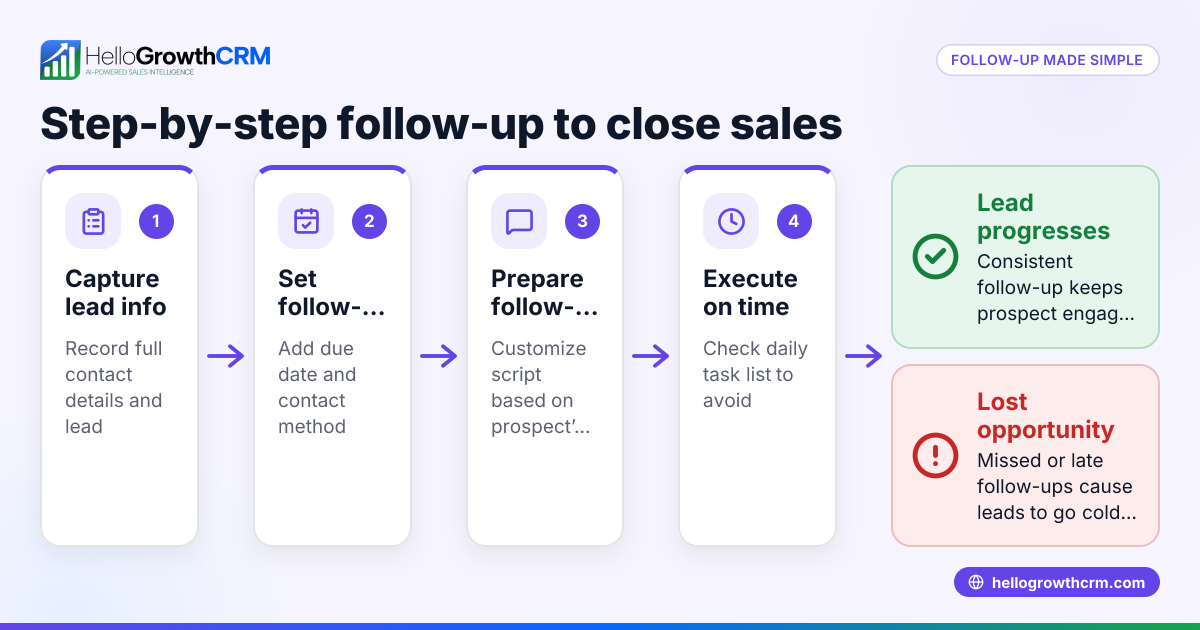
Small business owners and sales teams often manage customer follow-ups using text messages, emails, and spreadsheets. Without a structured tracking tool, it’s easy to forget who to contact next or when to follow up. Leads can slip through the cracks due to slow or missed follow-ups, resulting in lost revenue. A ready-to-use Excel template offers a simple, low-cost way to manage follow-ups and keep the sales process on track.
Step-by-step
- Download or create the template: Start with an Excel sheet that includes columns for Customer Name, Contact Info, Last Contact Date, Next Follow-Up Date, Follow-Up Status, and Notes. You can download a free template from sales templates or build your own.
- Enter your customer data: Input your current leads or customers with accurate contact details and the date of the last interaction. Double-check phone numbers and emails for correctness.
- Set follow-up dates: Decide the interval for the next follow-up based on your sales cycle. Use Excel formulas like
=LastContactDate + 7to automatically calculate the Next Follow-Up Date. Check that the dates update correctly.
- Track follow-up status: Use dropdown lists or color codes to mark each follow-up as Pending, Completed, or No Response. Regularly update these statuses to keep the tracker current.
- Add notes and outcomes: Record the result of each follow-up call or message in the Notes column. Ensure notes are clear and concise to avoid confusion later.
- Sort and filter regularly: Use Excel’s sort and filter features to focus on customers needing immediate attention. Confirm that filters show the correct subset before acting.
- Backup your tracker: Save copies regularly to cloud storage or external drives. Test backups to make sure files open correctly.
For better organization, consider using sales task boards that turn follow-ups into actionable tasks with due dates.
Example (fictional figures)
A landscaping contractor in Charlotte, North Carolina, manages 10 active leads using an Excel follow-up tracker.
- Customer: Green Gardens LLC
- Contact: (704) 555-1234
- Last Contact Date: 04/10/2024
- Follow-up interval: 7 days
Calculate next follow-up date:
04/10/2024 + 7 days = 04/17/2024
Status: Pending
Notes: Sent proposal on 04/10/2024, awaiting feedback.
Another lead:
- Customer: Oak Tree Services
- Contact: (704) 555-5678
- Last Contact Date: 04/12/2024
- Follow-up interval: 5 days
Calculate next follow-up date:
04/12/2024 + 5 days = 04/17/2024
Status: Completed
Notes: Follow-up call made, customer requested a quote revision.
This calculation helps the contractor prioritize calls and emails on 04/17/2024 to maintain sales momentum.
Common mistakes
- Not updating follow-up status promptly: Leads to confusion and repeated contacts. Prevent this by scheduling a daily routine to update the tracker.
- Ignoring missed follow-ups: Causes lost opportunities. Use Excel conditional formatting to highlight overdue tasks.
- Overloading the tracker with unnecessary columns: Makes it hard to use. Keep the template simple and focused on key data.
- Failing to backup the file: Risks losing all data. Schedule regular backups to cloud or external drives.
- Relying solely on manual follow-ups: Increases errors. Combine Excel tracking with automated email automation and sequences for consistency.
Doing this in HelloGrowthCRM
HelloGrowthCRM offers activities and task boards where each follow-up becomes a task with a due date, turning your daily calls into a manageable list instead of a memory test. Its sequences and campaigns feature runs automated multi-step follow-ups over two weeks and stops as soon as the prospect replies, ensuring timely outreach without manual effort. Additionally, AI agents can draft follow-up messages after calls, so reps only need to review and send, saving time and reducing errors. Explore more about these features at sales task boards and email automation and sequences.
Frequently asked questions
What should a customer follow up tracker include? A good tracker includes customer name, contact info, last contact date, next follow-up date, follow-up status, and notes. This helps organize outreach and monitor progress.
How often should I update my follow up tracker? Update it daily or immediately after each customer interaction to keep data accurate and avoid missed opportunities.
Can I automate follow-ups instead of using Excel? Yes, tools like HelloGrowthCRM automate follow-ups with sequences and task boards, reducing manual work and improving consistency.
Is Excel the best tool for follow-up tracking? Excel is simple and accessible but can become cumbersome with many leads. For growing teams, CRM systems provide better automation and tracking.
How do I avoid losing leads with an Excel tracker? Use reminders, conditional formatting for overdue tasks, and regular backups. Also, consider combining Excel with CRM tools for automation.
Key takeaways
- Use a simple Excel template with key columns: customer, contact, dates, status, and notes.
- Regularly update and review the tracker to prevent lost follow-ups.
- Avoid common errors like outdated status, missed tasks, and lack of backups.
- Combine Excel with sales task boards and email automation to reduce manual follow-up errors.
- HelloGrowthCRM offers built-in task boards, automated sequences, and AI agents to streamline follow-ups.
Start with a free Excel template or upgrade your process with HelloGrowthCRM. Start on the Free Forever plan (200 leads, no credit card) to experience automated follow-up management.
Ready to put this into practice?
Set up your pipeline, WhatsApp follow-ups, and AI lead scoring in minutes — free, no credit card.
Try HelloGrowthCRM freeGet CRM tips in your inbox
Join thousands of sales professionals who get weekly insights on CRM strategy, AI automation, and pipeline optimization.

The HelloGrowthCRM team publishes guides on CRM strategy, AI sales tools, and revenue operations for small business sales teams.