HelloGrowthCRM software
Built for real small-business sales teams
HelloGrowthCRM helps reps qualify faster, follow up on time, and close more deals—with practical automation in one place.
- AI lead scoring and pipeline visibility
- Built-in dialer, WhatsApp, and email automation
- Sales forecasting and RevOps-ready reporting
A customer service suite is a software package that combines multiple customer support functions into a single platform. These functions typically include managing support tickets, offering a knowledge base for self-service, tracking referrals, and providing a branded customer portal. For small and mid-sized businesses, using such a suite helps keep customer data, service requests, and communication organized and accessible.
Why this comes up / what goes wrong
Small-business owners often struggle to keep customer service efficient as their customer base grows. They may rely on scattered tools like email, spreadsheets, or text messaging to track support requests, which leads to slow responses, lost tickets, and frustrated customers. Without a unified system, service history is fragmented, making it hard to resolve issues quickly or maintain consistent communication.
Evaluating a customer service suite comes up when a business wants to solve these problems by centralizing customer interactions and support workflows. The right suite improves team collaboration, speeds up issue resolution, and helps retain customers.
Step-by-step
- Identify your customer service needs. List the main tasks your team handles: ticket management, knowledge base access, referral tracking, customer self-service, etc. Check which features are essential versus nice-to-have.
- Check integration with your sales and CRM tools. A customer service suite should connect or be part of your CRM to keep customer records unified. This avoids switching apps and losing context.
- Evaluate the user interface and ease of use. Your team should find the system intuitive to reduce training time and errors.
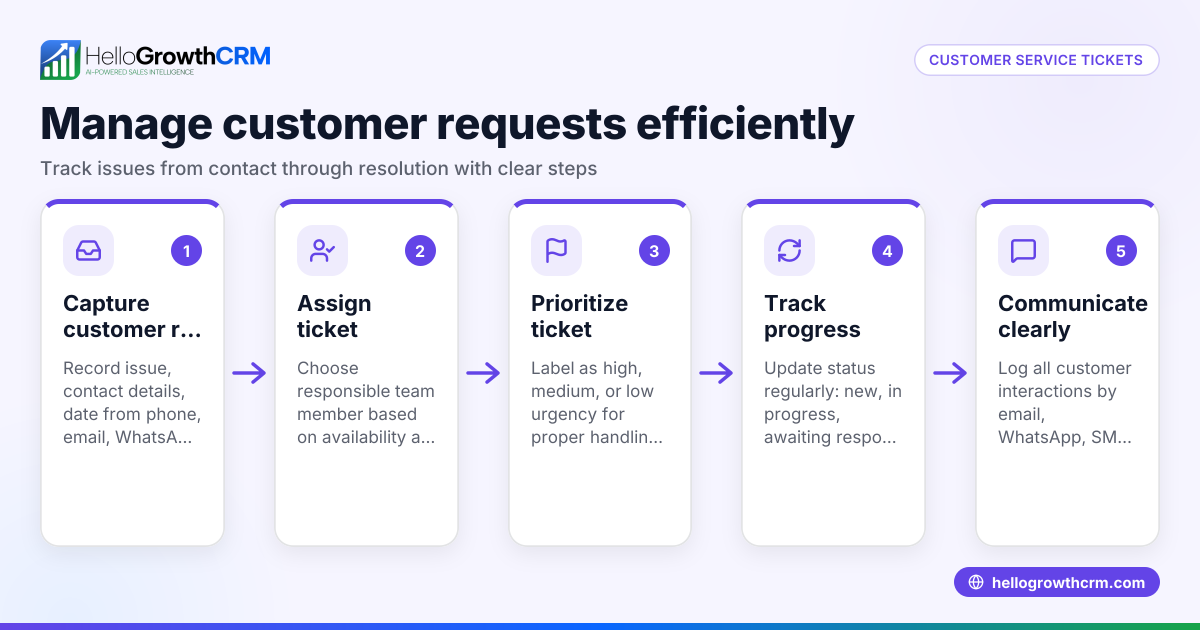
- Assess support ticket management capabilities. Look for features like ticket creation, assignment, status tracking, and SLA policies to ensure timely responses.
- Review self-service options. A branded customer portal and knowledge base allow customers to find answers independently, reducing support load.
- Consider referral program tracking. If your business relies on word-of-mouth, built-in referral tracking can help manage and reward advocates.
- Check reporting and analytics. Understanding ticket volume, resolution times, and customer satisfaction helps improve service.
- Compare pricing and scalability. Ensure the suite fits your budget and can grow with your business.
- Request demos and trial periods. Hands-on experience will reveal usability and fit for your team.
- Ask about customer support from the vendor. Reliable vendor support is critical for smooth adoption.
For more on customer engagement, see customer health score.
Example (fictional figures)
A plumbing company in Austin, Texas, called "Austin Pipes," decided to invest in a customer service suite on 05/01/2026. They handle about 1,000 service requests annually and want to reduce response time and improve customer satisfaction.
- Current average ticket resolution time: 48 hours.
- Target resolution time after suite adoption: 24 hours.
- Estimated cost of lost customers due to slow service: $150,000 per year.
- Suite annual subscription cost: $12,000.
Calculations:
Current losses due to slow service = $150,000
Potential savings if resolution time halves = $150,000 × 50% = $75,000
Net benefit after suite cost = $75,000 - $12,000 = $63,000
Austin Pipes expects to save $63,000 annually by improving service with the suite, justifying the investment.
Common mistakes
- Choosing a suite without integration to your CRM. Prevent this by verifying the suite can connect or is part of your CRM, so customer records and service tickets stay unified, as with HelloGrowthCRM’s approach.
- Ignoring the user experience. Avoid complex interfaces that frustrate your team. Request demos and involve your team in testing.
- Overlooking self-service options. Not offering a knowledge base or customer portal increases support volume. Choose a suite with these features to empower customers.
- Neglecting referral tracking. If referrals drive your business, missing this feature means lost opportunities. Pick suites that include referral program tracking.
- Failing to check reporting tools. Without analytics, you can’t improve service. Ensure the suite provides clear reports.
- Underestimating training and support needs. Prevent adoption problems by selecting vendors with good customer support.
Explore how HelloGrowthCRM supports these needs at WhatsApp and SMS CRM.
Doing this in HelloGrowthCRM
HelloGrowthCRM offers a customer portal, referrals, tickets, and knowledge base features that keep service requests on the same customer record as the deal. This integration helps your team manage after-sale service efficiently without switching platforms. You can also track referral programs and provide branded self-service portals to reduce support volume. Learn more about these features at HelloGrowthCRM for the United States.
Frequently asked questions
What is included in a customer service suite? A customer service suite typically includes tools for managing support tickets, a knowledge base for customer self-help, referral tracking, and a branded customer portal. These features centralize customer interactions and improve service efficiency.
How do I know if my business needs a customer service suite? If your team struggles with scattered support requests, slow response times, or inconsistent customer communication, a customer service suite can help organize and speed up service. Consider your volume of requests and growth plans.
Can a customer service suite integrate with my existing CRM? Many customer service suites either integrate with popular CRMs or are built into CRM platforms, keeping customer data unified. This is important to avoid data silos and improve team collaboration.
What are the benefits of a customer portal? A customer portal allows customers to view their service requests, access a knowledge base, and sometimes submit tickets themselves. This reduces the support team's workload and improves customer satisfaction.
How does referral tracking work in a customer service suite? Referral tracking monitors customers who recommend your business to others, helping you reward advocates and measure referral program success.
Key takeaways
- A customer service suite centralizes support tickets, knowledge base, referrals, and customer portals.
- Integration with your CRM is essential for unified customer records.
- Look for suites with self-service options to reduce support load.
- Referral program tracking can boost business growth.
- Evaluate usability, reporting, and vendor support before choosing.
- HelloGrowthCRM includes these features with tickets and customer portals on the same record.
Start improving your customer service today. Start on the Free Forever plan (200 leads, no credit card).
Ready to put this into practice?
Set up your pipeline, WhatsApp follow-ups, and AI lead scoring in minutes — free, no credit card.
Try HelloGrowthCRM freeGet CRM tips in your inbox
Join thousands of sales professionals who get weekly insights on CRM strategy, AI automation, and pipeline optimization.

The HelloGrowthCRM team publishes guides on CRM strategy, AI sales tools, and revenue operations for small business sales teams.