HelloGrowthCRM software
Built for real small-business sales teams
HelloGrowthCRM helps reps qualify faster, follow up on time, and close more deals—with practical automation in one place.
- AI lead scoring and pipeline visibility
- Built-in dialer, WhatsApp, and email automation
- Sales forecasting and RevOps-ready reporting
Email domain authentication confirms that emails sent from your business domain are legitimate and authorized. This protects your brand from being impersonated by spammers and increases the chance your emails reach customers' inboxes instead of spam folders. Small businesses often face issues like bounced emails or phishing risks when authentication is missing or incomplete.
Why this comes up / what goes wrong
Small-business owners frequently send sales proposals, newsletters, or customer support emails using their business domain (e.g., yourcompany.com). Without proper authentication, recipients' email servers may reject or flag these messages as spam. This leads to lost leads, damaged reputation, and security vulnerabilities. For example, a plumbing company in Austin sending quotes via email might never reach prospects if their domain isn’t authenticated. Often, business owners don’t realize their emails lack proper verification, especially when using third-party email services or CRMs.
Step-by-step
- Check your current domain DNS records. Use online tools like MXToolbox or your domain registrar’s DNS manager to review existing SPF, DKIM, and DMARC records.
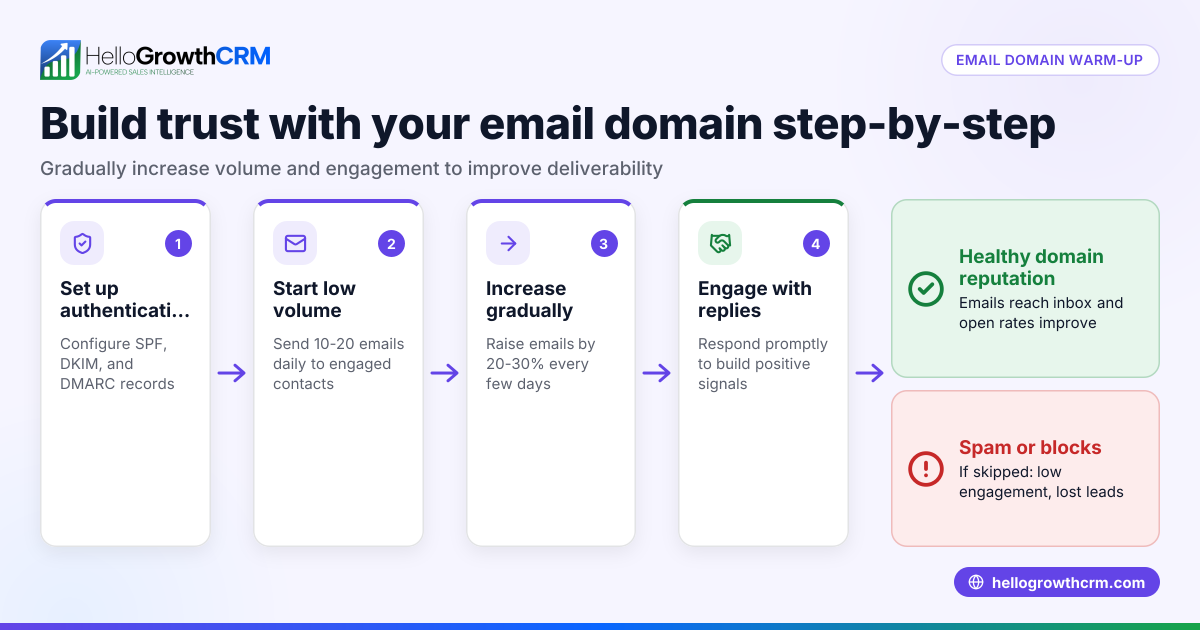
- Set up SPF (Sender Policy Framework). Add a TXT record in your DNS specifying which mail servers are authorized to send emails on your domain’s behalf. This prevents unauthorized servers from sending emails that appear to come from your domain.
- Configure DKIM (DomainKeys Identified Mail). Generate a public/private key pair and publish the public key as a TXT record in your DNS. Your email server will sign outgoing messages with the private key, allowing recipients to verify authenticity.
- Implement DMARC (Domain-based Message Authentication, Reporting & Conformance). Add a TXT record that instructs receiving servers how to handle emails failing SPF or DKIM checks (e.g., quarantine or reject). DMARC also enables you to receive reports on authentication results.
- Test your setup. Send test emails to services like Gmail, Outlook, or specialized tools to verify SPF, DKIM, and DMARC pass correctly.
- Monitor and adjust. Review DMARC reports regularly to identify unauthorized uses or delivery issues and update your DNS records as needed.
For small businesses using HelloGrowthCRM, integrating email authentication with your CRM email tools ensures smoother outreach and follow-up. Learn more about email automation and sequences to maximize your authenticated email campaigns.
Example (fictional figures)
Austin Plumbing Co. wants to authenticate their domain austinplumbingco.com to improve email delivery for their sales quotes.
- They check their DNS and find no SPF record.
- They add an SPF TXT record: "v=spf1 include:mailprovider.com -all".
- They generate DKIM keys and add the public key TXT record.
- They add a DMARC TXT record: "v=DMARC1; p=quarantine; rua=mailto:dmarc@austinplumbingco.com".
Costs:
- Domain DNS management: $0 (included with domain registrar)
- Time to configure: 3 hours
- Expected increase in successful email delivery:
By authenticating their domain, Austin Plumbing Co. reduces bounced emails and protects customers from phishing scams pretending to be their company.
Common mistakes
- Skipping one or more authentication methods. SPF alone is not enough; always set up DKIM and DMARC too. Prevent this by following all three steps.
- Incorrect DNS record formatting. Even small typos can cause failures. Use online validators to check your records before publishing.
- Not monitoring DMARC reports. Without monitoring, you won’t know if unauthorized emails are sent using your domain. Set up reporting emails and review regularly.
- Using generic or third-party email addresses without proper authorization. Ensure your CRM or email service is included in your SPF records.
- Delaying setup. The longer your domain is unauthenticated, the more emails you lose or risk being marked spam. Start authentication early.
For ongoing email campaigns, consider using HelloGrowthCRM’s WhatsApp and SMS CRM features alongside authenticated email to diversify your outreach.
Doing this in HelloGrowthCRM
HelloGrowthCRM supports your authenticated email outreach with the HelloMail shared inbox, where replies to quotation emails are visible to your entire sales team on the deal. This ensures timely follow-up without missing any customer responses. Additionally, sequences and campaigns automate follow-ups with a five-step outreach over two weeks that stops immediately when a prospect replies. Learn more about these features at email automation and sequences.
Frequently asked questions
What is the difference between SPF, DKIM, and DMARC? SPF specifies which servers can send email from your domain. DKIM adds a digital signature to verify the email’s integrity. DMARC instructs receiving servers how to handle emails failing SPF or DKIM and provides reporting. Together, they strengthen email security.
Can I authenticate my domain if I use a third-party email service? Yes, you must include your third-party provider’s servers in your SPF record and set up DKIM according to their instructions. This authorizes them to send emails on your behalf.
How long does it take for authentication changes to take effect? DNS changes can take from a few minutes up to 48 hours to propagate globally. Plan accordingly and test after propagation.
Will email domain authentication stop all spam from my domain? Authentication helps prevent spoofing but doesn’t stop all spam. It improves trust and deliverability but should be part of a broader email security strategy.
Do I need technical skills to set up email domain authentication? Basic technical knowledge of DNS management is helpful. Many domain registrars provide guides or support. Alternatively, consult your IT provider.
Key takeaways
- Email domain authentication uses SPF, DKIM, and DMARC to verify your emails are legitimate.
- Proper setup improves email deliverability and protects your brand from spoofing.
- Check and update your domain’s DNS records carefully and monitor DMARC reports.
- Avoid common mistakes like incomplete setup or ignoring reports.
- HelloGrowthCRM’s email tools support authenticated outreach with shared inboxes and automated sequences.
Start authenticating your domain today to protect your emails and improve customer communication. Get started with HelloGrowthCRM on the Free Forever plan (200 leads, no credit card).
Ready to put this into practice?
Set up your pipeline, WhatsApp follow-ups, and AI lead scoring in minutes — free, no credit card.
Try HelloGrowthCRM freeGet CRM tips in your inbox
Join thousands of sales professionals who get weekly insights on CRM strategy, AI automation, and pipeline optimization.

The HelloGrowthCRM team publishes guides on CRM strategy, AI sales tools, and revenue operations for small business sales teams.