HelloGrowthCRM software
Built for real small-business sales teams
HelloGrowthCRM helps reps qualify faster, follow up on time, and close more deals—with practical automation in one place.
- AI lead scoring and pipeline visibility
- Built-in dialer, WhatsApp, and email automation
- Sales forecasting and RevOps-ready reporting
An email thread is a series of emails connected by the same subject or conversation, displaying all the back-and-forth messages between sender and recipient(s). This grouping helps keep related emails organised, so you don’t lose track of replies or important details.
Why this comes up / what goes wrong
Small business owners often rely on email for sales enquiries, customer support, and supplier communications. Without understanding how email threads work, it’s easy to lose track of replies or create confusion by sending separate emails on the same topic. For example, a customer might ask for a quotation, then reply with questions. If replies are scattered or new emails are sent without referencing previous messages, the thread breaks. This can cause delays, duplicated efforts, or lost leads.
Managing email threads well is crucial when your team shares customer communication. If each member sees only some emails or starts new threads unnecessarily, important details can be missed. This is common in small and mid-sized businesses where sales and support are handled by several people using different tools like email, WhatsApp, or spreadsheets.
Step-by-step
- Start with a clear subject line: When sending the first email on a topic, use a descriptive subject like "Quotation request for office cleaning – ABC Ltd." This helps group all related replies.
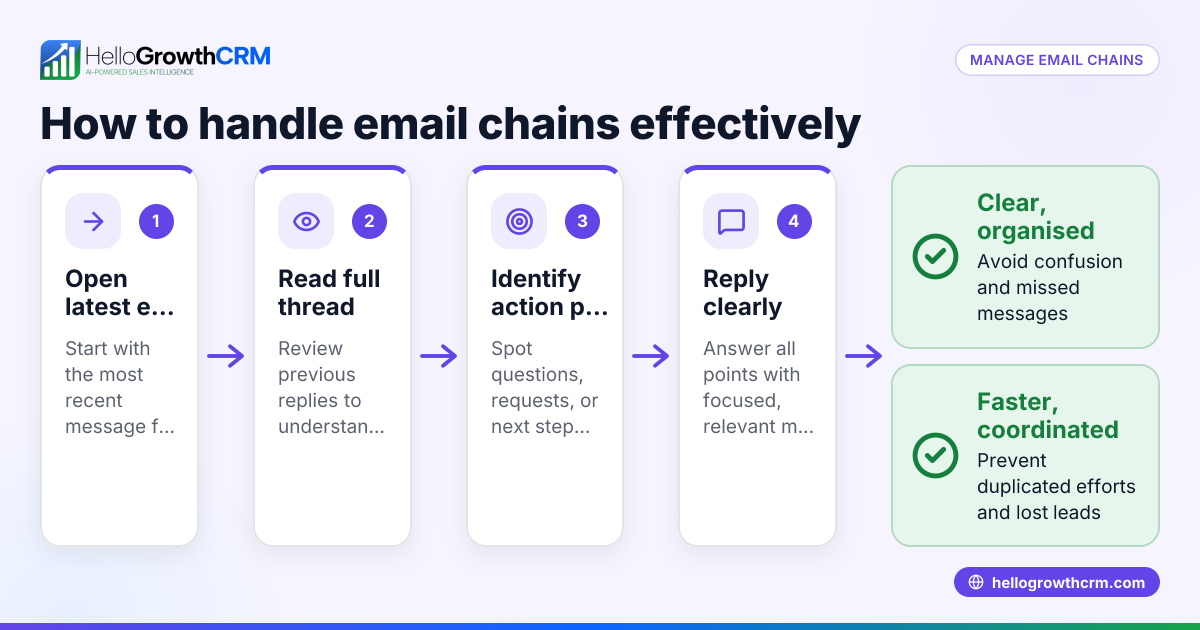
- Always reply within the thread: Use the "Reply" or "Reply All" button to respond, not a new email. This keeps all messages linked and visible in one place.
- Check the subject line before sending: Make sure the subject line stays consistent. If the topic changes significantly, start a new thread with a new subject.
- Include previous messages: Ensure your email client includes earlier emails in your reply so recipients see the full conversation history and context.
- Use CC and BCC carefully: Add team members who need to see the conversation, but avoid overusing CC or BCC to prevent clutter and confusion.
- Review the thread before replying: Read the entire thread to understand the context, avoid repeating information, and answer all questions raised.
- Organise threads with folders or labels: Use email folders, labels, or tags to sort threads by client, project, or status for easy retrieval.
- Use shared inboxes or CRM tools: This ensures the whole team can see replies and contribute without losing track. Tools like HelloGrowthCRM’s HelloMail shared inbox help with this.
Example (fictional figures)
Manchester Lettings Ltd, a small letting agency, sends a quotation email on 01/03/2026 to a prospective landlord for property management services.
Quotation amount: £1,200 per year
Step 1: Send initial quotation email with subject: "Quotation for Property Management – 123 High Street"
Step 2: Prospect replies on 03/03/2026 asking about additional fees.
Step 3: Agent replies within the same thread, quoting £150 annual admin fee.
Step 4: Prospect agrees on 05/03/2026.
Benefits:
- All messages are in one thread, avoiding lost information.
- Quick reference to previous terms without searching multiple emails.
Calculations: £1,200 + £150 = £1,350 total annual cost
Common mistakes
- Starting new emails instead of replying: Prevent by always clicking "Reply" or "Reply All" to keep the thread intact and maintain context.
- Changing the subject line mid-conversation: Prevent by keeping the subject consistent or starting a new thread if the topic changes significantly.
- Not including previous emails in replies: Prevent by checking your email client settings to include original messages in replies.
- Overusing CC or BCC: Prevent by adding only necessary recipients to avoid clutter and confusion.
- Ignoring email threads in team communication: Prevent by using shared inboxes or CRM tools like HelloGrowthCRM’s HelloMail shared inbox to make threads visible to all team members.
- Failing to follow up consistently: Prevent by using automated sequences that run follow-ups over days or weeks and stop when a reply is received.
Doing this in HelloGrowthCRM
HelloGrowthCRM offers a HelloMail shared inbox where replies to a quotation email are visible to the whole team on the deal, ensuring everyone stays updated without switching apps. This shared inbox helps avoid duplicated replies and keeps all communication in one place.
Additionally, sequences and campaigns automate follow-ups with prospects. For example, a five-step follow-up over two weeks runs automatically and stops immediately when the prospect replies. This ensures timely follow-up without manual effort.
Learn more about email automation and sequences and how HelloGrowthCRM supports WhatsApp and SMS CRM for multi-channel communication.
Frequently asked questions
What is the difference between an email thread and a conversation? An email thread is a group of related emails linked by subject and replies, showing the back-and-forth messages. A conversation can include multiple threads or channels but generally refers to the whole communication on a topic.
How can I keep email threads organised in a small team? Use shared inboxes or CRM tools that display all replies on a deal or customer record. This prevents duplicated replies and keeps everyone informed. HelloGrowthCRM’s HelloMail shared inbox is designed for this.
What should I do if the topic changes during an email thread? If the conversation shifts to a new subject, start a new email thread with a clear new subject line. This avoids confusion and keeps discussions focused.
Can automated follow-ups interfere with email threads? Automated sequences should pause as soon as a prospect replies, preventing overlapping messages. HelloGrowthCRM sequences stop immediately on reply, ensuring smooth communication.
How do I avoid missing replies in long email threads? Regularly check your inbox and use CRM tools that alert you to new replies. Label or flag important threads to prioritise responses.
Is it better to use a CRM instead of just email to manage threads? A CRM centralises communication and makes threads visible to the whole team, reducing the chance of missed replies or duplicated messages. HelloGrowthCRM combines email threads with other channels like WhatsApp and SMS for better sales management.
Key takeaways
- An email thread groups related messages to keep conversations organised.
- Always reply within the same thread and keep the subject consistent.
- Include previous messages in replies to maintain context.
- Use shared inboxes or CRM tools to keep teams aligned and avoid duplicated efforts.
- Automated follow-ups should pause once a reply is received to prevent overlap.
- Managing email threads well improves response times and lead retention.
Start managing your email threads more effectively today with HelloGrowthCRM. Start on the Free Forever plan (200 leads, no credit card).
Ready to put this into practice?
Set up your pipeline, WhatsApp follow-ups, and AI lead scoring in minutes — free, no credit card.
Try HelloGrowthCRM freeGet CRM tips in your inbox
Join thousands of sales professionals who get weekly insights on CRM strategy, AI automation, and pipeline optimization.

The HelloGrowthCRM team publishes guides on CRM strategy, AI sales tools, and revenue operations for small business sales teams.