HelloGrowthCRM software
Built for real small-business sales teams
HelloGrowthCRM helps reps qualify faster, follow up on time, and close more deals—with practical automation in one place.
- AI lead scoring and pipeline visibility
- Built-in dialer, WhatsApp, and email automation
- Sales forecasting and RevOps-ready reporting
Assigning customer support tickets properly ensures timely responses and satisfied customers. Many Indian small businesses receive queries across WhatsApp, emails, phone calls, and spreadsheets, which can lead to slow follow-ups and lost leads. This guide explains why assigning tickets is important, provides a clear step-by-step process, shows a practical example with arithmetic, highlights common mistakes to avoid, and describes how HelloGrowthCRM’s ticketing and customer portal features help streamline support.
Why this comes up / what goes wrong
Small-business owners in India often face challenges managing customer support requests scattered across multiple channels like WhatsApp chats, email inboxes, phone calls, and web forms. Without a structured system, requests get lost or delayed, causing unhappy customers and missed sales opportunities. Support teams may duplicate work or fail to follow up because tickets lack clear ownership. Assigning tickets means each request is logged, categorised, assigned to the right person, and tracked until resolved. This improves response times, accountability, and customer satisfaction.
Step-by-step
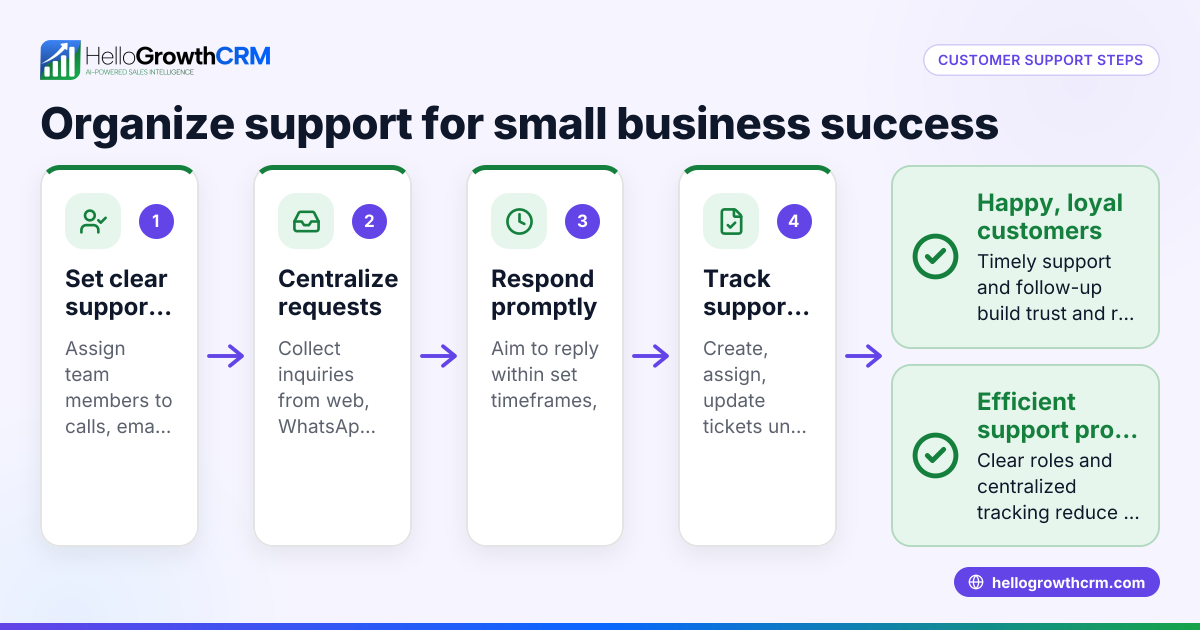
- Collect all support requests in one place. Every day, gather new tickets from WhatsApp messages, emails, phone call logs, and website forms. Use a spreadsheet or a simple ticketing tool to list each ticket with customer name, contact details, and a brief issue description.
- Categorise tickets by issue type and urgency. Group tickets as product inquiry, order status, complaint, or technical problem. Mark urgent tickets that need quick resolution.
- Check team member availability and expertise. Know who specialises in which products or issues and who is free to take new tickets. Avoid overloading any team member.
- Assign tickets to the right team members. Allocate each ticket based on skills and current workload. Record the ticket ID, assignee name, and assignment date clearly.
- Set deadlines and reminders for follow-up. Define when each ticket should be resolved or updated. Use calendar alerts, task boards, or reminders to ensure timely action.
- Monitor ticket progress regularly. Track statuses such as open, in progress, waiting for customer response, or closed.
- Communicate promptly with customers. Send acknowledgments when a ticket is received and updates during resolution via WhatsApp, SMS, or email to keep customers informed.
- Close tickets after customer confirmation. Once resolved, confirm with the customer that the issue is fixed before marking the ticket closed.
- Review ticket resolution times and customer feedback. Use this data to improve your support process and team efficiency.
Example (fictional figures)
A small electronics store in Mumbai receives a complaint on 15/06/2024 about a faulty smartphone screen.
- Ticket received: 15/06/2024
- Customer: Mr. Sharma
- Issue: Screen not responding
- Team member: Priya (technical support)
- Deadline set: 17/06/2024 (2 days to resolve)
Steps:
Ticket assigned on 15/06/2024 = Ticket ID 3120 to Priya Priya checks replacement screen cost = ₹3,500 Customer informed about repair cost on 16/06/2024 and approves Screen replaced on 17/06/2024 Ticket closed on 17/06/2024 after customer confirmation
Calculations:
Replacement cost = ₹3,500 Service charge = ₹500 Total cost = ₹3,500 + ₹500 = ₹4,000
This example shows the full process of assigning, tracking, communicating, and closing a ticket with clear dates, costs, and customer approval.
Common mistakes
- Not centralising support requests: Prevent this by collecting all tickets daily in one place to avoid missing any. Use tools that integrate WhatsApp, email, and web forms.
- Skipping ticket categorisation: Always sort tickets by issue type and urgency to assign correctly and prioritise.
- Assigning tickets without checking workload: Confirm team members’ current tasks before assigning new tickets to avoid delays.
- No follow-up reminders: Use calendar alerts or task boards to track deadlines and prevent tickets from being forgotten.
- Delayed communication with customers: Send prompt acknowledgments and status updates via WhatsApp or SMS to keep customers informed and reduce frustration.
- Closing tickets without customer confirmation: Always verify with the customer before closing a ticket to ensure satisfaction.
Doing this in HelloGrowthCRM
HelloGrowthCRM offers a customer portal and support ticket features that keep all service requests linked to the same customer record as the sale. This centralises communication and ticket management, making it easier to assign, track, and resolve tickets efficiently. Customers can access a branded self-service portal to log and check their tickets, reducing repeated queries. Learn more about the customer health score and explore HelloGrowthCRM’s WhatsApp and SMS CRM capabilities designed for Indian SMBs managing sales and support. For details specific to India, see HelloGrowthCRM for India.
Frequently asked questions
How do I prioritise customer support tickets? Prioritise tickets based on urgency and impact on the customer. For example, complaints affecting product use or delivery delays should be addressed first. Categorise tickets and set deadlines accordingly.
What tools can I use for ticket assignment in a small Indian business? Many small businesses start with spreadsheets or WhatsApp but face challenges in tracking and timely follow-up. CRM solutions with ticketing and customer portal features centralise communication and assignment in one place, improving efficiency.
How can I ensure team members respond to assigned tickets on time? Set clear deadlines, use task boards or reminders, and regularly review ticket status. Assign tickets based on team members’ expertise and availability to improve accountability.
Can customers track their ticket status themselves? With a customer portal, customers can log in to view and update their tickets, reducing repeated queries and improving transparency.
How do I measure if my ticket assignment process is effective? Track metrics like resolution time, customer feedback, and ticket backlog. Use reports and dashboards to identify bottlenecks and improve team performance.
Key takeaways
- Collect and centralise all customer support requests daily.
- Categorise tickets by issue type and urgency for proper assignment.
- Assign tickets based on team member skills and availability.
- Set deadlines and use reminders to track progress.
- Communicate promptly with customers via WhatsApp, SMS, or email.
- Confirm resolution with customers before closing tickets.
Start managing your customer support tickets more efficiently today. Start on the Free Forever plan (200 leads, no credit card).
Ready to put this into practice?
Set up your pipeline, WhatsApp follow-ups, and AI lead scoring in minutes — free, no credit card.
Try HelloGrowthCRM freeGet CRM tips in your inbox
Join thousands of sales professionals who get weekly insights on CRM strategy, AI automation, and pipeline optimization.

The HelloGrowthCRM team publishes guides on CRM strategy, AI sales tools, and revenue operations for small business sales teams.