HelloGrowthCRM software
Built for real small-business sales teams
HelloGrowthCRM helps reps qualify faster, follow up on time, and close more deals—with practical automation in one place.
- AI lead scoring and pipeline visibility
- Built-in dialer, WhatsApp, and email automation
- Sales forecasting and RevOps-ready reporting
To automate support ticket notifications in New Zealand, you need a system that captures customer support requests, assigns tickets automatically to the right team members, and sends timely notifications to both your staff and customers without manual effort. This article explains why automation is important, gives you a step-by-step setup guide, a worked example with NZD figures and calculations, common mistakes to avoid, and how HelloGrowthCRM can help with its built-in ticketing and customer portal features.
Why this comes up / what goes wrong
Many small businesses in New Zealand handle support tickets manually via emails, text messages, or spreadsheets. This often causes delays in response times because notifications are not sent automatically to the right person. Tickets can be missed or take too long to assign, frustrating customers who expect quick updates. Customers may also need to repeatedly contact your team for progress updates. Automating support ticket notifications ensures that no request is overlooked, the right team member is alerted immediately, and customers receive timely updates without chasing your business.
Step-by-step
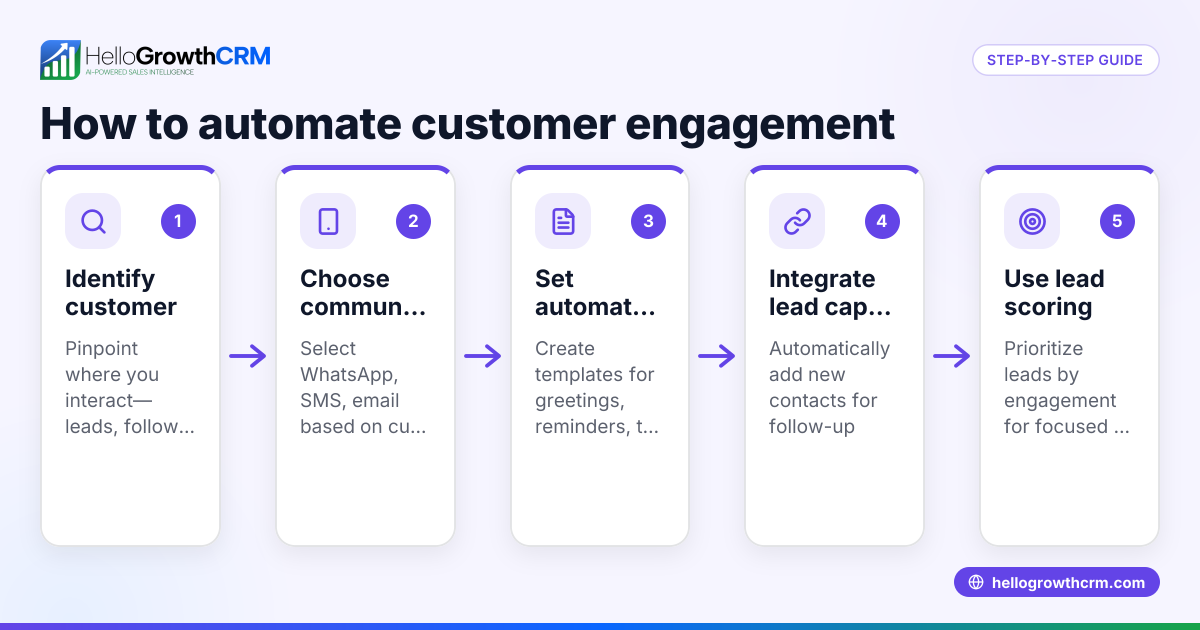
- Choose your ticketing system: Select a CRM or helpdesk platform that supports ticket capture, assignment, and notifications. Confirm it integrates with your communication channels such as email, WhatsApp, or web forms.
- Set up ticket capture: Configure the system to automatically create tickets from customer emails, website forms, or WhatsApp messages. Check that all channels you use for support are included.
- Define notification triggers: Decide which ticket events should send notifications. Common triggers include when a ticket is created, assigned to a team member, updated with progress notes, or resolved.
- Create ticket assignment rules: Automate ticket routing based on criteria like issue type, customer location, or team member workload. This avoids manual sorting and speeds up response.
- Configure notification recipients: Specify who receives each notification type. Typically, support agents, team leads, and the customer should get notifications relevant to their role.
- Write notification templates: Prepare clear, concise message templates for each notification event. Include ticket details, expected response times, and next steps.
- Test the notification workflow: Create test tickets to verify that notifications are sent promptly and to the correct recipients. Adjust settings if needed.
- Train your team: Ensure all support staff understand how the ticket system works, how to respond to notifications, and update tickets properly.
- Monitor and improve: Use reporting tools to track ticket volumes, response times, and notification effectiveness. Refine triggers and assignment rules based on real data.
For more on managing customer communications effectively, see WhatsApp and SMS CRM and learn about tracking customer engagement with customer health score.
Example (fictional figures)
Imagine a Christchurch-based building company, KiwiBuild Ltd, which wants to automate notifications for maintenance support requests.
- KiwiBuild sets up a web form on their website to capture maintenance requests.
- Each request automatically creates a ticket in their CRM system.
- Tickets are assigned automatically to the nearest available technician.
- Notifications are sent instantly to both the assigned technician and the customer.
On 15/04/2024, a customer submits a maintenance request at 10:00am.
- Ticket created at 10:00am.
- Notification sent immediately to Technician A and the customer.
KiwiBuild tracks that before automation, average response time was 3 hours, now it is 30 minutes.
Calculations for time saved per ticket:
Average old response time = 3 hours = 180 minutes
Average new response time = 30 minutes
Time saved per ticket = 180 minutes - 30 minutes = 150 minutes
If KiwiBuild receives 20 maintenance tickets per week:
Total time saved per week = 20 tickets × 150 minutes = 3,000 minutes
Convert minutes to hours: 3,000 minutes ÷ 60 = 50 hours saved per week
This saved time allows technicians to respond faster and handle more requests efficiently.
Common mistakes
- Not defining clear notification triggers: Prevent this by mapping all ticket events that need notifications before setup.
- Assigning tickets manually: Prevent delays by creating automated assignment rules based on workload or expertise.
- Sending too many notifications: Prevent overload by limiting notifications to essential updates only.
- Using generic message templates: Prevent confusion by customising templates with ticket details and personalised greetings.
- Failing to test the system: Prevent issues by running test tickets and verifying notifications reach the right people.
- Ignoring customer updates: Prevent customer frustration by including them in notification loops and offering a self-service portal.
- Not training staff properly: Prevent errors by providing clear instructions and ongoing support.
Learn more about providing customer self-service with HelloGrowthCRM’s customer portal, referrals, tickets and knowledge base.
Doing this in HelloGrowthCRM
HelloGrowthCRM offers a branded self-service customer portal where customers can submit and track support tickets. After the sale, all service requests stay on the same customer record as the deal, helping your team stay organised. The system supports automated ticket notifications and includes a knowledge base to reduce repetitive queries. This helps automate communication with your customers and team in one place.
Frequently asked questions
Can I automate support ticket notifications via WhatsApp? Yes, if your CRM supports WhatsApp integration, you can set up automated notifications to customers and staff through WhatsApp messages, improving response speed and convenience.
How do I assign tickets automatically to the right team member? You can set rules based on ticket category, customer location, or team member availability to automatically route tickets to the best person, reducing manual sorting.
What if customers want to track their tickets themselves? A customer portal allows customers to view their open tickets, updates, and resolutions anytime without needing to contact your team directly.
How do I avoid spamming customers with too many notifications? Set clear rules for when notifications are sent, such as only on ticket creation, status changes, or resolution, and avoid sending updates for minor internal notes.
Can HelloGrowthCRM help with support ticket reporting? Yes, HelloGrowthCRM includes reporting tools to monitor ticket volumes, response times, and team performance, helping you improve your support process.
Key takeaways
- Automate ticket capture and assignment to speed up responses.
- Set clear notification triggers and customise message templates.
- Include customers in notification loops via a self-service portal.
- Test automation thoroughly before going live.
- Avoid notification overload by targeting the right recipients.
- HelloGrowthCRM’s customer portal and ticket features support seamless automation.
Start automating your support ticket notifications today to improve customer satisfaction and team efficiency. Start on the Free Forever plan (200 leads, no credit card).
Ready to put this into practice?
Set up your pipeline, WhatsApp follow-ups, and AI lead scoring in minutes — free, no credit card.
Try HelloGrowthCRM freeGet CRM tips in your inbox
Join thousands of sales professionals who get weekly insights on CRM strategy, AI automation, and pipeline optimization.

The HelloGrowthCRM team publishes guides on CRM strategy, AI sales tools, and revenue operations for small business sales teams.