HelloGrowthCRM software
Built for real small-business sales teams
HelloGrowthCRM helps reps qualify faster, follow up on time, and close more deals—with practical automation in one place.
- AI lead scoring and pipeline visibility
- Built-in dialer, WhatsApp, and email automation
- Sales forecasting and RevOps-ready reporting
To correct an invoice mistake in Canada, you should first identify the error, then issue a correction document such as a credit note or a revised invoice that references the original. Clearly describe the changes, adjust amounts if needed, and send the corrected document to your customer promptly to maintain clear records and avoid payment confusion. This article explains why invoice mistakes happen, provides step-by-step correction instructions, shows a worked example with Canadian dollars, highlights common mistakes, and explains how HelloGrowthCRM can help manage invoices efficiently.
Why this comes up / what goes wrong
Small business owners in Canada often face invoice mistakes due to manual entry errors, incorrect pricing, or missing details like GST numbers. These mistakes can delay payments, confuse customers, and complicate bookkeeping. For example, a bilingual insurance agency in Laval might accidentally list the wrong coverage amount or forget to apply GST on an invoice. Knowing how to quickly and correctly fix these errors is essential to keep cash flow steady and maintain professional customer relationships.
Step-by-step
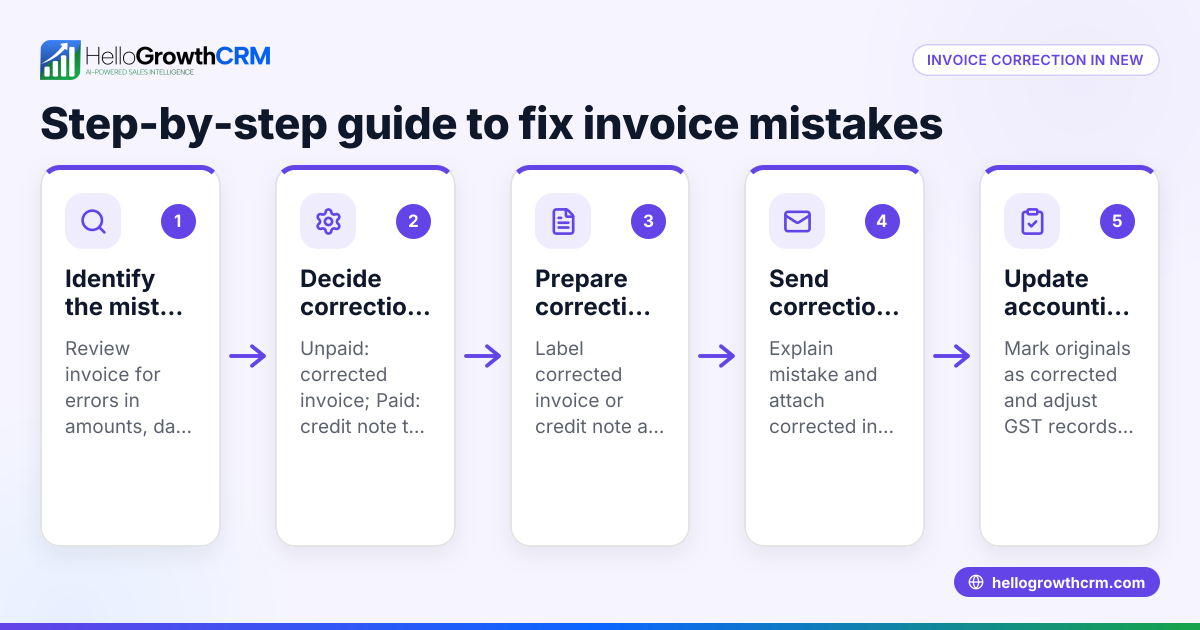
- Identify the mistake clearly: Review the original invoice and note exactly what is incorrect (e.g., wrong amount, missing GST, incorrect customer information).
- Decide the correction method: Choose whether to issue a credit note referencing the original invoice or create a corrected invoice. A credit note reduces or cancels the original invoice amount.
- Prepare the correction document:
- Include the original invoice number and date.
- Clearly state that this document corrects the previous invoice.
- Show the corrected amounts, taxes, and descriptions.
- Check calculations carefully: Verify that totals, GST, and any discounts are accurate.
- Send the correction promptly: Deliver the credit note or corrected invoice to your customer by email or mail.
- Update your records: Adjust your accounting and sales records to reflect the correction.
- Follow up with the customer: Confirm receipt and clarify any questions to avoid payment delays.
Consider tools that integrate quotes, proposals, invoices, and payments from the deal record for easier management. Learn more about HelloGrowthCRM for Canada here.
Example (fictional figures)
A bilingual insurance agency in Laval issued an invoice on 2024-04-15 for C$5,000 coverage plus 5% GST but mistakenly charged C$4,500.
- Original invoice amount: C$4,500
- Correct amount before GST: C$5,000
- GST (5% of C$5,000): C$5,000 × 5% = C$250
- Correct total: C$5,000 + C$250 = C$5,250
Correction steps:
- Issue a credit note referencing invoice #123 dated 2024-04-15.
- State the credit amount: C$4,500 (to cancel the incorrect charge).
- Issue a new corrected invoice:
- Coverage: C$5,000
- GST: C$250
- Total: C$5,250
- Send both documents to the customer.
This clears the incorrect invoice and replaces it with the correct amount.
Common mistakes
- Not referencing the original invoice: Always include the original invoice number and date on correction documents to avoid confusion.
- Failing to clearly state the correction: Use clear language such as "Credit Note" or "Corrected Invoice" and explain the changes.
- Incorrect calculations on the correction: Double-check math, especially GST amounts, to prevent further errors.
- Delaying sending the correction: Send corrections promptly to maintain trust and avoid payment delays.
- Not updating accounting records: Ensure your bookkeeping reflects the correction to keep financial reports accurate.
- Mixing credit notes and corrected invoices improperly: Use credit notes to cancel or reduce amounts and corrected invoices to replace the original.
Explore the built-in CRM dialer and invoicing features that help keep commercial documents and follow-up tasks in one place here.
Doing this in HelloGrowthCRM
HelloGrowthCRM offers a built-in quoting and proposal tool that lets you build, send, and track commercial documents such as invoices and payments from the deal record. When you send a quotation or invoice, its status (sent, viewed, accepted) appears on the same screen as your follow-up tasks, helping you stay on top of corrections and communications without switching tools. Read more about HelloGrowthCRM’s WhatsApp and SMS CRM capabilities here.
Frequently asked questions
Can I just void the incorrect invoice and send a new one? You should not void an invoice without documenting the correction. Instead, issue a credit note referencing the original invoice and then send a corrected invoice. This maintains a clear audit trail.
Do I need to notify the Canada Revenue Agency about invoice corrections? Generally, you do not notify CRA directly about invoice corrections, but you must keep accurate records for tax reporting. Always ensure your GST calculations are correct after corrections. NEEDS EXPERT REVIEW
What if the customer has already paid the incorrect invoice? If the customer overpaid, issue a credit note for the overpayment or arrange a refund or credit toward future purchases. If underpaid, send the corrected invoice with the outstanding amount.
How long do I have to correct an invoice mistake? There is no fixed deadline, but correcting mistakes promptly helps avoid payment and tax reporting issues. Keep clear documentation for your records.
Can HelloGrowthCRM automate invoice corrections? HelloGrowthCRM tracks the status of quotes and invoices on the same screen as follow-up tasks, helping you manage corrections efficiently, but you still prepare credit notes or corrected invoices manually.
Key takeaways
- Identify invoice mistakes clearly before correcting.
- Use a credit note or corrected invoice referencing the original.
- Verify all calculations, including GST, carefully.
- Send correction documents promptly to your customer.
- Update your accounting records to reflect changes.
- HelloGrowthCRM helps manage invoices and follow-ups from one screen.
Start managing your invoices and corrections easily with HelloGrowthCRM. Start on the Free Forever plan (200 leads, no credit card).
Ready to put this into practice?
Set up your pipeline, WhatsApp follow-ups, and AI lead scoring in minutes — free, no credit card.
Try HelloGrowthCRM freeGet CRM tips in your inbox
Join thousands of sales professionals who get weekly insights on CRM strategy, AI automation, and pipeline optimization.

The HelloGrowthCRM team publishes guides on CRM strategy, AI sales tools, and revenue operations for small business sales teams.