HelloGrowthCRM software
Built for real small-business sales teams
HelloGrowthCRM helps reps qualify faster, follow up on time, and close more deals—with practical automation in one place.
- AI lead scoring and pipeline visibility
- Built-in dialer, WhatsApp, and email automation
- Sales forecasting and RevOps-ready reporting
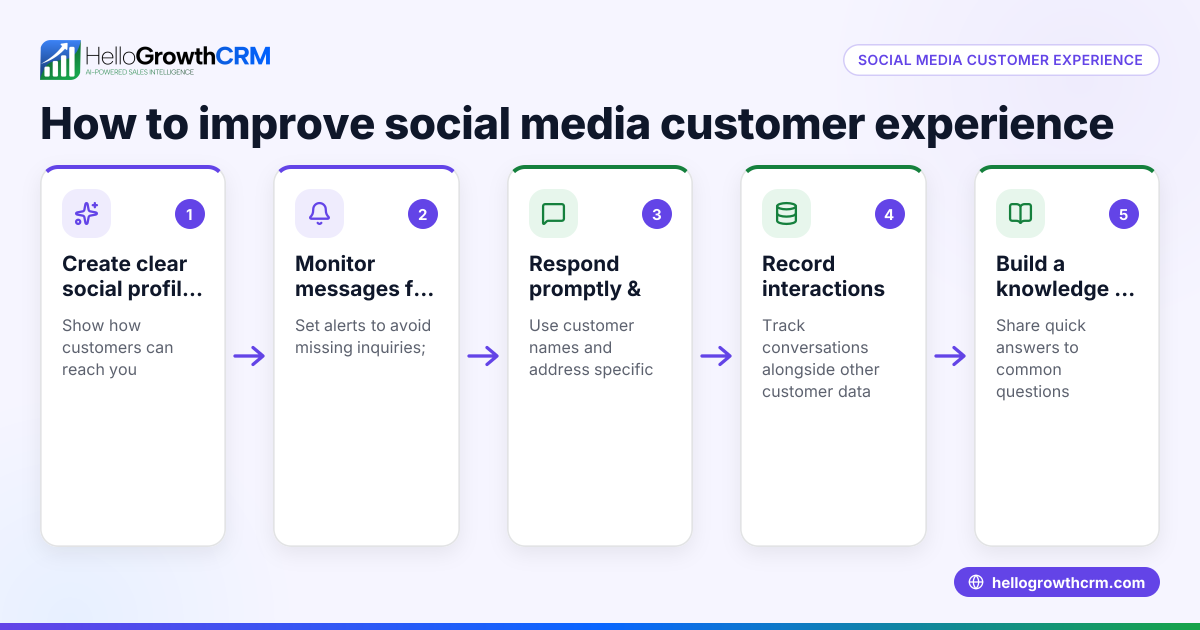
To leverage social media for customer service, start by actively monitoring your chosen social media channels for customer messages, comments, and mentions. Respond quickly and clearly to inquiries or complaints to keep customers satisfied. Track every customer request in one organized system to ensure no messages are missed and follow-ups happen on time. Use resources like a knowledge base to answer common questions and encourage referrals to grow your customer base.
Why this comes up / what goes wrong
Many small-business owners find customers reaching out on social media platforms such as Facebook, Instagram, or Twitter expecting fast, helpful responses. Without a clear process, messages can get lost or answered late, damaging customer trust and losing sales. Often, businesses rely on spreadsheets or scattered notes to track these requests, which leads to missed follow-ups. Owners juggling multiple roles struggle to keep up with social media service demands, resulting in frustrated customers and missed opportunities.
Step-by-step
- Identify your key social media channels. Find out where your customers spend the most time, for example, Facebook, Instagram, or Twitter. Focus on 2-3 platforms to avoid spreading your resources too thin. (executiveeducation.wharton.upenn.edu)
- Set up notifications and monitoring. Turn on notifications for direct messages, comments, and mentions on your business pages. Use built-in tools or third-party apps to centralize monitoring so you don’t miss any customer contact.
- Create a response policy. Decide how fast you will reply — for example, within 1-2 hours during business hours. Prepare message templates for common questions to speed up replies while keeping responses personal.
- Assign responsibility. Designate a team member or yourself to check social media channels regularly. If you don’t have a sales manager, consider Managed RevOps support to keep follow-up queues handled weekly.
- Log all customer inquiries in one system. Use a CRM or ticketing system to record social media messages. This keeps everything organized and makes it easier to track the status of each request.
- Build a knowledge base. Publish FAQs and guides that can be linked in your responses to reduce repetitive questions and empower customers to find answers quickly.
- Encourage referrals and reviews. After resolving a customer’s issue, invite them to share their experience or refer others through a referral program.
- Review and improve regularly. Analyze response times, customer satisfaction, and common issues to refine your social media customer service process.
Example (fictional figures)
A two-location dental practice in Columbus, Ohio, started using Facebook and Instagram for customer service on 04/01/2026. They set a policy to respond within 2 hours during office hours (8 AM–6 PM). The office manager checks messages twice daily and logs them in a CRM ticket system.
In April, they received 120 messages:
- 100 appointment requests
- 20 insurance questions
They tracked responses as follows:
- 100 appointment requests × 100% responded = 100 handled
- 20 insurance questions × 90% responded = 18 handled
Calculations:
100 appointment requests × 100% = 100 responses 20 insurance questions × 90% = 18 responses
Total responses = 100 + 18 = 118 responses handled
With this system, they reduced no-shows by 15% and improved overall customer satisfaction.
Common mistakes
- Ignoring or delaying responses on social media. Prevent this by setting notifications and a strict response time policy.
- Not tracking requests in a single system. Use a CRM with ticketing or a customer portal to keep all customer interactions organized and visible.
- Trying to cover too many social platforms without enough resources. Focus on the top 2-3 platforms your customers use most.
- Using generic, impersonal replies. Personalize responses and link to your knowledge base for detailed help.
- Failing to assign responsibility for social media service. Assign a team member or use Managed RevOps to ensure consistent follow-up.
Doing this in HelloGrowthCRM
HelloGrowthCRM helps by keeping service requests on the same customer record as the deal through its customer portal, tickets, and knowledge base features. This lets your team see all customer interactions in one place and respond faster. If you don’t have a sales manager, Managed RevOps provides weekly follow-up support to keep your service queue up to date. Learn more about these features and how they improve customer health score and sales follow-up in HelloGrowthCRM for the United States, WhatsApp and SMS CRM, and the customer health score.
Frequently asked questions
How quickly should I respond to customer messages on social media? Aim to respond within 1-2 hours during business hours. Fast replies improve customer satisfaction and prevent issues from escalating.
Which social media platforms are best for customer service? Focus on where your customers are most active, often Facebook, Instagram, or Twitter. It’s better to manage a few well than many poorly.
How can I keep track of social media customer requests? Use a CRM or ticket system that logs all messages and tracks their status. HelloGrowthCRM’s customer portal and ticket features help organize this effectively.
What if I don’t have a dedicated team member for social media service? Consider Managed RevOps support to handle follow-up queues weekly, ensuring no customer request is missed.
Can I automate responses on social media? You can use templates for common questions but avoid fully automated replies that may seem impersonal or miss important details.
Key takeaways
- Monitor and respond quickly on your customers’ preferred social media channels.
- Assign responsibility and set clear response policies.
- Track all requests in one system, ideally a CRM with ticketing.
- Use a knowledge base to reduce repetitive questions.
- Avoid spreading resources too thin by focusing on top channels.
- Consider Managed RevOps support to maintain follow-up consistency.
Start providing better customer service today by organizing your social media interactions in HelloGrowthCRM. Start on the Free Forever plan (200 leads, no credit card).
Ready to put this into practice?
Set up your pipeline, WhatsApp follow-ups, and AI lead scoring in minutes — free, no credit card.
Try HelloGrowthCRM freeGet CRM tips in your inbox
Join thousands of sales professionals who get weekly insights on CRM strategy, AI automation, and pipeline optimization.

The HelloGrowthCRM team publishes guides on CRM strategy, AI sales tools, and revenue operations for small business sales teams.