HelloGrowthCRM software
Built for real small-business sales teams
HelloGrowthCRM helps reps qualify faster, follow up on time, and close more deals—with practical automation in one place.
- AI lead scoring and pipeline visibility
- Built-in dialer, WhatsApp, and email automation
- Sales forecasting and RevOps-ready reporting
To organise customer requests from multiple channels in Singapore, you must centralise all incoming requests—whether from WhatsApp, email, phone calls, or web forms—into one system where you can track, assign, and respond efficiently. This prevents lost leads, slow follow-ups, and customer frustration.
Why this comes up / what goes wrong
Many small and mid-sized businesses in Singapore receive customer requests through various channels such as WhatsApp messages, emails, phone calls, and online forms. Without a unified system, these requests get scattered across platforms, making it difficult to keep track. This leads to delayed responses, lost opportunities, and unhappy customers. For example, a tuition centre in Tampines might get enrolment questions on WhatsApp, payment queries by email, and feedback by phone. Managing these separately causes confusion, missed follow-ups, and duplicated work.
Step-by-step
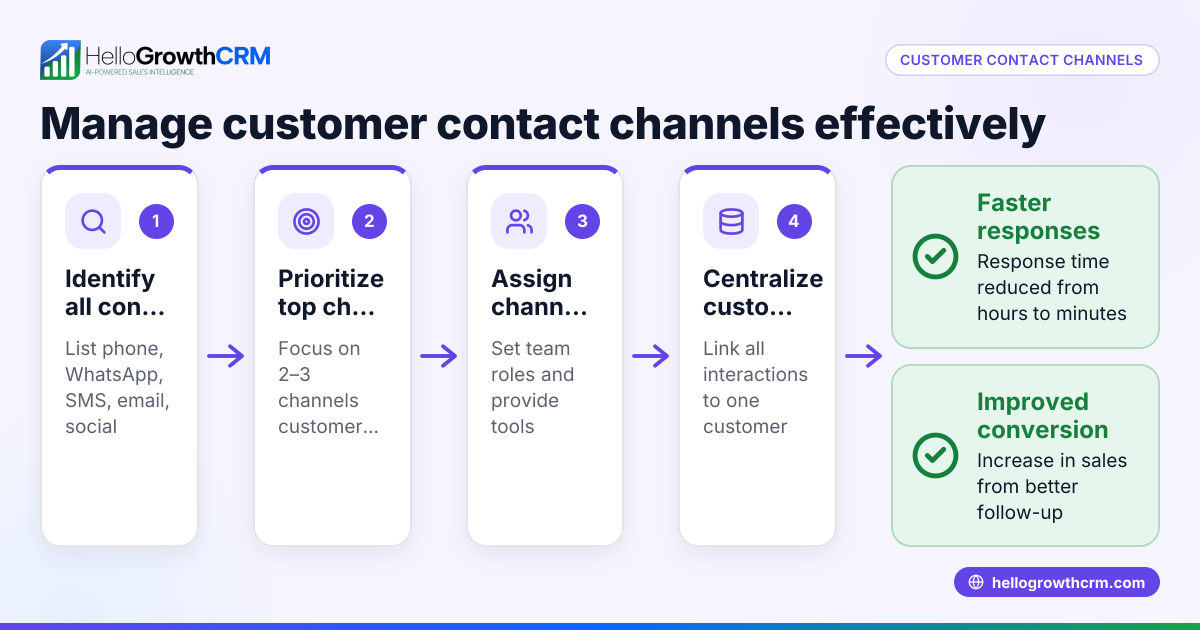
- Identify all customer request channels. List every channel your customers use to contact you, including WhatsApp, email inboxes, phone calls, web forms, and social media.
- Choose a single system to capture and track requests. This could be a CRM, ticketing system, or a shared spreadsheet. Ensure it can store customer details, request type, status, and deadlines.
- Set up processes to capture requests into this system. For example, forward WhatsApp messages or emails to the CRM automatically or enter phone call notes immediately after each call.
- Categorise requests by type, such as sales enquiry, support, or payment questions. This helps assign the right team member and prioritise tasks.
- Assign each request to a responsible team member with clear deadlines or response times to ensure timely action.
- Regularly review outstanding requests and update their status (pending, in progress, resolved). This prevents requests from being forgotten or duplicated.
- Keep all customer communication history in one place. This provides context for follow-ups and improves customer experience.
- Train your team to use the system consistently and check it daily. Consistent use prevents lost requests and ensures smooth operations.
Using a customer health score can help prioritise requests based on urgency and customer value.
Example (fictional figures)
A tuition centre in Tampines receives customer requests weekly from WhatsApp, email, and phone calls as follows:
- WhatsApp requests: 60
- Email requests: 40
- Phone call requests: 30
Total weekly requests = 60 + 40 + 30 = 130
The centre decides to use a CRM to capture all requests in one place. They assign 4 staff members to handle requests evenly.
Requests per staff member per week = 130 ÷ 4 = 32.5, approximately 33 requests
They set a target to respond to all requests within 24 hours.
If one staff member misses 4 requests in a week, the missed workload percentage is:
4 ÷ 33 × 100% = 12.12%
By centralising requests into one system, the tuition centre reduces missed follow-ups and improves customer satisfaction.
Common mistakes
- Not centralising requests: Leads to lost or duplicated efforts. Prevent this by using a single tracking system.
- Ignoring some channels: For example, responding to WhatsApp but missing email queries. Prevent by listing all channels and monitoring each.
- No clear assignment or deadlines: Requests pile up unaddressed. Prevent by assigning owners and setting follow-up times.
- Failing to update request status: Causes confusion and repeated work. Prevent by regularly reviewing and updating statuses.
- Poor team training: Leads to inconsistent use of the system. Prevent by training and monitoring usage.
- Separating sales and service requests: Makes it hard to see customer history. Prevent by keeping all interactions on the same customer record.
Using a customer health score can help prioritise requests effectively.
Doing this in HelloGrowthCRM
HelloGrowthCRM offers a branded self-service customer portal, referrals tracking, tickets, and a knowledge base. After the sale, service requests stay on the same customer record as the deal, keeping all communications together. This makes managing requests from multiple channels like WhatsApp and email easier in one place. Learn more about WhatsApp and SMS CRM features and how HelloGrowthCRM supports Singapore businesses on the HelloGrowthCRM for Singapore page.
Frequently asked questions
How can I capture WhatsApp requests automatically? You can use a CRM like HelloGrowthCRM that integrates WhatsApp messages directly into customer records, avoiding manual entry and ensuring no request is missed.
What is the best way to prioritise customer requests? Categorise requests by urgency and type, then assign a customer health score or priority level to focus on the most important ones first. This helps manage workload and improves customer satisfaction.
How often should I review outstanding requests? Daily reviews are recommended to keep track of pending requests, update statuses, and assign follow-ups promptly.
Can I manage after-sales service requests in the same system as sales leads? Yes, keeping service requests on the same customer record as the deal provides full visibility of customer interactions and history.
Is training necessary for my team to use a CRM effectively? Yes, training ensures consistent use and helps the team follow the process, reducing errors and lost requests.
Key takeaways
- Centralise all customer requests from WhatsApp, email, phone, and web forms into one system.
- Categorise and assign requests promptly with clear deadlines.
- Keep all communication on the same customer record for context.
- Regularly review and update request statuses to prevent backlog.
- Train your team to use the system consistently.
- Consider using HelloGrowthCRM’s customer portal and ticketing features for better management.
Start organising your customer requests today. Start on the Free Forever plan (200 leads, no credit card).
Ready to put this into practice?
Set up your pipeline, WhatsApp follow-ups, and AI lead scoring in minutes — free, no credit card.
Try HelloGrowthCRM freeGet CRM tips in your inbox
Join thousands of sales professionals who get weekly insights on CRM strategy, AI automation, and pipeline optimization.

The HelloGrowthCRM team publishes guides on CRM strategy, AI sales tools, and revenue operations for small business sales teams.