HelloGrowthCRM software
Built for real small-business sales teams
HelloGrowthCRM helps reps qualify faster, follow up on time, and close more deals—with practical automation in one place.
- AI lead scoring and pipeline visibility
- Built-in dialer, WhatsApp, and email automation
- Sales forecasting and RevOps-ready reporting
To organise customer requests from multiple channels in the UK, centralise all requests into one system. This allows you to track, prioritise and respond efficiently without losing leads or missing deadlines. This article explains why this matters, gives step-by-step instructions, a worked example with GBP figures, common mistakes to avoid, and how a CRM with customer portal and ticketing features can support this process.
Why this comes up / what goes wrong
Small business owners often receive customer requests through various channels such as email, WhatsApp, phone calls, social media, and web forms. Without a clear system, these requests can get lost or delayed, causing frustrated customers and lost sales. Many businesses try to manage requests using spreadsheets, WhatsApp chats, or email inboxes separately, which leads to duplication, missed follow-ups and no easy way to prioritise urgent issues.
For example, a property lettings agency in Manchester might get enquiries about available properties via WhatsApp, emails about maintenance requests, and phone calls for viewings. Without central organisation, it’s hard to know which requests are new, which have been handled, and which need urgent attention.
Step-by-step
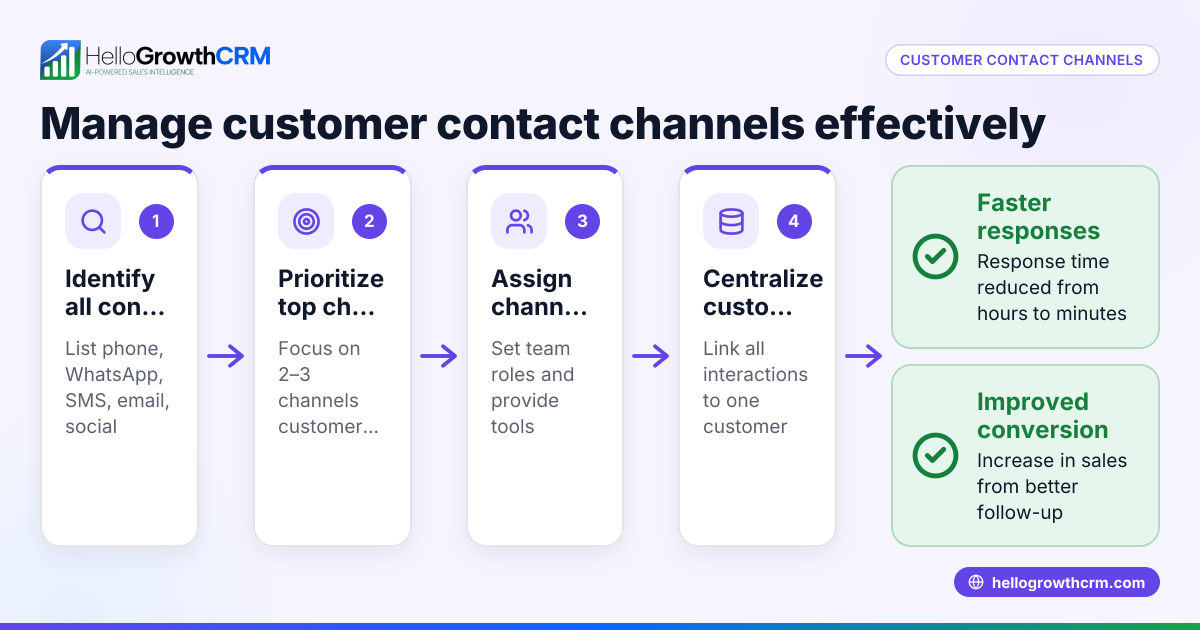
- List all customer contact channels Write down every way customers can reach you: email, WhatsApp, phone, website forms, social media, etc.
- Choose a central system to collect requests Use a CRM or ticketing system that can capture requests from all channels into one place. Check the system can handle WhatsApp and SMS if those are key channels.
- Set up integrations or manual processes Connect your channels to the system via integrations or set a manual routine to enter requests promptly. For example, copy WhatsApp messages into the CRM or use web form leads that auto-populate.
- Create categories or tags for requests Define clear categories like ‘sales inquiry’, ‘support request’, or ‘maintenance’ to organise and prioritise.
- Assign responsibility and deadlines Allocate each request to a team member and set deadlines for follow-up or resolution.
- Track status and progress Use pipeline or task boards to monitor open, pending, and closed requests.
- Regularly review and update Check the system daily to ensure no requests are overdue and update statuses promptly.
- Use customer records to keep history Link all requests to the same customer record to see full interaction history.
- Train your team Make sure everyone knows how to use the system and follows the process.
- Use reports to improve Analyse response times and request volumes to identify bottlenecks. For more on tracking customer interactions and health, see customer health score.
Example (fictional figures)
Manchester Lettings Ltd receives enquiries via WhatsApp, email, and phone. On 01/05/2024, they had:
- 30 WhatsApp messages
- 20 emails
- 10 phone calls
They centralised requests into their CRM following these calculations:
Total requests = 30 + 20 + 10 = 60 requests
They assigned 3 team members to handle these. Each member handles an equal share:
Requests per member = 60 3 = 20 requests
They set a 24-hour response target. If each request takes 30 minutes to handle:
Total hours needed = 60 0.5 = 30 hours
Each member’s daily capacity is 8 hours, so they can cover 20 requests 0.5 hours = 10 hours, slightly over capacity, indicating the need to prioritise urgent requests or add resources.
Common mistakes
- Not centralising requests: Leads to lost or duplicated work. Prevent by using a single system.
- Ignoring some channels: Missing WhatsApp or social media requests causes delays. Prevent by listing all channels and integrating them.
- No clear ownership: Requests get ignored if no one is responsible. Prevent by assigning tasks.
- No status tracking: Requests fall through the cracks. Prevent by using task boards or pipelines.
- Failing to update records: Losing customer history. Prevent by linking requests to customer records.
- No team training: Incorrect use of the system. Prevent by training and documentation.
For more on tracking customer interactions and health, see customer health score.
Doing this in HelloGrowthCRM
HelloGrowthCRM offers a customer portal, referrals, tickets and knowledge base features. After the sale, service requests stay on the same customer record as the deal, so your team sees the full customer history. These features help manage and resolve requests efficiently. For more details, visit HelloGrowthCRM for the United Kingdom.
Frequently asked questions
How can I keep track of customer requests from WhatsApp and SMS? You can use a CRM that supports WhatsApp and SMS to capture and manage messages within the same system. This reduces the risk of missing requests and helps your team respond faster. See WhatsApp and SMS CRM for details.
What if I have too many requests to handle? Prioritise requests by urgency and category. Use your CRM’s task boards and pipelines to focus on high-priority cases first. Consider adding team members or automating routine responses.
Can I use spreadsheets instead of a CRM? Spreadsheets can quickly become overwhelming and error-prone when managing multiple channels. A CRM centralises data, tracks statuses, and assigns tasks, improving organisation and follow-up.
How do I ensure my team follows the process? Provide training and clear documentation. Use the CRM’s reporting features to monitor compliance and response times.
Can I keep customer history linked to their requests? Yes, a CRM that links service requests to the same customer record as the deal gives you a complete view of all interactions and helps provide better service.
Key takeaways
- Centralise all customer requests from every channel into one system.
- Categorise, assign and track requests to ensure timely responses.
- Link requests to customer records for full interaction history.
- Avoid common mistakes like ignoring channels or lacking ownership.
- Use tools with customer portal, tickets and knowledge bases to manage requests.
- Train your team and review progress regularly to improve.
Start organising your customer requests today. Start on the Free Forever plan (200 leads, no credit card) and see how this approach can help you manage all channels in one place.
Ready to put this into practice?
Set up your pipeline, WhatsApp follow-ups, and AI lead scoring in minutes — free, no credit card.
Try HelloGrowthCRM freeGet CRM tips in your inbox
Join thousands of sales professionals who get weekly insights on CRM strategy, AI automation, and pipeline optimization.

The HelloGrowthCRM team publishes guides on CRM strategy, AI sales tools, and revenue operations for small business sales teams.