HelloGrowthCRM software
Built for real small-business sales teams
HelloGrowthCRM helps reps qualify faster, follow up on time, and close more deals—with practical automation in one place.
- AI lead scoring and pipeline visibility
- Built-in dialer, WhatsApp, and email automation
- Sales forecasting and RevOps-ready reporting
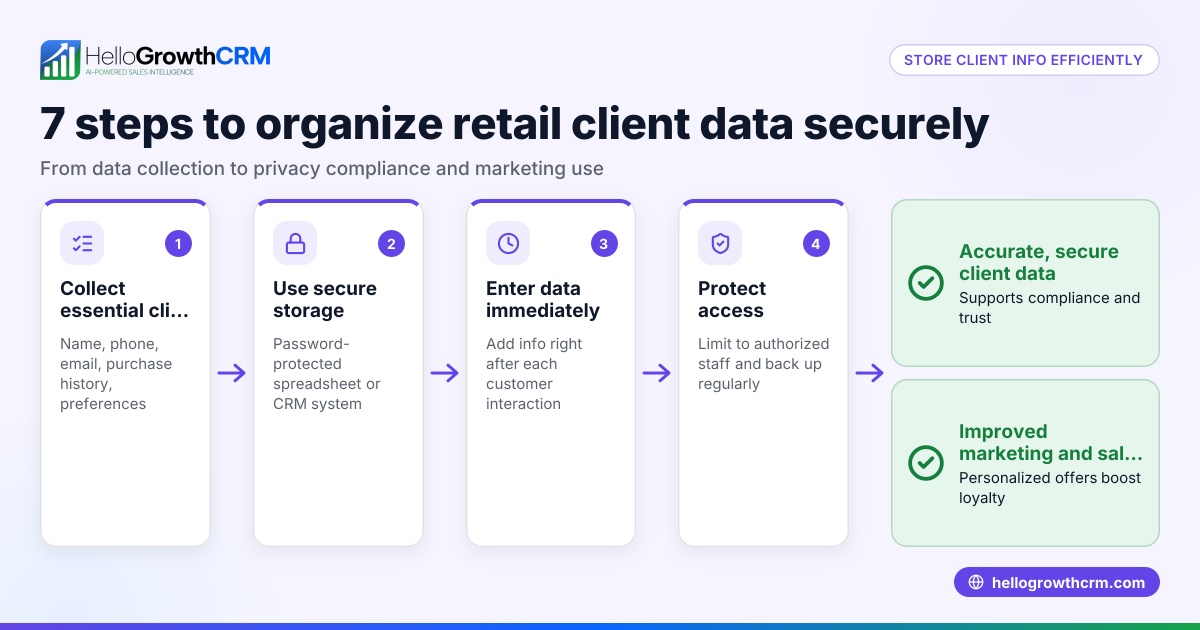
Protecting customer information in your CRM is essential for maintaining trust and complying with data protection requirements. UK small businesses can secure customer data by controlling who accesses it, encrypting information, backing up records regularly, training staff on data privacy, and monitoring access and communications.
Why this comes up / what goes wrong
Many small UK businesses rely on CRMs or informal tools like spreadsheets and WhatsApp to manage customer information. Without clear security measures, sensitive data such as addresses, phone numbers, and payment details can be exposed accidentally or through unauthorised access. For instance, a kitchen-fitting company in Leeds might keep customer details scattered across WhatsApp chats and Excel sheets without proper protection. If a device is lost or an employee leaves without access being revoked, customer data may be compromised.
Step-by-step
- Define user roles and access levels: Assign CRM access only to employees who need it. Set permissions so some can view data only, while others can edit. Check that no one has unnecessary full access.
- Implement strong passwords and two-factor authentication (2FA): Require passwords with a minimum of 12 characters including letters, numbers, and symbols. Enable 2FA on all CRM user accounts.
- Ensure data encryption: Confirm your CRM provider encrypts data during transmission (in transit) and when stored (at rest).
- Schedule regular backups: Set up automatic backups daily or weekly to a secure location. Verify backups by restoring sample data monthly.
- Train your staff: Provide regular training on GDPR, phishing risks, and how to handle customer data securely.
- Monitor and log access: Keep detailed logs of who accessed or changed customer data. Review these logs monthly for any unusual activity.
- Use secure communication within the CRM: Prefer CRM-integrated WhatsApp and SMS messaging features that log conversations on customer records rather than informal apps.
- Keep software updated: Regularly update your CRM and related systems to patch security vulnerabilities.
Example (fictional figures)
Leeds Kitchens Ltd, a kitchen-fitting business in Leeds, wants to protect customer data starting 01/07/2024.
- Step 1: 5 employees require CRM access. 2 are sales reps with edit rights, 3 are admin staff with view-only rights.
- Step 2: Passwords must be at least 12 characters, combining upper and lower case letters, numbers, and symbols. 2FA is enabled.
- Step 4: Daily backups of CRM data are stored in encrypted cloud storage.
Backup storage cost calculation:
Backup size per day = 2 GB Monthly backup size = 2 GB × 30 days = 60 GB Storage cost per GB per month = £0.10 (assumed illustrative rate) Monthly storage cost = 60 GB × £0.10 = £6
Leeds Kitchens Ltd budgets £6 monthly for secure backup storage.
Common mistakes
- Granting broad access to all employees: Prevent by assigning specific roles and permissions, limiting access to what employees need.
- Using weak or repeated passwords: Prevent by enforcing strong password policies and enabling 2FA.
- Neglecting backups or failing to test them: Prevent by scheduling regular backups and verifying they can be restored.
- Communicating customer data via unsecured apps: Prevent by using WhatsApp and SMS features integrated into the CRM that log messages securely WhatsApp and SMS CRM.
- Failing to train staff on data privacy: Prevent by holding regular training sessions on GDPR and data security.
- Ignoring access logs: Prevent by reviewing logs monthly to detect unauthorised access.
Doing this in HelloGrowthCRM
HelloGrowthCRM helps protect customer information by logging WhatsApp conversations and SMS messages directly on lead records, keeping communication secure and auditable. Its built-in dialer allows telecallers to work from inside the CRM with call outcomes logged automatically. AI agents (in beta) draft follow-up messages after calls for review and sending, reducing manual handling of sensitive data. Learn more at HelloGrowthCRM for the United Kingdom.
Frequently asked questions
How do I control who can see customer data in a CRM? Set role-based access controls that assign view or edit permissions only to staff who require them. Regularly review these permissions to ensure they remain appropriate.
Is it safe to communicate with customers over WhatsApp? Using WhatsApp integrated within a CRM logs all conversations securely on the lead record, which is safer than using personal WhatsApp apps. HelloGrowthCRM supports this integration.
What should I do if a staff member leaves? Immediately revoke their CRM access and change shared passwords. Review access logs for any unusual activity before their departure.
How often should I back up CRM data? Daily backups are recommended, with monthly checks to confirm backups are complete and restorable.
Can AI help with protecting customer information? AI agents in HelloGrowthCRM (beta) draft follow-up messages after calls, reducing manual data handling and potential errors.
How can I monitor access to customer data? Maintain detailed logs of who accessed or modified data and review these logs regularly to detect unauthorised activity.
Key takeaways
- Limit CRM access strictly to necessary staff with clear roles.
- Use strong passwords and two-factor authentication.
- Encrypt data and back it up regularly with verification.
- Train your team on data privacy and secure communication.
- Use CRM features like WhatsApp and SMS logging for safer messaging.
- Monitor access logs for unusual activity and act promptly.
Protecting customer data in your CRM is vital to your business reputation and compliance. Start securing your CRM today with these steps and consider tools like HelloGrowthCRM to help manage communication and data securely.
Start on the Free Forever plan (200 leads, no credit card) at HelloGrowthCRM.
Ready to put this into practice?
Set up your pipeline, WhatsApp follow-ups, and AI lead scoring in minutes — free, no credit card.
Try HelloGrowthCRM freeGet CRM tips in your inbox
Join thousands of sales professionals who get weekly insights on CRM strategy, AI automation, and pipeline optimization.

The HelloGrowthCRM team publishes guides on CRM strategy, AI sales tools, and revenue operations for small business sales teams.