HelloGrowthCRM software
Built for real small-business sales teams
HelloGrowthCRM helps reps qualify faster, follow up on time, and close more deals—with practical automation in one place.
- AI lead scoring and pipeline visibility
- Built-in dialer, WhatsApp, and email automation
- Sales forecasting and RevOps-ready reporting
Scheduling sales calls with prospects in Canada requires clear communication and organisation to avoid missed opportunities and delays. This guide explains why scheduling sales calls is a common challenge, provides step-by-step instructions, shares a worked example with Canadian figures, highlights common mistakes, and introduces how HelloGrowthCRM can make the process easier.
Why this comes up / what goes wrong
Small-business owners and sales teams often struggle to schedule sales calls efficiently because prospects have busy schedules and prefer quick, flexible booking options. Without a clear process, back-and-forth messages on WhatsApp, email, or texts can cause delays or missed appointments. This slows down sales follow-up, resulting in lost leads and revenue. Many businesses still rely on manual methods like spreadsheets or informal texting, which lack reminders and visibility.
Step-by-step
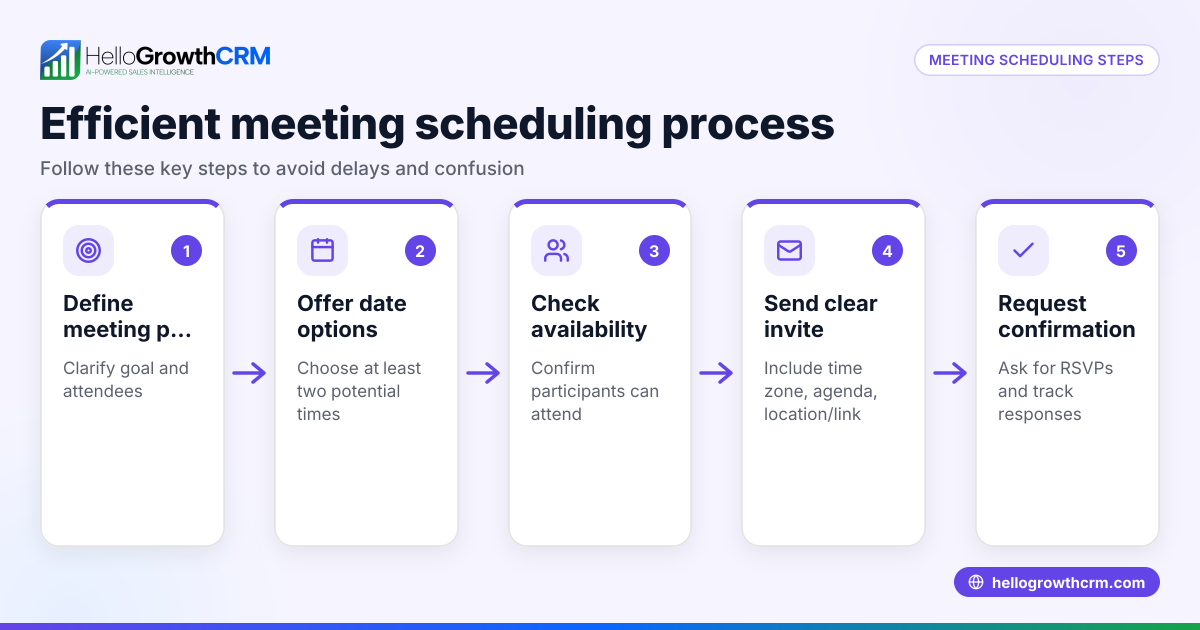
- Prepare your availability: Decide on the days and times you can take sales calls. Block out your calendar to avoid double-booking.
- Reach out to the prospect: Send a polite message introducing yourself and stating your intent to discuss their needs.
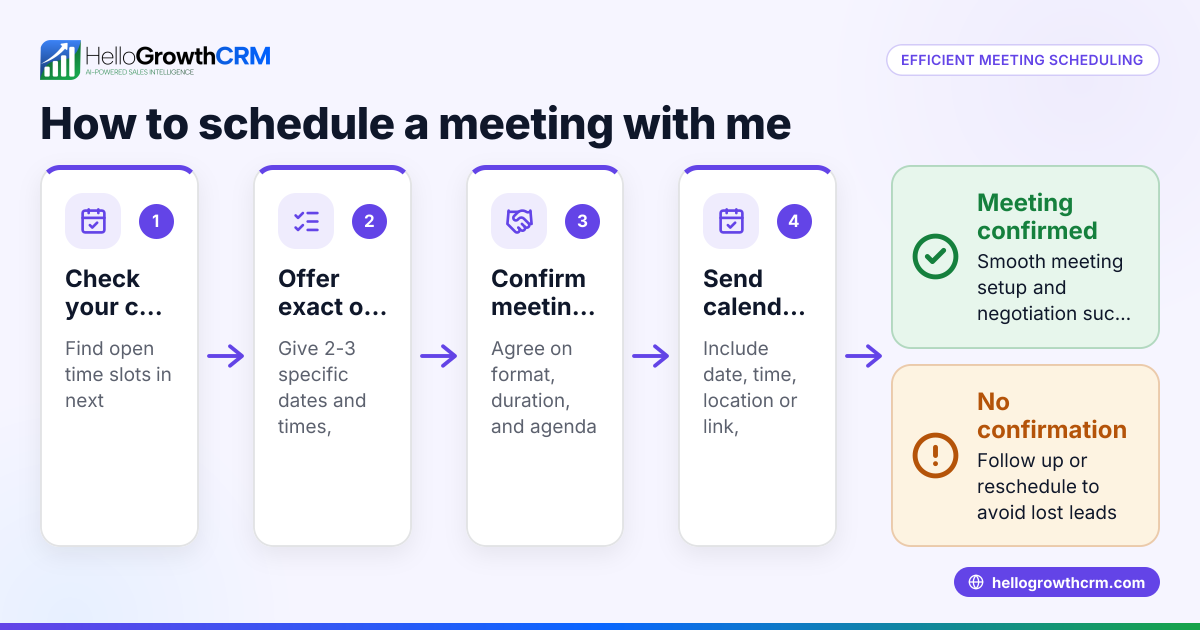
- Offer specific time slots: Provide 2-3 clear options for call times, including dates and times in the prospect’s time zone.
- Use a scheduling link if possible: Share a meeting scheduler link so the prospect can pick a time that suits them, reducing back-and-forth messages. This is faster and more convenient.
- Confirm the appointment: Once the prospect selects a time, send a confirmation message with the date, time, and call details (phone number, WhatsApp, or video link).
- Set reminders: Use calendar invites or CRM reminders to alert you and the prospect before the call.
- Prepare for the call: Review the prospect’s details and any previous communication before the scheduled time.
- Follow up after the call: Send a thank-you message summarising next steps or scheduling a follow-up call if needed.
Check that your communication is clear, polite, and professional throughout. Confirm time zones to avoid confusion.
Example (fictional figures)
A bilingual insurance agency in Laval, Quebec, wants to schedule a sales call with a prospect. They have availability on 2024-06-10 and 2024-06-11 from 10:00 to 14:00 Eastern Time.
- They prepare three time slots:
- 2024-06-10 at 10:30 AM ET
- 2024-06-10 at 1:00 PM ET
- 2024-06-11 at 11:00 AM ET
- They message the prospect:
"Hello, I’m Jane from Laval Insurance. I’d like to discuss your insurance needs. Are you available for a call on one of these times? 2024-06-10 at 10:30 AM, 1:00 PM, or 2024-06-11 at 11:00 AM ET?"
- The prospect replies: "2024-06-10 at 1:00 PM works."
- Jane sends a confirmation:
"Great! Our call is confirmed for 2024-06-10 at 1:00 PM ET. I will call you on WhatsApp at your number. Looking forward to speaking with you."
- Jane sets a calendar reminder 15 minutes before the call.
This clear process avoids confusion and ensures the call is booked efficiently.
Common mistakes
- Not offering specific time slots: Asking "When are you free?" causes delays. Prevent by suggesting exact times.
- Ignoring time zones: Not confirming time zones leads to missed calls. Always specify and confirm time zones.
- No confirmation message: Without confirmation, prospects may forget or double-book. Always confirm in writing.
- Failing to send reminders: Missing reminders causes no-shows. Use calendar or CRM reminders.
- Back-and-forth scheduling on WhatsApp or SMS: This wastes time and risks errors. Use a meeting scheduler link to let prospects pick.
- Not preparing for the call: Lack of preparation wastes the prospect’s time. Review notes before the call.
Doing this in HelloGrowthCRM
HelloGrowthCRM offers a meeting scheduler feature that lets prospects pick a call slot from a shared link, eliminating back-and-forth messaging on WhatsApp. The CRM's deals (pipeline) tool tracks quotations and follow-up dates so no opportunity is forgotten. For teams with field sales reps, the territories, field operations and commissions features help log visits and manage schedules efficiently.
Frequently asked questions
How do I handle time zones when scheduling calls with Canadian prospects? Always specify the time zone when offering call times, for example, Eastern Time (ET) or Pacific Time (PT). Confirm with the prospect to avoid confusion, especially if they are in a different province.
What’s the best way to reduce no-shows for sales calls? Send a confirmation message immediately after booking and set reminders for both you and the prospect. Using calendar invites and automated reminders from a CRM can improve attendance.
Can I schedule sales calls without using a calendar app? Yes, but it’s less efficient. Using a scheduling tool or CRM that offers a meeting scheduler link helps prospects pick a convenient time without back-and-forth messages.
How can I keep track of follow-ups after sales calls? A CRM with a deals pipeline feature helps track open opportunities, set follow-up dates, and record call outcomes to ensure nothing is missed.
Is it better to schedule calls via WhatsApp or email? WhatsApp is quicker for informal communication, but scheduling links reduce back-and-forth on any platform. Email is more formal and good for detailed confirmations.
Key takeaways
- Offer specific, clear time slots including time zones.
- Use scheduling links to let prospects pick times and avoid back-and-forth.
- Confirm appointments in writing and set reminders.
- Prepare for calls by reviewing prospect details.
- Track follow-ups using a CRM pipeline.
- Avoid common mistakes like ignoring time zones or failing to confirm.
Scheduling sales calls with prospects in Canada is easier and more reliable when you follow a clear process and use tools designed to reduce manual work. To start scheduling calls more efficiently, try HelloGrowthCRM’s meeting scheduler and pipeline features today.
Start on the Free Forever plan (200 leads, no credit card) at HelloGrowthCRM.
Ready to put this into practice?
Set up your pipeline, WhatsApp follow-ups, and AI lead scoring in minutes — free, no credit card.
Try HelloGrowthCRM freeGet CRM tips in your inbox
Join thousands of sales professionals who get weekly insights on CRM strategy, AI automation, and pipeline optimization.

The HelloGrowthCRM team publishes guides on CRM strategy, AI sales tools, and revenue operations for small business sales teams.