HelloGrowthCRM software
Built for real small-business sales teams
HelloGrowthCRM helps reps qualify faster, follow up on time, and close more deals—with practical automation in one place.
- AI lead scoring and pipeline visibility
- Built-in dialer, WhatsApp, and email automation
- Sales forecasting and RevOps-ready reporting
Scheduling sales calls with prospects in the UK involves clear communication, organisation and follow-up. You need to find a suitable time that works for both parties, confirm it without confusion, and keep the appointment top of mind to avoid no-shows. This article explains why scheduling sales calls is a common challenge for small businesses, provides a step-by-step method to get it right, includes a realistic example, outlines common mistakes and how to avoid them, and shows how HelloGrowthCRM can help streamline scheduling.
Why this comes up / what goes wrong
Many small UK businesses lose leads because they struggle to schedule calls efficiently. Often, business owners rely on back-and-forth emails, WhatsApp messages or phone tag to find a suitable time. This wastes time and frustrates prospects. Without a clear system, calls get missed, follow-ups delayed and sales opportunities lost. Busy founders or sales teams juggling multiple leads find it hard to track who they’ve contacted, what time was agreed, and when to follow up. This leads to disorganisation and lost revenue.
Step-by-step
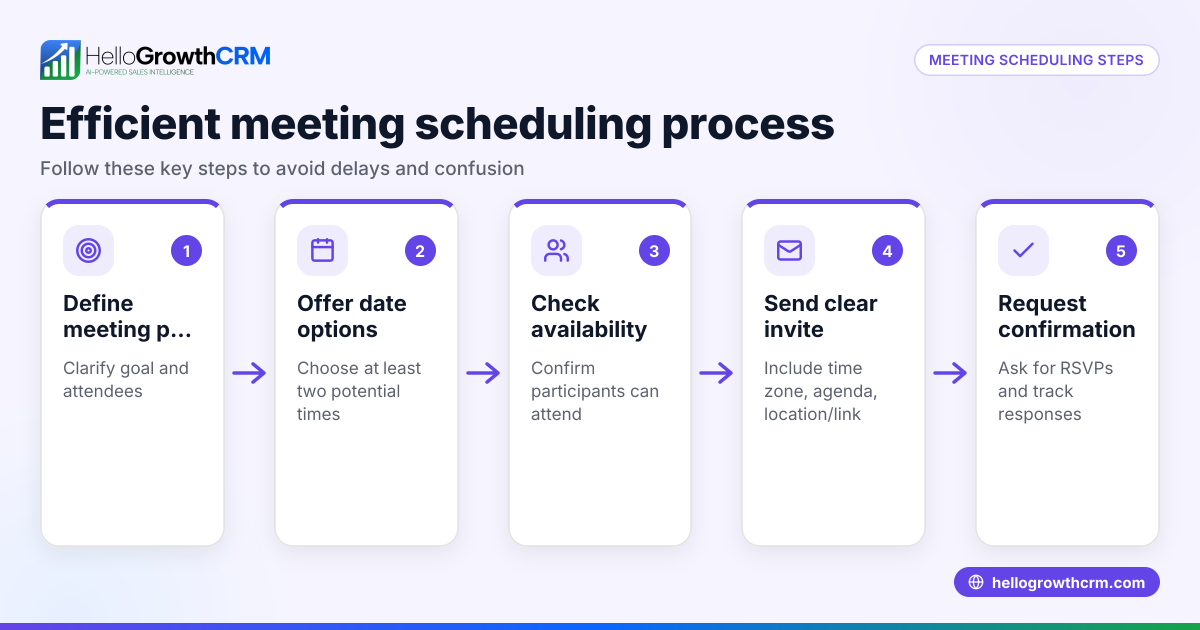
- Identify the prospect's availability: Ask your prospect for their preferred dates and times. Use clear language such as “Which day and time next week suits you for a 30-minute call?” Confirm their time zone if relevant.
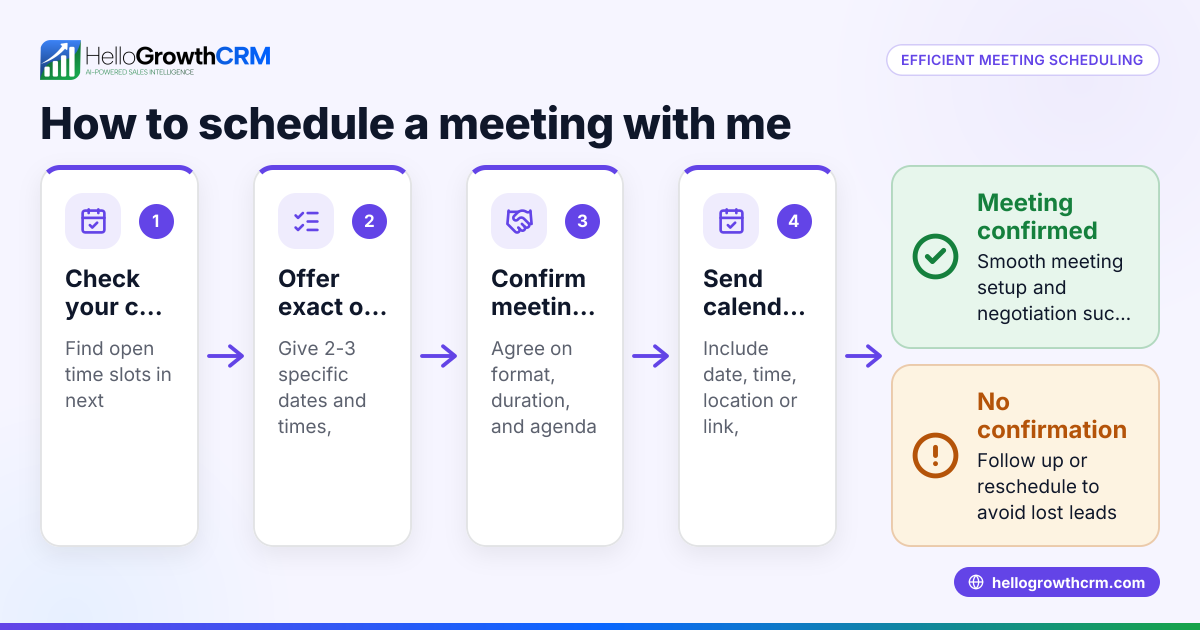
- Propose specific options: Based on their reply, suggest 2-3 specific slots. For example, “I’m free on Tuesday 14/03 at 10:00 or Thursday 16/03 at 14:30. Does either work for you?”
- Confirm the agreed slot: Once the prospect picks a time, repeat it back to them in writing to avoid confusion. Include the date, time, duration, and time zone.
- Send a calendar invite or booking link: Use a calendar invite (Outlook, Google Calendar) or send a scheduling link so the prospect can book directly. This reduces back-and-forth and automatically sets reminders.
- Prepare for the call: Add the call to your sales pipeline or task list with a follow-up reminder. Gather any documents or notes you’ll need.
- Follow up if needed: If the prospect doesn’t confirm or misses the call, send a polite follow-up message to reschedule.
- Keep records: Note the call details, outcomes and next steps in your CRM or sales tracker.
Using a meeting scheduler tool can automate steps 2 to 4, letting prospects pick slots from your available times without messaging back and forth.
Example (fictional figures)
A recruitment consultancy in Bristol wants to schedule a 30-minute sales call with a prospect. They ask:
“Hi Sarah, which day next week suits you for a 30-minute call to discuss your hiring needs?”
Sarah replies: “Tuesday or Wednesday morning works.”
The consultant proposes:
“Tuesday 21/03 at 09:30 or Wednesday 22/03 at 10:00. Does either work?”
Sarah picks Tuesday 21/03 at 09:30.
The consultant confirms:
“Great, I’ll call you on Tuesday 21/03 at 09:30 for 30 minutes.”
They send a calendar invite with:
Date: 21/03/2024 Time: 09:30 – 10:00 Duration: 30 minutes Time zone: GMT
The consultant adds the call to their sales pipeline as a deal with a follow-up date of 22/03/2024.
This clear process avoids confusion and ensures the call is planned properly.
Common mistakes
- Not confirming the agreed time in writing: Leads to no-shows or calls at wrong times. Always repeat the date and time clearly.
- Using vague language: Avoid “sometime next week” or “morning or afternoon” without specifics. Propose exact slots.
- Failing to send calendar invites or reminders: Without them, prospects may forget the call. Use calendar invites or scheduling tools.
- Overloading with back-and-forth messages: This wastes time and frustrates prospects. Use a booking link to let them choose.
- Not tracking calls and follow-ups: Without a system, calls get missed. Use a CRM or task board to keep organised.
- Ignoring time zones: When dealing with prospects outside your local time, confirm their time zone to avoid mistakes.
Use tools like a meeting scheduler to reduce back-and-forth and improve clarity.
Doing this in HelloGrowthCRM
HelloGrowthCRM offers a meeting scheduler that lets prospects pick a call slot from your available times, eliminating back-and-forth messaging on WhatsApp. You can track calls and quotations as deals in the pipeline, with follow-up dates so no opportunity is forgotten. For field sales teams, territories and visit logging help managers monitor daily activity. These features help small businesses organise sales calls efficiently and keep leads moving through the pipeline.
Frequently asked questions
How do I avoid no-shows when scheduling sales calls? Send a calendar invite with reminders and confirm the time in writing. Using a scheduling link that sets automatic reminders can also reduce no-shows.
What’s the best way to propose call times to prospects? Offer 2-3 specific date and time options rather than vague suggestions. This makes it easier for prospects to choose and speeds up scheduling.
Can I schedule calls without back-and-forth messages? Yes, using a meeting scheduler tool lets prospects pick available slots directly from a link, reducing messaging and errors.
How do I keep track of scheduled calls and follow-ups? Use a CRM or sales pipeline to log calls, set reminders and record outcomes. This prevents leads from slipping through the cracks.
Should I consider time zones when scheduling calls? Yes, always confirm the prospect’s time zone if they are outside your local area to avoid confusion.
Key takeaways
- Ask prospects for their availability and propose specific slots.
- Confirm agreed times clearly in writing with date, time and time zone.
- Send calendar invites or use a meeting scheduler to automate booking.
- Track calls and follow-ups in a CRM or sales pipeline.
- Avoid vague language and back-and-forth messaging.
- Confirm time zones for remote prospects.
Scheduling sales calls with prospects in the UK becomes straightforward when you follow these steps. To try scheduling with a tool designed for small businesses, start on the Free Forever plan (200 leads, no credit card) at HelloGrowthCRM.
Ready to put this into practice?
Set up your pipeline, WhatsApp follow-ups, and AI lead scoring in minutes — free, no credit card.
Try HelloGrowthCRM freeGet CRM tips in your inbox
Join thousands of sales professionals who get weekly insights on CRM strategy, AI automation, and pipeline optimization.

The HelloGrowthCRM team publishes guides on CRM strategy, AI sales tools, and revenue operations for small business sales teams.