HelloGrowthCRM software
Built for real small-business sales teams
HelloGrowthCRM helps reps qualify faster, follow up on time, and close more deals—with practical automation in one place.
- AI lead scoring and pipeline visibility
- Built-in dialer, WhatsApp, and email automation
- Sales forecasting and RevOps-ready reporting
To send a contact, start by opening your contacts list or CRM where the contact is saved. Select the contact you want to share, then use the share or send option to choose how you want to send it—via email, SMS, WhatsApp, or another messaging app. Confirm the recipient’s details and send the contact. This article explains why sending contacts is important, provides detailed steps, highlights common mistakes, and includes an example with USD figures for clarity.
Why this comes up / what goes wrong
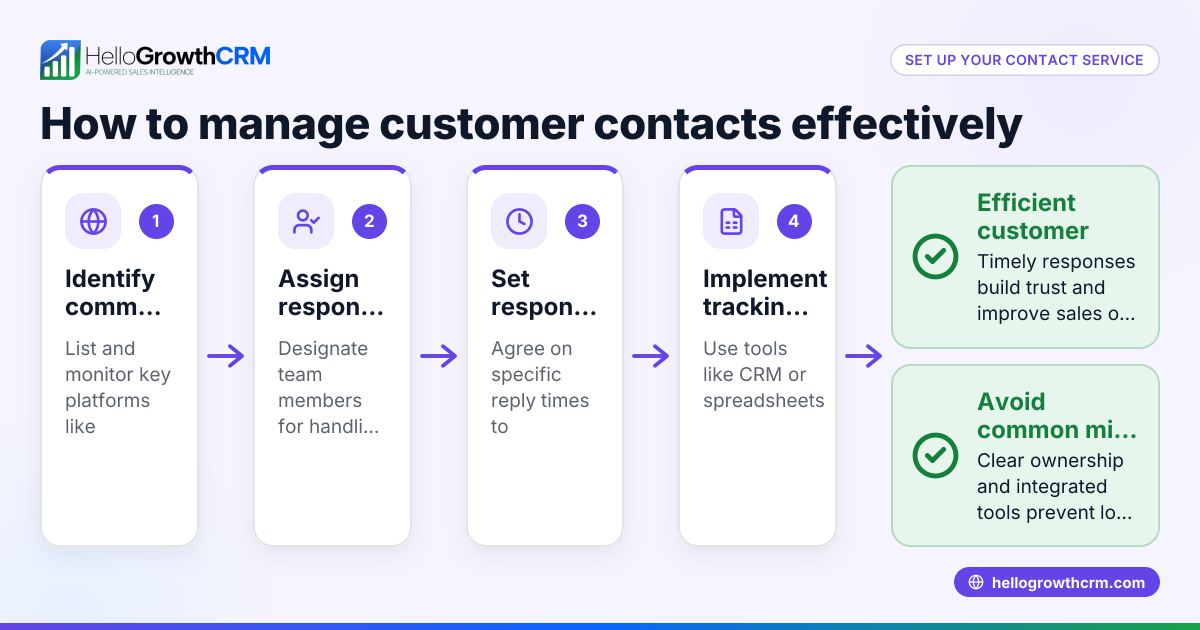
Small-business owners often need to send contact information to clients, vendors, or team members quickly and accurately. This can include sharing phone numbers, email addresses, or business details. Problems arise when contacts are sent incorrectly, incomplete, or in an inconvenient format, causing delays or lost leads. Many small teams rely on text messages, email, or spreadsheets to manage contacts, but these methods can lead to errors or slow follow-up. Knowing how to send a contact properly helps keep communication smooth and supports sales and customer service efforts.
Step-by-step
- Open your contacts list or CRM: Locate where your contacts are stored, such as your phone’s address book, email client, or CRM system like HelloGrowthCRM WhatsApp and SMS CRM.
- Find the contact to send: Search or scroll to the contact you want to share. Verify the contact’s details are complete and up to date.
- Select the contact: Tap or click on the contact to open their details.
- Choose the share or send option: Look for a button or menu labeled “Share,” “Send Contact,” or similar.
- Pick the sending method: Choose how to send the contact—via email, SMS, WhatsApp, or another supported app. Confirm the recipient’s contact info (phone number or email address).
- Add a message (optional): Include a brief note if needed to explain the contact or context.
- Send the contact: Confirm and send. Wait for confirmation if available.
- Follow up if needed: After sending, verify the recipient received the contact and can access it.
Example (fictional figures)
A two-location dental practice in Columbus, Ohio, wants to send the contact information of their new dental supplier to the office manager via WhatsApp on 06/15/2026.
- Open the contacts list on the phone.
- Search for “Bright Dental Supplies.”
- Select the contact to open details: phone number (614-555-1234), email (orders@brightdental.com).
- Tap “Share Contact.”
- Choose WhatsApp as the sending method.
- Enter the office manager’s WhatsApp number: 614-555-5678.
- Add a message: “Here is the new supplier contact for ordering dental materials.”
- Send the contact.
Additionally, the dental practice calculates the estimated monthly spend with this supplier to budget accordingly:
Estimated monthly supply cost = $8,000 Estimated delivery fee per month = $500 Total monthly cost = $8,000 + $500 = $8,500
This calculation helps the office manager understand the financial impact of the new supplier.
Common mistakes
- Sending incomplete contact details: Always check the contact has all necessary fields filled before sending.
- Choosing the wrong sending method: Confirm the recipient uses the app or channel you select, such as WhatsApp or SMS.
- Not verifying the recipient’s contact info: Double-check the phone number or email address to avoid sending to the wrong person.
- Forgetting to follow up: Confirm the recipient received and can open the contact.
- Relying on manual spreadsheets or text chains: These can cause errors; consider using a CRM with integrated communication tools like a built-in dialer built-in CRM dialer to streamline sending and tracking contacts.
Frequently asked questions
Can I send a contact via email and WhatsApp at the same time? Generally, you must send through one method at a time. Some CRMs or apps may allow forwarding to multiple channels, but standard contact sharing usually requires separate sends.
Is it safe to send contacts through WhatsApp? WhatsApp uses end-to-end encryption, making it a secure way to share contacts. However, always ensure you trust the recipient and avoid sharing sensitive private information unnecessarily.
How do I send a contact from a spreadsheet or CRM? If your CRM supports contact export or sharing, use its built-in features to send contacts directly. Otherwise, export the contact details to a vCard or CSV file and send the file via email or messaging.
What if the recipient cannot open the contact I sent? Confirm the format you sent is compatible with their device or app. You may need to resend in a different format or provide the details manually.
Can HelloGrowthCRM help with sending contacts? HelloGrowthCRM focuses on managing leads and communication through WhatsApp, SMS, and email with lead capture and AI lead scoring but does not have a specific contact sending feature. It does include a built-in CRM dialer built-in CRM dialer to call contacts directly.
Key takeaways
- Open your contacts or CRM and select the contact to send.
- Use the share option and pick the correct sending method.
- Verify recipient details before sending.
- Follow up to confirm receipt.
- Avoid manual errors by using integrated tools like HelloGrowthCRM’s communication features WhatsApp and SMS CRM.
Sending contacts correctly saves time and prevents lost leads or miscommunication.
Start sending contacts confidently today by trying HelloGrowthCRM’s free plan, which supports up to 200 leads without a credit card at Start on the Free Forever plan (200 leads, no credit card).
Ready to put this into practice?
Set up your pipeline, WhatsApp follow-ups, and AI lead scoring in minutes — free, no credit card.
Try HelloGrowthCRM freeGet CRM tips in your inbox
Join thousands of sales professionals who get weekly insights on CRM strategy, AI automation, and pipeline optimization.

The HelloGrowthCRM team publishes guides on CRM strategy, AI sales tools, and revenue operations for small business sales teams.