HelloGrowthCRM software
Built for real small-business sales teams
HelloGrowthCRM helps reps qualify faster, follow up on time, and close more deals—with practical automation in one place.
- AI lead scoring and pipeline visibility
- Built-in dialer, WhatsApp, and email automation
- Sales forecasting and RevOps-ready reporting
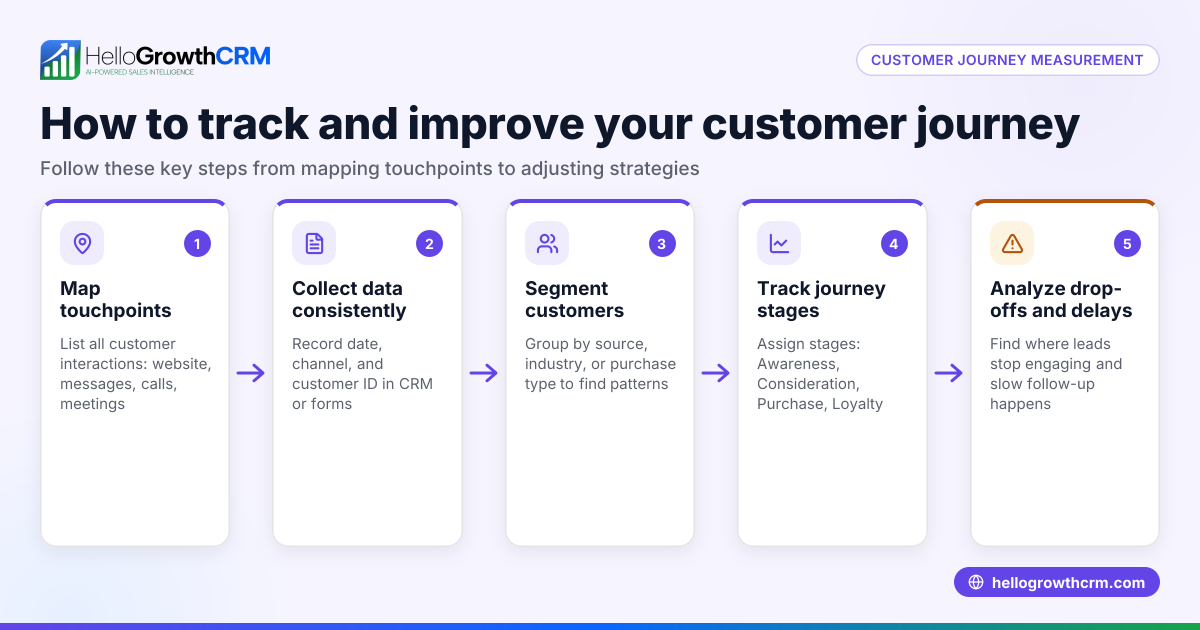
Tracking customer interaction history means keeping a detailed record of every conversation, message, and service event your business has with each customer. This helps you understand customer needs, improve follow-up, and avoid lost leads. Many small businesses in the USA struggle with scattered data across email, text, and spreadsheets. This guide explains why tracking is essential, how to do it step-by-step, a practical example with calculations, common pitfalls, and how HelloGrowthCRM can assist.
Why this comes up / what goes wrong
Small business owners in the USA often lose track of customer interactions because they use multiple communication channels like WhatsApp, SMS, emails, and phone calls without a unified system. Sales teams may rely on spreadsheets or personal notes, causing delays in follow-up or missed opportunities. Without a clear history, it’s hard to personalize service or forecast sales accurately. Tracking interaction history solves these problems by centralizing all customer contacts and service events in one place, making data accessible to the whole team.
Step-by-step
- Choose a tracking method: Decide whether to use manual tools like spreadsheets or a CRM system. Manual methods require more upkeep and risk errors, while CRMs automate data capture and centralize information.
- Create a customer record: For each customer, create a profile including contact info, purchase history, and communication preferences. Check that all relevant details are accurate and complete.
- Log every interaction: Record each phone call, email, WhatsApp or SMS message, and in-person meeting. Include the date, time, summary, and outcome. Confirm that no interactions are missed.
- Include service requests and tickets: After the sale, track support tickets or service requests linked to the customer record. This ensures a full interaction history is visible.
- Review and update regularly: Assign a team member to verify records weekly, updating interaction notes and next steps.
- Use tags or categories: Label interactions by type (e.g., inquiry, complaint, follow-up) to filter and analyze later.
- Set reminders for follow-up: Use task boards or calendar alerts to ensure timely customer contact.
- Analyze interaction history: Periodically review the data to identify patterns, customer health, and sales opportunities. See customer health score for more details.
Example (fictional figures)
A residential real-estate team in Phoenix, Arizona, wants to track interactions with a buyer named Sarah Johnson.
- 02/01/2024: Initial phone call to Sarah to discuss home preferences.
- 02/05/2024: Email sent with property listings.
- 02/10/2024: WhatsApp message to confirm viewing appointment.
- 02/15/2024: In-person meeting and offer submission.
- 02/20/2024: Support ticket opened for mortgage assistance.
Each interaction is logged in Sarah’s customer record with date and notes:
Number of interactions = 5 Cost per interaction logged = $0 (manual logging or included in CRM cost) Total cost = 5 × $0 = $0
The team reviews Sarah’s record weekly to ensure no follow-up is missed. By keeping all data in one place, they improve communication and close deals faster.
Common mistakes
- Scattered data: Using multiple unlinked tools causes lost information. Prevent this by centralizing records in one system.
- Incomplete logging: Forgetting to note details or dates. Prevent by standardizing entry fields and training staff.
- No follow-up reminders: Leads go cold without alerts. Use task boards or calendar alerts to stay on top.
- Ignoring service requests: After-sale issues tracked separately lose context. Link tickets to customer records.
- No regular review: Data becomes outdated. Schedule weekly checks.
- Failing to categorize interactions: Makes analysis hard. Use tags or labels to organize.
See how WhatsApp and SMS CRM can automate message logging and reduce manual entry.
Doing this in HelloGrowthCRM
HelloGrowthCRM lets you keep service requests, support tickets, and knowledge base articles all linked to the same customer record as the deal. Its branded self-service customer portal and referral tracking help maintain a full interaction history after the sale. This unified view helps your team follow up faster and deliver better service. Learn more about HelloGrowthCRM for the United States.
Frequently asked questions
How do I start tracking customer interactions without software? Start by creating a spreadsheet with columns for customer name, contact info, date, interaction type, and notes. Update it immediately after each contact and review weekly to avoid missing details.
What is the best way to track WhatsApp and SMS conversations? Manually copying messages can be slow and error-prone. Using a CRM with WhatsApp and SMS integration, like HelloGrowthCRM, automatically logs these interactions under the customer record, saving time and reducing errors.
How often should I update customer interaction history? Update immediately after each interaction to avoid forgetting details. Also, review the history weekly to plan next steps and ensure no leads slip through.
Can I track service requests and sales in one place? Yes, tracking both on the same customer record gives a complete view of the relationship and helps resolve issues faster by keeping all information accessible.
How does tracking interaction history improve sales? It helps personalize communication, ensures timely follow-up, and identifies upsell opportunities by understanding customer needs over time. This leads to higher customer satisfaction and increased revenue.
Key takeaways
- Centralize all customer interactions in one record to avoid lost information.
- Log every contact with date, type, and notes for accurate history.
- Include after-sale service requests linked to the customer record.
- Use reminders and regular reviews to maintain up-to-date data.
- Categorize interactions with tags for easier filtering and analysis.
- Automate message logging with tools like HelloGrowthCRM to save time.
Start tracking your customer interactions today to never miss a lead or follow-up again. Start on the Free Forever plan (200 leads, no credit card) with HelloGrowthCRM.
Ready to put this into practice?
Set up your pipeline, WhatsApp follow-ups, and AI lead scoring in minutes — free, no credit card.
Try HelloGrowthCRM freeGet CRM tips in your inbox
Join thousands of sales professionals who get weekly insights on CRM strategy, AI automation, and pipeline optimization.

The HelloGrowthCRM team publishes guides on CRM strategy, AI sales tools, and revenue operations for small business sales teams.