HelloGrowthCRM software
Built for real small-business sales teams
HelloGrowthCRM helps reps qualify faster, follow up on time, and close more deals—with practical automation in one place.
- AI lead scoring and pipeline visibility
- Built-in dialer, WhatsApp, and email automation
- Sales forecasting and RevOps-ready reporting
Tracking who visits your website helps small-business owners understand their audience, identify potential leads, and improve marketing efforts. Using web analytics tools, you can collect data on visitor behavior, location, and referral sources. This article covers why tracking visitors is important, detailed step-by-step instructions to set it up, a worked example with US dollar figures, common mistakes to avoid, and answers to frequently asked questions.
Why this comes up / what goes wrong
Small-business owners often want to know who visits their website to improve sales and marketing but find it difficult to do so without technical knowledge. Without tracking, they miss valuable insights like which marketing channels bring visitors, how visitors move through the site, and which visitors are interested in their products or services. This can lead to slow follow-up on leads and lost sales. Owners may also be overwhelmed by the variety of tools and unsure how to install or interpret tracking data.
Step-by-step
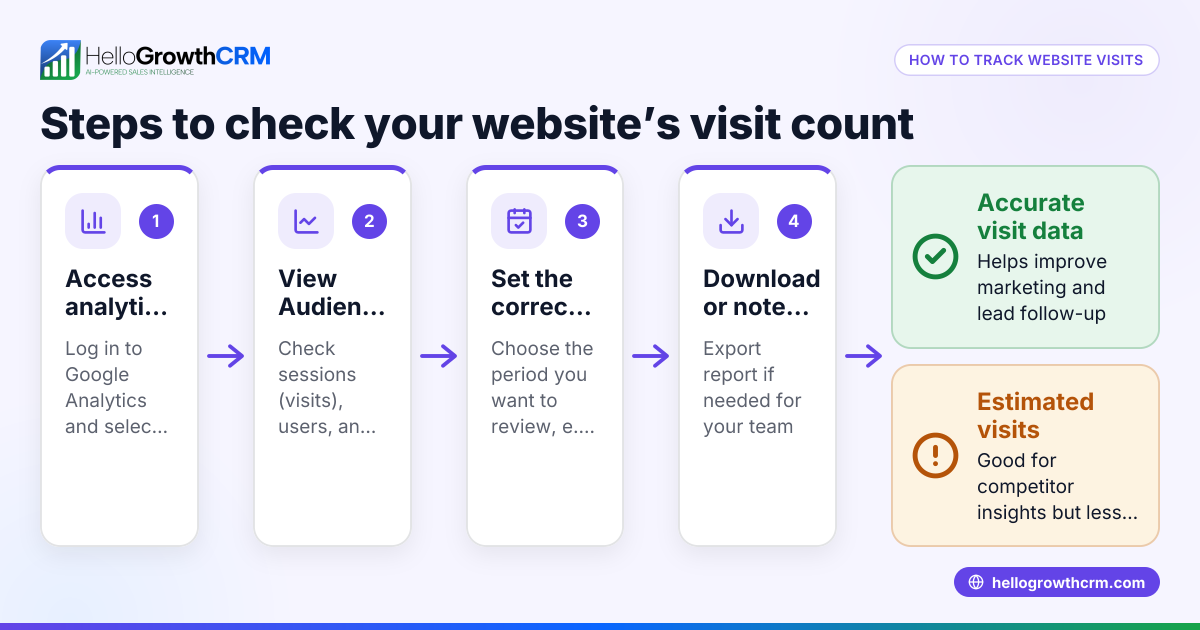
- Choose a tracking tool: Sign up for a free tool like Google Analytics at analytics.google.com and create an account for your website.
- Install the tracking code: After account setup, Google Analytics provides a JavaScript tracking code. Insert this code into every page of your website just before the closing
</head>tag. If you use a website builder like WordPress or Wix, use their plugin or settings to add the code. - Set up goals and events: In Google Analytics, go to Admin > Goals and create goals to track key actions such as form submissions or phone clicks.
- Enable location tracking: Confirm that location reporting is enabled under Admin > Data Settings to get visitor location data based on IP addresses.
- Link Google Analytics with Google Search Console: This shows which search terms bring visitors. Set this up in Admin > Property Settings > Adjust Search Console.
- Use UTM parameters on URLs: Add tags like
?utm_source=facebook&utm_medium=cpcto your marketing URLs to identify which campaigns drive traffic. - Review reports regularly: Check Audience Overview, Acquisition, Behavior, and Conversion reports in Google Analytics to see who visits and what they do.
- Consider visitor identification software: For more detailed lead tracking, use tools that match IP addresses to companies or provide visitor contact info; these often require paid plans.
- Integrate with your CRM: Connect your website lead data to your CRM system for fast follow-up. See options like HelloGrowthCRM for the United States and its WhatsApp and SMS CRM and built-in CRM dialer features.
Example (fictional figures)
Austin Plumbing Co., a small plumbing business in Austin, Texas, wants to track website visitors to increase leads.
- On 04/01/2026, they sign up for Google Analytics.
- They install the tracking code on their WordPress site.
- They set a goal for "Contact Form Submission."
- They run a Facebook ad campaign with URLs tagged as
?utm_source=facebook&utm_medium=cpc. - After one month, their report shows 5,000 visitors and 200 contact form submissions.
- They calculate the conversion rate:
200 ÷ 5,000 = 0.04 or 4%
- They note 3,000 visitors came from Facebook ads (based on their campaign data).
This helps Austin Plumbing Co. measure marketing effectiveness and prioritize follow-up with leads.
Common mistakes
- Not installing the tracking code on every page: Leads to gaps in data. Always check page source to confirm the code is present.
- Skipping goal setup: Without goals, you cannot measure conversions. Define key actions like form fills or phone calls.
- Ignoring privacy compliance: Inform visitors about cookies and tracking to comply with laws.
- Failing to review data regularly: Data is useless if ignored. Schedule weekly or campaign-based reviews.
- Relying only on basic analytics: Use visitor identification tools or CRM integration to identify leads and automate follow-up. Explore HelloGrowthCRM for the United States for CRM options.
- Mixing traffic sources without UTM parameters: Use consistent UTM tagging to avoid confusion.
Frequently asked questions
Can I see exactly who visits my website? You cannot see personal details like names unless visitors fill out forms or identify themselves. Tracking tools provide anonymized data such as IP addresses, locations, and behavior. For lead identification, use specialized software or CRM integrations.
Is Google Analytics free and easy to use? Yes, Google Analytics is free and widely used. (support.google.com) It offers detailed visitor data but requires setup and some learning. Many website builders provide simple ways to add it.
How often should I check my website visitor data? Check at least weekly to monitor trends and adjust marketing. Daily checks are helpful during active campaigns.
Can tracking slow down my website? Properly installed tracking code has minimal impact on site speed. Avoid adding multiple heavy scripts.
How do I comply with privacy laws when tracking visitors? Display a cookie consent banner and privacy policy explaining data use. Obtain visitor consent where required.
Key takeaways
- Use tools like Google Analytics to track website visitors.
- Install tracking code on every page and set goals to measure conversions.
- Use UTM parameters to identify marketing sources clearly.
- Review visitor data regularly and avoid common setup mistakes.
- Integrate visitor data with a CRM for better lead follow-up.
- Inform visitors about tracking and comply with privacy laws.
Start tracking your website visitors today to better understand your audience and improve sales. For managing leads and follow-up, consider HelloGrowthCRM for the United States.
Start on the Free Forever plan (200 leads, no credit card) at HelloGrowthCRM.
Ready to put this into practice?
Set up your pipeline, WhatsApp follow-ups, and AI lead scoring in minutes — free, no credit card.
Try HelloGrowthCRM freeGet CRM tips in your inbox
Join thousands of sales professionals who get weekly insights on CRM strategy, AI automation, and pipeline optimization.

The HelloGrowthCRM team publishes guides on CRM strategy, AI sales tools, and revenue operations for small business sales teams.