HelloGrowthCRM software
Built for real small-business sales teams
HelloGrowthCRM helps reps qualify faster, follow up on time, and close more deals—with practical automation in one place.
- AI lead scoring and pipeline visibility
- Built-in dialer, WhatsApp, and email automation
- Sales forecasting and RevOps-ready reporting
Using WhatsApp Business for sales in Singapore can help small businesses engage leads quickly and keep track of conversations. Many business owners rely on WhatsApp because their customers prefer messaging over calls or emails. However, without a clear process, leads can be lost or forgotten. This guide explains why WhatsApp Business is popular for sales, then gives detailed steps to use it effectively, a realistic example, common mistakes, and how HelloGrowthCRM supports WhatsApp sales workflows.
Why this comes up / what goes wrong
Small business owners in Singapore often start sales conversations on WhatsApp because it is fast and familiar. But they face challenges like:
- Losing track of leads when chats mix with personal messages.
- Forgetting to follow up because WhatsApp lacks reminders.
- Manually managing contacts and sales stages with no pipeline view.
- Running sales on multiple channels (email, WhatsApp, spreadsheets) without centralisation.
These issues cause slow follow-up and lost sales. Owners want a step-by-step way to use WhatsApp Business for sales that fits their Singapore business context.
Step-by-step
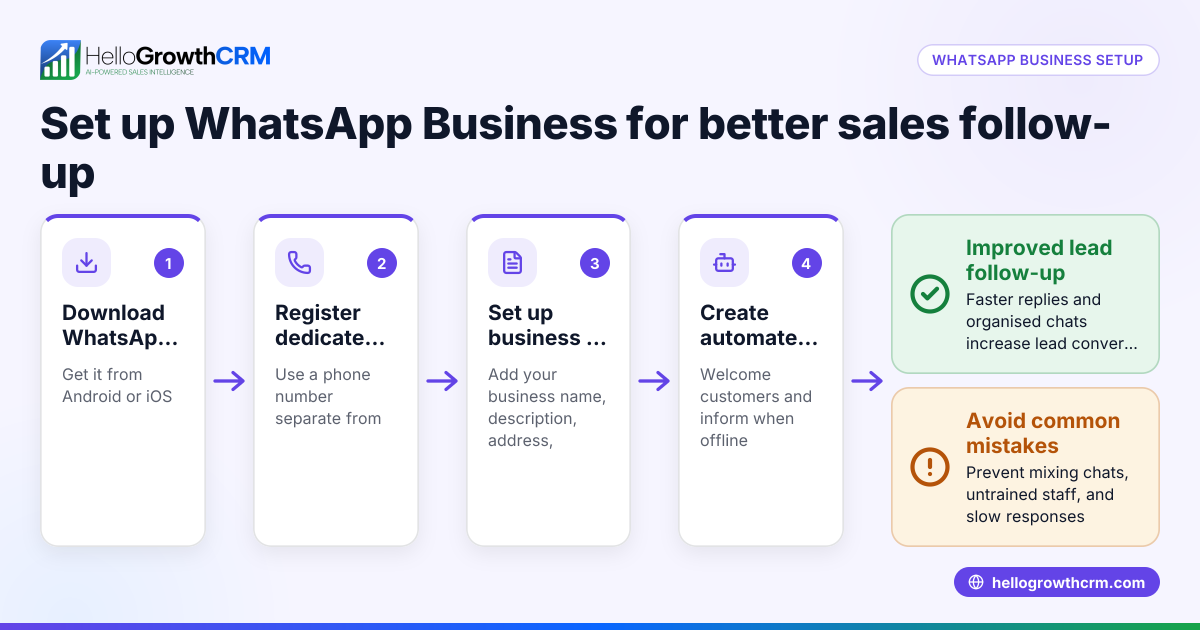
- Download and install WhatsApp Business app from the Google Play Store or Apple App Store.
- Check your phone number is dedicated to your business.
- Create your business profile:
- Add your business name, description, address, email, and website.
- Upload a clear business logo.
- Organise contacts using labels:
- Create labels such as "New Lead", "Interested", "Quotation Sent", "Customer".
- Assign these labels to contacts to track their sales stage.
- Use quick replies to save time:
- Set up common responses for FAQs or initial greetings.
- Access quick replies by typing '/' in chat.
- Respond promptly:
- Set business hours and automated greeting messages.
- Reply within 24 hours to avoid losing interest.
- Manually track sales stages:
- Note in a spreadsheet or notebook when you sent quotations or follow-ups.
- Schedule reminders on your calendar for follow-ups.
- Capture leads from your website or social media:
- Share your WhatsApp Business number or QR code.
- Use WhatsApp links (wa.me/your-number) for easy contact.
- Backup your chat history regularly:
- Use Google Drive or iCloud backups to avoid losing data.
- Consider integrating with a CRM:
- To log WhatsApp conversations automatically and track deals.
- Review and update your sales process weekly:
- Check which leads need follow-up.
- Move contacts between labels as they progress.
For more detailed workflows and integrations, see WhatsApp and SMS CRM.
Example (fictional figures)
A property agency in Novena uses WhatsApp Business to follow up on leads.
- On 01/05/2024, they receive a lead inquiry.
- They label the contact "New Lead".
- On 02/05/2024, they send a quotation for a property priced at S$1,200,000.
- They update the label to "Quotation Sent" and set a calendar reminder to follow up on 09/05/2024.
- On 09/05/2024, they send a follow-up message.
Calculations for commission if the sale closes:
Property price = S$1,200,000 Commission rate (assumed) = 2% Commission = S$1,200,000 × 2% = S$24,000
The agency tracks this deal manually but could use a CRM pipeline to automate reminders.
Common mistakes
- Mixing personal and business chats: Use a separate WhatsApp Business number to avoid confusion.
- Not labelling contacts: Without labels, you lose visibility of sales stages. Always assign labels.
- Ignoring follow-up reminders: Set calendar alerts or use a CRM to stay on top of leads.
- Sending generic messages: Personalise replies using quick replies and customer names.
- Not backing up chats: Regularly back up to avoid losing important sales conversations.
- Running sales across too many channels: Centralise communication to avoid losing leads; see HelloGrowthCRM for Singapore for solutions.
Doing this in HelloGrowthCRM
HelloGrowthCRM helps Singapore businesses manage WhatsApp sales by logging WhatsApp conversations on each lead record. Follow-ups can be sent as WhatsApp messages directly from the CRM. Deals appear in a pipeline with stages like "Quotation Sent" and follow-up dates to prevent forgotten leads. For founders without a sales manager, Managed RevOps support ensures someone works the follow-up queue weekly. Learn more about these features at WhatsApp and SMS CRM.
Frequently asked questions
Can I use WhatsApp Business on multiple devices? WhatsApp Business primarily supports one phone per account but offers a multi-device feature allowing up to 4 linked devices. However, the main phone must stay connected to the internet.
Is WhatsApp Business free to use for sales? Yes, the WhatsApp Business app is free to download and use. Some advanced API features require approval and may involve costs, but basic sales messaging and profiles are free.
How do I avoid losing leads on WhatsApp? Use labels to organise contacts, set reminders for follow-ups, and consider integrating with a CRM like HelloGrowthCRM to log conversations and track deals.
Can I send bulk sales messages on WhatsApp Business? WhatsApp restricts bulk messaging to avoid spam. Use broadcast lists carefully and only send messages to contacts who have consented.
How do I handle sales if I don’t have a dedicated sales team? Consider Managed RevOps services where a specialist helps manage follow-ups and pipeline hygiene weekly, ensuring no lead is forgotten.
Key takeaways
- Set up a dedicated WhatsApp Business profile with clear business info.
- Use labels to organise leads by sales stage.
- Respond quickly using quick replies and automated greetings.
- Track sales stages manually or with a CRM pipeline.
- Back up chats regularly to avoid data loss.
- Avoid mixing personal and business chats to keep sales organised.
Start managing your WhatsApp sales today with a clear process. To simplify follow-ups, deal tracking, and logging conversations, consider HelloGrowthCRM. You can start on the Free Forever plan (200 leads, no credit card) to see how it helps Singapore small businesses.
Ready to put this into practice?
Set up your pipeline, WhatsApp follow-ups, and AI lead scoring in minutes — free, no credit card.
Try HelloGrowthCRM freeGet CRM tips in your inbox
Join thousands of sales professionals who get weekly insights on CRM strategy, AI automation, and pipeline optimization.

The HelloGrowthCRM team publishes guides on CRM strategy, AI sales tools, and revenue operations for small business sales teams.