HelloGrowthCRM software
Built for real small-business sales teams
HelloGrowthCRM helps reps qualify faster, follow up on time, and close more deals—with practical automation in one place.
- AI lead scoring and pipeline visibility
- Built-in dialer, WhatsApp, and email automation
- Sales forecasting and RevOps-ready reporting
An online video conference API allows your business to add video meeting capabilities directly into your own software or website. This means you can host video calls without relying on external apps, improving customer experience and internal communication. Small businesses often look for these APIs to maintain control over branding, user experience, and data.
Why this comes up / what goes wrong
Small businesses frequently need video conferencing for sales demos, customer support, or team meetings. Off-the-shelf video apps may not fit well with their existing workflows or branding. They want an online video conference API to embed video calls into their own platforms or CRM systems. However, choosing the wrong API can lead to integration headaches, poor call quality, unexpected costs, or limited features. Without clear evaluation steps, small business owners risk delays and wasted budget.
Step-by-step
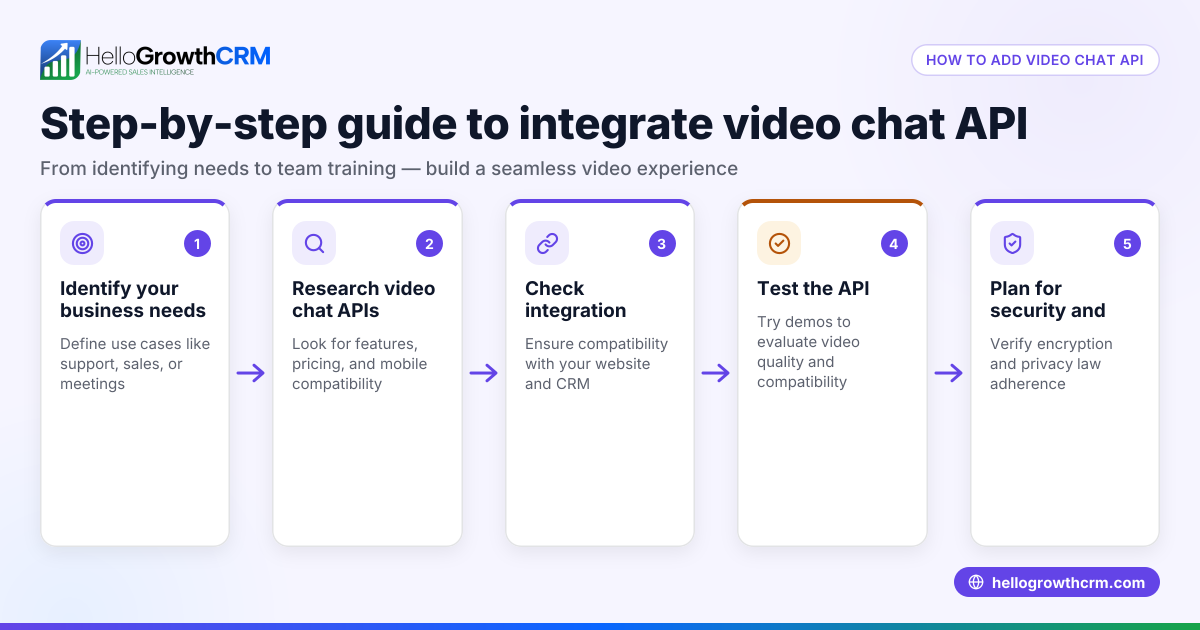
- Define your video conferencing needs. Decide if you need one-to-one calls, group meetings, screen sharing, recording, or chat features. Also consider required call quality and expected user volume.
- Check API compatibility. Verify that the API supports your existing tech stack and platforms (web, iOS, Android). Confirm it has SDKs or documentation for easy integration.
- Evaluate pricing models. Look for transparent pricing based on usage, such as minutes or participants. Watch out for hidden fees like recording storage or advanced features.
- Test call quality and reliability. Use trial accounts to check video and audio quality under real conditions. Confirm uptime guarantees or SLAs.
- Assess security and compliance. Ensure the API supports encryption, access controls, and meets any industry regulations relevant to your business.
- Review support and documentation. Good developer support and clear docs speed up integration and troubleshooting.
- Plan for scalability. Choose an API that can grow with your business, handling more users or features as needed.
- Consider integration with your CRM and workflows. APIs that connect with your CRM or sales tools improve efficiency. For example, HelloGrowthCRM offers API and integrations that bring leads from web forms and other connected lead sources directly into the CRM, streamlining follow-up HelloGrowthCRM for the United States.
Example (fictional figures)
A plumbing company in Austin, Texas wants to add video consultations to their booking website by 07/15/2026. They expect 100 calls a month, mostly one-to-one, with occasional screen sharing.
- API charges $0.003 per minute per participant.
- Average call length: 20 minutes.
- Two participants per call (plumber and customer).
Monthly cost calculation:
100 calls × 20 minutes = 2,000 total minutes
2,000 minutes × 2 participants = 4,000 participant-minutes
4,000 participant-minutes × $0.003 = $12 monthly cost
They budget $15/month to cover minor overages.
They test the API for call quality and confirm it supports web and mobile apps. Integration with their CRM is possible via API, allowing automatic lead capture and follow-up tasks.
Common mistakes
- Ignoring integration needs. Choose an API without checking if it fits your CRM or sales tools. Prevent this by confirming API compatibility early and exploring HelloGrowthCRM’s integrations HelloGrowthCRM for the United States.
- Overlooking hidden costs. Some APIs charge extra for recording or advanced features. Always read pricing details carefully.
- Skipping trial testing. Not testing call quality and reliability leads to surprises. Use free trials to evaluate performance.
- Neglecting security. Failing to verify encryption and compliance risks data breaches. Confirm security features before committing.
- Choosing limited scalability. An API that can't grow with your business causes future migration headaches. Pick scalable solutions.
- Poor documentation and support. Lack of developer resources slows integration. Prioritize APIs with good support.
Doing this in HelloGrowthCRM
HelloGrowthCRM supports API and integrations that bring leads from web forms and other connected lead sources directly into the CRM as leads. This connectivity helps sync data and trigger workflows, fitting the CRM into your existing tech stack. Learn more about available integrations See HelloGrowthCRM integrations.
Frequently asked questions
What is an online video conference API? It is a set of programming tools that lets you add video meeting capabilities to your own app or website, enabling customized video calls without relying on external platforms.
How do I know if an API is right for my business? Evaluate your needs, test call quality, check pricing transparency, ensure security compliance, and confirm it integrates with your existing tools like your CRM.
Can I integrate video calls with my sales CRM? Yes, many video conference APIs offer integration options, allowing you to manage leads and follow-ups efficiently. HelloGrowthCRM provides API and integrations that help capture leads from web forms and other connected lead sources directly into the CRM HelloGrowthCRM for the United States.
Are there free online video conference APIs? Some providers offer free tiers with limited features or usage. These can be good for testing but may not scale well for business needs.
What security features should I look for? Look for end-to-end encryption, access controls, compliance certifications, and data privacy policies that meet your industry standards.
Key takeaways
- Define your video conferencing needs clearly before choosing an API.
- Test call quality, pricing, and integration capabilities thoroughly.
- Avoid hidden costs by reviewing pricing details carefully.
- Ensure the API supports security and compliance requirements.
- Choose scalable APIs that grow with your business.
- Check integration options with your CRM and sales tools, such as HelloGrowthCRM’s API and integrations.
Start on the Free Forever plan (200 leads, no credit card) at HelloGrowthCRM to manage your leads and sales workflows efficiently.
Ready to put this into practice?
Set up your pipeline, WhatsApp follow-ups, and AI lead scoring in minutes — free, no credit card.
Try HelloGrowthCRM freeGet CRM tips in your inbox
Join thousands of sales professionals who get weekly insights on CRM strategy, AI automation, and pipeline optimization.

The HelloGrowthCRM team publishes guides on CRM strategy, AI sales tools, and revenue operations for small business sales teams.