HelloGrowthCRM software
Built for real small-business sales teams
HelloGrowthCRM helps reps qualify faster, follow up on time, and close more deals—with practical automation in one place.
- AI lead scoring and pipeline visibility
- Built-in dialer, WhatsApp, and email automation
- Sales forecasting and RevOps-ready reporting
Video in email marketing means including a video element—either embedded directly or linked—in your emails to catch attention, explain your offerings, and encourage action. Small businesses use it to increase open rates, click-throughs, and conversions by making emails more engaging and personal. This article covers why video is important, how to add it properly, an example with numbers, common pitfalls, and how HelloGrowthCRM’s tools can help manage your email campaigns.
Why this comes up / what goes wrong
Small business owners often struggle with email marketing because plain text or static images fail to grab attention or explain their products clearly. They wonder if adding video can help but don’t know where to start or if it’s too complex or expensive. Common problems include low email engagement, leads lost due to slow follow-up, and managing sales communication across email, text, and phone without a unified system.
Video in emails can solve these by making messages more dynamic and easier to understand, but technical challenges and best practices are not obvious. Without guidance, businesses risk sending emails that don’t display videos correctly or slow down loading, leading to unsubscribes or ignored messages.
Step-by-step
- Choose the right video content. Pick videos that explain your product, share testimonials, or demonstrate services clearly and briefly (1-2 minutes max). Check that the video is professionally made or at least clear and well-lit.
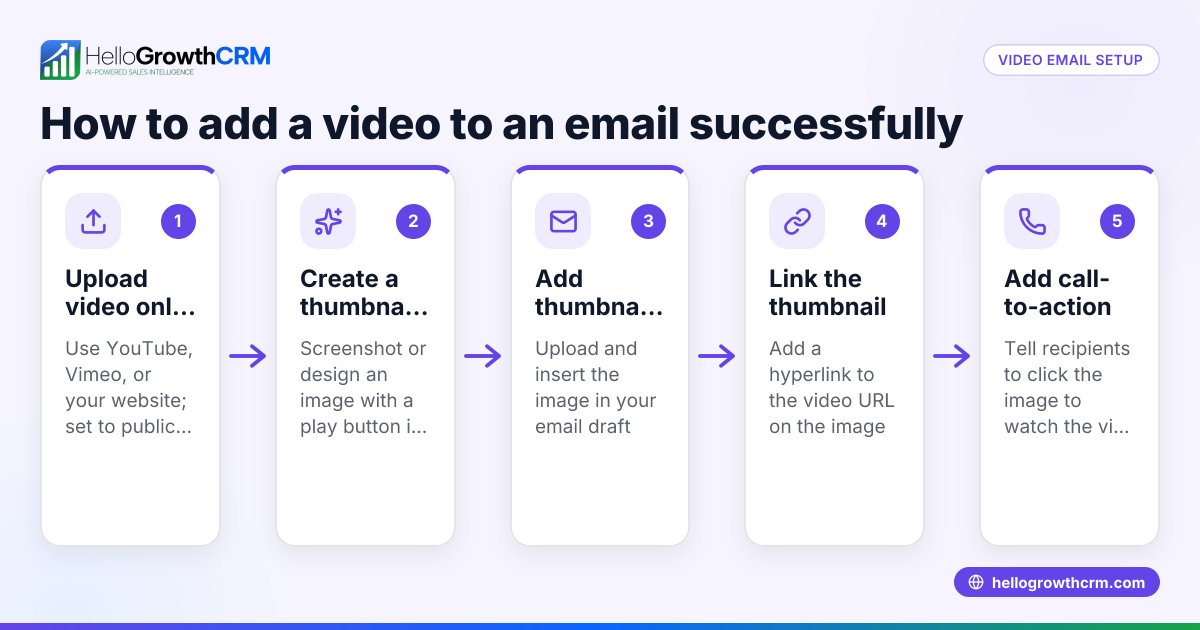
- Host your video externally. Upload your video to a reliable platform like YouTube or Vimeo. Avoid attaching video files directly to emails, which can cause large file sizes and delivery failures.
- Create a video thumbnail image. Take a screenshot or design a thumbnail with a play button overlay. This image will be inserted into the email as a clickable link.
- Insert the thumbnail image into your email. Use your email marketing tool to embed the thumbnail image where you want the video link to appear.
- Link the thumbnail to the hosted video. Set the thumbnail image to link to the video URL so when recipients click it, the video opens in a new browser tab.
- Add a clear call-to-action (CTA). Below the thumbnail, include text like "Watch our demo video" or "See how it works" to encourage clicks.
- Test your email. Send test emails to yourself and colleagues using different email clients (Gmail, Outlook, mobile) to ensure the thumbnail displays correctly and links work.
- Send and monitor. Use your CRM or email tool to send the campaign and track open rates, click-throughs, and replies.
- Follow up with sequences. Set up automated follow-up emails to engage those who clicked or didn’t respond, adjusting messaging based on behavior. For more on automation, see email automation and sequences.
Example (fictional figures)
A plumbing company in Austin, Texas, wants to boost leads by adding video to their email marketing. They create a 90-second video showing a common plumbing repair and upload it to Vimeo.
- Video production cost: $1,200
- Email marketing tool fee: $50/month (part of overall marketing budget)
- Usual email open rate: 20%
- Usual click-through rate (CTR): 5%
They send the campaign to 5,000 contacts.
- Expected opens = 5,000 × 20% = 1,000
- Expected clicks before video = 1,000 × 5% = 50
After adding the video thumbnail linked to their video, they monitor engagement. Video thumbnails often encourage more clicks, though results vary.
If clicks increase to 75:
- New clicks = 75
- Additional clicks = 75 - 50 = 25
Cost per additional click:
- $1,200 ÷ 25 = $48
If some of these additional clicks convert to service jobs, the company gains extra revenue. Conversion rates vary by case.
This example shows video can increase engagement and sales when done right.
Common mistakes
- Attaching video files directly to emails. Prevent by always hosting videos externally and linking via thumbnails.
- Using long videos. Prevent by keeping videos concise to help maintain viewer interest.
- No clear call-to-action. Prevent by adding explicit instructions like "Click to watch" near the video thumbnail.
- Neglecting testing. Prevent by sending test emails across devices and email clients before launch.
- Ignoring follow-up. Prevent by using automated sequences to engage recipients after video views (email automation and sequences).
- Not tracking results. Prevent by monitoring open and click rates to optimize future campaigns.
Doing this in HelloGrowthCRM
HelloGrowthCRM supports your video email marketing with these features:
- HelloMail shared inbox: Replies to your video emails are visible to the whole team on the deal, so everyone stays updated without switching apps.
- Built-in dialer: A rep can work a list from inside the CRM and log call outcomes on the lead, helping follow up on engaged prospects.
- Sequences and campaigns: Automate a five-step follow-up over two weeks that stops when a prospect replies, ensuring timely engagement without manual effort. Learn more at email automation and sequences and WhatsApp and SMS CRM.
Frequently asked questions
Can I embed a video to play directly inside an email? Most email clients don’t support playing videos inside the email itself. Instead, use a clickable thumbnail image linked to a hosted video. This ensures compatibility and better deliverability.
What video content works best in email marketing? Short, clear videos that explain your product, show customer testimonials, or demonstrate services work best. Keep videos under 2 minutes to hold attention.
How do I measure success when using video in emails? Track open rates, click-through rates on the video thumbnail, and follow-up conversions. Use your CRM or email tool’s reporting features to analyze these metrics.
Is video email marketing expensive for small businesses? Costs vary depending on production quality, but even simple videos made with smartphones can be effective. The ROI often justifies the investment if videos increase engagement and sales.
How can I follow up with leads who watch my video? Use automated sequences that send follow-up messages or calls based on recipient actions. HelloGrowthCRM supports this with sequences and a built-in dialer to log calls directly on leads.
Key takeaways
- Video in email marketing increases engagement by making messages more dynamic and clear.
- Always link video thumbnails to externally hosted videos, not attach video files.
- Keep videos short and add clear calls-to-action to encourage clicks.
- Test emails across clients and devices before sending.
- Use automated follow-ups to engage leads who interact with your video.
- HelloGrowthCRM offers tools like HelloMail shared inbox, built-in dialer, and sequences to manage video email campaigns effectively.
Start using video in your email marketing to boost leads and sales today. To begin, try HelloGrowthCRM’s Free Forever plan with 200 leads and no credit card required at Start on the Free Forever plan (200 leads, no credit card).
Ready to put this into practice?
Set up your pipeline, WhatsApp follow-ups, and AI lead scoring in minutes — free, no credit card.
Try HelloGrowthCRM freeGet CRM tips in your inbox
Join thousands of sales professionals who get weekly insights on CRM strategy, AI automation, and pipeline optimization.

The HelloGrowthCRM team publishes guides on CRM strategy, AI sales tools, and revenue operations for small business sales teams.