HelloGrowthCRM software
Built for real small-business sales teams
HelloGrowthCRM helps reps qualify faster, follow up on time, and close more deals—with practical automation in one place.
- AI lead scoring and pipeline visibility
- Built-in dialer, WhatsApp, and email automation
- Sales forecasting and RevOps-ready reporting
An order not received email template is essential for small business owners who need to inform a seller or supplier that their order has not arrived by the promised date. This email should be clear, polite, and include all relevant details such as the order number, purchase date, and expected delivery date. Using such a template helps avoid confusion and speeds up resolution. This article covers why you might need this email, how to write and send it step-by-step, a realistic example with US figures, common pitfalls to avoid, and how HelloGrowthCRM can support your follow-ups.
Why this comes up / what goes wrong
Small business owners often face issues like delayed or missing shipments due to shipping errors, inventory problems, or communication breakdowns. When an order does not arrive as expected, sending a professional email promptly lets the supplier know and helps you get a status update quickly. Without clear communication, orders can be lost or forgotten, causing longer delays that disrupt your business operations and customer satisfaction.
Step-by-step
- Gather your order details: Locate your order number, purchase date, and expected delivery date. Check your purchase confirmation and any tracking information.
- Verify delivery status: Check with your shipping provider or use tracking tools to see if the order is in transit or delayed.
- Write the email using the template below: Include all key details, state clearly that the order has not been received, and politely ask for an update or next steps.
- Use a clear subject line: For example, “Order Not Received – Order #12345” so the recipient can identify your issue immediately.
- Send to the correct contact: Use the supplier’s customer service or sales email address to ensure your message reaches the right team.
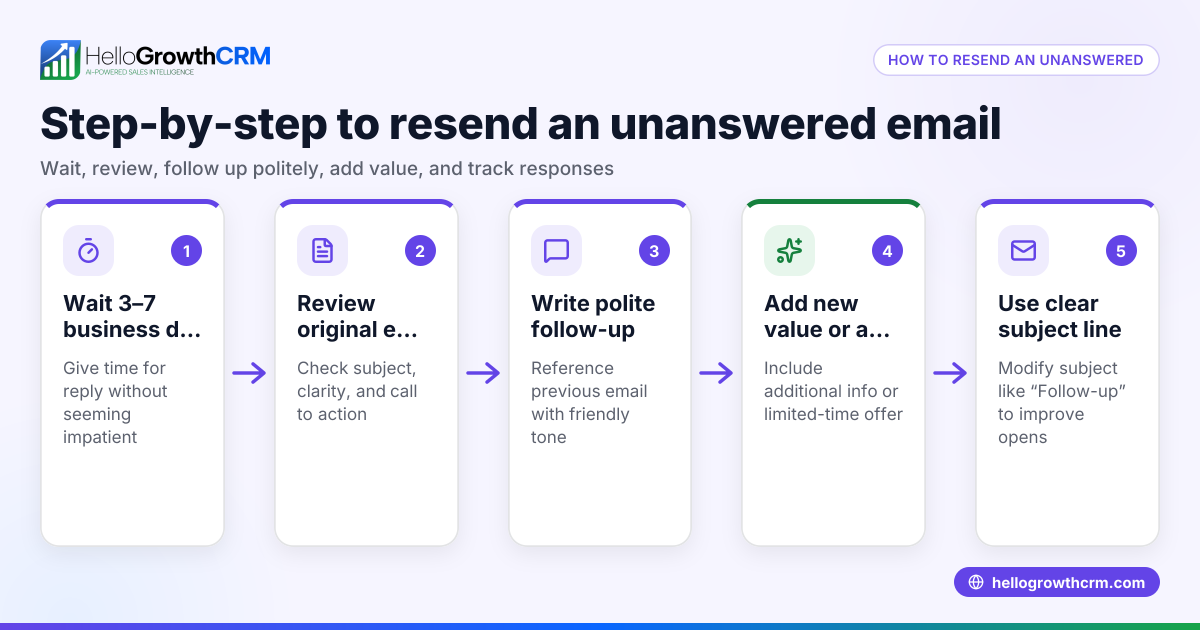
- Set a reminder to follow up: If you don’t get a response within 3 to 5 business days, send a polite follow-up email.
- Keep records of all communication: Save your sent emails and any replies for future reference or escalation if needed.
You can download free sales templates and follow-up cadence tools to help manage your communication at free sales tools and calculators.
Example (fictional figures)
Subject: Order Not Received – Order #45678
Dear GreenLeaf Landscaping Supplies,
I placed an order on 03/01/2026 for $1,250 worth of gardening tools (Order #45678), with an expected delivery date of 03/10/2026. As of today, 03/15/2026, I have not received the shipment.
Could you please provide an update on the status of this order or advise on the next steps? I appreciate your assistance in resolving this matter promptly.
Thank you,
John Smith GreenLeaf Landscaping Charlotte, NC
Calculation example for order value:
$1,000 + $250 = $1,250 total order value
This email clearly states the order details, the amount, relevant dates, and requests a status update politely.
Common mistakes
- Not including order details: Always mention your order number, purchase date, and amount to help the recipient quickly identify your order.
- Using vague or emotional language: Keep your tone polite and factual to maintain a constructive conversation.
- Ignoring available tracking information: Check tracking before emailing to avoid unnecessary confusion or premature complaints.
- Failing to follow up: Set reminders to send a follow-up email if there is no reply within a reasonable time.
- Sending to the wrong contact: Verify the correct email address to avoid delays in response.
Prevent these mistakes by using a clear email template and following the step-by-step process outlined here. You can also find email templates and automated follow-up sequences at sales templates and email automation and sequences.
Doing this in HelloGrowthCRM
HelloGrowthCRM offers HelloMail, a shared inbox inside the CRM where your team can see replies to order-related emails collectively, preventing missed messages. You can also automate follow-up sequences: set a five-step follow-up over two weeks that stops automatically when the recipient replies, ensuring timely communication without manual tracking. Learn more at email automation and sequences.
Frequently asked questions
What should I include in an order not received email? Include your order number, purchase date, expected delivery date, a clear statement that you have not received the order, and a polite request for an update.
When should I send a follow-up email if I don’t get a response? Wait about 3 to 5 business days after your initial email before sending a polite follow-up to check on the status.
How can I keep track of multiple order inquiries? Use a CRM or sales templates to organize your communications and set reminders. HelloGrowthCRM provides tools for managing email follow-ups and shared inboxes.
Can I automate follow-up emails for missing orders? Yes, with HelloGrowthCRM’s sequences feature, you can set automated multi-step follow-ups that pause when a reply is received, saving time and ensuring no inquiry is forgotten.
What if the order is lost or canceled? Request clear next steps or a replacement shipment in your email. Keep all communication documented for reference.
Key takeaways
- Use a clear, polite email template including order number, purchase and delivery dates, and request for update.
- Check shipping status or tracking before emailing to avoid confusion.
- Follow up after a few business days if you don’t receive a reply to your order not received email.
- Avoid vague language and emotional tone to keep communication constructive.
- Use free sales templates and email automation tools to manage follow-ups effectively.
Start managing your order communications and follow-ups with free templates and automation tools at free sales tools and calculators and sales templates.
Start on the Free Forever plan (200 leads, no credit card) at HelloGrowthCRM to organize your sales and customer communication efficiently.
Ready to put this into practice?
Set up your pipeline, WhatsApp follow-ups, and AI lead scoring in minutes — free, no credit card.
Try HelloGrowthCRM freeGet CRM tips in your inbox
Join thousands of sales professionals who get weekly insights on CRM strategy, AI automation, and pipeline optimization.

The HelloGrowthCRM team publishes guides on CRM strategy, AI sales tools, and revenue operations for small business sales teams.