HelloGrowthCRM software
Built for real small-business sales teams
HelloGrowthCRM helps reps qualify faster, follow up on time, and close more deals—with practical automation in one place.
- AI lead scoring and pipeline visibility
- Built-in dialer, WhatsApp, and email automation
- Sales forecasting and RevOps-ready reporting
A project update email template is a structured format you can use to quickly inform clients, team members, or stakeholders about the current status of a project. It typically includes the project name, recent progress, upcoming tasks, any challenges, and a call to action or next meeting. This article covers why you need such a template, a step-by-step guide to writing one, a detailed example with fictional figures, common pitfalls to avoid, and how HelloGrowthCRM supports effective communication.
Why this comes up / what goes wrong
Small business owners often juggle multiple roles and projects simultaneously. They need to keep clients and teams updated without spending hours drafting emails. Without a clear template, updates can be inconsistent, too vague, or miss critical information like deadlines or risks. This leads to confusion, missed expectations, and extra follow-up questions. A ready-to-use project update email template saves time and ensures everyone stays on the same page.
Step-by-step
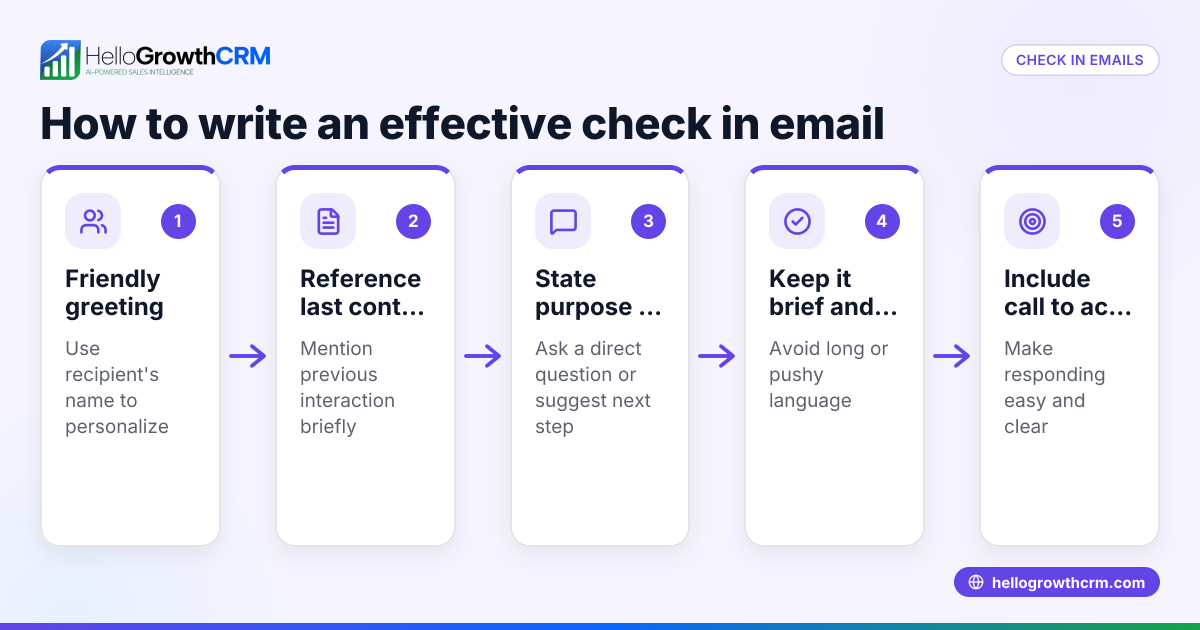
- Start with a clear subject line: Use a straightforward subject such as “Project Update: [Project Name] – [Date]” to help recipients immediately recognize the email’s purpose.
- Greet the recipient(s): Use a polite opening like “Hello [Name/Team],” to set a professional tone.
- State the purpose: In one sentence, say this is a status update on the project.
- Summarize recent progress: List key accomplishments since the last update. Use bullet points for clarity.
- Highlight upcoming tasks or milestones: Explain what will happen next and expected dates.
- Mention any issues or risks: Be transparent about any delays or problems and what you’re doing to address them.
- Include a call to action or next steps: For example, invite questions, confirm the next meeting, or request approval.
- Close politely: Use a sign-off like “Best regards” or “Thank you.”
- Proofread and check for clarity: Ensure all dates, figures, and names are correct. Avoid jargon.
- Send with relevant attachments or links: Include files like reports or a project timeline if needed.
You can find free sales templates including email formats at sales templates and useful tools to organize your communication at free sales tools and calculators.
Example (fictional figures)
Subject: Project Update: Austin Plumbing Website Redesign – 06/15/2026
Hello Team,
This is a status update on the Austin Plumbing Website Redesign project.
Recent progress:
- Completed the homepage design on 06/10/2026
- Finalized content for services pages
- Set up hosting and domain renewal ($1,200 annual cost)
Upcoming tasks:
- Begin coding the services pages on 06/20/2026
- Schedule client review meeting for 06/30/2026
Issues:
- Delay in receiving client logo files has pushed back the branding section by one week. We are following up daily to expedite.
Next steps: Please review the attached homepage mockup and send any feedback by 06/18/2026.
Best regards, Jane Smith Project Manager
Common mistakes
- Being too vague: Avoid general statements like “progress is good.” Instead, specify what was completed. Prevent this by listing concrete accomplishments.
- Ignoring issues: Not mentioning delays or risks leads to surprises later. Always include a brief note on challenges and mitigation.
- Overloading with details: Too much technical jargon or irrelevant info can confuse readers. Stick to key points and use attachments for details.
- Not specifying next steps: Recipients should know what to expect or do next. Always include a clear call to action.
- Forgetting to proofread: Typos or wrong dates reduce professionalism. Double-check before sending.
- Skipping a clear subject line: Without it, emails may be overlooked. Use a consistent format.
You can avoid these errors by using templates and automations available in email automation and sequences.
Doing this in HelloGrowthCRM
HelloGrowthCRM offers a shared inbox called HelloMail where your team can manage project-related emails together without switching apps. Replies to project update emails are visible to everyone involved in the deal, reducing missed messages. You can also access free sales tools and templates, including follow-up cadences and pipeline templates, without needing an account at free sales tools and calculators. For ongoing communication, set up sequences and campaigns that automate follow-ups over days or weeks, stopping automatically once the recipient replies. Learn more at email automation and sequences.
Frequently asked questions
What should a project update email include? A project update email should include the project name, summary of recent progress, upcoming tasks, any issues or risks, and next steps or calls to action. A clear subject line and polite greeting are also important.
How often should I send project update emails? The frequency depends on the project and stakeholder preferences. Weekly or biweekly updates are common for ongoing projects, but urgent issues may require more frequent communication.
Can I use a project update email template for different projects? Yes, a good template is adaptable. Customize the project name, dates, accomplishments, and next steps for each update while keeping the structure consistent.
Where can I find free project update email templates? You can download free templates and sales tools from HelloGrowthCRM’s free sales tools and calculators page without signing up.
How can I automate sending project update emails? HelloGrowthCRM supports sequences and campaigns that automate multi-step follow-ups via email and SMS, stopping automatically when a prospect replies. This helps maintain regular updates without manual effort. See email automation and sequences for details.
Key takeaways
- Use a clear subject line and polite greeting.
- Summarize recent progress and upcoming tasks with dates.
- Be transparent about any delays or risks.
- Always include next steps or a call to action.
- Avoid jargon and proofread carefully.
- Use templates and automation tools to save time and improve consistency.
Start sending effective project updates today. You can Start on the Free Forever plan (200 leads, no credit card) with HelloGrowthCRM to manage your communications and sales pipelines efficiently.
Ready to put this into practice?
Set up your pipeline, WhatsApp follow-ups, and AI lead scoring in minutes — free, no credit card.
Try HelloGrowthCRM freeGet CRM tips in your inbox
Join thousands of sales professionals who get weekly insights on CRM strategy, AI automation, and pipeline optimization.

The HelloGrowthCRM team publishes guides on CRM strategy, AI sales tools, and revenue operations for small business sales teams.