HelloGrowthCRM software
Built for real small-business sales teams
HelloGrowthCRM helps reps qualify faster, follow up on time, and close more deals—with practical automation in one place.
- AI lead scoring and pipeline visibility
- Built-in dialer, WhatsApp, and email automation
- Sales forecasting and RevOps-ready reporting
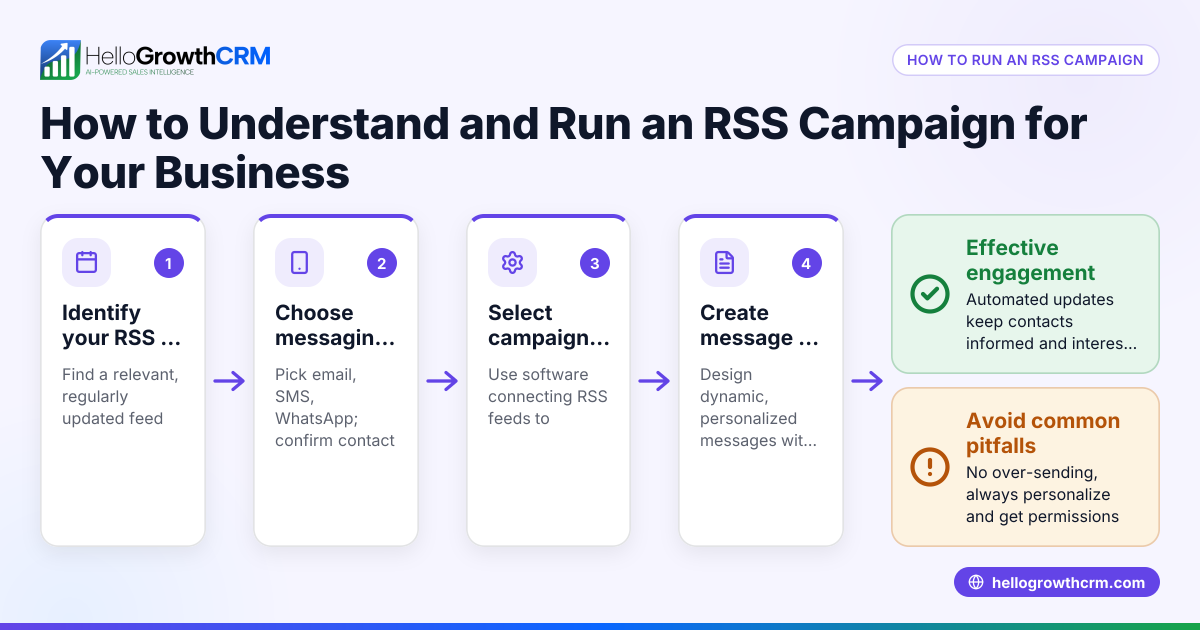
RSS to newsletter is the process of using your website or blog’s RSS feed to automatically create and send email newsletters to your subscribers. This method saves time by eliminating the need to write each newsletter manually and ensures your audience receives the latest updates promptly.
Why this comes up / what goes wrong
Small business owners often want to keep customers and prospects engaged with regular updates but find it difficult to create newsletters consistently. They might run a blog, post news, or update product information on their website, which generates an RSS feed. Instead of manually crafting emails each time, they look for ways to automate newsletter creation by using that RSS feed. Without this automation, newsletters can be inconsistent, time-consuming, or prone to errors, leading to missed opportunities for engagement.
Step-by-step
- Locate your RSS feed URL
- Visit your website or blog platform to find the RSS feed link. It usually ends with ".xml" or "/feed".
- Verify the feed updates correctly with your latest content by opening the URL in a browser.
- Select an email marketing or newsletter service that supports RSS feeds
- Choose a platform like Mailchimp, Constant Contact, or others that allow RSS-to-email automation.
- Confirm the service supports US business compliance such as CAN-SPAM and subscriber management.
- Connect your RSS feed to the newsletter service
- Enter your RSS feed URL into the newsletter platform’s RSS-to-email feature.
- Customize the email template to control how the feed content appears, such as showing titles, summaries, or images.
- Set a sending schedule for your newsletters
- Decide how often to send newsletters (daily, weekly, monthly) based on your content frequency and audience preference.
- Choose the best time of day to maximize open rates.
- Test your newsletter before launching
- Preview the email to check formatting, images, and links.
- Send test emails to yourself or colleagues to verify appearance across devices.
- Launch and monitor your newsletters
- Start sending automated newsletters.
- Track performance metrics like open rates, click rates, and subscriber feedback to improve future issues.
Using a CRM that integrates communication channels like WhatsApp and SMS can help you follow up on leads generated from newsletters. Learn more about WhatsApp and SMS CRM and the built-in CRM dialer to manage your sales process effectively.
Example (fictional figures)
GreenScape Landscaping in Charlotte, North Carolina, wants to keep clients informed about seasonal tips and promotions. They publish 4 blog posts monthly, each estimated to generate $1,000 in potential lead value. They expect a 10% increase in client engagement from newsletters.
Calculation of potential newsletter value:
$1,000 × 4 posts = $4,000 monthly content value
$4,000 × 10% engagement lift = $400 estimated monthly benefit
GreenScape sets their newsletter to send on the first Monday of each month, pulling the four latest posts from their RSS feed. They test the email for formatting and links, then launch it on 07/01/2026.
Common mistakes
- Using an outdated or incorrect RSS feed URL
- Prevent this by double-checking the feed link and confirming it updates with new content regularly.
- Neglecting email formatting and readability
- Prevent by testing emails on multiple devices and email clients to ensure the newsletter looks good everywhere.
- Sending newsletters too often or too rarely
- Prevent by analyzing your audience’s preferences and engagement data to find the right balance.
- Ignoring unsubscribe options and legal compliance
- Prevent by including clear unsubscribe links and following laws like CAN-SPAM.
- Not monitoring newsletter performance
- Prevent by regularly reviewing open and click rates and adjusting content or timing accordingly.
- Relying only on newsletters for lead follow-up
- Prevent by integrating newsletters with CRM tools and other communication channels. Check out HelloGrowthCRM for the United States for managing leads efficiently.
Frequently asked questions
What is an RSS feed? An RSS feed is a web format that automatically updates with new content from your website or blog. It allows email services and other platforms to pull your latest posts without manual effort.
Can I customize how RSS content appears in my newsletter? Yes, most email marketing platforms let you design templates and choose which parts of the RSS feed (like titles, summaries, or images) appear in your newsletter.
How often should I send RSS-based newsletters? This depends on how often you publish content and your audience’s preferences. Weekly or monthly schedules are common to keep subscribers engaged without overwhelming them.
Is RSS to newsletter automation suitable for all businesses? It works best for businesses with regular content updates such as blogs, news, or product announcements. If your content updates are infrequent, manual newsletters might be more effective.
Can I integrate RSS newsletters with other sales tools? Yes, combining newsletters with CRM systems and communication channels like WhatsApp and SMS can improve lead engagement. See WhatsApp and SMS CRM and the built-in CRM dialer for options.
Key takeaways
- RSS to newsletter automates sending your website updates to email subscribers.
- Locate your RSS feed URL and connect it to an email service that supports RSS.
- Customize your newsletter template and set a consistent sending schedule.
- Test emails thoroughly and monitor performance to improve engagement.
- Avoid common mistakes like wrong feed URLs, poor formatting, and ignoring compliance.
- Combine newsletters with CRM tools for better lead management and follow-up.
Automating newsletters with RSS feeds saves time and keeps your audience engaged. To start managing leads and communications more effectively, consider HelloGrowthCRM for the United States.
Start on the Free Forever plan (200 leads, no credit card) at HelloGrowthCRM.
Ready to put this into practice?
Set up your pipeline, WhatsApp follow-ups, and AI lead scoring in minutes — free, no credit card.
Try HelloGrowthCRM freeGet CRM tips in your inbox
Join thousands of sales professionals who get weekly insights on CRM strategy, AI automation, and pipeline optimization.

The HelloGrowthCRM team publishes guides on CRM strategy, AI sales tools, and revenue operations for small business sales teams.