HelloGrowthCRM software
Built for real small-business sales teams
HelloGrowthCRM helps reps qualify faster, follow up on time, and close more deals—with practical automation in one place.
- AI lead scoring and pipeline visibility
- Built-in dialer, WhatsApp, and email automation
- Sales forecasting and RevOps-ready reporting
A sales forecast dashboard is a visual tool that shows your projected sales revenue over a set period, based on your current sales pipeline and deal stages. It helps business owners and sales teams understand how much revenue they can expect, which deals are progressing, and where potential bottlenecks exist.
Why this comes up / what goes wrong
Small business owners often struggle to predict future sales accurately. Without a clear sales forecast dashboard, they rely on scattered data from emails, spreadsheets, or memory, which leads to missed targets and poor resource planning. Sales teams may lose track of deals or fail to follow up on important quotes, resulting in lost revenue. A sales forecast dashboard consolidates this information into one place, making it easier to spot stalled deals and forecast revenue.
Many small businesses run sales on text messages, emails, and spreadsheets. This scattered approach makes it hard to see the overall picture and causes delays in follow-up. Without a dashboard, you might not know which deals are stuck or when to expect income, making it difficult to plan staffing or expenses.
Step-by-step
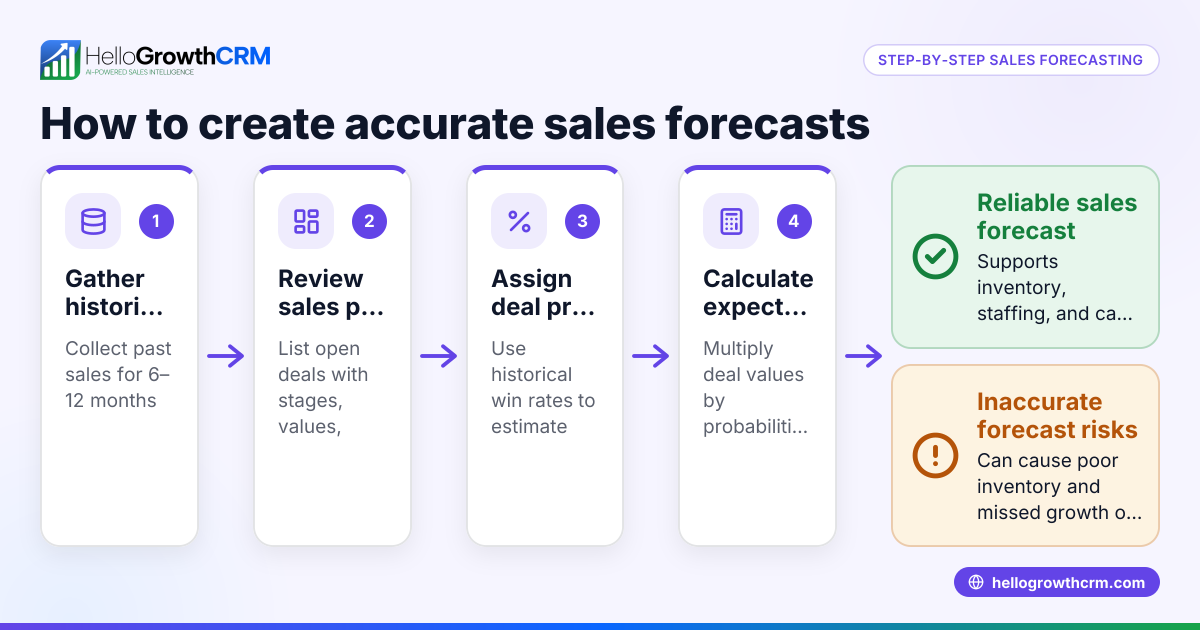
- Collect your sales data: Gather information about all current deals, including deal value, stage in the pipeline, and expected close dates. This ensures your forecast is based on up-to-date data.
- Define sales stages clearly: Set consistent stages such as Prospecting, Quote Sent, Negotiation, and Closed Won/Lost. Clear stages help track progress and assign probabilities.
- Assign probabilities to each stage: Estimate the chance of closing deals at each stage to weigh their expected revenue. For example, a deal at 'Quote Sent' might have a higher chance of closing compared to earlier stages.
- Input data into a dashboard tool: Use a CRM or spreadsheet to visualize deals by stage, expected close date, and value. This creates a clear picture of your sales pipeline.
- Review pipeline velocity: Check how long deals typically stay in each stage to adjust your forecast timing. Slow-moving deals might need extra attention.
- Update regularly: Keep deal statuses and expected close dates current to maintain an accurate forecast. Frequent updates prevent surprises.
- Analyze stalled deals: Identify where deals are stuck and plan follow-ups or interventions. This helps move deals forward and improves your forecast.
- Use AI insights if available: Some CRMs offer AI to analyze pipeline health and predict revenue based on historical patterns. AI can highlight risks and opportunities you might miss.
Example (fictional figures)
A residential real-estate team in Phoenix, Arizona, wants to forecast sales for the next quarter ending 06/30/2026.
- Deals in pipeline:
- Deal A: $500,000 at 'Quote Sent' stage, 60% probability, expected close 06/15/2026
- Deal B: $300,000 at 'Negotiation' stage, 80% probability, expected close 06/20/2026
- Deal C: $200,000 at 'Prospecting' stage, 30% probability, expected close 06/30/2026
Calculate expected revenue:
$500,000 × 60% = $300,000 $300,000 × 80% = $240,000 $200,000 × 30% = $60,000
Total forecasted revenue = $300,000 + $240,000 + $60,000 = $600,000
This forecast helps the team plan marketing, staffing, and expenses for the quarter. They can spot if deals are stalling and focus efforts accordingly.
Common mistakes
- Ignoring deal stages or probabilities: Without assigning realistic probabilities, your forecast will be inaccurate. Prevent this by reviewing and updating probabilities regularly.
- Using outdated data: Old data causes wrong predictions. Prevent this by updating your dashboard daily or weekly.
- Not tracking stalled deals: Deals stuck in one stage reduce forecast reliability. Prevent by reviewing pipeline health and following up promptly.
- Relying solely on gut feeling: Guesswork leads to errors. Prevent by using data-driven insights and AI tools like those in HelloGrowthCRM (AI CRM, sales forecasting).
- Complex dashboards that no one uses: Overly detailed or confusing dashboards fail to help. Prevent by keeping dashboards simple and actionable.
- Failing to integrate field sales data: If your sales reps work in the field, missing their activity leads to incomplete forecasts. Prevent by using territory and visit logs to track on-site actions.
Doing this in HelloGrowthCRM
HelloGrowthCRM offers pipeline forecast and AI insights that show which stage deals are stalling in without building a spreadsheet. You can track deals from first contact through close with stage movement, probability, and expected value. For example, a quotation sent last week appears as a deal at the 'quote sent' stage with a follow-up date, so it is not forgotten. For businesses with field sales, territories and visit logs help managers see daily field activity and commissions. Learn more about HelloGrowthCRM for the United States here.
Frequently asked questions
What is the difference between a sales pipeline and a sales forecast dashboard? A sales pipeline shows all current deals and their stages, while a sales forecast dashboard projects expected revenue based on those deals and their probabilities. The forecast dashboard helps predict future sales, not just track current opportunities.
How often should I update my sales forecast dashboard? Ideally, update it at least weekly to reflect changes in deal status, new opportunities, or lost deals. Frequent updates keep your forecast accurate and actionable.
Can a small business create a sales forecast dashboard without software? Yes, you can use spreadsheets to build a basic dashboard by listing deals, stages, probabilities, and expected close dates. However, software like HelloGrowthCRM automates data capture, updates, and AI insights, saving time and reducing errors.
What role does AI play in sales forecasting? AI analyzes historical sales data, pipeline velocity, and deal stages to predict revenue more accurately and identify stalled deals. This helps prioritize follow-ups and improve sales performance.
How can field sales data improve my sales forecast? Tracking field sales visits, check-ins, and routes provides real-time insight into sales activities. This data helps managers see daily progress and adjust forecasts based on actual field work, improving accuracy.
What should I do if a deal is stalled in one stage for too long? Identify the cause, such as missing information or delayed decision-making. Plan targeted follow-ups or offer incentives to move the deal forward. Use AI insights to prioritize these actions effectively.
Key takeaways
- A sales forecast dashboard visualizes expected revenue based on current deals and pipeline stages.
- Regular updates and clear sales stages with probabilities are essential for accuracy.
- Common mistakes include outdated data, ignoring stalled deals, and overcomplex dashboards.
- AI-powered CRMs like HelloGrowthCRM simplify forecasting and pipeline management.
- Integrating field sales data improves forecast accuracy and team oversight.
Start improving your sales forecasting today. Start on the Free Forever plan (200 leads, no credit card).
Ready to put this into practice?
Set up your pipeline, WhatsApp follow-ups, and AI lead scoring in minutes — free, no credit card.
Try HelloGrowthCRM freeGet CRM tips in your inbox
Join thousands of sales professionals who get weekly insights on CRM strategy, AI automation, and pipeline optimization.

The HelloGrowthCRM team publishes guides on CRM strategy, AI sales tools, and revenue operations for small business sales teams.