HelloGrowthCRM software
Built for real small-business sales teams
HelloGrowthCRM helps reps qualify faster, follow up on time, and close more deals—with practical automation in one place.
- AI lead scoring and pipeline visibility
- Built-in dialer, WhatsApp, and email automation
- Sales forecasting and RevOps-ready reporting
A sample email for requesting a document should be clear, polite, and specific about what you need. For example: "Dear [Name], I hope this message finds you well. Could you please send me the [document name] by [date]? Thank you." This article covers how to write such emails step-by-step, includes a realistic example with USD figures and calculations, common mistakes to avoid, and how HelloGrowthCRM can help automate follow-ups.
Why this comes up / what goes wrong
Small business owners frequently need to request important documents like contracts, invoices, registration papers, or proof of insurance from clients, suppliers, or partners. Without a clear and professional email format, these requests can be ignored, delayed, or misunderstood. Many owners struggle to write concise emails that get timely responses. Vague requests or overly demanding tones can harm business relationships or cause delays in projects or payments, impacting cash flow and operations.
Step-by-step
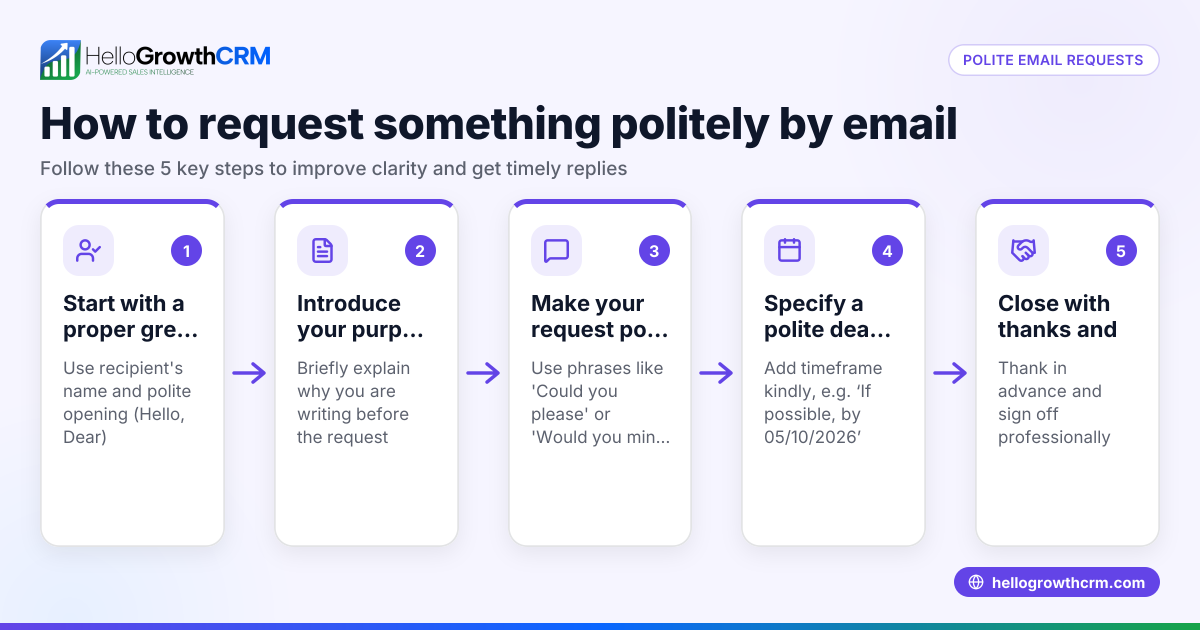
- Start with a clear subject line. Use a direct subject like "Request for [Document Name]" so the recipient immediately understands the email's purpose.
- Greet the recipient politely. Use their name if possible to personalize the message.
- State your request clearly. Specify the exact document you need and why it is needed if relevant.
- Include a deadline. Politely mention when you need the document to keep your project or process on track.
- Offer assistance or clarification. Let the recipient know you are available to answer any questions.
- Thank them in advance. A courteous closing encourages cooperation.
- Sign off professionally. Include your full name, position, company name, and contact details.
Check your email tone: keep it polite, professional, and concise. Avoid jargon or overly complex language. Proofread carefully to avoid spelling or grammar errors.
Example (fictional figures)
Subject: Request for Signed Service Agreement
Dear Ms. Johnson,
I hope you are well. To proceed with your landscaping project scheduled for 07/15/2026, could you please send me the signed service agreement by 06/30/2026? This document is necessary to finalize our preparations and ensure timely delivery.
The project cost is $48,000, and we require the signed agreement to secure materials and labor. For example, the deposit is 10% of the project cost: $48,000 × 10% = $4,800
Please send the signed agreement by 06/30/2026 to avoid delays.
If you have any questions or need assistance, feel free to contact me.
Thank you for your prompt attention.
Best regards,
Mark Stevens Owner, GreenScape Lawn Care mark@greenscape.com (704) 555-1234
Common mistakes
- Being vague about the document needed. Prevent this by specifying the exact document name and why you need it.
- No deadline or an unrealistic deadline. Prevent delays by setting a clear, reasonable due date.
- Writing too long or wordy emails. Keep messages concise and to the point.
- Not including contact information. Always sign off with your full details so the recipient can reach you easily.
- Using a cold or demanding tone. Use polite, appreciative language to maintain good relationships.
- Failing to follow up. Use reminders or automated follow-ups to ensure you get the documents.
Doing this in HelloGrowthCRM
HelloGrowthCRM helps small businesses manage document requests and follow-ups efficiently. The HelloMail shared inbox lets your team see all replies to document requests in one place, avoiding missed responses. Sequences and campaigns automate follow-ups with a five-step outreach over two weeks, stopping as soon as the recipient replies. For founders without a sales manager, Managed RevOps assigns a specialist to handle your follow-up queue weekly, keeping your document requests on track. Learn more about email automation and sequences and WhatsApp and SMS CRM to see how these features support your document requests.
Frequently asked questions
What should I include in a request for registration email? Include a clear subject line, a polite greeting, the specific registration document you need, the reason for the request, a deadline, and your contact information. Keep the tone professional and offer help if needed.
How do I follow up if I don’t get a response to my document request? Wait a reasonable time after your initial email, then send a polite follow-up reminder. Using automated email sequences can help manage this process without manual effort. HelloGrowthCRM’s sequences feature automates multi-step follow-ups until you get a reply.
Can I request multiple documents in one email? Yes, but be clear and organized. List each document separately with any relevant deadlines. Avoid overwhelming the recipient; if the list is long, consider sending separate emails or explaining why all documents are needed.
How formal should my email be when requesting documents? Match the formality to your relationship with the recipient. For new or formal contacts, use professional language. For ongoing partners, a slightly casual tone can be acceptable but remain polite.
Is it better to request documents by email or phone? Email provides a written record and allows the recipient to respond at their convenience. Phone calls can be used for urgent requests or to clarify details but always follow up with an email for documentation.
Key takeaways
- Use a clear subject line and polite greeting.
- Specify the exact document and include a reasonable deadline.
- Keep the email concise and professional.
- Include your contact details and offer assistance.
- Avoid common mistakes like vagueness or demanding tone.
- Use HelloGrowthCRM’s email automation and follow-up tools to streamline requests.
Start managing your document requests and follow-ups more effectively by starting on the Free Forever plan (200 leads, no credit card).
Ready to put this into practice?
Set up your pipeline, WhatsApp follow-ups, and AI lead scoring in minutes — free, no credit card.
Try HelloGrowthCRM freeGet CRM tips in your inbox
Join thousands of sales professionals who get weekly insights on CRM strategy, AI automation, and pipeline optimization.

The HelloGrowthCRM team publishes guides on CRM strategy, AI sales tools, and revenue operations for small business sales teams.