HelloGrowthCRM software
Built for real small-business sales teams
HelloGrowthCRM helps reps qualify faster, follow up on time, and close more deals—with practical automation in one place.
- AI lead scoring and pipeline visibility
- Built-in dialer, WhatsApp, and email automation
- Sales forecasting and RevOps-ready reporting
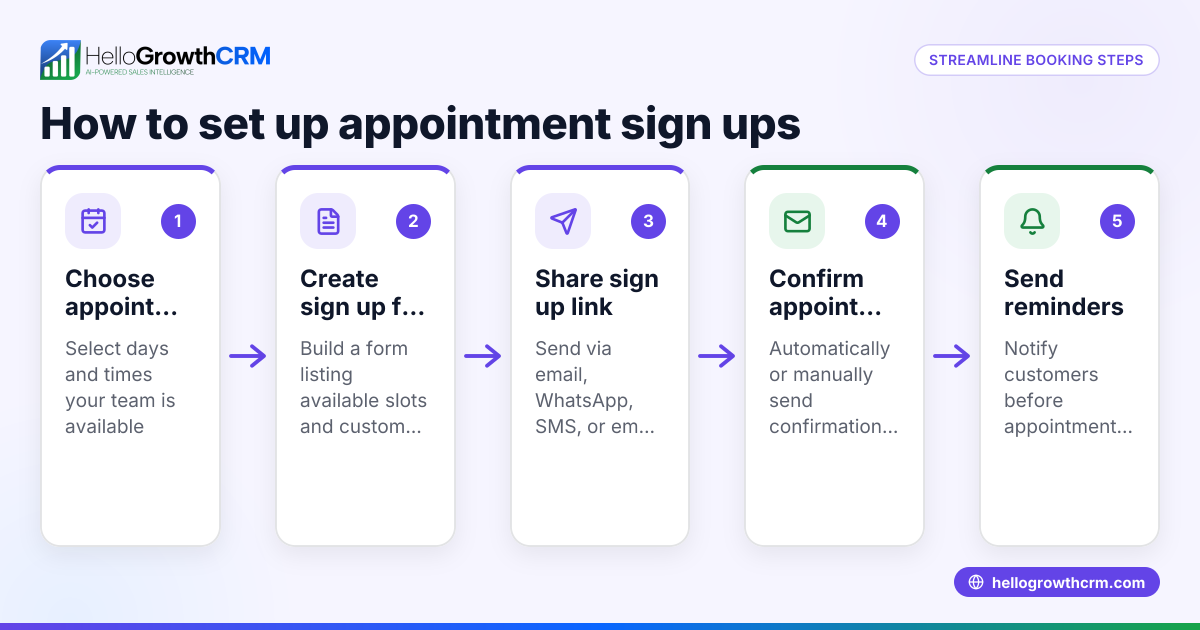
To set up appointments effectively, define the meeting purpose, contact the prospect with clear date/time options, confirm the appointment explicitly, record all details, and send reminders. This guide covers why appointment setting matters, step-by-step instructions, a practical example with calculations, common mistakes to avoid, and how HelloGrowthCRM can help automate follow-ups.
Why this comes up / what goes wrong
Small-business owners often need to set appointments to meet prospects, clients, or partners. However, many struggle because their scheduling process is informal, relies on memory or scattered notes, or uses multiple channels like text, email, and spreadsheets without coordination. This leads to missed or double-booked appointments, slow follow-up, and lost sales opportunities. Clear, repeatable steps for appointment setting reduce confusion and improve conversion.
Step-by-step
- Define the appointment’s purpose. Know why you want the meeting (e.g., sales demo, consultation) to set the right tone.
- Identify the prospect or client contact. Have their name, phone number, and email ready.
- Choose the contact method. Decide whether to call, email, text, or use a scheduling tool. Confirm the prospect’s preferred method if possible.
- Propose specific dates and times. Offer 2-3 options to increase the chance of agreement.
- Get confirmation. Ask the prospect to confirm the chosen time explicitly.
- Record the appointment details. Write down the date, time, location (or call link), and purpose.
- Send a calendar invite or reminder message. Include all details and any preparation instructions.
- Set reminders for yourself and the prospect. Use alarms or task boards to avoid forgetting.
- Prepare for the appointment. Review notes and objectives ahead of time.
Check that each step is complete before moving on, especially confirmation and recording, to avoid errors. For additional help managing tasks and follow-ups, see the help center.
Example (fictional figures)
A landscaping contractor in Charlotte, North Carolina, wants to set up an appointment with a prospect for a site visit.
- Purpose: Site visit to discuss lawn care services.
- Contact: John Smith, phone 704-555-1234, email john@example.com.
- Contact method: Phone call (preferred by prospect).
- Proposed times:
- 03/15/2026 at 10:00 AM
- 03/16/2026 at 2:00 PM
- 03/17/2026 at 9:00 AM
- Prospect confirms 03/16/2026 at 2:00 PM.
- Record appointment: 03/16/2026, 2:00 PM, at the prospect’s home, purpose site visit.
- Send calendar invite via email with address and preparation notes.
- Set reminders:
- Contractor sets phone alarm for 03/16/2026 at 1:30 PM.
- Sends reminder text to John on 03/15/2026.
- Prepare: Review previous correspondence and service options on 03/15/2026.
Calculations:
- Time between reminder text and appointment: 03/16/2026 2:00 PM - 03/15/2026 9:00 AM = 29 hours
- Time between phone alarm and appointment: 2:00 PM - 1:30 PM = 30 minutes
This clear process ensures the appointment is set, confirmed, and remembered.
Common mistakes
- Not confirming the appointment explicitly. Prevent by asking for a clear “yes” and repeating details.
- Failing to record appointment details immediately. Prevent by logging details as soon as confirmed.
- Using multiple uncoordinated communication channels. Prevent by choosing one method or using a scheduling tool.
- Neglecting reminders. Prevent by setting alarms or task board items.
- Not preparing for the appointment. Prevent by reviewing notes and goals beforehand.
- Overbooking or double-booking. Prevent by checking your calendar before proposing times.
For more tips on managing tasks and follow-ups, see the help center.
Doing this in HelloGrowthCRM
HelloGrowthCRM helps by turning each follow-up into a task with a due date on your task board, so the day’s calls and appointments show as a clear list, not a memory test. You can automate a five-step follow-up sequence over two weeks that stops as soon as the prospect replies, keeping your outreach consistent without manual effort. Additionally, AI agents can draft follow-up messages after calls for your review and send, speeding up your workflow. Learn more about these features at the meeting scheduler page.
Frequently asked questions
How can I avoid no-shows for appointments? Send reminders via text or email one day and a few hours before the appointment. Confirm the appointment when scheduling and provide clear details to reduce confusion.
What is the best way to handle appointment rescheduling? Politely acknowledge the change request, offer alternative dates promptly, and update the appointment details immediately. Confirm the new time clearly.
Should I use a scheduling tool or manual methods? Scheduling tools reduce errors and automate reminders, but manual methods can work if you record details carefully and set reminders. For small teams, a CRM with task boards can combine both benefits. See HelloGrowthCRM for the United States for details.
How far in advance should I set appointments? Set appointments at least 24-48 hours ahead to give both parties time to prepare. For complex meetings, schedule further in advance.
Can HelloGrowthCRM integrate with my calendar? HelloGrowthCRM supports task boards and reminders linked to your CRM records, helping you track appointments, though integration specifics depend on your calendar system. See HelloGrowthCRM for the United States for details.
Key takeaways
- Define appointment purpose and gather contact info before reaching out.
- Propose multiple times and get explicit confirmation.
- Record all details immediately and send reminders.
- Use task boards or scheduling tools to manage follow-ups and avoid missed appointments.
- Prepare in advance for every meeting.
- Automate follow-up sequences and task management with HelloGrowthCRM features.
Setting up appointments clearly and consistently improves your sales and client relationships. Start organizing your appointments today with HelloGrowthCRM’s free tools. Start on the Free Forever plan (200 leads, no credit card).
Ready to put this into practice?
Set up your pipeline, WhatsApp follow-ups, and AI lead scoring in minutes — free, no credit card.
Try HelloGrowthCRM freeGet CRM tips in your inbox
Join thousands of sales professionals who get weekly insights on CRM strategy, AI automation, and pipeline optimization.

The HelloGrowthCRM team publishes guides on CRM strategy, AI sales tools, and revenue operations for small business sales teams.