HelloGrowthCRM software
Built for real small-business sales teams
HelloGrowthCRM helps reps qualify faster, follow up on time, and close more deals—with practical automation in one place.
- AI lead scoring and pipeline visibility
- Built-in dialer, WhatsApp, and email automation
- Sales forecasting and RevOps-ready reporting
A three way call is a phone call involving three participants at the same time. This allows you to bring a colleague, client, or partner into a live conversation without disconnecting the current call. Small businesses often use three way calls to streamline communication, close deals faster, or provide immediate expert input.
Why this comes up / what goes wrong
Small-business owners frequently find themselves needing to connect multiple people on a call quickly. For example, a sales rep might need to add a manager to answer a pricing question during a client call. Or customer support may want to bring in a technical expert to resolve an issue without the customer hanging up and calling back later. Without three way calling, this requires ending one call and dialing another, causing delays and lost opportunities.
Sometimes, business owners don’t know if their phone system supports three way calls or how to start one, leading to frustration and slow follow-up. Also, managing calls across personal phones, text messages, and spreadsheets can cause missed chances to add the right people promptly.
Step-by-step
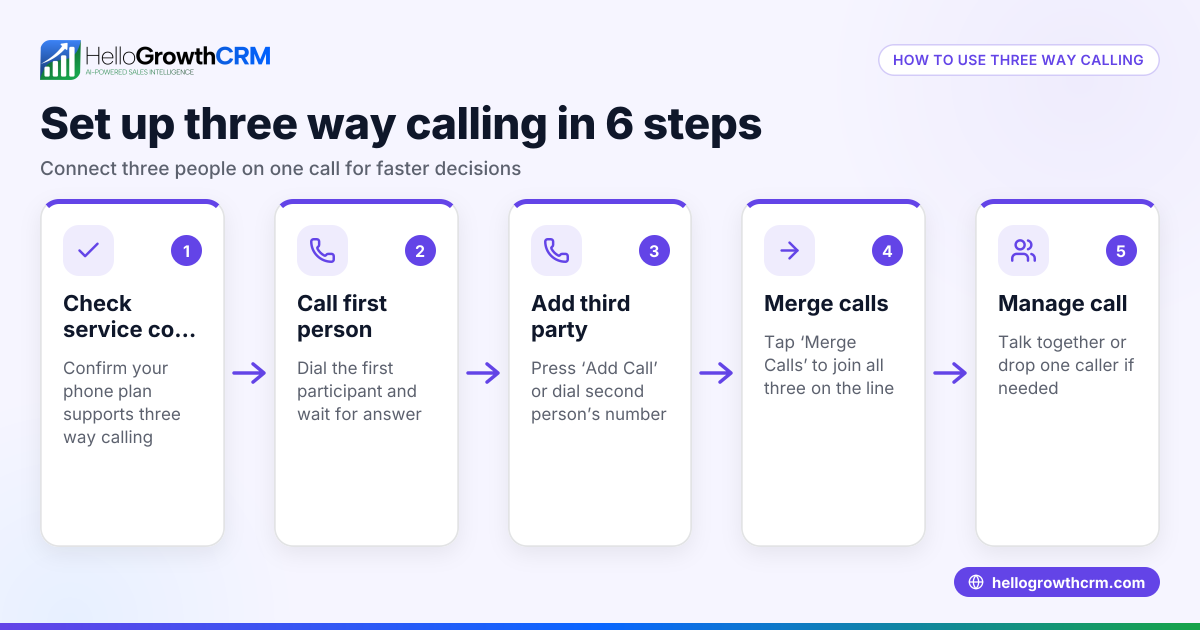
- Check your phone system supports three way calls: Most modern smartphones and business phone systems support it. Test by calling one person, then look for an “Add Call” or “Merge” button.
- Call the first person: Dial and connect with the first party as usual.
- Add the second person: Tap the “Add Call” button, dial the second person, and wait for them to answer.
- Merge the calls: After the second person answers, tap “Merge” or “Merge Calls” to combine the calls into a three way conversation.
- Manage the call: You can now talk to all three participants simultaneously. To remove someone, usually tap a specific button or end their line.
- Log the call outcome: After the call, note what happened for follow-up or team sharing.
Check your phone’s user guide or carrier support if these options aren’t visible, as some systems require activation or have different steps.
Example (fictional figures)
A two-location dental practice in Columbus, Ohio, wants to use three way calls to speed up patient scheduling. On 06/15/2026, the front desk receptionist calls a patient to confirm an appointment. The patient asks about insurance coverage, so the receptionist adds the office manager to the call.
- Receptionist calls Patient: connected
- Receptionist taps “Add Call” and dials Office Manager: connected
- Receptionist taps “Merge Calls” to combine the calls
- The three discuss insurance coverage and schedule the appointment
This saves time by avoiding separate calls and ensures the patient gets accurate information immediately.
Common mistakes
- Not verifying three way call support: Prevent by testing your phone system before relying on it in business.
- Dropping calls when merging: Avoid by following exact steps and ensuring good signal quality.
- Forgetting to log call outcomes: Prevent by using a CRM or call log to record details for follow-up.
- Using personal phones without coordination: Leads to missed info; use a centralized system like HelloGrowthCRM’s built-in dialer to keep calls organized.
- Adding the third party too late: Plan ahead to add needed people early in the call to avoid awkward pauses.
Doing this in HelloGrowthCRM
HelloGrowthCRM includes a built-in dialer that lets your sales and support team call contacts directly from the CRM. When working a list, reps can make calls, add outcomes, and keep full call histories tied to each lead and deal. Although it does not specifically mention three way calling, using HelloGrowthCRM’s dialer helps centralize your calls and follow-ups, reducing the chaos of switching between phones and spreadsheets. Learn more about the built-in CRM dialer and how HelloGrowthCRM supports WhatsApp and SMS CRM for integrated communication.
Frequently asked questions
Can I make a three way call on my smartphone? Most smartphones support three way calling with native features like “Add Call” and “Merge Calls.” Check your phone’s manual or carrier details to confirm.
Does three way calling cost extra? Usually, three way calls are included in your phone plan, but some carriers may charge additional fees. Check with your provider.
Can I do three way calls using HelloGrowthCRM? HelloGrowthCRM’s built-in dialer lets you call contacts and log outcomes but does not list three way calling as a feature. It helps keep all call data organized for your team.
What if I can’t merge calls? Your phone or carrier might not support it or require activation. Contact your provider or check settings.
Is three way calling secure for business? It is generally secure, but be aware of privacy when adding parties. Use trusted phone lines and systems.
How do I record or track three way calls? Use a CRM like HelloGrowthCRM to log call outcomes and notes. Recording calls may require additional tools or permissions.
Key takeaways
- A three way call connects three people simultaneously on one phone line.
- It helps small businesses improve communication and speed up decision-making.
- Steps include calling first person, adding second, and merging calls.
- Common mistakes include not testing support and forgetting to log calls.
- HelloGrowthCRM’s built-in dialer centralizes calls and logs outcomes to keep your team organized.
Start managing your calls better by trying HelloGrowthCRM. You can Start on the Free Forever plan (200 leads, no credit card) and see how the built-in dialer helps your team stay on top of leads and calls.
Ready to put this into practice?
Set up your pipeline, WhatsApp follow-ups, and AI lead scoring in minutes — free, no credit card.
Try HelloGrowthCRM freeGet CRM tips in your inbox
Join thousands of sales professionals who get weekly insights on CRM strategy, AI automation, and pipeline optimization.

The HelloGrowthCRM team publishes guides on CRM strategy, AI sales tools, and revenue operations for small business sales teams.