HelloGrowthCRM software
Built for real small-business sales teams
HelloGrowthCRM helps reps qualify faster, follow up on time, and close more deals—with practical automation in one place.
- AI lead scoring and pipeline visibility
- Built-in dialer, WhatsApp, and email automation
- Sales forecasting and RevOps-ready reporting
Three way calling is a phone feature that allows you to add a third person to an ongoing call so that all three participants can talk together. This is helpful for small business owners who want to quickly include a team member or client in a conversation without having to hang up and redial multiple times. This article covers why small businesses use three way calling, how to set it up step-by-step, a practical example, common mistakes, and how HelloGrowthCRM’s built-in dialer supports your calling efforts.
Why this comes up / what goes wrong
Small business owners often need to communicate with multiple parties at once—such as a client, supplier, and their sales team—especially when decisions must be made quickly. Without three way calling, they might try to coordinate multiple separate calls or use text and email, which can slow down decision-making and cause missed opportunities. Many business owners also run sales and customer service calls on their mobile phones or landlines without a proper system, leading to lost call history and inefficient follow-up.
Step-by-step
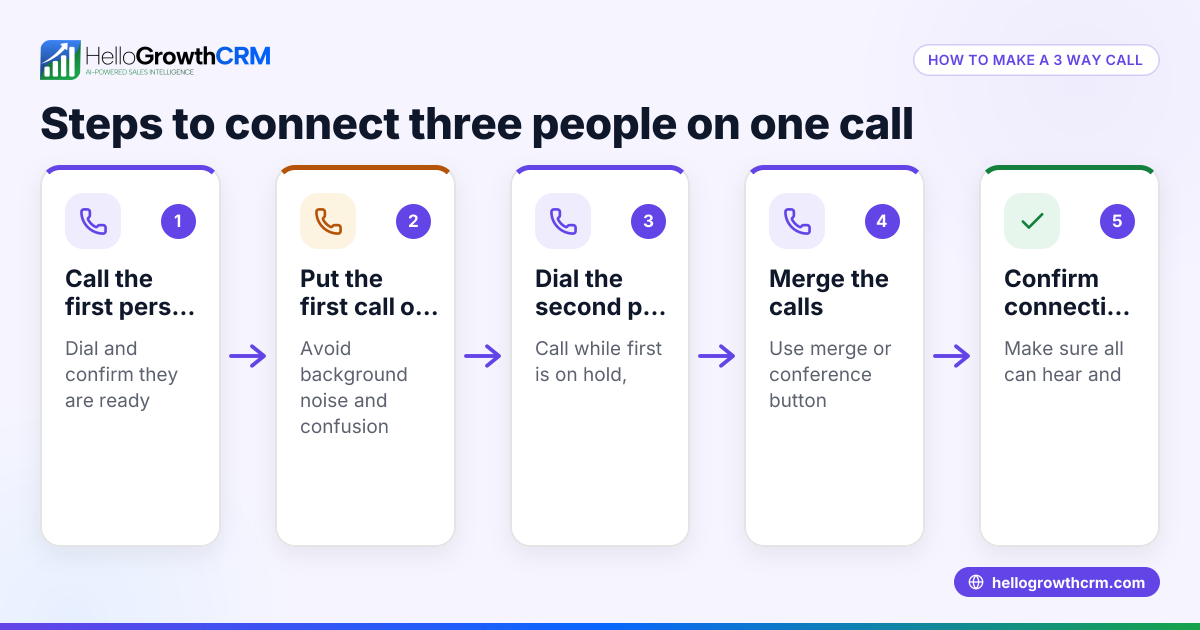
- Check your phone service supports three way calling. Most Canadian phone providers include this feature, but confirm with your carrier if unsure.
- Make your initial call. Dial the first person you want on the call and wait for them to answer.
- Add the third party. Use your phone’s “Add Call” button or dial the second person's number. The first call is put on hold while you connect with the second person.
- Merge the calls. Once the second person answers, tap the “Merge Calls” button to join all three callers together.
- Manage the call. You can speak to all participants simultaneously, or drop one caller if needed by ending their line.
- End the call. Hang up when finished to disconnect all participants.
Before you start, check your phone’s manual or carrier website for specific instructions, as the buttons and procedures can vary by device and provider. Also, ensure you have good signal or internet connection if using VoIP or mobile phones.
Example (fictional figures)
Imagine a home-renovation contractor in Calgary, Alberta, named Maple Home Renovations. On 2026-07-15, the contractor needs to discuss a project update with a client and a subcontractor simultaneously.
Step 1: The contractor calls the client at C$0 cost (included in their phone plan).
Step 2: The client answers.
Step 3: The contractor presses “Add Call” and dials the subcontractor’s number.
Step 4: The subcontractor answers.
Step 5: The contractor presses “Merge Calls” to have all three on the line.
Step 6: They discuss the project timeline and materials.
Step 7: The contractor ends the call.
This process saves time by avoiding separate calls and ensures everyone hears the same information at once.
Common mistakes
- Not verifying three way calling availability. Prevent by checking with your phone provider before needing it.
- Forgetting to merge calls properly. Prevent by learning your phone’s exact button sequence.
- Poor call quality or dropped calls. Prevent by using a reliable phone or internet connection.
- Not informing participants about the three way call. Prevent confusion by telling each party they will be on a conference call.
- Failing to log call details. Prevent lost information by using a CRM or note-taking app.
Using a CRM with a built-in dialer like HelloGrowthCRM helps avoid the last mistake by logging call outcomes automatically.
Doing this in HelloGrowthCRM
HelloGrowthCRM includes a built-in dialer that lets your reps work a list of leads directly inside the CRM. When making calls, outcomes are logged on each lead, keeping your call history and notes organized. While HelloGrowthCRM’s dialer does not specifically mention three way calling, it supports efficient calling workflows by centralizing call activity and follow-up. Learn more about the built-in CRM dialer and how it fits into your sales process. HelloGrowthCRM also supports WhatsApp and SMS CRM to complement calling with messaging, all tailored for HelloGrowthCRM for Canada.
Frequently asked questions
What is the difference between three way calling and conference calling? Three way calling typically refers to adding one extra party to a call, while conference calling can involve multiple participants, often managed through a conference bridge or service. Three way calling is usually simpler and built into standard phone services.
Do I need special equipment for three way calling? No special equipment is required beyond a phone that supports the feature and a phone plan that includes it. Most smartphones and landlines in Canada support three way calling by default.
Are there extra charges for three way calling? This depends on your phone provider and plan. Many providers include it free with your regular minutes, but some may charge for the additional call leg. Check with your carrier to confirm.
Can three way calling be used on mobile phones and VoIP? Yes, most mobile phones support three way calling. VoIP services may also support it but check your provider’s features and instructions.
How can I track three way calls for my business? Using a CRM with a built-in dialer like HelloGrowthCRM lets you log call outcomes and keep track of which leads or customers were contacted, helping you manage follow-up efficiently.
Key takeaways
- Three way calling lets you connect three people on the same phone call.
- It is useful for small business owners needing quick group conversations.
- Steps include calling the first person, adding a second, then merging calls.
- Common mistakes include not verifying availability and poor call management.
- HelloGrowthCRM’s built-in dialer supports efficient call logging and follow-up.
Start managing your calls better with HelloGrowthCRM’s built-in dialer. Start on the Free Forever plan (200 leads, no credit card) today.
Ready to put this into practice?
Set up your pipeline, WhatsApp follow-ups, and AI lead scoring in minutes — free, no credit card.
Try HelloGrowthCRM freeGet CRM tips in your inbox
Join thousands of sales professionals who get weekly insights on CRM strategy, AI automation, and pipeline optimization.

The HelloGrowthCRM team publishes guides on CRM strategy, AI sales tools, and revenue operations for small business sales teams.