HelloGrowthCRM software
Built for real small-business sales teams
HelloGrowthCRM helps reps qualify faster, follow up on time, and close more deals—with practical automation in one place.
- AI lead scoring and pipeline visibility
- Built-in dialer, WhatsApp, and email automation
- Sales forecasting and RevOps-ready reporting
Making a 3 way call allows you to connect with two people simultaneously, which is useful in business settings such as sales discussions or team coordination. This guide explains why you might need to make a 3 way call, provides clear step-by-step instructions, includes a worked example with realistic Canadian business context, highlights common mistakes, and shows how HelloGrowthCRM’s built-in dialer can streamline your calling process.
Why this comes up / what goes wrong
Small business owners and sales teams often need to bring multiple parties into one call to save time and ensure everyone hears the same information. For example, you might want to introduce a client to a product expert or discuss project details with both your supplier and your team. Without knowing how to properly make a 3 way call, you risk dropping calls, confusing participants, or failing to connect everyone at once.
Sales teams relying on multiple communication channels like text, email, and spreadsheets can also lose leads due to slow or ineffective follow-up. Making 3 way calls efficiently helps keep all parties engaged and informed, reducing lead loss.
Step-by-step
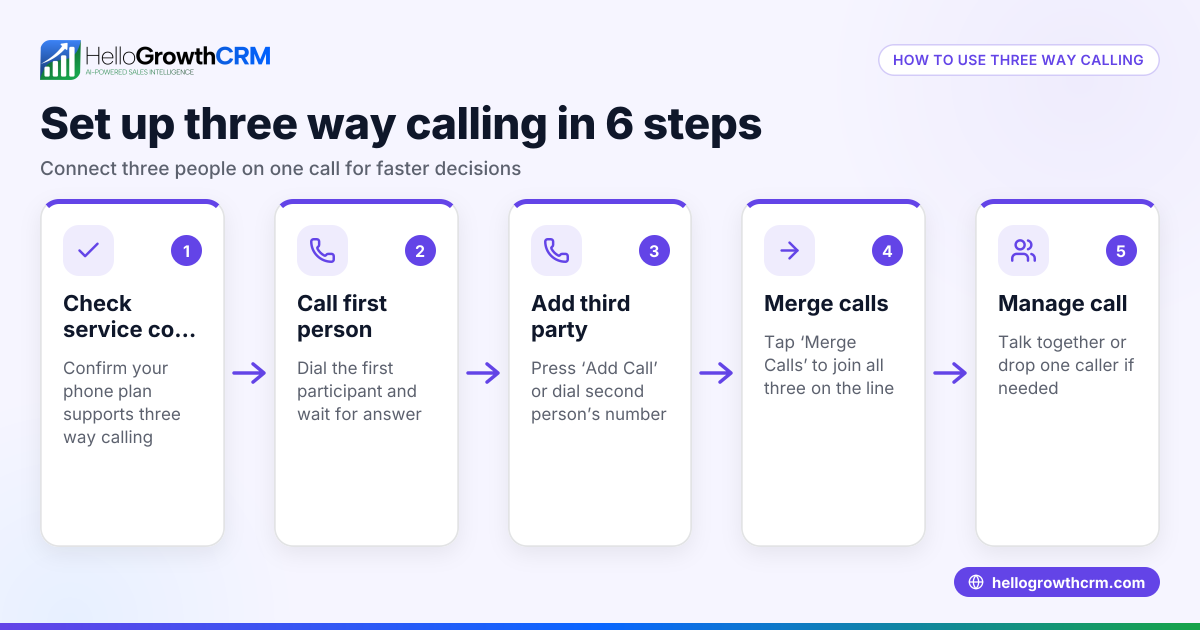
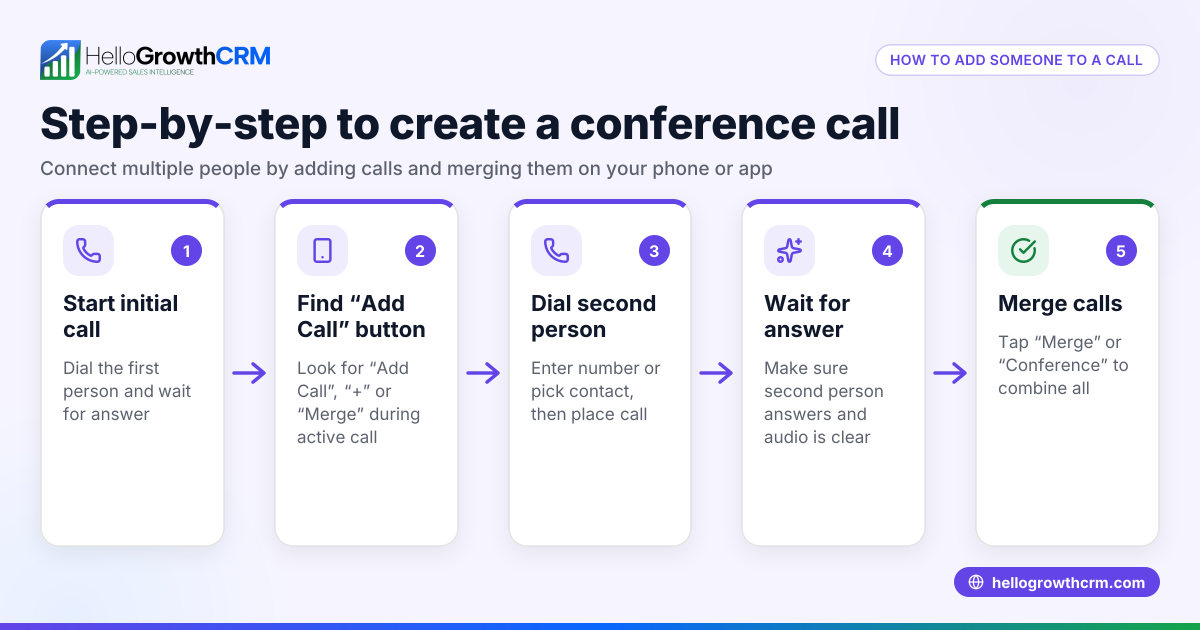
- Call the first person: Use your phone or business phone system to dial the first participant. Confirm they are on the line and ready.
- Put the first call on hold: Before adding the next person, place the first call on hold. This ensures they do not hear any background noise or the dialing process.
- Dial the second person: Call the next participant while the first call remains on hold. Wait for them to answer.
- Merge the calls: Once both parties are on the line, use your phone’s merge or conference button to combine the calls into a single 3 way call.
- Confirm connection: Make sure everyone can hear and speak to each other. Clarify roles and purpose for the call.
- Manage the call: You can add or drop participants if your phone supports it, but typically 3 way calls involve just three parties.
- End the call: Hang up when the discussion finishes, ensuring all parties are aware.
Example (fictional figures)
A home-renovation contractor in Calgary, Alberta, wants to discuss a project update with a client and a subcontractor on 2026-07-15.
- Step 1: Contractor calls client at C$0.10/min local rate.
- Step 2: Contractor puts client on hold.
- Step 3: Contractor calls subcontractor at C$0.15/min.
- Step 4: Contractor merges both calls.
If the call lasts 20 minutes total:
Client call cost = 20 minutes × C$0.10/min = C$2.00 Subcontractor call cost = 20 minutes × C$0.15/min = C$3.00 Total call cost = C$2.00 + C$3.00 = C$5.00
This example shows how call costs add up when making a 3 way call and why planning is important.
Common mistakes
- Not putting the first call on hold: This can cause confusion or noise. Always put the first call on hold before dialing the second.
- Not confirming both parties are ready: Ensure both participants answer and are prepared before merging.
- Using a phone without 3 way call capability: Check that your device or system supports merging calls.
- Dropping calls accidentally: Be careful when merging to avoid disconnecting anyone.
- Failing to clarify the call purpose: Set expectations at the start to keep the call focused.
Linking your calls and leads with a built-in CRM dialer can help your sales team track calls and outcomes efficiently.
Doing this in HelloGrowthCRM
HelloGrowthCRM includes a built-in dialer that lets reps work a list directly inside the CRM. Each call’s outcome is logged on the lead record, keeping your call history organized and accessible. This helps inside-sales teams follow up faster, avoid losing leads, and manage calls including 3 way calls more effectively. Learn more about HelloGrowthCRM for Canada and its WhatsApp and SMS CRM capabilities.
Frequently asked questions
Can I make a 3 way call on any phone? Most modern smartphones and business phone systems support 3 way calling, but some older or basic phones may not. Check your device’s user manual or settings.
Is there an extra cost for 3 way calls? You pay for the total call time to each participant. For example, a 20-minute 3 way call counts as 20 minutes to each person connected, which may affect your phone bill.
Can I add more than two people to a call? Standard 3 way calls connect three parties. Some phone systems support conference calls with more participants, but the process differs.
How do I avoid dropping calls during the merge? Make sure your phone signal is strong and follow the device’s instructions carefully when merging calls to prevent disconnects.
Does HelloGrowthCRM help with 3 way calls? Yes, its built-in dialer allows calling directly from the CRM and logging call outcomes, improving call management and follow-up.
Key takeaways
- Make a 3 way call by calling the first person, putting them on hold, calling the second, then merging.
- Confirm both parties are ready before merging to avoid confusion.
- Check your phone supports 3 way calling before attempting.
- Call costs add up as you pay for each participant’s call time.
- Avoid common mistakes like not putting calls on hold or dropping calls during merging.
- Using a built-in CRM dialer like HelloGrowthCRM helps manage calls and follow-ups efficiently.
Making 3 way calls can improve your business communication and save time. To get started with managing calls and leads in one place, Start on the Free Forever plan (200 leads, no credit card).
Ready to put this into practice?
Set up your pipeline, WhatsApp follow-ups, and AI lead scoring in minutes — free, no credit card.
Try HelloGrowthCRM freeGet CRM tips in your inbox
Join thousands of sales professionals who get weekly insights on CRM strategy, AI automation, and pipeline optimization.

The HelloGrowthCRM team publishes guides on CRM strategy, AI sales tools, and revenue operations for small business sales teams.