HelloGrowthCRM software
Built for real small-business sales teams
HelloGrowthCRM helps reps qualify faster, follow up on time, and close more deals—with practical automation in one place.
- AI lead scoring and pipeline visibility
- Built-in dialer, WhatsApp, and email automation
- Sales forecasting and RevOps-ready reporting
Web based customer service software is an online platform that helps small businesses manage support tickets, customer inquiries, and self-service options efficiently. This article explains why choosing the right software matters, guides you through practical steps to evaluate options, highlights common mistakes to avoid, and provides a realistic example for a US business.
Why this comes up / what goes wrong
Small business owners often face challenges in keeping customer service organized and timely. Without a central system, support requests can get lost in emails, texts, or spreadsheets, leading to slow responses and unhappy customers. Managing service across multiple channels without proper tracking wastes time and risks losing repeat business. As the business grows, the volume and complexity of service requests increase, making manual methods unsustainable. This is why many seek web based customer service software that can streamline communication, track issues, and provide self-service options for customers.
Step-by-step
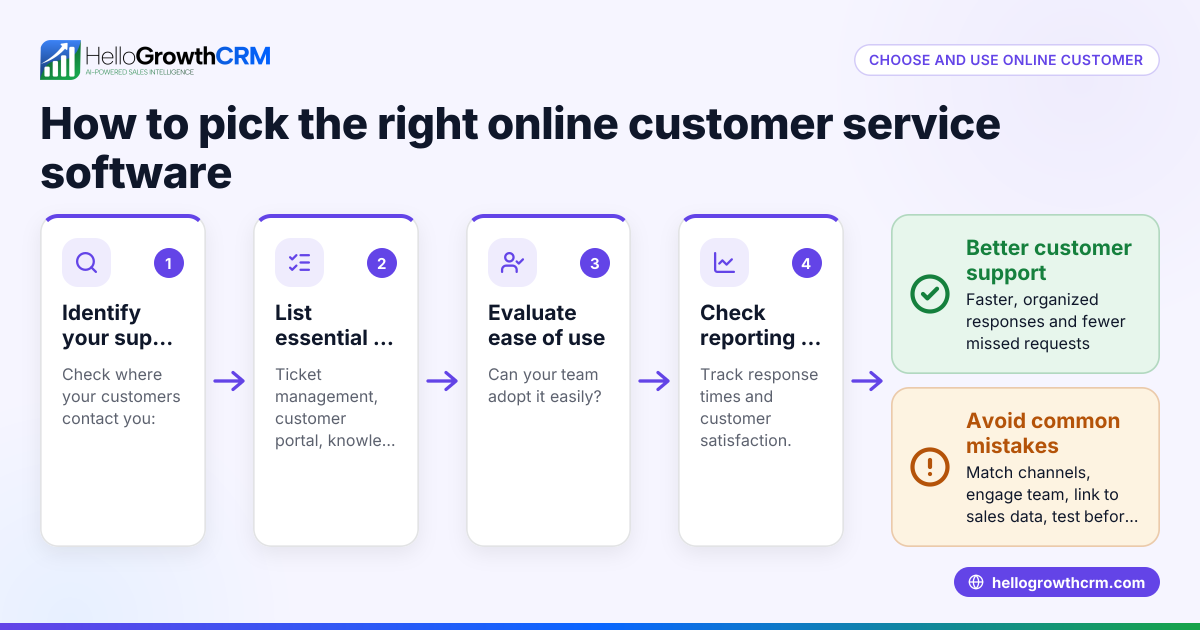
- Identify Your Business Needs
- List the common customer service tasks you handle (e.g., support tickets, FAQs, referrals).
- Determine the channels you use (email, chat, phone, WhatsApp).
- Check if you need features like a customer portal or knowledge base.
- Check Software Usability and Integration
- Ensure the software is easy for your team to adopt.
- Confirm it integrates smoothly with tools you already use (CRM, email, messaging).
- Look for mobile access if your team works remotely.
- Evaluate Ticketing and Tracking Features
- The software should let you log, assign, and track support tickets.
- Check if it supports SLA policies to manage response times.
- See if it keeps service requests linked to customer records for context.
- Consider Self-Service Options
- A branded customer portal allows clients to find answers and submit tickets independently.
- A knowledge base or reference library reduces repetitive questions.
- Assess Reporting and Analytics
- Look for dashboards that show ticket volume, response times, and customer satisfaction.
- Use reports to identify bottlenecks and improve service quality.
- Review Pricing and Support
- Compare pricing plans to your budget.
- Check what support the vendor offers (training, troubleshooting).
- Test with a Free Trial or Demo
- Use a trial to see how the software fits your workflow.
- Involve your team to get feedback on usability.
Following these steps helps you shortlist software that matches your business size and service goals.
Example (fictional figures)
A residential real estate team in Phoenix, Arizona, handles about 150 monthly customer inquiries by phone, email, and WhatsApp. They want to improve response time and track all service requests in one place.
- Monthly inquiries: 150
- Current average response time: 48 hours
- Goal: Reduce response time to 12 hours
- Estimated cost of software: $300/month
If the team saves 36 hours per inquiry in response time, they can serve more clients and close more deals.
Calculation of improved response time savings:
150 inquiries × 36 hours saved = 5,400 hours saved monthly
Assuming each hour saved allows the team to handle 0.1 additional deals worth $5,000 each:
5,400 hours × 0.1 deals/hour = 540 additional deals 540 deals × $5,000 = $2,700,000 potential additional revenue
Subtracting software cost:
$2,700,000 - ($300 × 12 months) = $2,696,400 net gain annually
This example shows how efficient service software can impact business growth.
Common mistakes
- Choosing software without a clear list of needs: Prevent by defining your customer service tasks and channels first.
- Ignoring team usability: Involve your team early to ensure the software is user-friendly.
- Overlooking integration capabilities: Check integrations to avoid data silos.
- Neglecting self-service features: A customer portal and knowledge base reduce workload.
- Failing to track service requests with customer records: Link tickets to customer data to maintain context and improve service.
- Skipping trial periods: Always test software to confirm it fits your workflows.
For more on tracking customer engagement, see our guide on customer health score.
Doing this in HelloGrowthCRM
HelloGrowthCRM offers a branded self-service customer portal, referral programme tracking, support tickets, and a knowledge base. After the sale, service requests stay on the same customer record as the deal, keeping all customer interactions in one place. This helps small and mid-sized businesses provide consistent, organized customer support. Learn more about these features in HelloGrowthCRM for the United States at hellogrowthcrm.com/usa.
Frequently asked questions
What is web based customer service software? It is software accessed through a web browser that helps businesses manage customer support tasks such as ticketing, communication, and self-service. It centralizes service requests and tracks resolution progress.
How does a customer portal improve service? A customer portal lets clients find answers, submit tickets, and track their requests independently. This reduces repetitive questions and speeds up issue resolution.
Can web based customer service software integrate with CRMs? Yes, many solutions integrate with CRMs to link service requests to customer records. This provides context for support teams and improves customer experience. HelloGrowthCRM offers such integration with WhatsApp and SMS CRM features WhatsApp and SMS CRM.
What should small businesses look for in reporting features? Look for dashboards showing ticket volumes, response times, and customer satisfaction metrics. These reports help identify service bottlenecks and improve team performance.
Is a free trial important before choosing software? Absolutely. A free trial lets your team test usability and fit within your workflows before committing.
Key takeaways
- Define your customer service needs and channels before evaluating software.
- Ensure the software supports ticket tracking linked to customer records.
- Prioritize usability and integration with existing tools.
- Choose solutions with self-service portals and knowledge bases to reduce workload.
- Use reporting features to monitor and improve service quality.
- Test software with a free trial to confirm it fits your team.
Start improving your customer service organization today. Start on the Free Forever plan (200 leads, no credit card).
Ready to put this into practice?
Set up your pipeline, WhatsApp follow-ups, and AI lead scoring in minutes — free, no credit card.
Try HelloGrowthCRM freeGet CRM tips in your inbox
Join thousands of sales professionals who get weekly insights on CRM strategy, AI automation, and pipeline optimization.

The HelloGrowthCRM team publishes guides on CRM strategy, AI sales tools, and revenue operations for small business sales teams.