HelloGrowthCRM software
Built for real small-business sales teams
HelloGrowthCRM helps reps qualify faster, follow up on time, and close more deals—with practical automation in one place.
- AI lead scoring and pipeline visibility
- Built-in dialer, WhatsApp, and email automation
- Sales forecasting and RevOps-ready reporting
A weekly sales report template for Indian businesses is a structured format that tracks sales activities, revenue, and pipeline progress for each week. It helps business owners and sales teams monitor performance, identify bottlenecks, and plan follow-ups. This article provides a clear step-by-step guide to prepare this report, a sample with realistic figures, common errors to avoid, and how HelloGrowthCRM can assist with sales tracking.
Why this comes up / what goes wrong
Small business owners in India often rely on WhatsApp, Excel sheets, or manual notes to track weekly sales. This can lead to lost leads, delayed follow-ups, and unclear visibility of sales progress. Without a standard weekly sales report template, it becomes difficult to measure which products sold well, what revenue was generated, and where deals are stuck in the pipeline. Many owners want a ready-to-use format that is simple, covers all key data points, and can be updated quickly without confusion.
Step-by-step
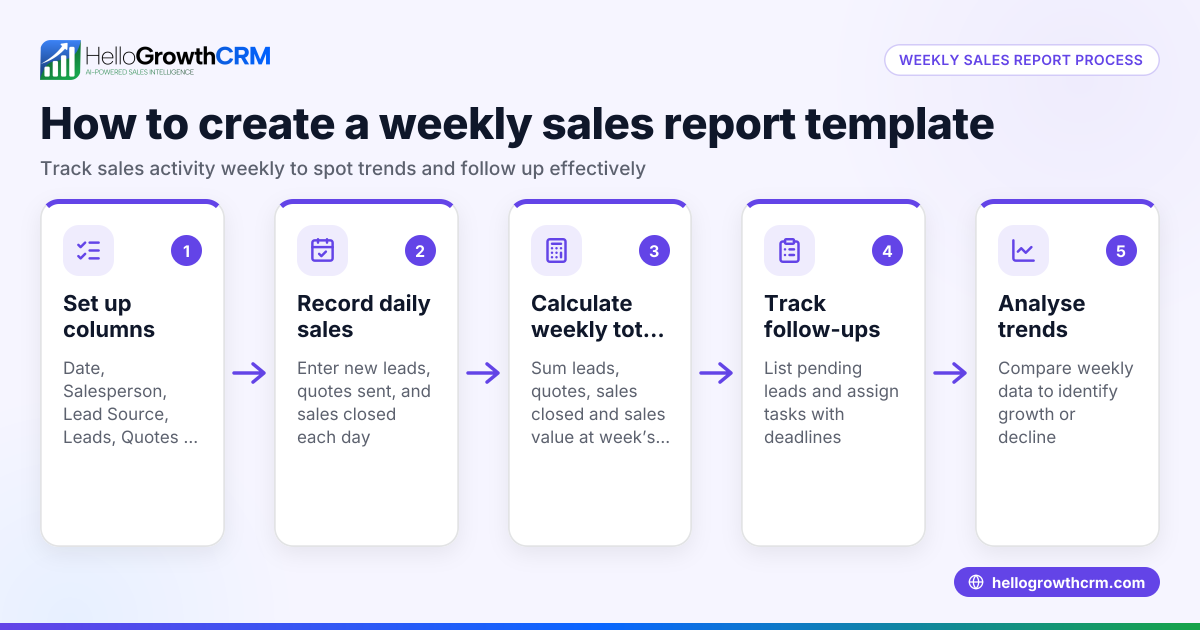
- Set the reporting week and date range: Define the week start and end dates clearly (e.g., Monday to Sunday). Check that all sales data falls within this range.
- List all sales leads or deals worked on during the week: Include lead source (IndiaMART, JustDial, walk-ins), customer name, contact details, and product or service interest.
- Record sales activities and outcomes: Note calls made, quotations sent, meetings held, and deals closed.
- Enter sales amounts and revenue collected: For each closed deal, record the sale value in ₹. Verify invoice or payment confirmation.
- Track pipeline stage for each deal: Mark stages like Lead, Contacted, Quote Sent, Negotiation, and Closed Won/Lost. Check for any deals stuck too long in a stage.
- Summarise weekly totals: Calculate total leads, quotations sent, deals closed, and total revenue.
- Add notes on issues or follow-up plans: Include reasons for lost deals or next steps for ongoing ones.
- Review for completeness and accuracy: Double-check figures and ensure no leads are missing. Confirm dates and amounts.
For ready templates and tools, you can download free sales templates and calculators without signing up at free sales tools and calculators or explore sales templates.
Example (fictional figures)
For the week 01/05/2024 to 07/05/2024, a small electronics retailer tracked these sales:
| Lead Source | Customer | Product | Stage | Sale Value (₹) |
|---|---|---|---|---|
| IndiaMART | Rajesh Kumar | LED TV | Closed Won | ₹45,000 |
| JustDial | Anjali Sharma | Washing Machine | Quote Sent | ₹25,000 |
| Walk-in | Sunil Gupta | Refrigerator | Negotiation | ₹30,000 |
Calculations:
Total leads = 3
Total quotations sent = 1 (Anjali Sharma)
Deals closed = 1 (Rajesh Kumar)
Total revenue = ₹45,000
Remaining pipeline value = ₹25,000 + ₹30,000 = ₹55,000
This simple table helps track weekly progress and plan follow-ups.
Common mistakes
- Missing or incorrect dates: Leads outside the reporting week cause inaccurate data. Always verify date ranges.
- Not updating deal stages: Leads stuck in old stages hide pipeline issues. Update stages promptly.
- Ignoring follow-up dates: Without follow-up reminders, leads go cold. Use reminders or task boards.
- Mixing different sales channels without clarity: Separate leads by source for better analysis.
- Overlooking lost deals: Record reasons for lost deals to improve strategy.
Prevent these by reviewing the report weekly and using clear templates.
Doing this in HelloGrowthCRM
HelloGrowthCRM provides free sales tools, templates, and calculators that you can download without an account at free sales tools and calculators. It also offers a deals (pipeline) feature where quotations sent last week appear as deals at the 'quote sent' stage with follow-up dates, so no opportunity is forgotten. For deeper insights, pipeline forecast and AI-assisted revenue forecasting show where deals are stalling without building spreadsheets. Learn more about HelloGrowthCRM for India.
Frequently asked questions
What should a weekly sales report include? A weekly sales report should include the reporting week dates, list of leads or deals, sales activities, deal stages, sale values, total revenue, and follow-up notes. This helps track progress and identify bottlenecks.
How can I create a weekly sales report without software? You can use Excel or Google Sheets with columns for lead source, customer, product, stage, sale value, and notes. Update it regularly and summarise totals at the end of the week. Free templates can speed this up.
How often should a weekly sales report be updated? Ideally, update daily or after each sales activity to keep data current. At minimum, complete the report at the end of each week for review.
Can I track sales from IndiaMART or JustDial in one report? Yes, separate columns or filters for lead source let you track sales from IndiaMART, JustDial, and other channels in the same report.
How does HelloGrowthCRM help with weekly sales reports? HelloGrowthCRM offers free downloadable sales templates and tools, plus a deals pipeline to track quotations and follow-ups. AI insights help forecast revenue and identify stalled deals without manual spreadsheets.
Key takeaways
- Use a clear date range and record all leads and sales activities weekly.
- Track deal stages and update follow-up dates to avoid lost leads.
- Summarise totals for leads, quotations, closed deals, and revenue.
- Prevent errors by checking dates, deal stages, and data completeness.
- Download free templates and tools from HelloGrowthCRM to simplify reporting.
Start managing your sales pipeline better with ready templates and AI insights. Start on the Free Forever plan (200 leads, no credit card).
Ready to put this into practice?
Set up your pipeline, WhatsApp follow-ups, and AI lead scoring in minutes — free, no credit card.
Try HelloGrowthCRM freeGet CRM tips in your inbox
Join thousands of sales professionals who get weekly insights on CRM strategy, AI automation, and pipeline optimization.

The HelloGrowthCRM team publishes guides on CRM strategy, AI sales tools, and revenue operations for small business sales teams.