HelloGrowthCRM software
Built for real small-business sales teams
HelloGrowthCRM helps reps qualify faster, follow up on time, and close more deals—with practical automation in one place.
- AI lead scoring and pipeline visibility
- Built-in dialer, WhatsApp, and email automation
- Sales forecasting and RevOps-ready reporting
Incident management reports are formal documents that record any unplanned event disrupting normal business activities. They capture what happened, how the incident was handled, and recommendations to prevent future occurrences. For small businesses, these reports are crucial to quickly understand issues, assign responsibility, and improve processes to avoid repeated problems.
Why this comes up / what goes wrong
Small-business owners often face incidents such as customer complaints, service interruptions, or operational errors that can impact sales, reputation, or efficiency. Without a structured report, these incidents may be forgotten, poorly handled, or repeated. This leads to lost customers, wasted time, and unnecessary costs. Incident management reports provide a clear, organized way to document the facts, responses, and lessons learned so your team can act effectively and improve.
Step-by-step
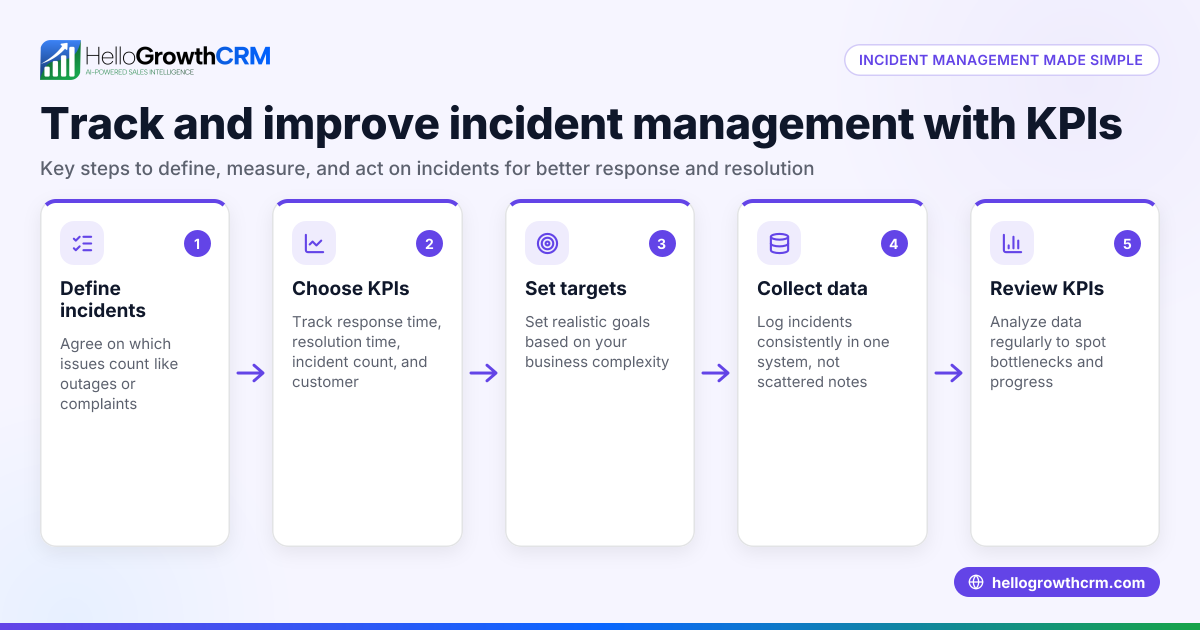
- Identify the incident: Record the date, time, location, and people involved. Check that all relevant details are included to avoid missing key information.
- Describe what happened: Write a clear, factual description without assumptions or opinions. Include the sequence of events and any immediate impacts on your business or customers.
- Record the response: Detail the actions taken to manage or resolve the incident. Verify who responded and when, to track accountability.
- Analyze the cause: Look for root causes or contributing factors, focusing on processes or systems rather than blaming individuals.
- Recommend improvements: Suggest practical steps to prevent recurrence or reduce impact. Confirm these steps are realistic and assign responsibility for implementation.
- Review and approve: Have a manager or responsible person review the report for accuracy and completeness before finalizing.
- Distribute and follow up: Share the report with relevant team members and schedule follow-up actions. Track progress to ensure improvements happen and incidents do not repeat.
Using a CRM like HelloGrowthCRM can help organize incident follow-ups by capturing related enquiries as leads with owners and next steps, keeping communication and actions on track. Learn more about WhatsApp and SMS CRM and the built-in CRM dialer to manage incident communications efficiently.
Example (fictional figures)
A residential real-estate team in Phoenix, Arizona, experienced a delay in closing a property sale due to missing paperwork on 04/15/2026.
- Incident identified: Delay on 04/15/2026 involving agent John Doe and client Jane Smith.
- Description: Paperwork for property #12345 was incomplete, delaying the closing by 5 days.
- Response: Agent contacted the client and legal team immediately, gathered missing documents by 04/17/2026.
- Cause analysis: Root cause was a miscommunication between the agent and document processing team.
- Recommendations: Implement a checklist for required documents before scheduling closings; assign a document review owner.
- Review: Manager Jane Lee approved the report on 04/18/2026.
- Follow-up: Checklist created and assigned to document team lead; progress to be reviewed monthly.
Financial impact calculation
Assuming the property sale was valued at $350,000 and the delay caused an additional holding cost of 0.5% per month: $350,000 × 0.5% = $1,750 (additional cost due to delay)
The team decides to reduce such delays by 80% with the checklist: $1,750 × 80% = $1,400 (estimated savings per incident)
This example shows how managing incidents effectively can save money and improve client satisfaction.
Common mistakes
- Incomplete details: Prevent by always recording date, time, people, and facts clearly to avoid confusion.
- Blaming individuals: Focus on process improvements instead to encourage openness and learning.
- Delaying report creation: Write reports immediately after incidents to ensure accuracy and fresh details.
- Ignoring follow-up: Assign clear owners and deadlines for recommended actions to ensure changes happen.
- Using scattered notes: Keep incident information organized in a central system or CRM to avoid lost or forgotten reports.
Doing this in HelloGrowthCRM
Every enquiry from a form, call, or WhatsApp lands as a lead with an owner and a next step in HelloGrowthCRM. This means incident-related follow-ups can be organized as leads instead of scattered notes. Your team can assign responsibility, set reminders, and track progress easily. Learn more about HelloGrowthCRM for the United States to see how it fits your business.
Frequently asked questions
What is the purpose of an incident management report? An incident management report records what happened during an unexpected event, how it was handled, and what can be improved. It helps businesses analyze problems and prevent repeats.
Who should write the incident management report? Usually, the person responsible for managing the incident or a designated team member writes the report. It should be reviewed by a manager for accuracy.
How soon should an incident management report be completed? Ideally, it should be written immediately after the incident or as soon as possible to ensure details are accurate and fresh.
Can incident management reports be tracked in a CRM? Yes. Using a CRM like HelloGrowthCRM allows you to capture incident-related enquiries as leads, assign owners, and set next steps to ensure follow-up actions are completed.
What details are essential in an incident management report? Include date, time, location, people involved, description of the incident, response actions, cause analysis, and recommendations.
How can incident management reports improve customer satisfaction? By documenting incidents and following up promptly, businesses can resolve issues faster and prevent repeats, which improves customer trust and satisfaction.
Key takeaways
- Incident management reports capture facts, responses, and improvements after unexpected events.
- Write reports promptly with complete details to avoid confusion and repeated problems.
- Focus on root causes and process improvements, not blaming individuals.
- Assign clear responsibility for follow-up actions and track progress.
- Using HelloGrowthCRM helps organize incident follow-ups by capturing enquiries as leads with owners and next steps.
Start managing your incident reports and follow-ups more effectively with HelloGrowthCRM. Start on the Free Forever plan (200 leads, no credit card).
Ready to put this into practice?
Set up your pipeline, WhatsApp follow-ups, and AI lead scoring in minutes — free, no credit card.
Try HelloGrowthCRM freeGet CRM tips in your inbox
Join thousands of sales professionals who get weekly insights on CRM strategy, AI automation, and pipeline optimization.

The HelloGrowthCRM team publishes guides on CRM strategy, AI sales tools, and revenue operations for small business sales teams.