HelloGrowthCRM software
Built for real small-business sales teams
HelloGrowthCRM helps reps qualify faster, follow up on time, and close more deals—with practical automation in one place.
- AI lead scoring and pipeline visibility
- Built-in dialer, WhatsApp, and email automation
- Sales forecasting and RevOps-ready reporting
A quote is a formal offer from a business to a potential customer that outlines the price and terms for products or services. It typically contains key details such as the business and customer information, descriptions of the goods or services, quantities, unit prices, line totals, taxes if applicable, payment terms, and the period the quote is valid.
Why this comes up / what goes wrong
Small business owners often need to provide quotes to prospects to communicate clear pricing and terms before closing a sale. Without a proper quote, customers may be confused about costs or terms, which can lead to lost sales or disputes later. Many Canadian small businesses struggle with creating quotes that look professional and complete, especially when relying on email, text messages, or spreadsheets. This can cause delays, miscommunication, or missed opportunities.
Additionally, managing multiple quotes across different platforms can lead to lost follow-ups or errors in tracking whether a quote was accepted. This is common for sales teams that run their sales process on various channels like WhatsApp, SMS, or email without a unified system.
Step-by-step
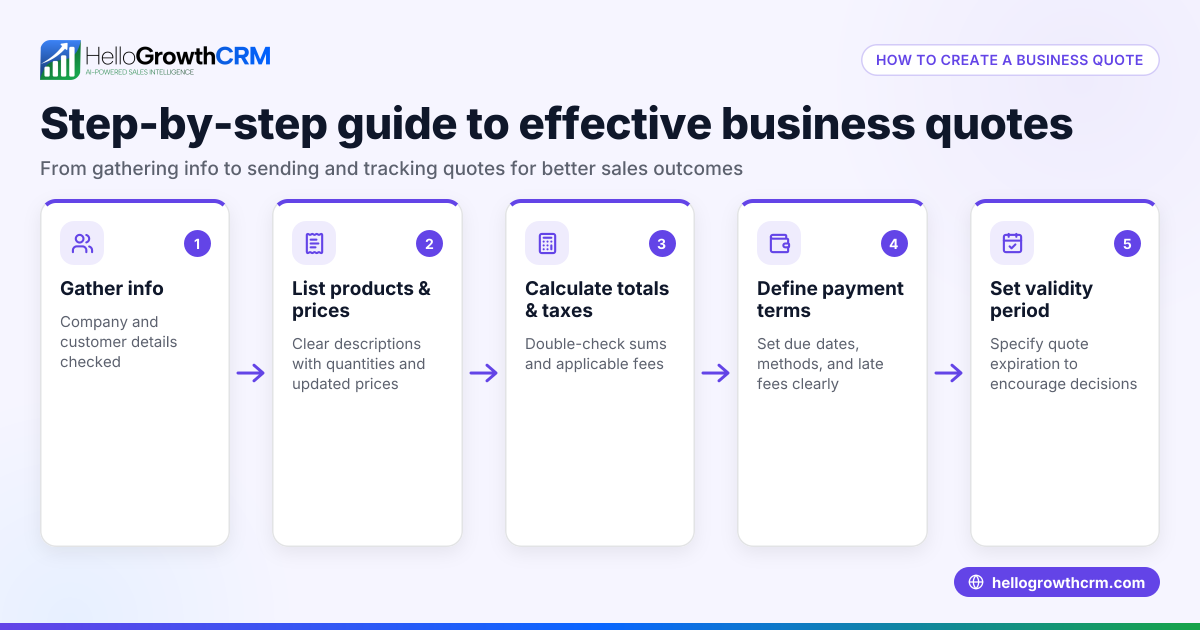
- Gather customer and project details: Confirm the customer's full name, contact information, and the exact products or services they want.
- List items or services clearly: For each product or service, provide a brief description, quantity, and unit price.
- Calculate line totals and subtotal: Multiply each quantity by its unit price to get line totals, then add all line totals for the subtotal.
- Add applicable taxes: If your business charges GST or other taxes, calculate these and add them clearly to the subtotal.
- Specify payment terms and validity period: State how and when payment is expected (e.g., due within 30 days) and how long the quote remains valid.
- Include business contact info and quote date: Add your business name, address, phone number, and the date the quote is issued.
- Review for accuracy and clarity: Double-check all calculations and wording to avoid mistakes or misunderstandings.
- Send and track the quote: Use a system or CRM to send the quote and track if it has been viewed or accepted to plan timely follow-up.
Using a CRM that supports WhatsApp and SMS integration can help streamline sending and tracking quotes, especially when your sales team uses these channels heavily. For example, HelloGrowthCRM offers features tailored to this need WhatsApp and SMS CRM.
Example (fictional figures)
Here is an example quote from a mortgage brokerage in Mississauga, Ontario, issued on 2026-06-01 to a customer named Jane Smith for mortgage application assistance services.
| Description | Quantity | Unit Price | Line Total |
|---|---|---|---|
| Mortgage application service | 1 | C$1,200 | C$1,200 |
| Credit report fee | 1 | C$100 | C$100 |
Subtotal = C$1,200 + C$100 = C$1,300
Assuming GST at 5% (illustrative):
GST = C$1,300 × 5% = C$65
Total = C$1,300 + C$65 = C$1,365
Payment terms: Due within 30 days
Quote valid until: 2026-06-30
This quote clearly shows each item, quantity, price, subtotal, tax, total, payment terms, and validity period.
Common mistakes
- Omitting important details: Always include quantities, prices, taxes, payment terms, and validity to avoid confusion. Use clear templates.
- Using unclear descriptions: Be specific about what each item or service includes to prevent misunderstandings.
- Not specifying validity or payment terms: This can cause delays or disputes. Clearly state these on the quote.
- Sending quotes without tracking or follow-up: Without tracking, you may miss when a customer views or accepts a quote. Use a CRM to monitor status.
- Manual errors in calculations: Double-check math or use software tools to reduce mistakes.
- Scattered communication channels: Running sales on text, email, and spreadsheets can cause lost leads or quotes. Consolidate using CRM tools.
Prevent these mistakes by using a clear, consistent quoting process and tools that help track quotes and follow-ups.
Doing this in HelloGrowthCRM
HelloGrowthCRM offers a built-in quoting and proposal tool that lets you build, send, and track commercial documents directly from a deal record. You can generate invoices tied to closed deals and reconcile payments. The status of each quote — whether sent, viewed, or accepted — is displayed on the same screen as your follow-up tasks. This integration helps sales teams manage leads and quotes efficiently without juggling multiple apps or spreadsheets. Learn more about HelloGrowthCRM for Canada here and its quoting features at the built-in CRM dialer.
Frequently asked questions
What information must be on a quote? A quote should include your business name, address, and contact info; the customer's details; descriptions of goods or services; quantities; unit prices; subtotal; applicable taxes; total price; payment terms; and the validity period.
Is a quote legally binding? Generally, a quote is an offer and not legally binding until accepted by the customer, at which point it forms part of the contract. Specific terms depend on your jurisdiction and agreement.
How long should a quote be valid? Quotes are commonly valid for 30 days, but you can set shorter or longer validity depending on your business needs or industry standards.
Can I update a quote after sending it? Yes, but you should clearly communicate any changes to the customer and resend the updated quote to avoid confusion.
How can I track if a customer viewed my quote? Using a CRM like HelloGrowthCRM, you can see if the quote was sent, viewed, or accepted directly from the deal screen, helping you plan timely follow-up.
Do I need to include taxes on the quote? If you charge GST or other taxes, include them clearly on the quote. Verify your tax obligations carefully.
Key takeaways
- A quote is a formal document outlining pricing and terms for products or services.
- It must include clear item descriptions, quantities, prices, taxes, payment terms, and validity.
- Avoid common mistakes like missing information, unclear descriptions, or lack of follow-up.
- Use a CRM that integrates with WhatsApp and SMS to send and track quotes efficiently.
- HelloGrowthCRM lets you manage quotes and their status alongside your sales tasks, reducing errors and lost leads.
Start managing your quotes better today. Start on the Free Forever plan (200 leads, no credit card).
Ready to put this into practice?
Set up your pipeline, WhatsApp follow-ups, and AI lead scoring in minutes — free, no credit card.
Try HelloGrowthCRM freeGet CRM tips in your inbox
Join thousands of sales professionals who get weekly insights on CRM strategy, AI automation, and pipeline optimization.

The HelloGrowthCRM team publishes guides on CRM strategy, AI sales tools, and revenue operations for small business sales teams.