HelloGrowthCRM software
Built for real small-business sales teams
HelloGrowthCRM helps reps qualify faster, follow up on time, and close more deals—with practical automation in one place.
- AI lead scoring and pipeline visibility
- Built-in dialer, WhatsApp, and email automation
- Sales forecasting and RevOps-ready reporting
An invoice is a formal document requesting payment for goods or services provided by your business. To ensure your invoice is clear and professional, it should contain several key elements: your business name and contact information, customer details, a unique invoice number, the date issued, a detailed list of products or services with quantities and prices, any applicable taxes, payment terms, and the total amount due.
Why this comes up / what goes wrong
Many small-business owners ask "what to include on invoice" because missing or unclear information can delay payments, cause confusion, or lead to disputes. For example, without a unique invoice number, tracking payments becomes difficult. If payment terms are vague or missing, customers might pay late or not at all. Invoices lacking business or customer contact details can be ignored or questioned. Clear and complete invoices help maintain steady cash flow and professional relationships.
Step-by-step
- Add your business information: Include your legal business name, physical address, phone number, and email. This identifies who is issuing the invoice.
- Include customer information: Add the customer's name or company, their address, and contact details to specify who should pay.
- Assign a unique invoice number: Use a sequential or coded system to keep your invoices organized and easy to reference.
- Add the invoice date: The date you issue the invoice, important for payment deadlines and record-keeping.
- List products or services: Provide a detailed description of each item or service, quantity, unit price, and line total.
- Calculate taxes if applicable: Include sales tax or other taxes based on your business location and customer.
- State payment terms: Specify when payment is due (e.g., Net 30), accepted payment methods, and any late payment penalties.
- Calculate totals: Show the subtotal, taxes, and the grand total amount due.
- Add payment instructions or notes: Include bank details, payment links, or other relevant information to help your customer pay promptly.
Before sending, carefully review each invoice to ensure all fields are complete and accurate.
Example (fictional figures)
A Denver-based B2B software reseller invoices a client on 06/15/2026 for software licenses and support.
Business: Software Solutions LLC Customer: GreenTech Inc. Invoice #: 2026-045 Date: 06/15/2026
| Description | Quantity | Unit Price | Line Total |
|---|---|---|---|
| Software License | 10 | $1,200 | $12,000 |
| Support Services (6 mo) | 1 | $3,000 | $3,000 |
Subtotal = $12,000 + $3,000 = $15,000 Sales Tax (assumed 7.5%) = $15,000 × 7.5% = $1,125 Total Due = $15,000 + $1,125 = $16,125
Payment Terms: Net 30 days
This invoice clearly shows all required details for timely payment.
Common mistakes
- Missing invoice number: Always assign a unique number to avoid confusion and ease tracking. Prevent this by using an automated numbering system.
- Unclear payment terms: Specify due dates and accepted payment methods to prevent late payments. Avoid vague terms like "pay soon."
- Incomplete item descriptions: Provide clear, detailed descriptions to avoid disputes over what was sold.
- Forgetting taxes: Understand your tax obligations and include applicable taxes correctly.
- No contact info: Include your business and the customer's contact details for questions or clarifications.
- Sending invoices late: Issue invoices promptly after delivery or service to speed up payment.
Use a checklist or invoicing software to prevent these errors. For managing customer communication, consider tools like HelloGrowthCRM’s WhatsApp and SMS CRM.
Doing this in HelloGrowthCRM
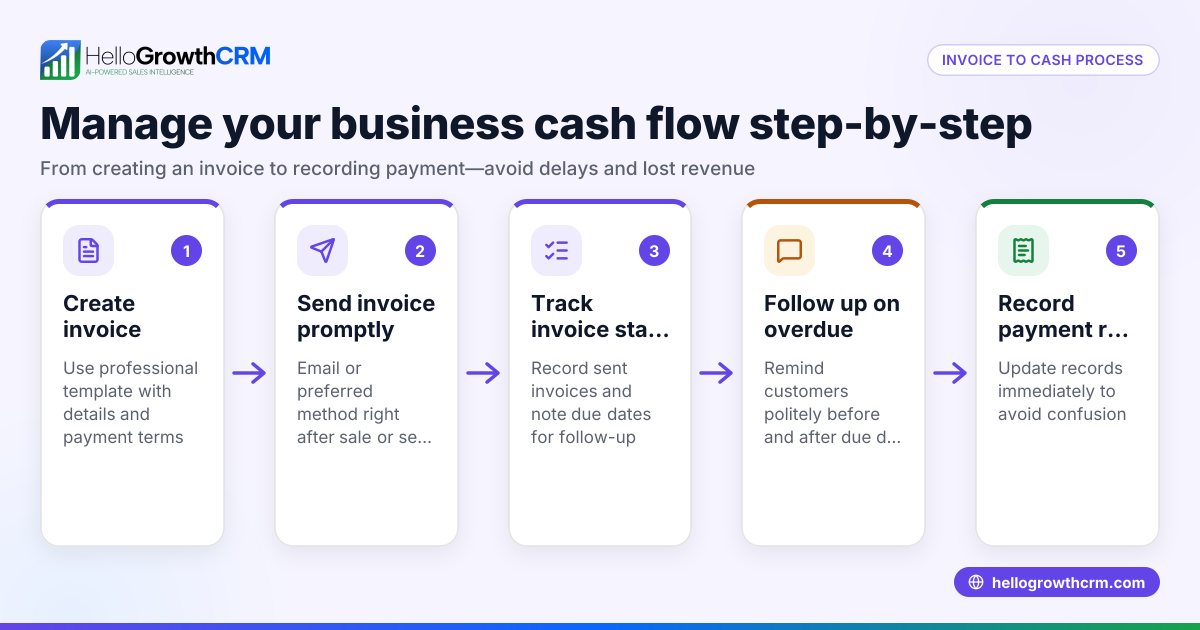
HelloGrowthCRM includes built-in quoting and proposal tools that let you create, send, and track quotes, proposals, invoices, and payments received directly from a deal record. You can monitor the status of these commercial documents—whether sent, viewed, or accepted—on the same screen as follow-up tasks. This helps your sales team manage invoicing and payment processes efficiently. Learn more about these features on the built-in CRM dialer page.
Frequently asked questions
What is the difference between an invoice and a receipt? An invoice is a request for payment sent before or after delivering goods or services. A receipt is proof of payment received. You send an invoice to ask for money and a receipt once payment is made.
Do I need to include taxes on every invoice? Include taxes if your business is required to collect sales tax or other taxes on the transaction. Check your state and local tax laws. If no tax applies, you can omit it.
Can I use the same invoice number twice? No. Each invoice number should be unique to avoid confusion and ensure accurate record-keeping.
What payment terms should I include? Common terms are Net 30 (payment due in 30 days), but you can set what works for your business. Include accepted payment methods and any late fees.
Is it okay to send invoices by email? Yes. Email is a common and efficient way to send invoices. You can also use CRM tools like HelloGrowthCRM to send and track invoices digitally.
How can I keep track of all my invoices? Use a spreadsheet, accounting software, or CRM system like HelloGrowthCRM to organize and monitor invoices, payments, and follow-ups.
Key takeaways
- Include your business and customer details on every invoice.
- Use unique invoice numbers and clear dates.
- List products or services with prices and taxes.
- Specify payment terms to avoid delays.
- Review invoices carefully before sending.
- Use tools like HelloGrowthCRM to manage quotes, proposals, invoices, and payments efficiently.
Start managing your invoices efficiently and avoid payment delays. Start on the Free Forever plan (200 leads, no credit card).
Ready to put this into practice?
Set up your pipeline, WhatsApp follow-ups, and AI lead scoring in minutes — free, no credit card.
Try HelloGrowthCRM freeGet CRM tips in your inbox
Join thousands of sales professionals who get weekly insights on CRM strategy, AI automation, and pipeline optimization.

The HelloGrowthCRM team publishes guides on CRM strategy, AI sales tools, and revenue operations for small business sales teams.