HelloGrowthCRM software
Built for real small-business sales teams
HelloGrowthCRM helps reps qualify faster, follow up on time, and close more deals—with practical automation in one place.
- AI lead scoring and pipeline visibility
- Built-in dialer, WhatsApp, and email automation
- Sales forecasting and RevOps-ready reporting
A WhatsApp Business API CRM is designed to help small and mid-sized businesses manage their sales and customer communication through WhatsApp’s Business API. This integration allows teams to capture leads, send follow-ups, and log conversations in one place, improving response times and sales effectiveness.
Why this comes up / what goes wrong
Many small-business owners run sales through WhatsApp messages, emails, and spreadsheets but struggle with slow lead follow-up and disorganized communications. Without a dedicated CRM that supports WhatsApp Business API, leads can get lost, conversations scattered, and sales opportunities missed. Business owners search for WhatsApp Business API CRMs to centralize communication, automate workflows, and help their inside-sales teams stay productive.
Step-by-step
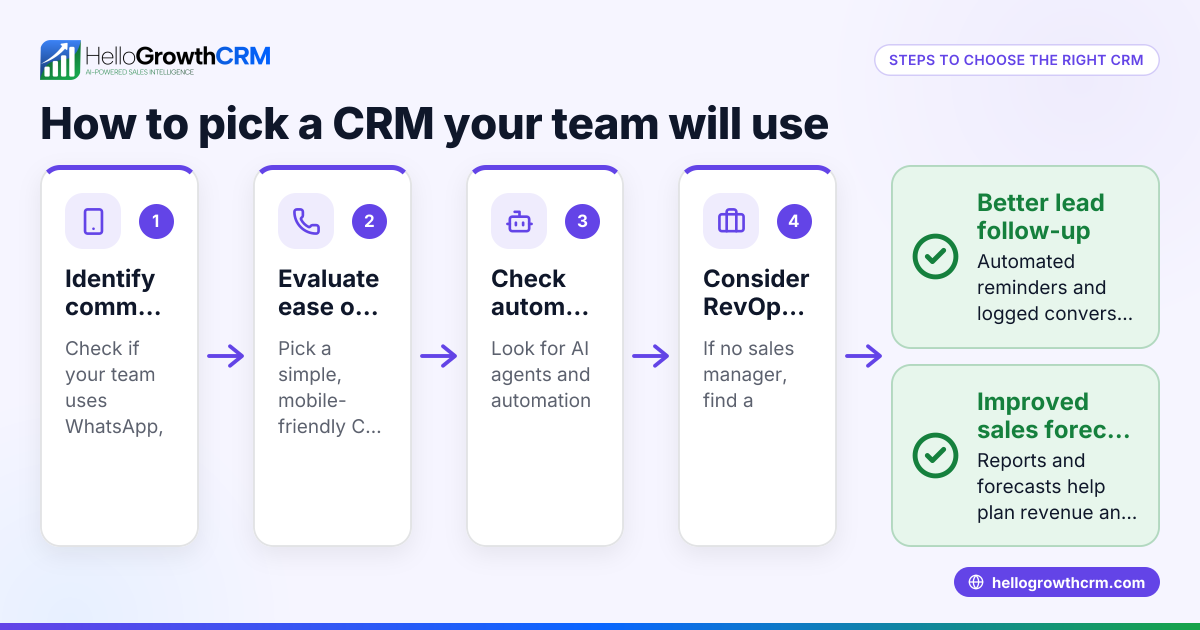
- Identify your communication channels: Confirm that WhatsApp is a primary channel for your leads and customers. Check if your team also uses SMS or email frequently.
- Check WhatsApp Business API access: Ensure the CRM supports WhatsApp Business API, not just the regular WhatsApp Business app, because the API allows automation and integration.
- Evaluate lead capture methods: Look for CRMs that can capture leads automatically from web forms and popular integrations to avoid manual data entry.
- Review messaging workflows: The CRM should let you send WhatsApp, SMS, and email sequences to automate follow-ups and keep leads engaged.
- Assess conversation logging: Verify that all WhatsApp conversations are logged on the lead record, enabling your sales team to track communication history.
- Consider AI assistance: Some CRMs offer AI agents that draft follow-up messages after calls, saving time for sales reps.
- Check integration options: See if the CRM connects with your existing platforms for seamless data syncing and workflow automation. For example, HelloGrowthCRM integrates with platforms like IndiaMART and JustDial to automatically import enquiries as leads.
- Test usability: Choose a CRM your team can adopt easily without complex training or resistance.
Example (fictional figures)
A two-location dental practice in Columbus, Ohio, receives about 300 new patient inquiries monthly through WhatsApp and web forms. They want to automate follow-ups to reduce lost leads and speed up appointment bookings.
- They pay $1,000 monthly for a CRM with WhatsApp Business API support.
- The CRM captures 300 leads automatically from WhatsApp and web forms.
- AI agents draft follow-up messages, saving each rep about 10 hours monthly.
- Faster follow-up increases booked appointments by 15%.
Calculations: $1,000 (CRM cost per month) × 12 months = $12,000 (annual CRM cost) 300 leads × 15% increase = 45 additional appointments Average appointment value = $150 45 × $150 = $6,750 additional revenue
This shows the CRM cost is justified by increased revenue and efficiency.
Common mistakes
- Choosing a CRM without WhatsApp Business API support: Prevent by confirming API support, not just WhatsApp Business app compatibility.
- Ignoring conversation logging: Without logging, teams lose context. Choose CRMs that log WhatsApp messages on lead records.
- Overlooking integrations: Manual lead entry wastes time. Use CRMs with integrations like IndiaMART and JustDial to automate lead capture.
- Neglecting team adoption: Complex CRMs lead to low usage. Test usability before committing.
- Not using AI features: Missing out on AI drafting follow-ups can slow sales. Consider CRMs with AI agents to speed workflows.
Doing this in HelloGrowthCRM
HelloGrowthCRM offers WhatsApp and SMS workflows that log all WhatsApp conversations on the lead record, enabling seamless follow-ups and engagement. It captures leads automatically from integrations including IndiaMART and JustDial. For sales reps, AI agents draft follow-up messages after calls, reducing manual effort and speeding response times. Learn more about these features on the WhatsApp and SMS CRM page and explore integrations available. HelloGrowthCRM is tailored for the United States market needs.
Frequently asked questions
What is the difference between WhatsApp Business API and WhatsApp Business app? WhatsApp Business API is designed for medium and large businesses to automate and integrate messaging at scale, while the WhatsApp Business app is for small businesses managing messages manually. A CRM must support the API to automate workflows effectively.
Can I integrate WhatsApp Business API CRM with other tools? Yes, many CRMs support integrations with platforms like IndiaMART, JustDial, Razorpay, and others to import leads and sync data. Check the CRM’s integration list to ensure compatibility.
How does AI help in a WhatsApp Business API CRM? AI agents can draft follow-up messages after calls or interactions, so sales reps only need to review and send them. This saves time and ensures consistent communication.
Is WhatsApp Business API CRM suitable for small businesses? Yes, especially for small businesses with growing sales teams that want to automate messaging and improve lead follow-up without juggling multiple tools.
How do I ensure my sales team uses the WhatsApp Business API CRM? Choose a CRM with an intuitive interface and features that match your team's workflow. Training and clear processes also help adoption.
Key takeaways
- WhatsApp Business API CRMs centralize messaging and automate lead follow-up.
- Ensure the CRM supports WhatsApp Business API, not just the app.
- Look for automatic lead capture and integration with your existing tools.
- Conversation logging on lead records is essential for team context.
- AI agents can draft follow-ups, saving reps time.
- Usability and team adoption are critical for CRM success.
Start managing your WhatsApp leads efficiently with HelloGrowthCRM. You can start on the Free Forever plan (200 leads, no credit card) today.
Ready to put this into practice?
Set up your pipeline, WhatsApp follow-ups, and AI lead scoring in minutes — free, no credit card.
Try HelloGrowthCRM freeGet CRM tips in your inbox
Join thousands of sales professionals who get weekly insights on CRM strategy, AI automation, and pipeline optimization.

The HelloGrowthCRM team publishes guides on CRM strategy, AI sales tools, and revenue operations for small business sales teams.