What accounts does
Accounts are company-level records that hold everything about an organisation you sell to: its contacts, open opportunities, activity history, and notes, on one screen. When a deal involves a procurement head, a technical evaluator, and a director who signs, the account is where those threads stay connected instead of living in three reps' memories.
Without account records, B2B selling goes single-threaded. Two reps email the same company without knowing it, a champion leaves and the relationship history leaves with them, and nobody can judge whether an account is genuinely engaged or one contact is just polite. Accounts fix that by rolling contacts, deals, and activity into one inspectable view.
How it works in HelloGrowthCRM
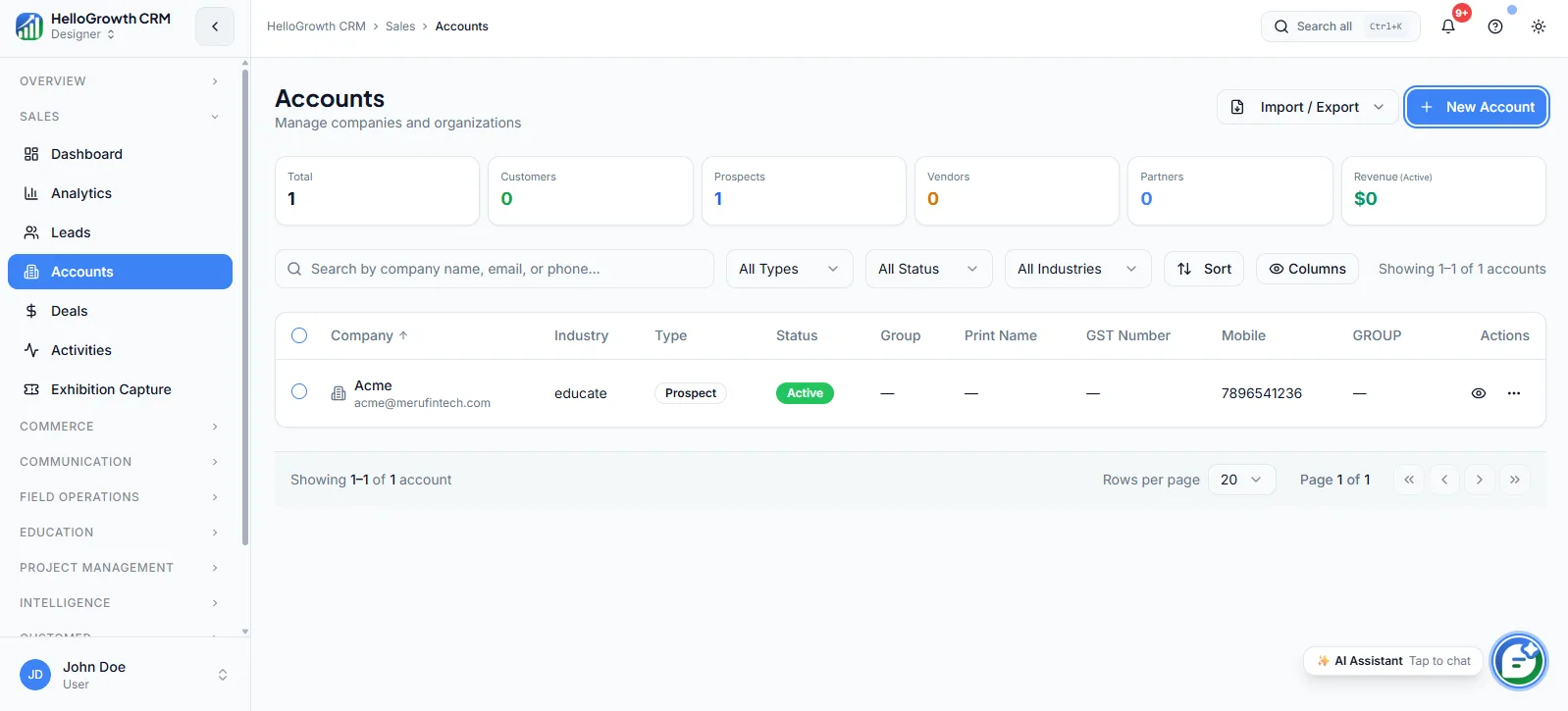
Accounts sit alongside leads and deals in the core CRM. Each account links its contacts, open and past deals, and every logged activity, so one screen shows the whole relationship. You can map decision-makers, champions, and blockers across the buying group, roll up activity across contacts to judge true engagement, and link parent and child companies for groups, franchises, and multi-location buyers.
Accounts give deals and activities their company context: a deal belongs to an account, activities roll up to it, and analytics can report engagement at account level. The free plan caps accounts at 50; all paid plans are unlimited.
See it in action
How this capability is packaged by plan
| Plan | Availability |
|---|---|
| Free Forever | 50 cap |
| Software Only | Unlimited |
| Growth Engine | Unlimited |
| RevOps Partner | Unlimited |
Setting it up — step by step
- 1
Import your company list
Bring existing companies in from a spreadsheet with owner and industry fields mapped.
- 2
Link contacts to their accounts
Attach every contact to a company so conversations stop floating free of context.
- 3
Map the buying group on key accounts
Tag decision-makers, champions, and blockers on your top accounts first.
- 4
Set up parent-child links where relevant
Connect group companies, franchises, and branch locations so rollups reflect the real structure.
- 5
Assign account ownership
Give every account one owner so outreach is coordinated instead of accidental.
Who uses accounts
Sales rep
Opens the account before every call to see all contacts, open deals, and the last five touches — so a conversation with the technical evaluator reflects what the commercial contact was told last week.
Sales manager
Reviews account-level engagement rollups to distinguish genuinely active accounts from single-thread noise, spots key accounts going quiet, and checks that big opportunities are multi-threaded before the forecast counts them.
Founder/owner
Uses accounts to keep institutional memory out of individual heads: when a rep leaves, the accounts they owned transfer with full contact maps and history, and revenue relationships survive the departure.
Accounts in practice — industry examples
Pharma distributors
A distributor manages hospital and chain-pharmacy accounts with a purchase officer, a pharmacist, and a finance contact each. The account record holds all three plus order history, so when the purchase officer changes — common in hospital procurement — the relationship survives on the record, not in a rep's phone.
Recruitment agencies
An agency sells into companies where three hiring managers and one HR head all raise roles. The account view shows every open mandate and conversation across those contacts, so consultants stop duplicating outreach and the account owner can judge whether the client relationship is deepening or drifting.
Exporters
An exporter sells to overseas buying houses with a merchandiser, a QA lead, and an owner involved per order. Accounts link the parent buying house to its regional offices, and activity rollups show which buyers have gone quiet this season — prompting re-engagement before the next order cycle is placed elsewhere.
Common mistakes to avoid
Leaving contacts unlinked to accounts, so the company view shows two of the six people actually involved in the deal.
Skipping buying-group mapping and running big deals single-threaded, then losing them when the one known contact changes jobs.
Ignoring parent-child structure for groups and franchises, so engagement and revenue rollups fragment across duplicate company records.
Creating accounts without owners, so three reps touch the same company with different messages and no one is accountable.
What teams usually care about here
Useful for account-based selling and multi-contact deal cycles
Keeps company notes, stakeholders, and revenue activity tied together
Paid tiers remove record caps and make account management scalable
See every contact, open deal, and past activity for an account on one screen
Map decision-makers, champions, and blockers so the whole buying group is covered
Roll up activity across contacts to judge true account engagement, not single-thread noise
Link parent and child companies for groups, franchises, and multi-location buyers
How this fits the buying decision
Buyers usually do not evaluate accounts in isolation. They want to know whether it improves execution, reporting, handoffs, and accountability inside the broader CRM workflow. That is why this capability matters most when it is connected to records, ownership, activity history, and manager review rather than living in a separate point tool.
The real decision is often less about whether a box is checked and more about how much depth the team needs. Lower tiers may be enough when the workflow is simple or the volume is small. Higher tiers become more valuable when teams need governance, faster response expectations, specialist execution, or a repeatable operating cadence around the process.
If this capability is important to your rollout, compare it in the context of the whole plan. That includes related workflows, support level, reporting expectations, and whether your team will manage the motion itself or rely on managed RevOps help to keep it consistent.
Frequently asked questions
How many accounts does the Free Forever plan include?
The free plan caps accounts at 50, enough to run a focused early-stage book. Software Only, Growth Engine, and RevOps Partner all remove the cap, which is what makes proper account management scalable as your customer list grows.
What is the fastest way to set up accounts?
Import your company list from a spreadsheet, then link existing contacts to their companies. Prioritise mapping buying groups on your top accounts rather than perfecting all of them; most teams get their key accounts structured in the first week and tidy the long tail gradually.
How are accounts different from leads?
Leads track individual enquiries through qualification; accounts track the company relationship over time. A qualified lead's company becomes or joins an account, where multiple contacts, deals, and years of activity accumulate. B2B teams selling into multiple stakeholders live in accounts; volume enquiry-handling lives in leads.
Do calls and WhatsApp messages to contacts show on the account?
Yes. Activities logged against a contact — dialer calls, WhatsApp and SMS threads, emails, meetings — roll up to the account view, so account-level engagement reflects every touchpoint across the buying group rather than just one contact's thread.
Can I model group companies and multi-location buyers?
Yes. Parent and child accounts can be linked, so franchises, group companies, and multi-location buyers show as one connected structure. That keeps engagement rollups and revenue reporting honest at group level while still letting reps work each location individually.
Related Pricing Capabilities
Dashboard (overview KPIs)
A home view for pipeline health, workload, follow-up priorities, and top-line KPIs so reps and managers can start the day with context.
Analytics
Reporting surfaces that help teams inspect conversion rates, stage-to-stage movement, rep activity levels, and overall funnel performance — so decisions come from data rather than gut feel.
Leads
Lead records that hold qualification context, ownership, source, and follow-up state in one CRM-native workflow — so no inquiry slips through the cracks between first touch and handoff.
Deals
Pipeline objects that track opportunity value, stage progress, next steps, and forecast contribution across every sales motion — the working surface where reps move deals and managers inspect risk.
Activities
Calls, meetings, notes, tasks, and logged touchpoints that give teams a usable timeline of work completed on every record.
Exhibition Capture
Lead capture workflows for events, trade shows, and offline sales moments where speed and attribution both matter.