AI Email Composer — Write Personalized Sales Emails in Seconds
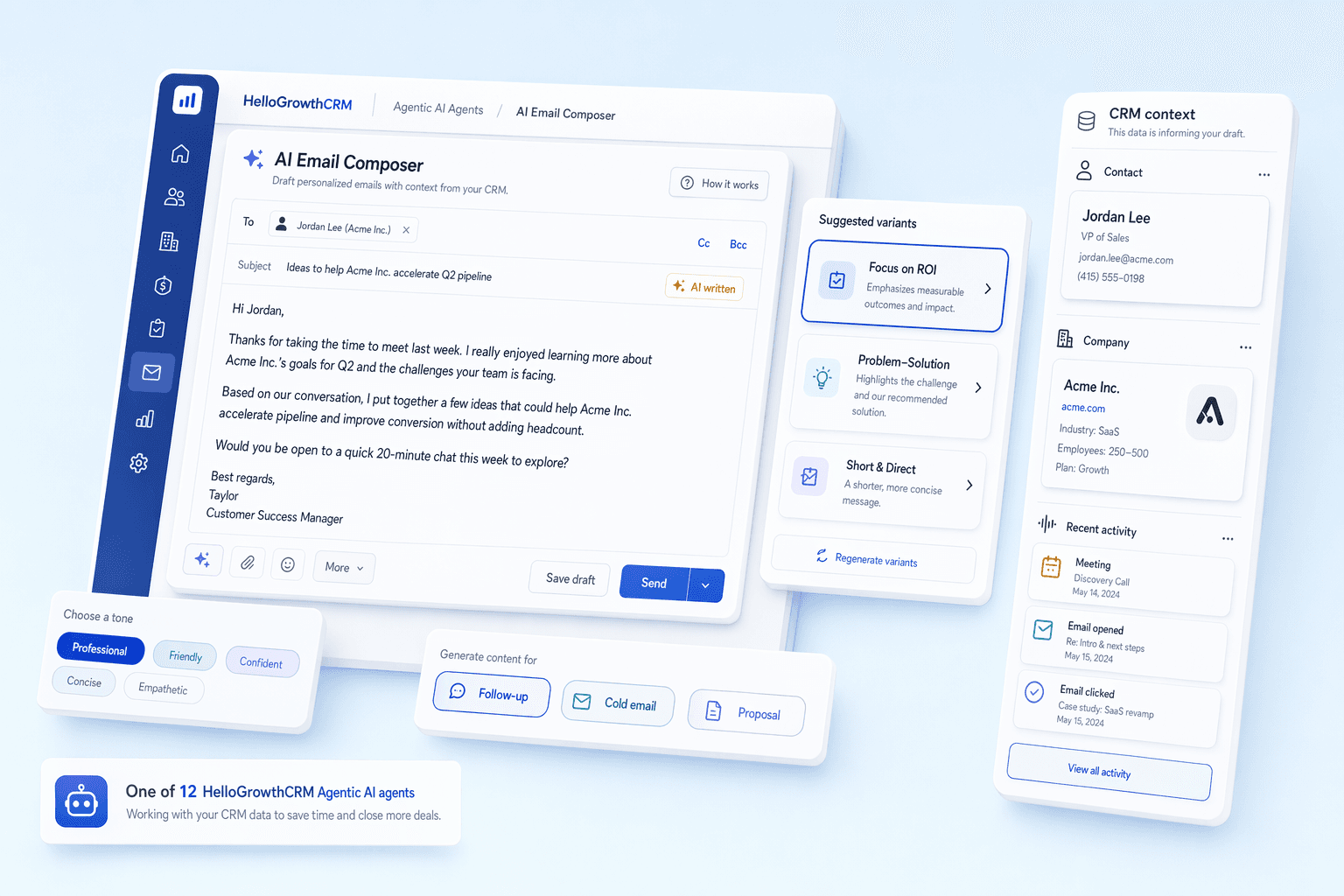
HelloGrowthCRM's AI email composer drafts personalized cold outreach, follow-up emails, and proposals using your CRM data. Smart compose suggests completions as you type — so every email is relevant and on-brand.
By Rushabh Shah, Founder, HelloGrowthCRM · Reviewed by HelloGrowthCRM RevOps Team, Revenue Operations · Last updated July 2026
Key takeaways
- An AI email composer inside the CRM drafts cold outreach, follow-ups, and proposals from the contact, company, and deal context already on the record — no copy-pasting into a separate tool.
- The advantage over generic ChatGPT prompting is context: the AI knows the prospect, deal stage, and last activity before it writes a word.
- Speed is real — a five-email sequence drops from ~45–90 minutes to a few minutes — but every draft still needs a human read before it sends.
- Deliverability guardrails (spam-trigger checks, SPF/DKIM/DMARC, volume throttling) matter as much as the words for cold outreach.
- Treat it as a fast first draft that you edit for accuracy and voice, not an autopilot that sends unreviewed email at scale.
Quick answer
How does the AI know what to write?
Also answered on this page
- Can I adjust the tone of the email
- Can the AI generate entire sequences
- Does the AI learn from my writing style
Why teams evaluate ai email composer
AI Email Composer usually becomes important when a repeated part of the revenue workflow is creating too much manual work, too little visibility, or too much tool-switching. Teams are rarely shopping for a feature in isolation. They are usually trying to make one meaningful workflow cleaner, faster, and easier to inspect.
That is why buyers usually look beyond the headline capability and inspect the surrounding details: Context-aware email drafting from CRM data — uses company, contact, deal, and activity context, Smart compose — AI suggests completions as you type to speed up drafting, Tone and length adjustment — formal, casual, short, long, urgent, friendly, Cold email sequence generation — AI drafts entire 5-7 email sequences in seconds. Those details determine whether the feature actually improves day-to-day execution or simply adds another surface area to manage.
Where ai email composer fits in the workflow
Most teams adopt this capability as part of practical motions such as cold outreach at scale, follow-up automation, proposal email generation. The value tends to show up fastest when the workflow is tied to a clear owner, a clear next action, and a visible outcome that managers can review later.
It also matters how this page connects to the rest of the stack. For many teams, tools such as Gmail, Outlook, WhatsApp Business are what make the feature operational instead of theoretical because they keep data, communication, and handoffs in sync.
What a strong rollout looks like for ai email composer
The best rollout usually starts small: one high-value workflow, one clear ownership model, and one review rhythm for adoption. Once the team is consistently using the feature, managers can expand into deeper automation, reporting, or cross-functional handoffs without rebuilding the foundation.
In practice, that means evaluating not only what the feature can do, but also whether the team can maintain the process around it. Ease of use, reporting trust, and manager visibility matter just as much as the feature checklist itself.
- Use it first for cold outreach at scale if that is the workflow creating the most friction today.
- Use it first for follow-up automation if that is the workflow creating the most friction today.
- Use it first for proposal email generation if that is the workflow creating the most friction today.
- Use it first for demo scheduling emails if that is the workflow creating the most friction today.
How It Works
Get started in three simple steps
Key Features
Use Cases
Cold Outreach at Scale
Draft personalized cold emails in seconds using prospect company data — send 50+ outreach emails daily.
What teams care about
- Fast adoption with less manual cleanup for managers and reps.
- Clear visibility into workflow execution, outcomes, and accountability.
- Reliable handoffs into the CRM record so downstream teams keep full context.
Deep dive
Open the sections that matter most instead of scrolling through a long uninterrupted text block.
What Is an AI Email Composer?
An AI email composer is a drafting assistant that writes sales emails for you from the context already in your CRM — the contact, company, deal stage, and recent activity — rather than from a blank page or a static template. You pick the email type and tone; it produces a personalized first draft in seconds that you edit and send.
The distinction that matters is between merge-field personalization and context-aware drafting. A template can drop in a first name and company; a composer can reference the demo that happened last week, the pricing question the prospect raised, and where the deal sits in the pipeline. That is the difference between an email that looks personalized and one that reads as if a colleague wrote it.
| Aspect | Writing from scratch | Static template | AI email composer |
|---|---|---|---|
| Time per email | High | Low | Low |
| Personalization depth | High (if you invest) | First name / company only | Context-aware from CRM |
| References deal history | If you remember | No | Yes |
| Adapts tone on demand | Manually | No | Yes |
| Consistent quality at volume | Hard | Yes but generic | Yes and personalized |
How the Composer Turns CRM Data Into a Draft
It helps to see which record fields feed a draft and how they change the output. The mapping below is illustrative, showing how the same compose action produces a different email depending on what the CRM knows about the prospect.
| CRM field | Example value | How it shows up in the draft |
|---|---|---|
| Deal stage | Post-demo | Recap + clear next step, not an intro |
| Last activity | Asked about pricing | Opens by answering the pricing question |
| Industry | Home services | Uses relevant example and language |
| Contact role | Owner | Outcome-focused, less technical detail |
| Prior emails | Two, no reply | Shorter, lighter follow-up tone |
AI Email Composer vs Generic ChatGPT Prompting
Sales reps who use ChatGPT directly for email drafting hit a consistent wall: the AI knows nothing about the specific prospect, deal, or company in the CRM. Every draft means copying contact details, deal context, and conversation history into the prompt — which often takes longer than just writing the email.
An integrated composer reads that data automatically. It knows the prospect's name, company, industry, deal stage, last activity, and email history before it writes a single word, so the output is genuinely personalized rather than a polished-but-blind draft. The trade is that a standalone chatbot is more flexible for one-off writing, while an in-CRM composer is faster and more accurate for the repetitive sales emails you send every day.
| Factor | In-CRM AI composer | General AI chatbot |
|---|---|---|
| Knows the prospect automatically | Yes | No — you paste it |
| Time to a usable draft | Seconds | Minutes (prep + prompt) |
| Logs the email to the deal | Yes | No |
| Deliverability guardrails | Built in | None |
| Best for | Repetitive sales email | One-off, freeform writing |
Best Practices for AI-Drafted Sales Email
The composer produces its best work when the CRM behind it is well kept and you treat drafts as a starting point. A few habits separate reps who get replies from reps who get filtered.
Keep contact, company, and deal fields current so the AI personalizes from facts, not guesses.
Always read a draft for accuracy before sending — fix any detail the AI assumed about the account.
Set tone deliberately per audience: formal for procurement, lighter for founders and owners.
A/B test the suggested subject line variants instead of shipping the first option every time.
For cold outreach, warm the sending domain and throttle volume rather than blasting from day one.
Let the composer learn from your edits by consistently correcting tone and phrasing you dislike.
Common Mistakes With AI Email Drafting
AI drafting fails most often when reps trade away the review step for raw speed, or lean on the tool to paper over a thin CRM. The recurring mistakes are easy to avoid once named.
Sending AI drafts unread, then wondering why a wrong detail cost the reply.
Generating high volumes off a cold domain with no warm-up, and landing in spam.
Leaving every email in the default tone, so outreach reads uniform and impersonal.
Relying on empty CRM fields, which forces the AI into vague, generic personalization.
Ignoring the deliverability flags the composer raises before a risky send.
Treating the composer as a volume machine rather than a way to make each email better and faster.
Drawbacks and Limits (An Honest View)
An AI email composer speeds up drafting; it does not guarantee replies, and it can produce confident, well-written emails that are subtly wrong. If a deal field is stale or a note is missing, the AI will personalize around inaccurate context and the mistake reaches the prospect in polished prose. Volume without judgment is the real risk: it is now trivial to send more mediocre email faster, which trains prospects to ignore you and can hurt sender reputation.
There are limits the tool cannot cross. It does not know the unspoken context of an account — the politics, the prior relationship, the reason a champion went quiet — so the highest-stakes emails still need a human to write or heavily rewrite. Deliverability guardrails reduce spam risk but cannot fix a bad list or an unwarmed domain. Used as a fast, context-aware first draft that a rep reviews and personalizes, it is a genuine time-saver. Used as an unattended send-at-scale engine, it tends to produce more noise than pipeline.
Evidence: Why Faster, Relevant Email Matters
The case for AI email drafting rests on two facts: reps lose a large share of the week to manual work like writing, and buyers reward the company that responds first and most helpfully. Faster, relevant drafts move both.
~28% — of the sales week reps spend on manual tasks such as data entry and drafting — time faster composing recovers (Source: Salesforce, State of Sales)
78% — of buyers buy from the company that responds first or most helpfully — where quick, relevant email wins (Source: HubSpot)
60x — more likely to reach a decision-maker when you follow up within an hour versus waiting a day (Source: Harvard Business Review)
Cold Email Sequences Generated in Minutes
Writing a five-email cold outreach sequence from scratch takes most reps 45–90 minutes per target persona. The composer reduces that to a few minutes — pick the prospect's industry and role, describe the value proposition, and it generates the full set with escalating urgency and varied angles across the steps.
The speed compounds for teams running outreach across several verticals. A rep who could previously keep two active campaigns going can maintain many more, and a solo founder can produce respectable outreach at volume without hiring a copywriter. The discipline that keeps this healthy is the same as always: a clean list, a warmed domain, and a human eye on each draft before it sends.
Getting Started With the AI Email Composer
The composer lives in HelloGrowthCRM's email window on paid plans. Open compose from any contact or deal, choose the email type, and a personalized draft appears within seconds — edit, adjust tone, and send, or rewrite freely from it as a starting point.
Cold outreach: generate personalized cold emails from company and contact CRM data
Follow-up: the AI reads previous emails and suggests contextually appropriate next-step messages
Proposal: generate proposal emails with deal value, timeline, and next steps auto-populated
Subject line variants: get three subject line options with predicted open rate guidance
Sequence generation: create full 5-7 email sequences for a prospect in under five minutes
Tone adjustment: formal, casual, urgent, friendly — per email or per sequence
Connects with Email Automation for sending AI-drafted sequences at scale
All AI features are included in transparent per-user pricing
How CRM-Context Email Drafting Works
Generic AI email tools like ChatGPT can draft a sales email, but they draft it in a vacuum — they have no knowledge of who this prospect actually is, where they are in your pipeline, what was discussed in your last call, or what competitor they mentioned. HelloGrowthCRM's AI Email Composer reads from live CRM data: the contact's company, title, recent call transcripts, email history, deal stage, and any custom fields you have populated. The result is a draft that references actual context rather than generic placeholder text.
This context-awareness is most visible in follow-up emails. After a demo call where the prospect mentioned budget constraints and asked for a case study from the manufacturing sector, the AI Email Composer drafts a follow-up that acknowledges the budget conversation, addresses the constraint with a specific pricing option, and attaches the relevant case study — all without the rep writing a single line. The rep reviews, adjusts tone if needed, and sends. The entire process takes under two minutes.
AI Email Composer in High-Volume Outreach Workflows
For sales teams running cold outreach at scale, the AI Email Composer integrates with the Cold Outreach Agent to personalize every email in a sequence at the contact level. Rather than writing one template for 'CFOs at logistics companies', the composer reads each CFO's specific company challenges, recent company news, and LinkedIn signals to write a message that references their actual context. Personalization at this level — across hundreds of contacts — was previously only possible with dedicated research teams or low-quality generic templates.
Subject line optimization is built into the composer. For each draft, it generates three to five subject line variants with predicted open rate scores based on historical performance data from your CRM. You can select a subject line or let the Cold Outreach Agent A/B test multiple variants across the campaign and promote the highest-performing one automatically. This continuous optimization means your cold outreach performance improves with every campaign cycle.
An AI email composer is a drafting assistant that writes sales emails for you from the context already in your CRM — the contact, company, deal stage, and recent activity — rather than from a blank page or a static template. You pick the email type and tone; it produces a personalized first draft in seconds that you edit and send.
The distinction that matters is between merge-field personalization and context-aware drafting. A template can drop in a first name and company; a composer can reference the demo that happened last week, the pricing question the prospect raised, and where the deal sits in the pipeline. That is the difference between an email that looks personalized and one that reads as if a colleague wrote it.
Blank page vs template vs AI email composer
| Aspect | Writing from scratch | Static template | AI email composer |
|---|---|---|---|
| Time per email | High | Low | Low |
| Personalization depth | High (if you invest) | First name / company only | Context-aware from CRM |
| References deal history | If you remember | No | Yes |
| Adapts tone on demand | Manually | No | Yes |
| Consistent quality at volume | Hard | Yes but generic | Yes and personalized |
Buyer playbook
Compare, launch, and govern the workflow with an interactive overview instead of four long generic essays.
How teams evaluate ai email composer
The best pages help buyers understand fit quickly instead of forcing them through long walls of copy.
Check whether the product covers the capabilities you actually care about, such as Context-aware email drafting from CRM data — uses company, contact, deal, and activity context, Smart compose — AI suggests completions as you type to speed up drafting, Tone and length adjustment — formal, casual, short, long, urgent, friendly, Cold email sequence generation — AI drafts entire 5-7 email sequences in seconds.
Test if it supports real execution scenarios like Cold Outreach at Scale, Follow-Up Automation, Proposal Email Generation.
Confirm the workflow stays connected to Gmail, Outlook, WhatsApp Business so reporting and handoffs remain reliable.
Frequently Asked Questions
Explore More
Related Products
Free Tools & Calculators
WhatsApp Template Generator
Draft WhatsApp message templates for intros, follow-ups, payments and support. Free.
Lead Scoring Calculator
Build a custom scoring model with weights.
CRM ROI Calculator
Calculate the revenue impact of adopting a CRM.
Pipeline Calculator
Model your pipeline stages and conversion rates.