Your AI CRM Agent — Command Your Pipeline With Natural Language
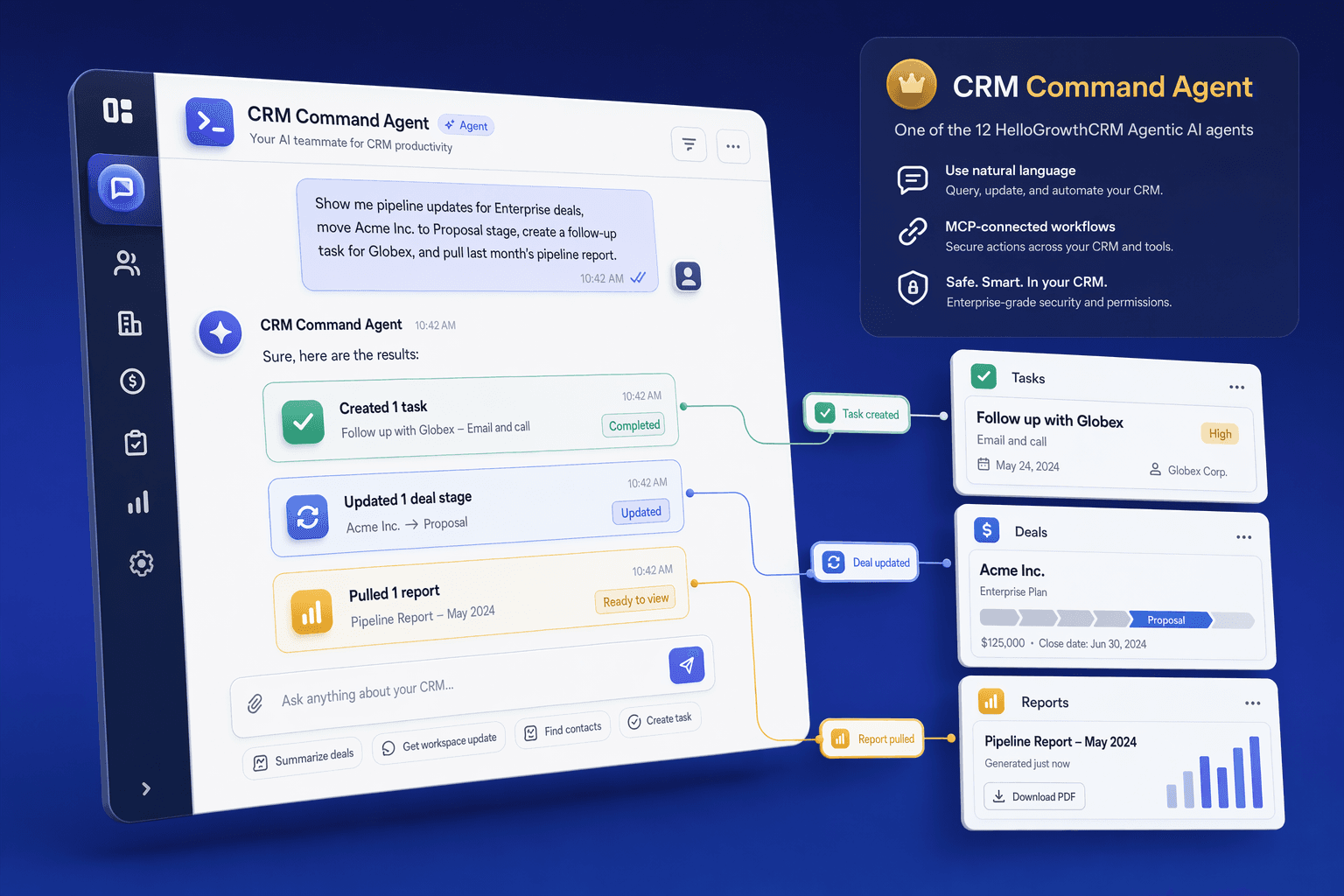
Ask questions, update deals, and automate tasks using natural language. HelloGrowthCRM's AI agent is powered by an MCP server — so you can connect it to ChatGPT, Claude, or any AI tool and control your CRM with a conversation.
By Rushabh Shah, Founder, HelloGrowthCRM · Reviewed by HelloGrowthCRM RevOps Team, Revenue Operations · Last updated July 2026
Key takeaways
- An AI CRM agent lets anyone query and update the pipeline in plain English instead of clicking through menus, filters, and report builders.
- It runs on the open MCP (Model Context Protocol) standard, so you connect it to ChatGPT, Claude, or any MCP-compatible assistant rather than a locked-in chat box.
- The agent reads live CRM data, so answers are current — but it can also write, which is why scoped permissions and an audit trail matter.
- Best first use is read-only reporting: pipeline summaries, at-risk deals, and pre-call context, before you enable write actions.
- It complements the CRM UI for power users; it does not replace clean data entry or the discipline of well-defined fields and stages.
Quick answer
What is MCP and why does it matter?
Also answered on this page
- Can the AI agent update my deals
- Is there a limit to what the AI can do
- How accurate is the AI's responses
Why teams evaluate ai crm agent
AI CRM Agent usually becomes important when a repeated part of the revenue workflow is creating too much manual work, too little visibility, or too much tool-switching. Teams are rarely shopping for a feature in isolation. They are usually trying to make one meaningful workflow cleaner, faster, and easier to inspect.
That is why buyers usually look beyond the headline capability and inspect the surrounding details: Natural language CRM queries — ask questions in plain English, Deal and contact updates via chat — 'Mark this deal as won' or 'Update contact email', Pipeline status summaries on demand — instant pipeline health snapshot, AI-generated activity suggestions — AI proposes next steps based on deal context. Those details determine whether the feature actually improves day-to-day execution or simply adds another surface area to manage.
Where ai crm agent fits in the workflow
Most teams adopt this capability as part of practical motions such as sales manager pipeline reviews, rep daily briefings, revops data queries. The value tends to show up fastest when the workflow is tied to a clear owner, a clear next action, and a visible outcome that managers can review later.
It also matters how this page connects to the rest of the stack. For many teams, tools such as ChatGPT, Claude, Slack, Zapier are what make the feature operational instead of theoretical because they keep data, communication, and handoffs in sync.
What a strong rollout looks like for ai crm agent
The best rollout usually starts small: one high-value workflow, one clear ownership model, and one review rhythm for adoption. Once the team is consistently using the feature, managers can expand into deeper automation, reporting, or cross-functional handoffs without rebuilding the foundation.
In practice, that means evaluating not only what the feature can do, but also whether the team can maintain the process around it. Ease of use, reporting trust, and manager visibility matter just as much as the feature checklist itself.
- Use it first for sales manager pipeline reviews if that is the workflow creating the most friction today.
- Use it first for rep daily briefings if that is the workflow creating the most friction today.
- Use it first for revops data queries if that is the workflow creating the most friction today.
- Use it first for automated reporting if that is the workflow creating the most friction today.
How It Works
Get started in three simple steps
Key Features
Use Cases
Sales Manager Pipeline Reviews
Ask 'what deals closed last week' or 'which reps are behind quota' — get instant answers without opening the CRM.
What teams care about
- Fast adoption with less manual cleanup for managers and reps.
- Clear visibility into workflow execution, outcomes, and accountability.
- Reliable handoffs into the CRM record so downstream teams keep full context.
Deep dive
Open the sections that matter most instead of scrolling through a long uninterrupted text block.
What Is an AI CRM Agent?
An AI CRM agent is an assistant that turns plain-language requests into real CRM operations — queries, summaries, and updates — instead of making you click through menus and report builders. You type or say what you want, and the agent figures out which records to read, which filters to apply, and whether an action is needed.
HelloGrowthCRM's agent is built on MCP (Model Context Protocol), an open standard for connecting AI models to external systems. Because it is a server rather than a bolted-on chat widget, you can point ChatGPT, Claude, or any MCP-compatible assistant at your CRM and get the same natural-language control. That distinction matters: an MCP agent is portable across AI tools, whereas a proprietary chatbot locks you into one vendor's box.
| Capability | CRM search bar | Scripted chatbot | AI CRM agent (MCP) |
|---|---|---|---|
| Understands open-ended requests | No | Partly | Yes |
| Reads live pipeline data | Yes | Limited | Yes |
| Can update records | No | Rarely | Yes, with permissions |
| Chains filter → summarize → act | No | No | Yes |
| Works from ChatGPT or Claude | No | No | Yes |
How a Natural-Language Command Becomes a CRM Action
It helps to see what happens between the request and the result. The examples below are illustrative, showing how everyday phrasing maps to the read or write operation the agent performs and what comes back.
| You ask | Operation | What the agent returns |
|---|---|---|
| Show deals stalled 14+ days | Read + filter | List with owner and last activity |
| Summarize this month's closed-won | Read + aggregate | Count, total value, top deals |
| Move the Acme deal to close Friday | Write (update field) | Confirmation + logged change |
| Who is behind quota this month? | Read + compare | Reps below target with gap |
| Prep me for the XYZ call | Read (record history) | Deal history, activity, next step |
Why MCP Matters for a CRM Agent
Most CRM AI features are closed: a chat box inside the product that only that vendor controls. MCP flips this by exposing the CRM as a standard server that any compatible AI client can call. The practical payoff is choice — your team can use the assistant they already work in, and you are not betting on one vendor's chat interface staying good.
There is a trade-off to understand honestly. An open connection means data flows to whichever AI client you connect, so governance moves to you: scope permissions tightly, prefer read-only for shared assistants, and keep an audit trail on writes. Used carefully, MCP gives you the flexibility of natural-language control without surrendering it to a single black box.
Best Practices for Running an AI CRM Agent
The agent rewards the same discipline that makes any CRM useful: clean fields, clear stages, and scoped access. Teams that get value treat it as a fast interface to good data, not a way to paper over messy data.
Start read-only — reporting and pre-call prep — and verify a dozen answers against the CRM before enabling any writes.
Scope permissions per role so a rep's agent sees their book of business and a manager's sees the team.
Keep field and stage definitions tight, because ambiguous data produces confidently wrong summaries.
Use the audit trail: review agent-made changes for the first few weeks so a bad command is caught fast.
Prefer specific phrasing over vague requests, and confirm before destructive updates like closing or deleting.
Schedule recurring read-only summaries to Slack rather than granting broad write access for convenience.
Common Mistakes With Natural-Language CRM Control
The failure modes here are less about the model and more about how much trust and access teams hand over on day one. A few recurring mistakes account for most of the frustration.
Granting write access immediately, before anyone has checked whether the read answers are correct.
Assuming the agent's summary is right when the underlying fields are half-empty or inconsistent.
Using vague commands like clean up my pipeline that the agent can interpret several ways.
Connecting an untrusted or personal AI assistant with full permissions to company data.
Ignoring the audit trail, so an incorrect bulk update goes unnoticed until a report looks wrong.
Treating the agent as a replacement for defined stages and required fields rather than a layer on top.
Drawbacks and Limits (An Honest View)
A natural-language agent is only as good as the data and the phrasing behind it. If your stages are inconsistent or key fields are blank, the agent will produce fluent answers that are quietly wrong — and a confident wrong answer is more dangerous than an obvious gap in a report. It also cannot invent judgment: asking which deals to prioritize returns a defensible list, not a substitute for a manager who knows the accounts.
There are governance costs too. Every AI client you connect is another place your CRM data can flow, so you inherit responsibility for permissions and for reviewing your AI provider's data handling. Ambiguous commands can trigger the wrong update, which is why write access should be scoped and audited rather than open. The agent is a powerful accelerant for teams with clean data and clear roles; for teams with messy data, it magnifies the mess before it helps.
Evidence: Why Removing CRM Friction Pays Off
The value of a conversational CRM interface is that it removes the manual lookup and prioritization work that eats into selling time — and CRM systems already show a strong return when the data is actually used.
~28% — of the sales week reps spend on manual data entry and prioritization — the work a query agent shortcuts (Source: Salesforce, State of Sales)
$8.71 — returned for every $1 invested in CRM, when teams keep the data current and act on it (Source: Nucleus Research)
~25% — productivity gain reported by organizations applying AI in sales workflows (Source: Gartner)
The Future of CRM: Natural Language Commands
CRM software has always required learning the tool — clicking through menus, finding the right fields, running reports. This friction slows down sales teams. AI agents are changing that by letting you control your CRM with natural language. Instead of logging in and searching for a deal, you ask your AI: 'Show me all deals stalled for 14+ days' and get an instant answer.
The direction of travel is clear: reporting, updates, and pre-call prep move from a series of clicks to a short conversation, and the CRM UI becomes the place you verify and configure rather than the place you do every lookup. HelloGrowthCRM's MCP-based agent is built for that shift, giving power users a faster interface while keeping the structured record intact underneath.
Natural Language CRM Interaction and What It Changes
Sales reps spend an average of 28% of their working day on data entry and CRM administration. The CRM Command Agent addresses this directly by allowing reps to interact with the CRM in plain English rather than navigating menus and forms. 'Add a note to the Acme deal: spoke with Priya, she confirmed budget is approved, decision expected by end of month' — the agent parses this, creates the note, updates the relevant CRM fields, and creates a follow-up task for the stated deadline. The rep dictated 20 words; the agent did 5 minutes of CRM work.
This interaction model is especially valuable for field sales teams and reps who take calls on mobile. Instead of trying to navigate a CRM interface on a small screen, reps can use the command interface to log activities, update deal stages, retrieve account history, and create tasks between calls. The command agent understands contextual references ('update that deal we discussed' after a search returns one result) and can handle multi-step commands in a single instruction.
CRM Command Agent and MCP: Natural Language Meets Protocol
The CRM Command Agent is the conversational interface layer on top of HelloGrowthCRM's MCP server. When you interact with the Command Agent, it uses the same underlying MCP tool calls that external AI clients like ChatGPT and Claude use — the difference is that the Command Agent is embedded in the CRM interface itself, while the MCP server allows external clients to interact with the same CRM data. Both use the same action layer, audit logging, and governance controls.
For teams already using Claude or ChatGPT for work, the MCP connection lets them bring their CRM data into those conversations without switching tools. A sales manager can ask Claude 'Which deals in Q4 are at risk based on recent activity?' and get an answer drawn from live CRM data. The CRM Command Agent does the same thing from within the CRM product — two interfaces, one data layer.
An AI CRM agent is an assistant that turns plain-language requests into real CRM operations — queries, summaries, and updates — instead of making you click through menus and report builders. You type or say what you want, and the agent figures out which records to read, which filters to apply, and whether an action is needed.
HelloGrowthCRM's agent is built on MCP (Model Context Protocol), an open standard for connecting AI models to external systems. Because it is a server rather than a bolted-on chat widget, you can point ChatGPT, Claude, or any MCP-compatible assistant at your CRM and get the same natural-language control. That distinction matters: an MCP agent is portable across AI tools, whereas a proprietary chatbot locks you into one vendor's box.
Search bar vs CRM chatbot vs AI CRM agent
| Capability | CRM search bar | Scripted chatbot | AI CRM agent (MCP) |
|---|---|---|---|
| Understands open-ended requests | No | Partly | Yes |
| Reads live pipeline data | Yes | Limited | Yes |
| Can update records | No | Rarely | Yes, with permissions |
| Chains filter → summarize → act | No | No | Yes |
| Works from ChatGPT or Claude | No | No | Yes |
Buyer playbook
Compare, launch, and govern the workflow with an interactive overview instead of four long generic essays.
How teams evaluate ai crm agent
The best pages help buyers understand fit quickly instead of forcing them through long walls of copy.
Check whether the product covers the capabilities you actually care about, such as Natural language CRM queries — ask questions in plain English, Deal and contact updates via chat — 'Mark this deal as won' or 'Update contact email', Pipeline status summaries on demand — instant pipeline health snapshot, AI-generated activity suggestions — AI proposes next steps based on deal context.
Test if it supports real execution scenarios like Sales Manager Pipeline Reviews, Rep Daily Briefings, RevOps Data Queries.
Confirm the workflow stays connected to ChatGPT, Claude, Slack, Zapier so reporting and handoffs remain reliable.
Frequently Asked Questions
Explore More
Related Products
Free Tools & Calculators
WhatsApp Template Generator
Draft WhatsApp message templates for intros, follow-ups, payments and support. Free.
Lead Scoring Calculator
Build a custom scoring model with weights.
CRM ROI Calculator
Calculate the revenue impact of adopting a CRM.
Pipeline Calculator
Model your pipeline stages and conversion rates.