HelloGrowthCRM software
Built for real small-business sales teams
HelloGrowthCRM helps reps qualify faster, follow up on time, and close more deals—with practical automation in one place.
- AI lead scoring and pipeline visibility
- Built-in dialer, WhatsApp, and email automation
- Sales forecasting and RevOps-ready reporting
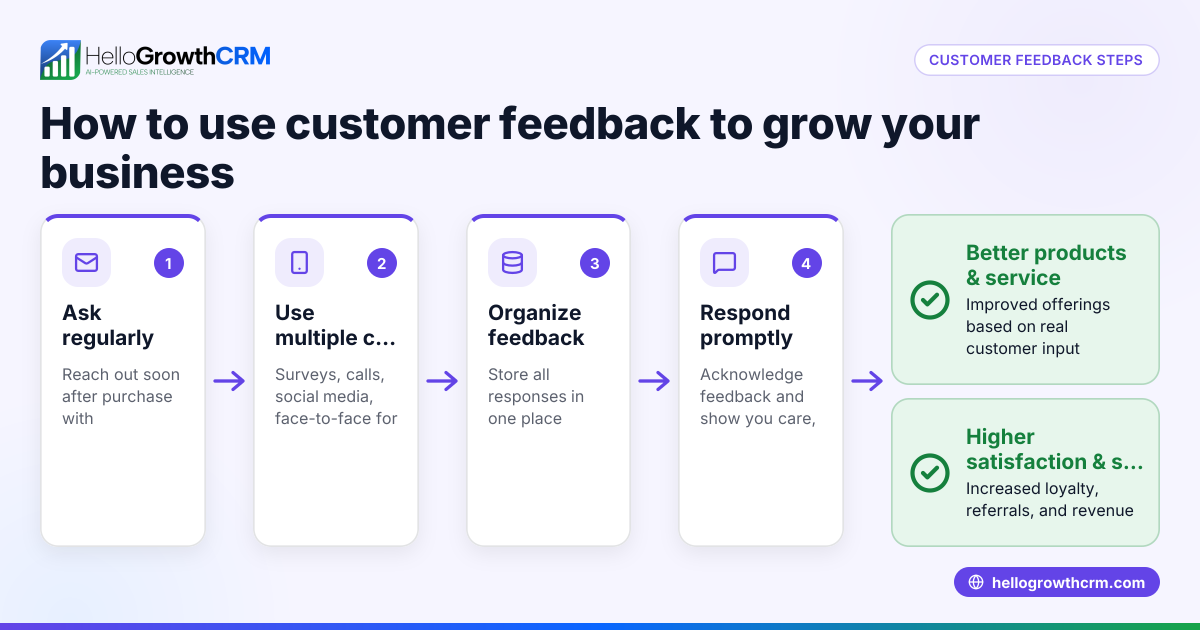
An asking feedback email is a message you send to customers or prospects requesting their opinions or experiences with your product, service, or interaction. It should be clear, polite, and easy to respond to. This article covers why you need feedback emails, step-by-step instructions to write and send them, a practical example, common mistakes to avoid, and how HelloGrowthCRM can simplify the process.
Why this comes up / what goes wrong
Small-business owners often struggle to get timely, useful feedback from customers or prospects after a sale, a consultation, or a trial period. Without feedback, it is hard to improve products, services, or sales processes. Many owners rely on informal phone calls or sporadic emails, which can be forgotten or ignored. They may also lose leads or customers because they don’t follow up systematically. Asking for feedback by email is a practical way to collect valuable insights, but it requires a clear approach to get responses without annoying recipients.
Step-by-step
- Identify the purpose of your feedback request. Decide if you want feedback on a recent purchase, service experience, or general customer satisfaction. This helps you tailor the questions and tone.
- Choose the right timing. Send the email soon after the interaction, for example, 1-3 days after delivery or service completion, so the experience is fresh.
- Write a clear, polite subject line. Examples: “We’d love your feedback on your recent purchase” or “How was your experience with us?”
- Start with a friendly greeting and thank the recipient. Show appreciation for their business or time.
- Explain why you want feedback and how it helps you improve. Keep it brief and sincere.
- Ask specific, easy-to-answer questions. Use 1-3 questions or a short survey link. Avoid overwhelming them.
- Provide a simple way to reply. Either reply directly to the email or click a survey link.
- Close with a thank-you and a polite sign-off. Include your contact info if appropriate.
- Review for spelling, tone, and clarity. Make sure it sounds professional and approachable.
- Send using an email tool that tracks replies and automates follow-up. This ensures no feedback requests are missed and follow-ups happen automatically if there is no reply.
Check that your email is mobile-friendly and that any links work correctly.
Example (fictional figures)
A residential real-estate team in Phoenix, Arizona, closed a home sale on 04/15/2026. They want feedback on the buying process.
- Send date: 04/18/2026 (3 days after closing)
- Subject: “Your feedback matters: How was your home buying experience?”
Email content excerpt: "Dear John, Thank you for choosing us to help you buy your new home. We’d love to hear how your experience was so we can improve our service. Could you please answer these quick questions?
- How satisfied are you with the buying process? (1-5)
- Was our team responsive to your questions?
- Any suggestions for us?
Thank you for your time! Best, Phoenix Home Team"
This clear, polite email encourages a reply without pressure.
Common mistakes
- Being too vague or lengthy. Prevent by keeping questions focused and email concise.
- Sending too soon or too late. Prevent by timing the email 1-3 days after the event.
- Not making it easy to reply. Prevent by allowing direct reply or including a simple survey link.
- Ignoring follow-up. Prevent by using automated sequences to send reminders if no reply comes.
- Using a generic subject line. Prevent by personalizing it to the customer or product.
- Not tracking responses. Prevent by using a CRM or email tool that logs replies.
Doing this in HelloGrowthCRM
HelloGrowthCRM offers a shared inbox called HelloMail, where replies to your feedback emails are visible to your whole team on the deal. This keeps everyone informed without switching apps. You can also set up sequences and campaigns to automate a five-step follow-up over two weeks that stops automatically once the prospect replies. This ensures no feedback request is missed and follow-ups happen on schedule. Learn more about email automation and sequences and how HelloGrowthCRM supports WhatsApp and SMS CRM for multi-channel outreach.
Frequently asked questions
What is the best time to send a feedback email? The best time is usually 1 to 3 days after the customer interaction, while the experience is fresh. This timing maximizes the chance of a response without seeming intrusive.
How long should a feedback email be? Keep it short and to the point. One to three questions or a brief survey link works best. Long emails can discourage replies.
Should I offer incentives for feedback? Incentives can increase response rates but are not always necessary. If you use incentives, clearly state them in the email.
Can I automate feedback requests? Yes, using CRM tools like HelloGrowthCRM, you can automate sending feedback emails and follow-ups, saving time and ensuring consistency.
How do I handle negative feedback? Respond politely and promptly. Use negative feedback as an opportunity to improve your service and rebuild trust.
Key takeaways
- Write clear, polite feedback emails with specific questions.
- Send feedback requests 1-3 days after the customer interaction.
- Make replying easy with direct reply or survey links.
- Avoid common mistakes like vague emails or no follow-up.
- Use CRM tools to automate and track feedback emails.
Start improving your feedback process today. Start on the Free Forever plan (200 leads, no credit card).
Ready to put this into practice?
Set up your pipeline, WhatsApp follow-ups, and AI lead scoring in minutes — free, no credit card.
Try HelloGrowthCRM freeGet CRM tips in your inbox
Join thousands of sales professionals who get weekly insights on CRM strategy, AI automation, and pipeline optimization.

The HelloGrowthCRM team publishes guides on CRM strategy, AI sales tools, and revenue operations for small business sales teams.