HelloGrowthCRM software
Built for real small-business sales teams
HelloGrowthCRM helps reps qualify faster, follow up on time, and close more deals—with practical automation in one place.
- AI lead scoring and pipeline visibility
- Built-in dialer, WhatsApp, and email automation
- Sales forecasting and RevOps-ready reporting
Automate incident management by using tools that capture incidents immediately from all channels, assign an owner and next step, track progress through stages, and send reminders to ensure timely resolution. This article covers why automation is needed, detailed steps to implement it, a practical example with US figures, common mistakes to avoid, and how HelloGrowthCRM helps organize incident leads automatically.
Why this comes up / what goes wrong
Small business owners often struggle to keep up with incidents such as customer complaints, service interruptions, or urgent internal issues. Without automation, incidents might be noted down in notebooks, scattered across emails, or tracked in spreadsheets. This fragmented approach causes delays in response and resolution, missed follow-ups, and unclear ownership. The result can be lost customers, frustrated staff, and a lack of insight into incident status or trends. Manual incident management also wastes time that could be better spent on business growth.
Step-by-step
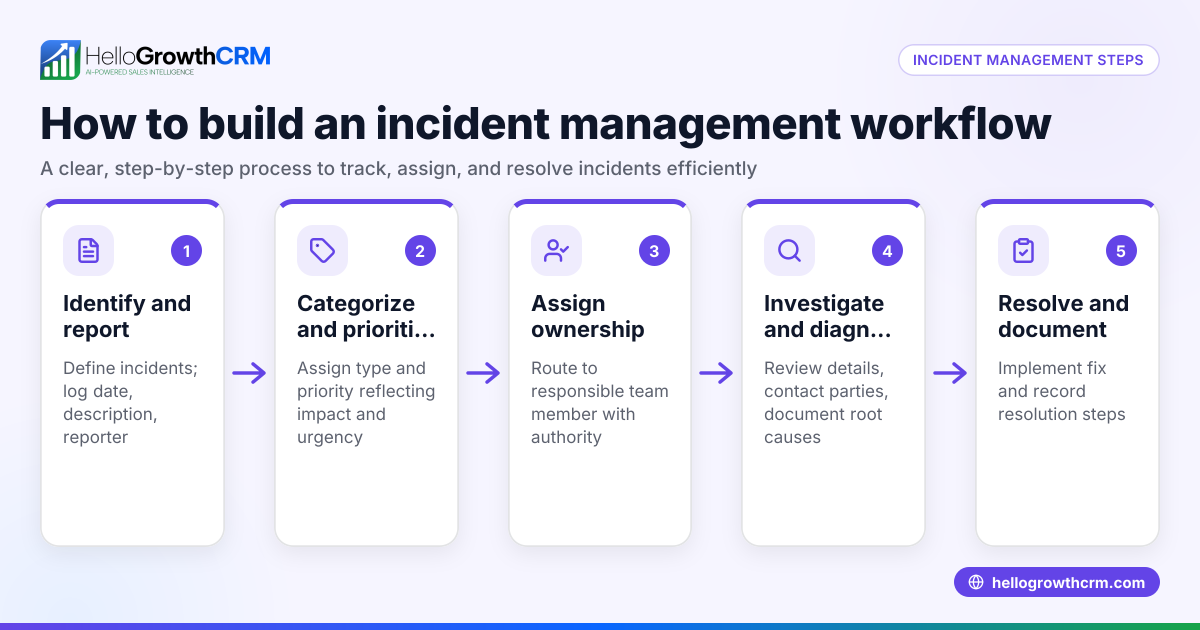
- Identify your incident types: Write down the kinds of incidents your business regularly faces, such as product defects, customer service issues, or delivery problems.
- Select incident capture channels: Decide how incidents will be reported — via phone calls, WhatsApp messages, web forms, or emails. Ensure all these channels feed into one system.
- Automate incident intake: Use software that automatically records every incident as a lead or ticket with an assigned owner and a clear next step, avoiding manual entry errors.
- Assign ownership and priority: Set rules or manually assign each incident to the right team member based on expertise or workload. Prioritize incidents based on urgency or impact.
- Track incident progress visually: Use a pipeline or task board to move incidents through stages such as New, In Progress, Resolved, and Closed. This helps everyone see status at a glance.
- Set automated reminders and follow-ups: Configure notifications and sequences via email, WhatsApp, or SMS to prompt timely updates and resolution.
- Review incident data regularly: Analyze reports on incident volumes, resolution times, and team performance to identify bottlenecks and improvement areas.
- Refine your process continuously: Update incident categories, workflows, and automation rules based on feedback and data insights.
Example (fictional figures)
A two-location dental practice in Columbus, Ohio, starts automating incident management on 02/01/2026. They handle patient complaints and appointment issues received via phone and WhatsApp.
- Monthly incidents: 150
- Average manual resolution time per incident: 2 hours
- Staff hourly cost: $30
Manual monthly incident handling cost:
150 incidents × 2 hours = 300 hours 300 hours × $30/hour = $9,000
After automation, resolution time drops by 40% (assumed):
2 hours × 60% = 1.2 hours per incident
Automated monthly incident handling cost:
150 incidents × 1.2 hours = 180 hours 180 hours × $30/hour = $5,400
Monthly time saved:
300 hours - 180 hours = 120 hours
Monthly cost saved:
$9,000 - $5,400 = $3,600
Automation also improves customer satisfaction and reduces missed appointments, benefits not quantified here.
Common mistakes
- Not centralizing incident capture: Prevent this by funneling all incident reports into a single system to avoid missed or duplicated entries.
- Failing to assign clear ownership: Prevent by automating owner assignment or establishing clear manual rules to ensure accountability.
- Ignoring follow-up reminders: Prevent by setting automated notifications and sequences to keep incidents progressing.
- Using complicated tools your team won’t adopt: Prevent by choosing simple, integrated solutions that work with familiar communication channels like WhatsApp and calls, as explained in WhatsApp and SMS CRM.
- Skipping regular reviews: Prevent by scheduling periodic incident trend and team performance reports to spot and fix bottlenecks.
Doing this in HelloGrowthCRM
HelloGrowthCRM automates incident management by capturing every inquiry from forms, calls, or WhatsApp as a lead with an assigned owner and a next step. This replaces lost or scattered notes with organized, trackable records. Your team can see incident status clearly, follow up efficiently, and avoid delays. Learn more about the built-in CRM dialer for phone-based communication and how HelloGrowthCRM for the United States fits your business needs.
Frequently asked questions
What is incident management automation? Incident management automation uses software to capture, assign, track, and resolve incidents without manual logging or follow-up. It speeds response times, improves accountability, and reduces errors.
How can small businesses start automating incident management? Begin by identifying common incident types and choosing capture methods that funnel all reports into one system. Use tools that automate recording, assign ownership, and track progress, ideally integrating with phone and WhatsApp as described in WhatsApp and SMS CRM.
Can HelloGrowthCRM help with incident-related leads? Yes, HelloGrowthCRM captures every inquiry or incident as a lead with an owner and a next step, helping you manage incidents alongside sales and customer contacts.
What benefits does automating incident management bring? Automation reduces manual errors and delays, improves customer satisfaction, ensures clear ownership, and provides visibility into incident trends and team performance.
Is automation complicated for small teams? Not if you choose tools that integrate with familiar communication channels and offer simple visual pipelines and reminders. HelloGrowthCRM supports this approach with its lead capture and assignment features.
How often should I review incident data? Regular reviews, such as monthly or quarterly, help identify recurring issues, track team performance, and refine your incident management process.
Key takeaways
- Automate incident management by capturing incidents immediately and assigning clear ownership.
- Use a centralized system to track progress and automate follow-ups.
- Avoid common mistakes like scattered records, unclear ownership, and missed reminders.
- Choose simple tools that integrate with communication channels like WhatsApp and calls.
- HelloGrowthCRM organizes incident inquiries as leads with owners and next steps.
- Regularly review incident data to improve your process.
Start automating your incident management today. Start on the Free Forever plan (200 leads, no credit card) and see how HelloGrowthCRM can help you stay organized and responsive.
Ready to put this into practice?
Set up your pipeline, WhatsApp follow-ups, and AI lead scoring in minutes — free, no credit card.
Try HelloGrowthCRM freeGet CRM tips in your inbox
Join thousands of sales professionals who get weekly insights on CRM strategy, AI automation, and pipeline optimization.

The HelloGrowthCRM team publishes guides on CRM strategy, AI sales tools, and revenue operations for small business sales teams.