HelloGrowthCRM software
Built for real small-business sales teams
HelloGrowthCRM helps reps qualify faster, follow up on time, and close more deals—with practical automation in one place.
- AI lead scoring and pipeline visibility
- Built-in dialer, WhatsApp, and email automation
- Sales forecasting and RevOps-ready reporting
Automated customer follow up software helps small and mid-sized businesses in Singapore keep track of leads and customers by sending timely, automatic messages and reminders. This software reduces the chance of losing sales due to slow or forgotten follow-ups. This article explains why businesses look for such software, the steps to evaluate options, common pitfalls, an example scenario, and how HelloGrowthCRM supports automated follow-ups.
Why this comes up / what goes wrong
Many Singapore small-business owners struggle with managing customer follow-ups effectively. Sales may be handled across WhatsApp, email, and spreadsheets, which can lead to lost leads when follow-ups are delayed or missed. Without automation, sales teams rely on memory or manual notes, causing inconsistent communication and missed opportunities. As businesses grow, the volume of leads and customers increases, making manual follow-up impractical and inefficient.
Choosing automated customer follow up software becomes necessary to organise tasks, schedule reminders, and send follow-up messages automatically. This helps maintain consistent contact with prospects and customers, improving conversion rates and customer satisfaction.
Step-by-step
- Identify your follow-up needs: Decide which channels you use most (email, WhatsApp, SMS) and the typical follow-up process your team follows. Check if multi-step sequences or one-off reminders suit you better.
- Check task and activity management features: Look for software that turns each follow-up into a task with due dates and reminders. This prevents forgetting calls or messages. Confirm if the software provides a clear daily task list to avoid memory overload.
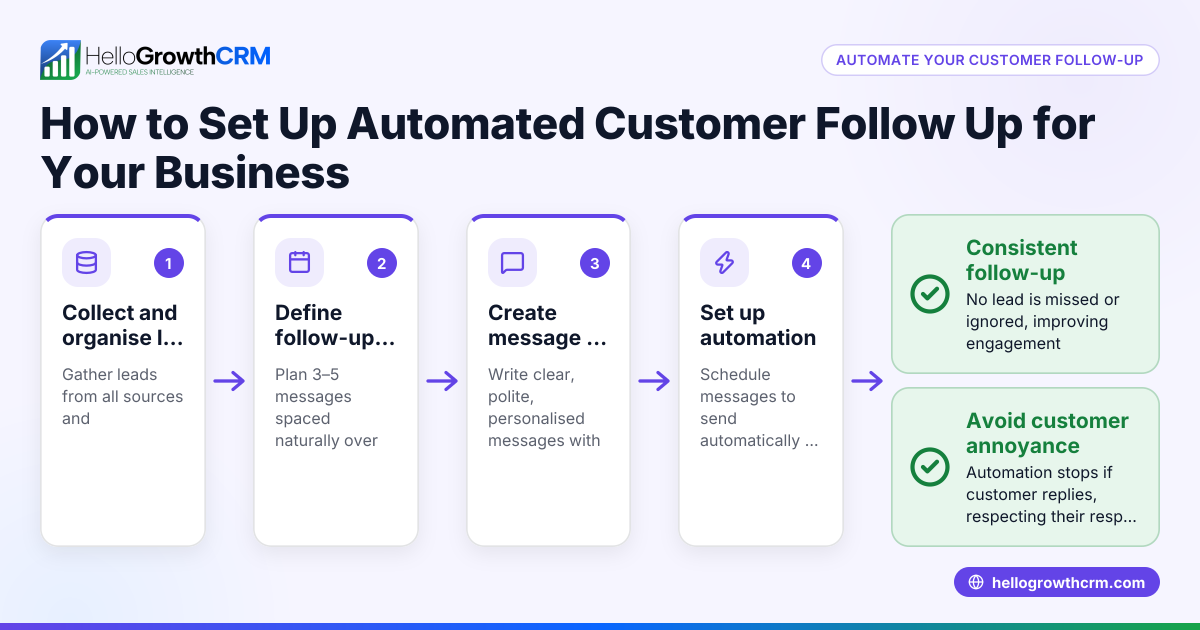
- Evaluate automation capabilities: Ensure the software supports automated sequences that send messages over days or weeks and stop automatically when a prospect replies. This saves manual effort and keeps prospects engaged without over-contacting.
- Consider AI assistance: Some solutions offer AI agents that draft follow-up messages after calls, requiring only review and sending by your sales rep. This speeds up communication while maintaining personalisation.
- Look for integration options: Choose software that can capture leads from your website forms or other tools you use, to centralise follow-up management.
- Check reporting and visibility: Sales forecasting and reporting help track follow-up effectiveness and pipeline health.
- Trial and user adoption: Test the software with your team to ensure it’s easy to use and actually improves follow-up speed and consistency.
For managing follow-ups effectively, consider solutions with sales task boards and email automation and sequences.
Example (fictional figures)
A tuition centre in Tampines gets about 150 new enquiries monthly. They want to follow up with each prospect up to five times over two weeks via WhatsApp and email.
- Average conversion rate without automation: 15%, roughly 22 enrollments.
- Average value per enrollment: S$1,200.
- Monthly revenue without automation: 22 × S$1,200 = S$26,400.
With automated follow-ups, assume a 5% increase in conversion rate due to consistent contact:
- New conversion rate: 20% → 30 enrollments.
- Monthly revenue with automation: 30 × S$1,200 = S$36,000.
Revenue increase: S$36,000 - S$26,400 = S$9,600 per month.
This example shows how automated follow-up software can improve sales by ensuring timely contact.
Common mistakes
- Ignoring team workflow: Choosing software that doesn’t fit how your team works leads to poor adoption. Prevent this by involving your sales reps in testing and choosing the tool.
- Over-automating messages: Sending too many automated messages without stopping when a prospect replies can annoy customers. Use software with sequences that automatically stop on reply.
- Not tracking tasks properly: Relying on memory or separate notes causes missed follow-ups. Use task boards that show daily calls and tasks clearly.
- Skipping integration checks: Without lead capture integration, new leads might not enter the system promptly. Verify the software supports your website forms or other lead sources.
- Neglecting reporting: Without sales forecasting and reporting, you won’t know if follow-ups are effective. Choose software that provides these insights.
- Not training users: Even the best software fails if the team doesn’t use it correctly. Provide training and support during rollout.
See how customer health score can help monitor ongoing engagement.
Doing this in HelloGrowthCRM
HelloGrowthCRM helps Singapore businesses automate customer follow-ups with practical features. Each follow-up becomes a task with a due date on task boards, so your sales team has a clear daily list of calls and messages instead of relying on memory. Its sequences and campaigns automate multi-step follow-ups over two weeks, stopping immediately when a prospect replies. For faster communication, AI agents in HelloGrowthCRM draft follow-up messages after calls, letting reps review and send quickly. Learn more about these features on sales task boards and email automation and sequences.
Frequently asked questions
What is automated email follow up software? Automated email follow up software sends pre-written emails to prospects or customers at scheduled intervals after an initial contact. It helps maintain consistent communication without manual effort and can stop sending once the recipient replies.
Can automated follow-up software work with WhatsApp? Yes, some CRM software, including HelloGrowthCRM, supports WhatsApp messaging as part of follow-up sequences, allowing you to reach customers on the platform they use most.
How does AI help in customer follow-up? AI can draft follow-up messages based on previous calls or interactions, reducing the time sales reps spend writing messages. The rep reviews and sends the message, ensuring personalisation and accuracy.
Will automated follow-ups annoy customers? If not managed well, yes. Good software stops sending messages as soon as the customer replies, preventing over-contacting. Also, messages should be relevant and spaced appropriately.
How do I measure if follow-up automation is working? Use sales forecasting and reporting features to track conversion rates, response times, and pipeline progress. This data shows if automated follow-ups improve sales outcomes.
Key takeaways
- Automated follow-up software ensures timely, consistent contact with prospects and customers.
- Task boards and activity tracking prevent missed calls and messages.
- Multi-step sequences automate outreach and stop when prospects respond.
- AI agents can draft follow-up messages to speed up communication.
- Integration with lead capture and reporting features helps measure success.
- Training your team on the software is essential for adoption.
Start automating your customer follow-ups today with HelloGrowthCRM. Start on the Free Forever plan (200 leads, no credit card).
Ready to put this into practice?
Set up your pipeline, WhatsApp follow-ups, and AI lead scoring in minutes — free, no credit card.
Try HelloGrowthCRM freeGet CRM tips in your inbox
Join thousands of sales professionals who get weekly insights on CRM strategy, AI automation, and pipeline optimization.

The HelloGrowthCRM team publishes guides on CRM strategy, AI sales tools, and revenue operations for small business sales teams.