HelloGrowthCRM software
Built for real small-business sales teams
HelloGrowthCRM helps reps qualify faster, follow up on time, and close more deals—with practical automation in one place.
- AI lead scoring and pipeline visibility
- Built-in dialer, WhatsApp, and email automation
- Sales forecasting and RevOps-ready reporting
Chatbots provide customers with instant answers, 24/7 availability, consistent information, and personalized interactions based on their data. This reduces wait times and improves satisfaction by handling common questions and tasks quickly. This article covers why small businesses consider chatbots, step-by-step implementation guidance, common mistakes to avoid, a detailed example with figures, and how HelloGrowthCRM helps manage customer service efficiently after the sale.
Why this comes up / what goes wrong
Small businesses often cannot keep up with customer inquiries due to limited staff and resources. Customers expect fast, reliable support but contacting staff by phone, email, or text can cause delays and inconsistent answers. This leads to lost sales opportunities and frustrated customers. Chatbots automate initial interactions, allowing businesses to respond immediately and free staff to focus on complex issues. Without chatbots or automation, small businesses risk losing leads and repeat customers who want quick service.
Step-by-step
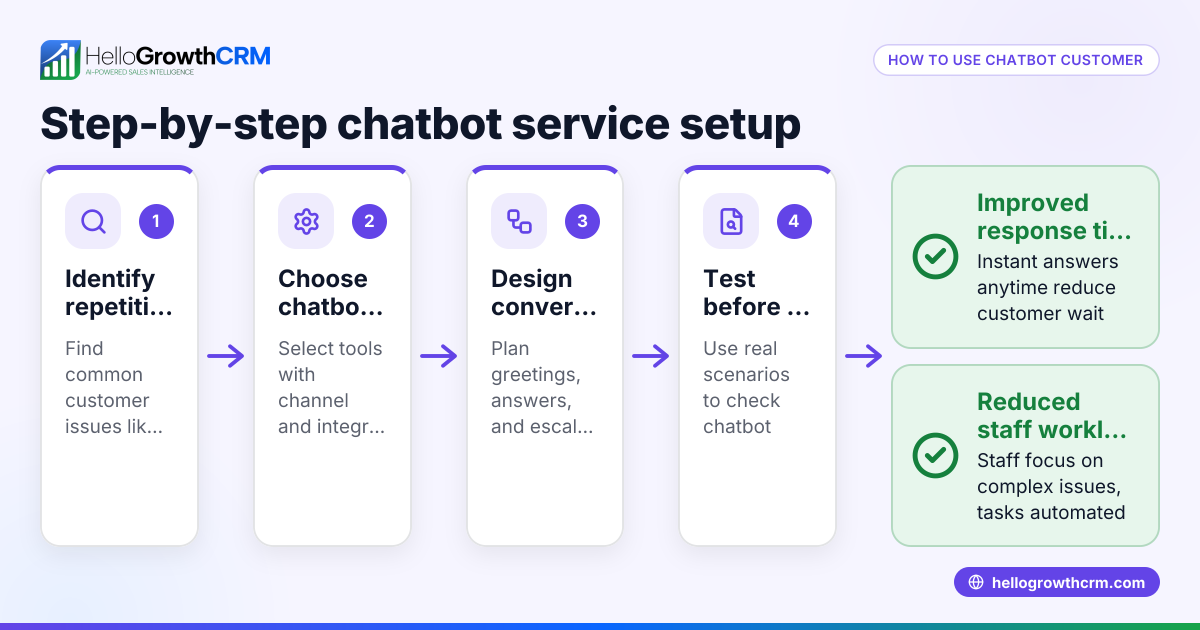
- Identify frequent customer questions and tasks: List common inquiries like FAQs, booking requests, order status, or support issues. Check if these can be handled by automated chatbot responses to save time.
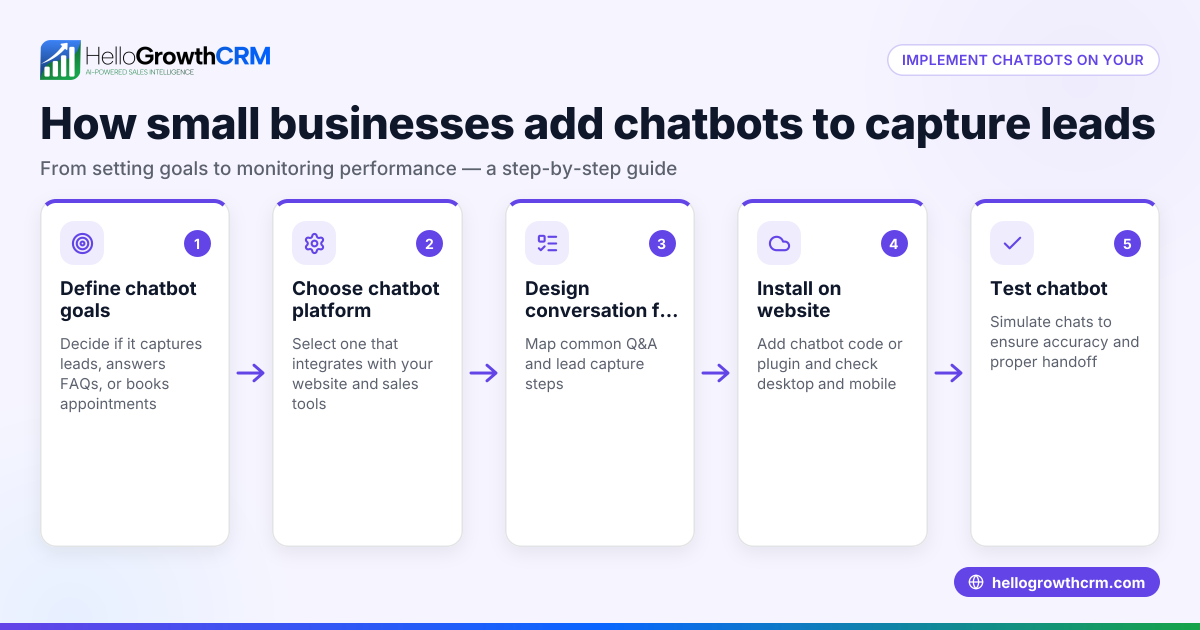
- Select chatbot software that fits your business: Choose one that integrates with your existing tools, especially your CRM or messaging platforms like WhatsApp and SMS. Integration keeps customer conversations and history centralized.
- Design clear conversation flows: Outline how the chatbot greets customers, collects necessary information, and when it should escalate to a human agent. Keep dialogues simple and focused on common queries.
- Test the chatbot internally: Look for errors, unclear answers, or dead ends. Confirm it understands typical phrases and routes complex issues properly.
- Deploy the chatbot on your website or messaging channels: Monitor its performance and gather customer feedback to spot areas for improvement.
- Update and refine regularly: Use customer interactions and new questions to improve chatbot accuracy and relevance over time.
Example (fictional figures)
A two-location dental practice in Columbus, Ohio, begins using a chatbot for appointment bookings and basic questions on 03/01/2026.
- Staff hours spent monthly answering calls/messages before chatbot: 80 hours
- Hourly wage: $20
- Staff cost before chatbot: 80 × $20 = $1,600
- Chatbot monthly subscription cost: $200 (assumed illustrative)
- Staff hours saved with chatbot: 50 hours
- Staff hours after chatbot: 80 - 50 = 30 hours
- Staff cost after chatbot: 30 × $20 = $600
- Total monthly cost with chatbot: $600 + $200 = $800
- Monthly savings: $1,600 - $800 = $800
This example shows the chatbot reduces staff time on repetitive tasks and cuts costs by $800 monthly while improving customer responsiveness.
Common mistakes
- Making chatbot conversations too complex: Long or complicated dialogues frustrate users. Prevent this by keeping interactions simple and focused on common questions, with regular reviews.
- Not offering a clear option to reach a human: Customers must always be able to escalate to live support. Clearly provide this option to avoid frustration.
- Ignoring customer feedback: Without feedback, chatbot responses may become irrelevant or inaccurate. Use feedback to continuously improve the chatbot.
- Failing to integrate with CRM: Without integration, customer history and preferences are lost, causing disjointed experiences. Use chatbots that sync with your CRM to maintain context, such as HelloGrowthCRM's CRM features supporting customer records and follow-up.
- Launching without thorough testing: Unchecked chatbots can have errors and dead ends. Test extensively before launch to ensure smooth customer experience.
Doing this in HelloGrowthCRM
HelloGrowthCRM helps manage customer service after the sale by keeping service requests, referrals, tickets, and knowledge base entries linked on the same customer record as the deal. This keeps all customer interactions organized in one place. For businesses without a sales manager, Managed RevOps provides a dedicated revenue specialist who handles weekly follow-up queues and pipeline hygiene, ensuring no inquiry is missed. Learn more about these features at customer health score and HelloGrowthCRM for the United States.
Frequently asked questions
What types of customer issues can chatbots handle? Chatbots are effective for answering FAQs, booking appointments, order tracking, basic troubleshooting, and gathering customer information. More complex issues should be escalated to human agents for proper resolution.
How do chatbots improve customer satisfaction? Chatbots provide instant, 24/7 responses and consistent information, reducing wait times and frustration. Personalized interactions based on previous data also make customers feel understood and valued.
Can chatbots work with WhatsApp and SMS? Yes, chatbots can integrate with WhatsApp and SMS platforms to manage conversations where customers prefer. HelloGrowthCRM supports this through its WhatsApp and SMS CRM capabilities, helping keep all communication unified.
Are chatbots expensive for small businesses? Costs vary, but many chatbot solutions offer scalable pricing. Savings come from reducing staff time spent on repetitive tasks and improving sales follow-up. Choosing a solution that fits your budget and integrates with your existing systems is important.
How do I measure chatbot effectiveness? Track metrics like response times, resolution rates, customer satisfaction scores, and escalation numbers. Using a CRM with integrated analytics helps maintain visibility into chatbot performance and customer health.
Key takeaways
- Chatbots provide immediate, 24/7 responses that improve customer satisfaction.
- They handle repetitive tasks, freeing staff for complex support.
- Integration with CRM systems keeps customer context and history intact.
- Clear escalation paths and regular testing prevent customer frustration.
- HelloGrowthCRM supports customer service with linked records and Managed RevOps.
Start improving your customer interactions today. Start on the Free Forever plan (200 leads, no credit card).
Ready to put this into practice?
Set up your pipeline, WhatsApp follow-ups, and AI lead scoring in minutes — free, no credit card.
Try HelloGrowthCRM freeGet CRM tips in your inbox
Join thousands of sales professionals who get weekly insights on CRM strategy, AI automation, and pipeline optimization.

The HelloGrowthCRM team publishes guides on CRM strategy, AI sales tools, and revenue operations for small business sales teams.