HelloGrowthCRM software
Built for real small-business sales teams
HelloGrowthCRM helps reps qualify faster, follow up on time, and close more deals—with practical automation in one place.
- AI lead scoring and pipeline visibility
- Built-in dialer, WhatsApp, and email automation
- Sales forecasting and RevOps-ready reporting
A call detail record (CDR) is a detailed log generated by phone systems or CRM dialers that records key information about each phone call. This includes the date and time of the call, duration, phone numbers involved, and the result or status of the call. Small and mid-sized business owners use CDRs to monitor sales calls, follow up with leads, and analyze team performance.
Why this comes up / what goes wrong
Small business owners often face challenges in tracking how their sales and customer service teams handle calls. Without a clear record of calls, it’s easy to lose leads due to missed follow-ups or lack of accountability. Calls made on personal phones, text messages, and spreadsheets do not provide a reliable way to see call history or outcomes. This can lead to confusion about which leads were contacted, what was discussed, and what next steps are needed.
Understanding and using call detail records helps ensure every call is logged and tracked properly, improving lead management and sales efficiency.
Step-by-step
- Identify your call system or CRM dialer: Check if your phone system or CRM software generates call detail records automatically.
- Access the call detail records: Locate where these records are stored—this could be in your phone provider’s portal or within your CRM system.
- Review key details: For each call, verify the date, time, duration, caller and receiver numbers, and call outcome or status.
- Match calls to leads: Ensure each call record is linked to the correct contact or lead in your CRM.
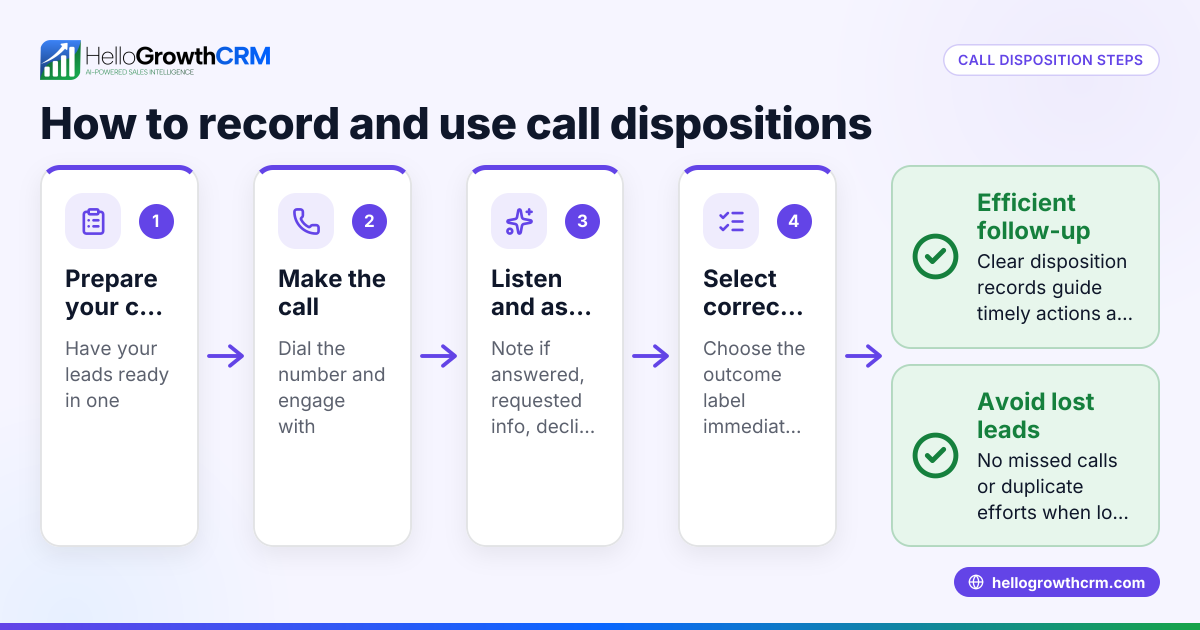
- Use call outcomes to plan next steps: Mark calls as completed, follow-up needed, or no answer to prioritize your sales activities.
- Regularly audit call logs: Check for missing or incorrect records to maintain accurate data.
Using a CRM with a built-in dialer can automate much of this process, logging calls and outcomes directly on lead records.
Example (fictional figures)
Phoenix Realty Team, a residential real-estate business in Phoenix, Arizona, tracks their calls using a CRM dialer.
- On 04/10/2026, agent Alice calls lead John Doe.
- Call duration: 8 minutes.
- Call outcome: Interested; follow-up scheduled.
Calculation of call tracking impact:
Number of calls in April = 150 Average call duration = 8 minutes Total call time = 150 × 8 minutes = 1,200 minutes = 20 hours
By logging each call with a CDR, Phoenix Realty can see all 150 calls with outcomes, helping prioritize follow-ups and estimate sales pipeline.
Common mistakes
- Not linking calls to leads: Leads get lost if calls aren’t tied to contacts. Prevent by using a CRM with a built-in dialer that logs calls automatically.
- Ignoring call outcomes: Without recording call results, sales teams miss follow-up chances. Always update call status after each call.
- Using multiple unconnected tools: Managing calls on phones, texts, and spreadsheets causes data gaps. Consolidate communication and call logs in one CRM.
- Failing to audit call records: Errors or missing data reduce reliability. Schedule regular reviews of call detail records.
- Delaying follow-up: Slow response after calls loses leads. Use call outcomes to trigger immediate tasks.
Integrating your call data with a WhatsApp and SMS CRM can also improve communication tracking.
Doing this in HelloGrowthCRM
HelloGrowthCRM includes a built-in dialer that lets your sales reps call directly from the CRM. Each call’s outcome is logged automatically on the lead’s record, keeping a full call history tied to contacts and deals. This helps your team work through call lists efficiently and ensures no lead falls through the cracks.
Frequently asked questions
What information does a call detail record include? A CDR typically includes the date and time of the call, duration, caller and receiver phone numbers, and the call outcome such as completed, missed, or no answer. This data helps track communication accurately.
Can I access call detail records from my phone provider? Yes, many phone service providers offer access to CDRs through their user portals. However, these records may not link directly to your leads or sales data unless integrated with a CRM.
How does a CRM dialer improve call tracking? A CRM dialer lets you make calls from within the CRM and automatically logs call details and outcomes on each lead. This eliminates manual entry and keeps all call data in one place for easy follow-up and reporting.
Are call detail records useful for sales forecasting? Yes, by analyzing call volumes, durations, and outcomes, businesses can forecast sales pipeline health and team performance more accurately.
Is call recording part of a call detail record? No, a call detail record logs metadata about the call but does not include the audio recording of the call. Recording calls requires separate functionality and legal compliance.
Key takeaways
- Call detail records log essential call information like time, duration, numbers, and outcomes.
- Using CDRs helps small businesses track sales calls and follow up effectively.
- Avoid common pitfalls by linking calls to leads and updating call outcomes promptly.
- Consolidate communication tools to prevent data loss and confusion.
- HelloGrowthCRM’s built-in dialer automates call logging and outcome tracking.
Start managing your calls efficiently and never lose a lead by using call detail records and a CRM that supports them.
Get started with HelloGrowthCRM on the Free Forever plan (200 leads, no credit card) to organize your calls and leads today.
Ready to put this into practice?
Set up your pipeline, WhatsApp follow-ups, and AI lead scoring in minutes — free, no credit card.
Try HelloGrowthCRM freeGet CRM tips in your inbox
Join thousands of sales professionals who get weekly insights on CRM strategy, AI automation, and pipeline optimization.

The HelloGrowthCRM team publishes guides on CRM strategy, AI sales tools, and revenue operations for small business sales teams.