HelloGrowthCRM software
Built for real small-business sales teams
HelloGrowthCRM helps reps qualify faster, follow up on time, and close more deals—with practical automation in one place.
- AI lead scoring and pipeline visibility
- Built-in dialer, WhatsApp, and email automation
- Sales forecasting and RevOps-ready reporting
Choosing the right Customer Relationship Management (CRM) system means finding software that fits your business needs, is easy for your team to use, integrates with your existing tools, and scales with your growth. This CRM buyer's guide helps you shortlist and evaluate CRM options effectively. It covers why this choice matters, detailed steps to assess CRMs, a practical example with Canadian figures, common pitfalls to avoid, and how HelloGrowthCRM can support your sales team.
Why this comes up / what goes wrong
Many Canadian small business owners start by managing leads and sales with spreadsheets, email, or texting. While these methods may work initially, they quickly become inefficient as the business grows. Slow follow-up, lost leads, and missed sales opportunities become common. When deciding on a CRM, owners often face confusion from too many features, unclear pricing, and uncertain integration claims. They need a clear, practical approach to compare CRM options and pick one their team will actually use.
Step-by-step
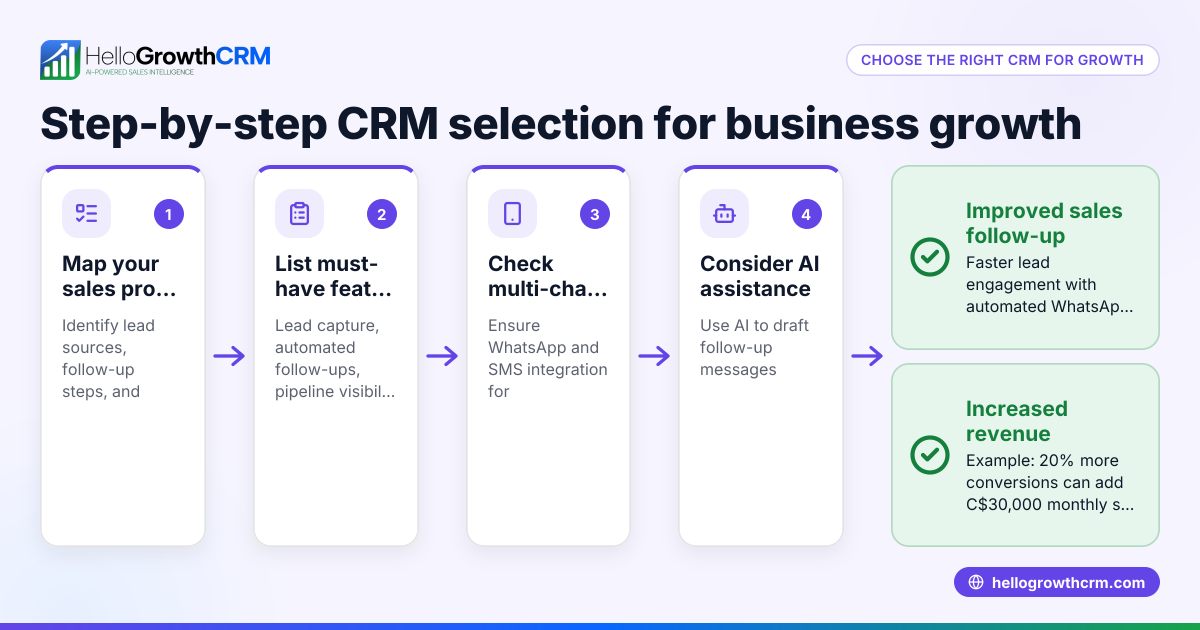
- Identify Your Business Needs
- Map out your current sales process and list the challenges you want to solve.
- Decide what features matter most: lead capture, pipeline management, communication channels like email, SMS, or WhatsApp, and reporting.
- Evaluate Ease of Use and Adoption
- Choose a CRM with a user-friendly interface that your team can learn quickly.
- Confirm it supports the communication methods your team uses daily, such as WhatsApp or SMS.
- Check Integration and Automation Capabilities
- Verify the CRM integrates with your existing tools, like web forms or email platforms.
- Look for automation features such as follow-up reminders or AI-assisted messaging to save time.
- Assess Pricing and Scalability
- Understand pricing tiers and what features are included at each level.
- Ensure the CRM can grow with your business without forcing costly upgrades.
- Test with a Trial or Free Plan
- Use free plans or trials to see how the CRM fits your workflow.
- Involve your sales team in testing to gather their feedback and ensure adoption.
- Review Support and Resources
- Check for accessible help centres, tutorials, and responsive customer support.
- Ask About Data Security and Compliance
- Ensure your data will be protected and check for any compliance requirements relevant to your industry. NEEDS EXPERT REVIEW
For more detailed guidance on CRM features and setup, visit the help center.
Example (fictional figures)
A bilingual insurance agency in Laval, Quebec, with 10 employees wants to improve lead follow-up and reduce lost opportunities. Their current process uses Excel and email.
- Monthly leads: 300
- Average deal size: C$2,500
- Current conversion rate: 10%
- Goal: Increase conversion to 15% with better follow-up
Calculations:
Current monthly sales = 300 leads × 10% conversion = 30 deals
Current monthly revenue = 30 deals × C$2,500 = C$75,000
Target monthly sales = 300 leads × 15% conversion = 45 deals
Target monthly revenue = 45 deals × C$2,500 = C$112,500
Revenue increase = C$112,500 - C$75,000 = C$37,500
By choosing a CRM that automates follow-ups and logs WhatsApp conversations, the agency expects to improve conversion and revenue by C$37,500 monthly.
Common mistakes
- Choosing a CRM based on features alone: Focus on features your team will actually use. Avoid overwhelming complexity.
- Ignoring team input: Involve sales reps early to ensure adoption.
- Skipping trials: Not testing the CRM leads to surprises after purchase.
- Overlooking integration: Confirm it works with your current tools to avoid double work.
- Neglecting communication channels: If your team uses WhatsApp or SMS heavily, pick a CRM that supports those natively.
- Underestimating training needs: Plan for onboarding to get value quickly.
For more on avoiding pitfalls, see the help center.
Doing this in HelloGrowthCRM
HelloGrowthCRM offers WhatsApp and SMS messaging where conversations with leads are logged on their records, making follow-ups seamless. Its AI agents draft follow-up messages after calls, so reps only review and send them, saving time. The Free Forever plan lets a two-person team manage their pipeline at no cost until they need calling or WhatsApp automation. Learn more about these features on HelloGrowthCRM for Canada and the WhatsApp and SMS CRM pages.
Frequently asked questions
What should I look for in a CRM for a small business? Focus on ease of use, support for your communication channels, integration with your existing tools, and automation features that save time. Also, consider pricing and scalability.
How important is mobile messaging in a CRM? Very important if your team communicates with leads via WhatsApp or SMS. A CRM that logs these conversations and automates follow-ups can improve responsiveness and sales.
Can I try a CRM before buying? Yes, many CRMs offer free plans or trials. Testing helps you see if the CRM fits your workflow and your team can adopt it smoothly.
How do AI features help in a CRM? AI can draft follow-up messages and update records automatically, reducing manual work and speeding up sales processes.
Is it necessary to involve my sales team in choosing a CRM? Absolutely. Their input ensures the CRM matches their needs and increases the chance of adoption.
What support resources should I expect from a CRM provider? Look for a CRM with a helpful support centre, tutorials, and responsive customer service. These resources help your team get up to speed and solve issues quickly. Visit the help center for examples.
Key takeaways
- Define your business needs and sales process before evaluating CRMs.
- Prioritise ease of use and communication channels your team uses daily.
- Test CRMs with free plans or trials involving your sales team.
- Avoid buying complex CRMs that your team won’t use.
- Look for automation and AI features to save time.
- Ensure the CRM integrates with your existing tools.
Choosing the right CRM can boost your sales and reduce lost leads. Start exploring your options today, and consider trying HelloGrowthCRM’s Free Forever plan to manage up to 200 leads with no credit card required at Start on the Free Forever plan (200 leads, no credit card).
Ready to put this into practice?
Set up your pipeline, WhatsApp follow-ups, and AI lead scoring in minutes — free, no credit card.
Try HelloGrowthCRM freeGet CRM tips in your inbox
Join thousands of sales professionals who get weekly insights on CRM strategy, AI automation, and pipeline optimization.

The HelloGrowthCRM team publishes guides on CRM strategy, AI sales tools, and revenue operations for small business sales teams.