HelloGrowthCRM software
Built for real small-business sales teams
HelloGrowthCRM helps reps qualify faster, follow up on time, and close more deals—with practical automation in one place.
- AI lead scoring and pipeline visibility
- Built-in dialer, WhatsApp, and email automation
- Sales forecasting and RevOps-ready reporting
A commercial real estate CRM in the United States helps developers track every broker referral, tenant lead, site tour, deal stage, and forecast in one place. For US teams, the best setup connects outreach, pipeline, activity tracking, and reporting so acquisitions, leasing, and leadership all work from the same data.
Key takeaways
- A strong commercial real estate CRM for United States teams should track brokers, tenants, properties, tours, and deal stages together.
- The most useful system supports email, phone, and task follow-up so no referral or tenant inquiry goes cold.
- Forecasting matters just as much as contact management because developers need a clear view of likely lease and sales outcomes.
- US commercial real estate teams should pay attention to record quality, permission controls, and outreach compliance, including CAN-SPAM and TCPA where relevant.
- AI can help score leads, highlight stalled deals, and improve follow-up without adding admin work.
- The right CRM is one your brokers, leasing teams, and executives will actually use every day.
Why commercial real estate developers in the United States need a specialized CRM
Commercial real estate developers manage long, complex sales cycles. A single project can involve outside brokers, tenant reps, local business owners, anchor prospects, investors, lenders, attorneys, and internal leasing teams. Spreadsheets break down fast when that many people touch the same deal.
A purpose-built process inside a CRM gives your team one system for relationship tracking and deal execution. You can store broker contacts, log referrals, assign follow-up, track site tours, and monitor deal progress from first conversation to signed lease or sale. That matters when your team is juggling retail centers in Houston, industrial sites near Chicago, and mixed-use projects in Detroit at the same time.
For US developers, the challenge is not just volume. It is visibility. Leadership needs to know which properties are active, which tenants are serious, which brokers send quality opportunities, and which deals are likely to close this quarter. If your data lives across inboxes, personal phones, and disconnected spreadsheets, forecasts become guesswork.
This is where an AI CRM can help. It can reduce manual data entry, surface the next best action, and make your pipeline easier to trust. For teams evaluating commercial real estate crm united states options, the core question is simple: can the system help your team move deals forward without adding more administrative work?
What should a commercial real estate CRM track?
It should track the full path from referral to revenue: broker source, tenant profile, property interest, tour history, follow-ups, deal stage, and forecast value. The best setup also records owner entities, decision-makers, lease timing, and next steps so teams can act quickly.
Beyond that short answer, developers usually need several record types working together. A basic contact and company database is not enough. You need a way to connect people, properties, activity, and expected revenue.
Broker referrals
Broker relationships are a major source of opportunities. Your CRM should track:
- Broker name and firm
- Market focus and tenant type
- Referral date
- Referred tenant or buyer
- Past deals sent
- Conversion rate by broker
- Last touch and next follow-up
This lets your team see which brokers consistently send qualified opportunities. It also helps you avoid weak follow-up. If a broker in Chicago sends a retail tenant looking for 15,000 square feet, that referral should not sit in someone’s inbox for four days.
Tenant leads
Tenant records should capture more than a name and email address. Useful fields include:
- Business name
- Industry
- Number of locations
- Square footage needs
- Target opening date
- Preferred trade area
- Budget range
- Current lease expiration
- Decision-makers
- Competition already in the center
This helps leasing teams prioritize real demand instead of treating every inquiry the same way. A regional tenant with a defined opening timeline is very different from an early-stage inquiry with no internal approval.
Properties and unit availability
Developers also need property-level visibility. Your CRM should connect each lead to a property, unit, or parcel. Include details such as:
- Property name
- Asset type
- City and state
- Available square footage
- Zoning or use notes
- Asking rent or pricing guidance
- Development stage
- Current occupancy
- Target tenants
When leasing and development teams use one system, it becomes easier to match the right opportunity to the right asset.
Site tours and meetings
Tours are often the turning point in a deal. Your CRM should record:
- Tour date and time
- Property shown
- Attendees
- Broker involved
- Notes from the visit
- Objections raised
- Required follow-up
- Probability change after the tour
This creates a clean record for everyone. If a leasing manager is out, another team member can quickly see what happened and what should happen next.
How do you track broker referrals without losing deals?
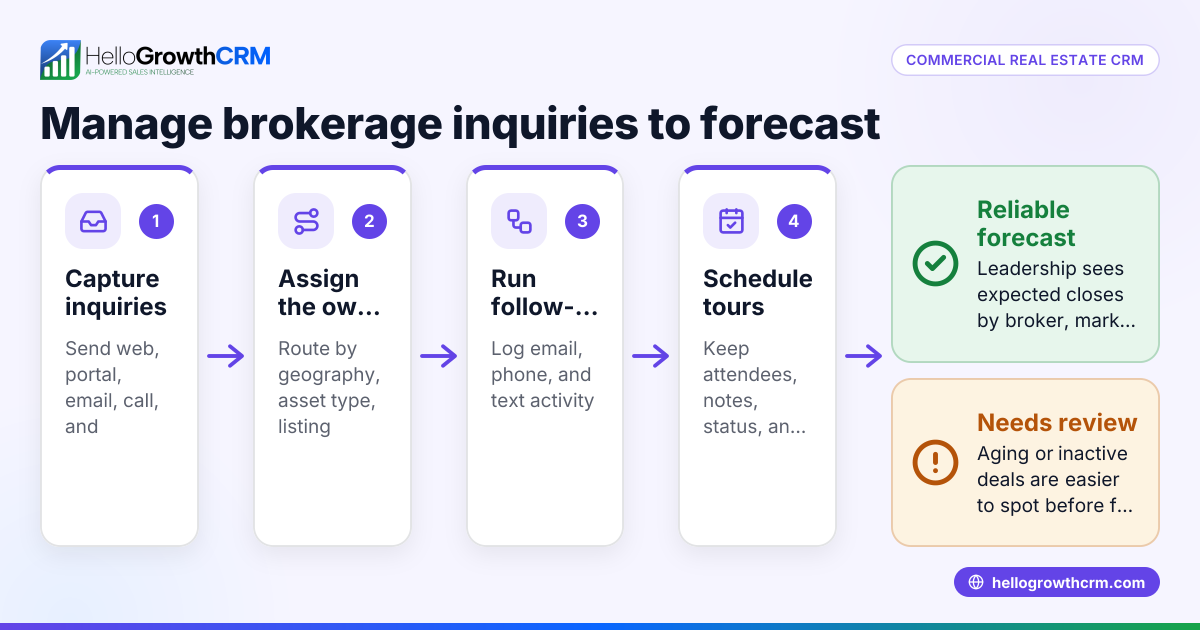
Use one pipeline where every referral is logged at intake, assigned an owner, tied to a property, and given a next step. The key is fast follow-up, visible stages, and required fields so no referral sits unworked or gets buried in email.
To make that work in practice, create a simple intake standard. Every broker referral should enter the CRM the same way. That means no side spreadsheets and no “I’ll remember it later” process.
A practical referral workflow
- Capture the referral immediately
Enter the broker, tenant name, contact details, property interest, and source date. - Assign ownership
Give the referral to a named leasing rep or deal owner right away. - Set a required next action
Every new referral should have a call, email, or meeting scheduled before the day ends. - Tag the relevant property or market
This helps leadership report by project, city, or asset class. - Track status changes
Move the record through clear stages such as New, Contacted, Qualified, Tour Scheduled, Proposal, Negotiation, and Closed. - Measure broker performance
Review which brokers send opportunities that reach proposal or close.
This process does two things. First, it improves response time. Second, it gives developers hard data on the broker relationships that matter most.
If your team wants less manual sorting, AI lead scoring can help rank incoming opportunities based on fit and activity. That is especially useful when multiple properties and markets compete for your team’s attention.
How should developers manage tenant leads and site tours?
Keep tenant leads and site tours in the same CRM record so your team can see the full story in one view. That means inquiry source, calls, emails, tour dates, objections, and next steps all stay connected to the deal and property.
The biggest mistake is splitting this work across tools. Marketing may have lead forms. Leasing may use calendars. Asset managers may rely on spreadsheets. Executives may ask for updates in meetings. Every handoff creates risk.
Build one tenant journey
A clean CRM process should connect these events:
- New inquiry received
- Qualification call completed
- Property shortlist sent
- Tour scheduled
- Tour completed
- Follow-up materials delivered
- Proposal requested
- Negotiation started
- Lease signed or opportunity lost
When these actions are logged in one place, your team gets better continuity. If a prospect tours a suburban office project in Houston and then asks about another location, you can see the entire timeline without digging through old email threads.
Use automation for follow-up
Site tours often create busywork. Reps need to send recap emails, create tasks, book next meetings, and update leadership. This is where email automation becomes useful. It helps your team send consistent follow-up after inquiries and tours without relying on memory.
Automation should still feel personal. Use it for reminders, recap templates, and internal alerts. Do not use it to replace real relationship-building.
Capture useful tour notes
The best notes are short and specific. Focus on facts your team will use later:
- Which space the tenant preferred
- What concerns came up
- Who attended from the prospect side
- Whether timeline or budget changed
- What documents they requested
- What the next commitment is
That level of detail makes your pipeline more accurate. It also improves handoffs between leasing, development, and leadership.
Where does AI fit into a commercial real estate CRM?
AI helps US development teams prioritize leads, summarize activity, flag stalled deals, and improve forecasts. It should support the team’s workflow, not replace judgment, because commercial real estate deals still depend on relationships, timing, and local market knowledge.
That is the real value of ai commercial real workflows. AI can spot patterns across broker referrals, tenant engagement, and deal movement that humans miss during a busy quarter. It can identify leads that deserve faster follow-up or opportunities that look active but have gone quiet.
Useful AI use cases for developers
Here are practical ways AI can help:
- Lead scoring: Rank tenant inquiries by fit, urgency, and likely intent.
- Activity summaries: Turn calls, emails, and notes into short deal summaries.
- Risk alerts: Flag opportunities with no recent activity or overdue tasks.
- Forecast support: Estimate likely close timing based on stage movement and history.
- Rep guidance: Recommend next steps based on past successful deals.
The key is keeping AI grounded in your actual process. If your stages are messy or fields are incomplete, AI will not fix that alone. First build a reliable workflow. Then use AI to improve speed and consistency.
For teams that want both software and operational help, managed RevOps can be useful. It helps standardize stages, fields, reporting, and ownership so the CRM works in real life.
Forecasting deals for developers in the United States
Forecasting is not just for SaaS companies. It is critical for commercial real estate developers. Your team needs to estimate future occupancy, leasing velocity, expected deal value, and likely timing so you can plan cash flow, staffing, lender updates, and board conversations.
A good forecast should answer questions like:
- Which deals are likely to close this month?
- Which properties are at risk of missing leasing targets?
- How much projected rent or sale value sits in negotiation?
- Which markets have the strongest pipeline coverage?
- Which reps or broker channels are producing results?
Build forecasts from stages and evidence
A trustworthy forecast uses both stage and activity signals. For example, a deal in “Proposal Sent” with a recent site tour, active replies, and executive involvement is stronger than a deal in the same stage with no activity for 21 days.
Use clear probability rules, but do not stop there. Your CRM should also consider recent movement:
- Last contact date
- Number of stakeholders involved
- Tour completed
- Proposal delivered
- Legal or LOI status
- Days in stage
- Next meeting scheduled
This gives leadership a more realistic view of the quarter. It also helps asset managers and development teams plan around what is likely, not just what is hoped for.
If forecasting is a major priority, sales forecasting features can help combine pipeline stages with live activity data. That can reduce end-of-month scrambling and improve confidence in reporting.
What features matter most in a commercial real estate CRM in the United States?
The essentials are contact and property records, broker referral tracking, pipeline stages, tour tracking, follow-up tasks, email and calling, reporting, and permission controls. US teams should also value easy integrations, strong data hygiene, and workflows that match how leasing and development work.
Many teams buy too much software and still miss the basics. The best CRM is not the one with the longest feature list. It is the one your team uses consistently.
Must-have features for US developers
Look for these capabilities first:
- Custom pipelines
You need stages that match leasing, acquisitions, and disposition workflows. - Property-linked records
Contacts, companies, and opportunities should tie back to specific projects or units. - Activity tracking
Calls, emails, meetings, notes, and tasks should be easy to log. - Broker source reporting
You should be able to see which referral partners drive real outcomes. - Forecast dashboards
Leadership needs quick visibility into likely closings and pipeline risk. - Team permissions
Not every user should see every deal, note, or financial detail. - Integrations
The CRM should connect with your existing tools through integrations.
Do not ignore compliance and data quality
In the United States, outreach workflows should respect CAN-SPAM for commercial email and TCPA where phone and text outreach apply. Your CRM should help teams track consent, unsubscribe status, and communication history when needed.
Data quality matters just as much. If duplicate broker records, missing stages, and stale opportunities pile up, your reports lose value fast. Set rules for required fields, ownership, and stage updates.
How to choose the right CRM for your development team
Most teams should start with process, not software. If you know how referrals enter the system, who owns follow-up, how tours are recorded, and how stages work, selecting a CRM becomes much easier.
A simple evaluation process
- Map your real workflow
List how broker referrals, tenant leads, tours, proposals, and closings happen today. - Define required records and fields
Include brokers, tenants, properties, units, stakeholders, and forecast value. - Set reporting goals
Decide what leadership needs weekly and monthly. - Test daily usability
Reps should be able to update records in seconds, not minutes. - Review automation and AI
Check whether the system reduces manual admin in useful ways. - Confirm integration needs
Many US businesses rely on tools like QuickBooks and Stripe on the finance side. Your CRM should fit the rest of your stack where relevant. - Plan adoption
Good onboarding, clean data migration, and clear ownership rules matter more than extra features.
If you are comparing options, reviewing the available features and pricing can help you decide whether the setup fits your team size and process.
Common mistakes developers make with CRM rollouts
The first mistake is treating the CRM like a contact list. Developers need a deal system, not just an address book. If properties, tours, and next steps are missing, your team will go back to spreadsheets.
The second mistake is weak ownership. Every opportunity needs a clear owner, and every stage needs a definition. If no one is accountable for updates, forecasts will drift.
The third mistake is overcomplicating the setup. Start with the fields and reports your team will actually use. You can always expand later.
The fourth mistake is ignoring executive use. Leadership should look at the same pipeline the team updates. That drives better habits and fewer side reports.
A good commercial real estate crm united states rollout should make daily work easier. If it creates more clicks without helping the team close deals, adoption will suffer.
Read next
This article covers one part of a bigger topic. For the complete picture, read our guide to real estate.
Ready to put this into practice?
Set up your pipeline, WhatsApp follow-ups, and AI lead scoring in minutes — free, no credit card.
Try HelloGrowthCRM freeGet CRM tips in your inbox
Join thousands of sales professionals who get weekly insights on CRM strategy, AI automation, and pipeline optimization.

The HelloGrowthCRM team publishes guides on CRM strategy, AI sales tools, and revenue operations for small business sales teams.