HelloGrowthCRM software
Built for real small-business sales teams
HelloGrowthCRM helps reps qualify faster, follow up on time, and close more deals—with practical automation in one place.
- AI lead scoring and pipeline visibility
- Built-in dialer, WhatsApp, and email automation
- Sales forecasting and RevOps-ready reporting
A CRM that integrates with HelpScout lets you combine sales and customer support data to provide a unified view of your leads and customers. This integration helps small and mid-sized businesses avoid losing leads due to disconnected tools and slow follow-up.
Why this comes up / what goes wrong
Small-business owners often use HelpScout for customer support emails and tickets but manage sales leads in separate spreadsheets, email threads, or standalone CRMs. This disconnect causes delays in follow-up and missed sales opportunities because sales reps lack context from support interactions. Also, switching between apps wastes time and increases errors.
When evaluating CRMs, business owners want one that connects directly to HelpScout or integrates through middleware like Zapier. They seek a solution that centralizes communication, automates lead capture, and tracks all interactions in one place.
Step-by-step
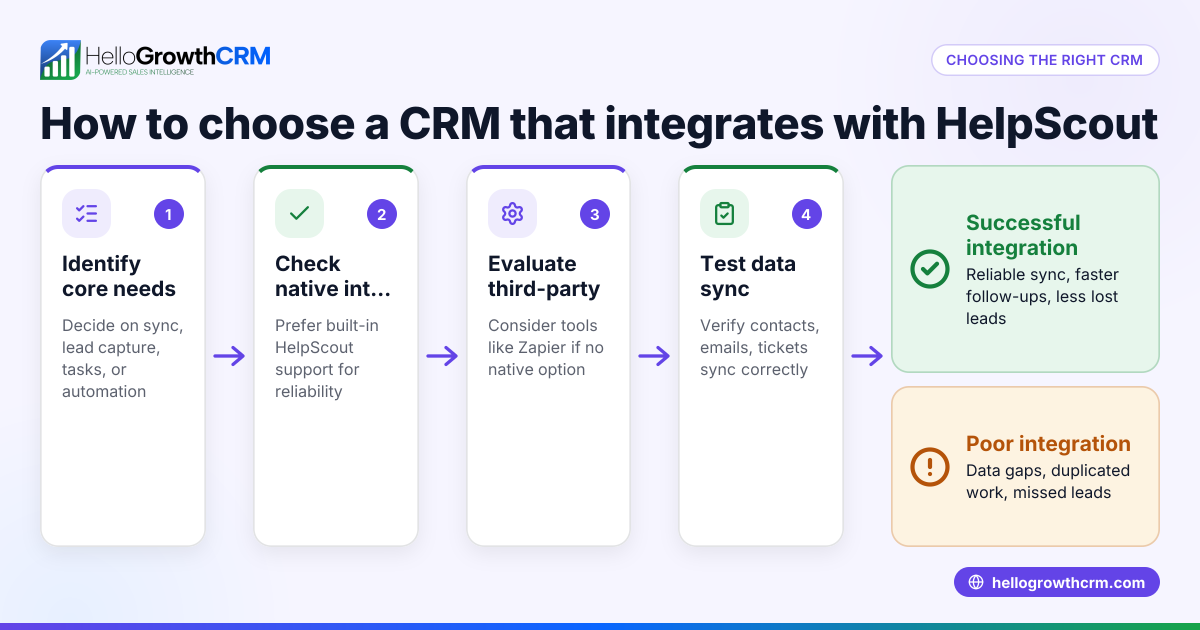
- Identify Your Integration Needs: Determine if you need two-way sync (both CRM and HelpScout update each other) or just one-way data flow. Check if you want tickets, conversations, or customer data synced.
- Check Native Support: Look for CRMs that offer native HelpScout integration. Native means built-in features without extra setup or third-party tools. This usually provides more reliable and real-time syncing.
- Evaluate Middleware Options: If native integration is unavailable, consider middleware like Zapier to connect your CRM with HelpScout. Verify the triggers and actions supported and any limits on automation runs.
- Assess User Experience: Test how easy it is for your sales and support teams to access HelpScout data inside the CRM. Confirm that conversations and tickets appear on lead or customer records.
- Review Pricing and Limits: Some integrations may require higher-tier CRM plans or additional costs for middleware. Confirm what is included in your budget.
- Verify Mobile and Messaging Support: If your team uses WhatsApp or SMS for sales follow-ups, check if the CRM supports these channels alongside HelpScout integration for a unified workflow.
- Test Reporting and Automation: Ensure that integrating HelpScout data helps you generate sales reports and automate follow-ups without manual copying.
- Check Security and Compliance: Confirm that the integration complies with your data security policies and any industry regulations.
For more on CRM communication tools, see built-in CRM dialer and integrations.
Example (fictional figures)
Sarah runs a landscaping company in Charlotte, North Carolina. She uses HelpScout for customer support but struggles with leads slipping through the cracks because her CRM does not sync with HelpScout.
Sarah wants to integrate her CRM with HelpScout to improve lead follow-up.
- Her average monthly leads: 150
- Average conversion rate before integration: 10%
- Average revenue per sale: $3,000
Current monthly revenue from leads:
150 leads × 10% conversion = 15 sales 15 sales × $3,000 = $45,000
After integrating the CRM with HelpScout, she improves follow-up speed and context, increasing conversion to 15%:
150 leads × 15% conversion = 22.5 sales (rounded to 23) 23 sales × $3,000 = $69,000
Increase in monthly revenue:
$69,000 - $45,000 = $24,000
This shows how integrating HelpScout with a CRM can boost sales by improving communication and follow-up.
Common mistakes
- Choosing a CRM without HelpScout integration: Leads to manual data entry and lost context. Prevent by confirming integration before purchase.
- Ignoring middleware limitations: Zapier or similar tools may have automation limits or delays. Prevent by checking automation quotas and speed.
- Not involving sales and support teams in testing: Integration may not meet user needs. Prevent by running joint trials and gathering feedback.
- Overlooking mobile messaging channels: If your team uses WhatsApp or SMS, missing these in your CRM reduces efficiency. Prevent by choosing a CRM with WhatsApp and SMS support.
- Underestimating training needs: New integrations require user training to avoid errors. Prevent by planning onboarding sessions.
- Ignoring data security: Integration can expose data if not secure. Prevent by verifying compliance and encryption.
Learn more about avoiding integration issues at HelloGrowthCRM for the United States.
Doing this in HelloGrowthCRM
HelloGrowthCRM supports WhatsApp and SMS messaging where conversations with leads are logged on the lead record, and follow-ups can go out as messages. Its AI agents (currently in Beta on the Growth plan) draft follow-up messages after calls, so sales reps only need to review and send. For small teams, the Free Forever plan lets a two-person team run their pipeline at no cost until they need calling or WhatsApp automation. While HelloGrowthCRM does not list a native HelpScout integration, its integrations page can help you explore connecting tools through middleware or APIs.
Frequently asked questions
Which CRM integrates with HelpScout? Many CRMs offer HelpScout integration either natively or via middleware like Zapier. Popular options include HubSpot, Salesforce, and Pipedrive, but check each vendor’s integration details as capabilities vary.
Can I use Zapier to connect HelpScout to any CRM? Yes, Zapier supports connecting HelpScout with many CRMs by automating workflows like creating contacts or tickets. However, Zapier may have limits on task runs and latency compared to native integrations.
Does HelloGrowthCRM integrate with HelpScout? HelloGrowthCRM does not currently offer a native HelpScout integration. You can explore connecting via Zapier or API. HelloGrowthCRM focuses on WhatsApp, SMS, AI agents, and pipeline management to improve sales workflows.
Does HelloGrowthCRM integrate with Gmail? HelloGrowthCRM supports email templates and scheduling within the CRM but does not list a native Gmail integration. Check the integrations page for options to connect email services.
Can HelloGrowthCRM integrate with Clearbit or JustCall? HelloGrowthCRM’s integrations page lists supported tools. For Clearbit or JustCall, check if middleware like Zapier can bridge the connection. HelloGrowthCRM focuses on WhatsApp and SMS messaging and AI features.
Key takeaways
- Choose a CRM with native HelpScout integration for reliable, real-time syncing.
- Middleware like Zapier can connect HelpScout to many CRMs but may have limits.
- Evaluate user experience, pricing, and security before committing.
- Avoid ignoring mobile messaging channels like WhatsApp and SMS in your CRM.
- Test integrations with your sales and support teams to ensure fit.
Start improving your sales and support workflow today. You can Start on the Free Forever plan (200 leads, no credit card) with HelloGrowthCRM and explore how its WhatsApp and SMS messaging and AI agents can help your team stay on top of leads.
Ready to put this into practice?
Set up your pipeline, WhatsApp follow-ups, and AI lead scoring in minutes — free, no credit card.
Try HelloGrowthCRM freeGet CRM tips in your inbox
Join thousands of sales professionals who get weekly insights on CRM strategy, AI automation, and pipeline optimization.

The HelloGrowthCRM team publishes guides on CRM strategy, AI sales tools, and revenue operations for small business sales teams.