Skip to content
CRM Tools List

CRM Tools List: 15 Examples Grouped by What They Do Best

Fifteen CRM tools in six groups, from large suites to WhatsApp-first platforms, with who each one suits, the entry price on the vendor's own page, and a simple way to choose between them.

Last updated:

Free Forever • No Credit Card Required

Quick answer

What are examples of CRM tools?

Common examples of CRM tools are Salesforce Sales Cloud, Microsoft Dynamics 365 Sales, HubSpot, Zoho CRM, Pipedrive, Bigin, Freshsales, monday CRM and Odoo CRM. Tools built mainly for Indian sales teams include LeadSquared, Kylas, TeleCRM and HelloGrowthCRM, while Wati and Interakt are WhatsApp-first platforms often used beside a CRM. All of them keep customers, deals and follow-ups in one place. They differ in who they are built for, how much set-up they need and how they charge.
  • 15 tools in six groups, so you can skip the groups that do not match how you sell
  • Entry prices read from each vendor's own pricing page on 21 September 2026
  • HelloGrowthCRM is our product and appears once, labelled as ours

Best CRM in IndiaCompare CRMs side by side

01

What counts as a CRM tool

A CRM tool is software that keeps your customers, your open deals and your follow-ups in one place, so that selling does not depend on anyone's memory. CRM stands for customer relationship management; the full form and its other meanings are explained separately, and what a CRM is and how it works has the longer introduction. If you want to see how businesses use these tools day to day instead of which tools exist, read the CRM examples.

This page is a list, not a ranking. The tools are grouped by what they are good at, because a tool that is right for a two-hundred-seat inside sales floor is wrong for a five-person trading firm, and the reverse. HelloGrowthCRM is our own product. It appears once, at number 8, and is labelled as ours.
02

The CRM tools list at a glance

Prices are the entry paid plan shown on each vendor's own pricing page on 21 September 2026, before tax, in the currency the page displayed. Open the vendor's page before you decide, since prices and plan names change often.

#CRM toolBest suited toEntry price on the vendor's pageFree plan or trial
1Salesforce Sales CloudLarge teams with complex processes and a dedicated administratorStarter Suite $25 per user a month; Pro Suite $100; Enterprise $175, billed annually30-day free trial; a Free Suite is also listed
2Microsoft Dynamics 365 SalesCompanies already standardised on Microsoft 365Sales Professional ₹5,410 per user a month, paid yearly, GST extraFree trial offered
3HubSpotTeams whose leads come from content, email and web formsSales Hub Professional $90 per seat a month, billed annuallyFree tools for up to two users and 1,000 contacts
4Zoho CRMBusinesses that want one vendor for CRM, accounts and supportStandard edition ₹800 per user a month, taxes extraFree edition for three users
5PipedriveSmall sales teams who want a visual pipeline and little administrationLite US$14 per seat a month, billed annually14-day free trial, no card needed
6Bigin by Zoho CRMVery small teams moving off spreadsheetsExpress US$7 per user a month, billed yearlyFree edition for a single user with 500 records; 15-day trial
7FreshsalesSmall and mid-sized teams who want AI help with scoring and emailGrowth $9 per user a month, billed annually21-day free trial, no card needed
8HelloGrowthCRM (ours)Indian small businesses that sell on calls and WhatsApp and quote with GST₹899 per user a monthFree plan for one user
9KylasGrowing Indian businesses with many occasional usersA flat monthly fee for the company, not a price per userFree plan capped at 10,000 records; 7-day trial, no card needed
10TeleCRMTelecalling teams that work from mobile phonesCore CRM ₹599 per user a month billed annually, or ₹849 billed quarterly; minimum three usersNot shown on the pricing page
11LeadSquaredHigh-volume sales and field teams with many lead sourcesSales Pro $60 per user a month; Sales Super $100, billed annuallyNot shown on the pricing page
12WatiSupport and sales teams that live in WhatsAppThree plans with three to five users included; WhatsApp message charges are extra7-day free trial
13InteraktOnline sellers who want campaigns, catalogues and chatbots on WhatsAppMonthly platform plans; WhatsApp template charges are billed on topFree trial offered
14monday CRMTeams that already run projects on monday.comBasic $12 per seat a month billed annually; plans start from three seats14-day free trial
15Odoo CRMBusinesses that want CRM and ERP in one open-source suiteSee the vendor's page; we could not read it when checkingOpen-source community edition

Each tool name links to the pricing page the figures were read from.

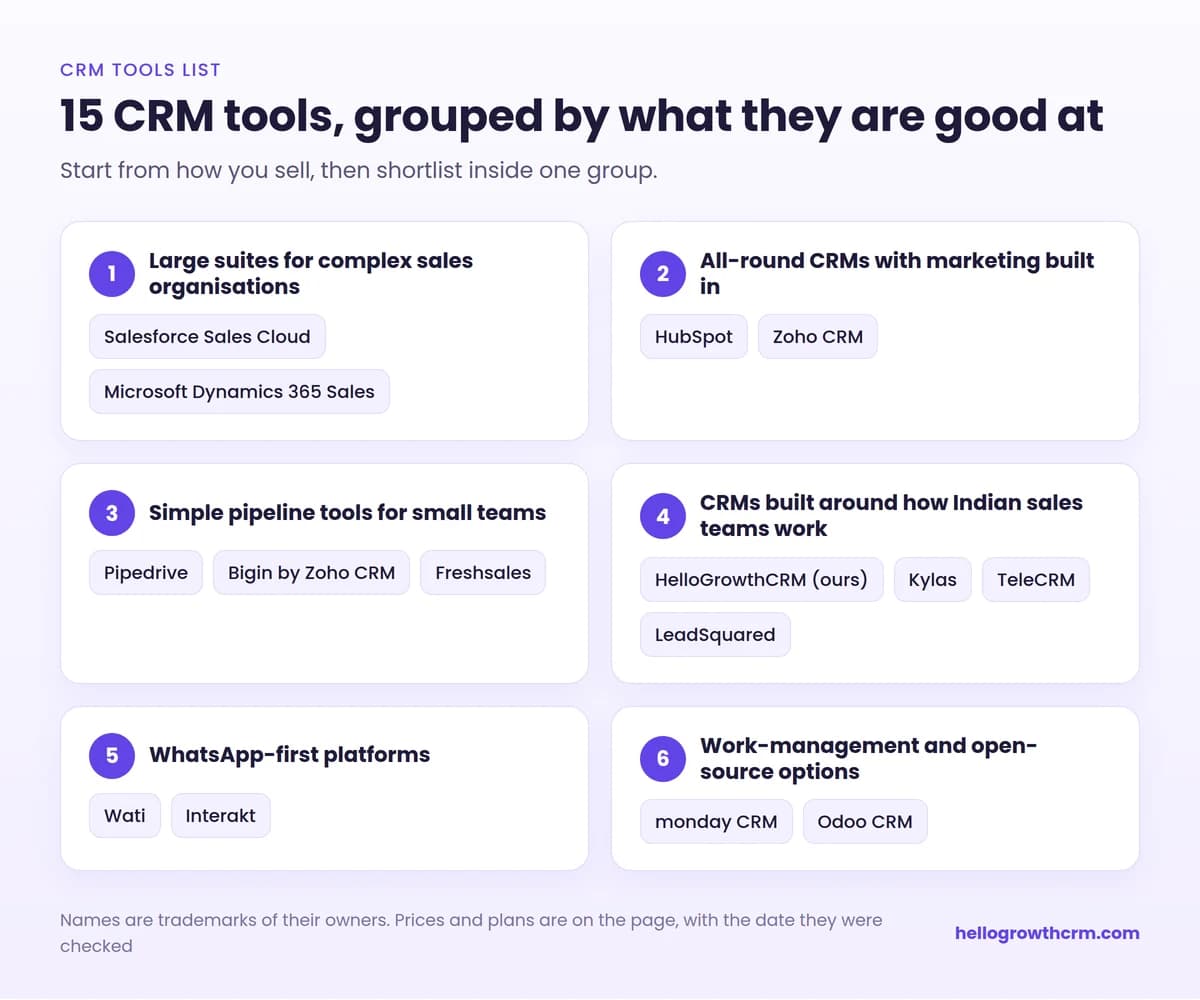
CRM tools list grouped by use case: large suites, all-round CRMs, simple pipeline tools, CRMs for Indian sales teams, WhatsApp-first platforms, and work-management and open-source options
The 15 CRM tools on this page, grouped by what they are good at.
03

Large suites for complex sales organisations

1. Salesforce Sales Cloud

The largest CRM vendor, and the most configurable tool on this list. Almost any sales process can be modelled in it, and there is a wide market of add-on apps and implementation partners. It suits organisations with several sales teams, formal approval steps and a dedicated administrator. Before buying, price the implementation as well as the licences, since set-up is normally the larger cost in the first year.

2. Microsoft Dynamics 365 Sales

Microsoft's sales CRM, which works closely with Outlook, Teams and the rest of Microsoft 365. It suits companies that are already standardised on Microsoft and want sales data beside their other business systems. Check which Microsoft licences you already hold, and which partner will configure it for you.

04

All-round CRMs with marketing built in

3. HubSpot

Known for free CRM tools and for marketing features such as forms, email and landing pages, with separate hubs for sales and service. It suits teams whose leads come mainly from content, email and web forms. Check how the cost changes as your contact list grows and as you move from the free tools to paid tiers.

4. Zoho CRM

A broad CRM with rupee pricing and a large family of connected Zoho apps for accounts, support, email and more. It suits businesses that want one vendor across several functions. Check which edition holds the features you need, because many of them sit in the higher editions.

05

Simple pipeline tools for small teams

5. Pipedrive

Built around a visual deal pipeline and designed to be learned quickly. It suits small sales teams that sell through a clear sequence of stages and want little administration. Check that the features you need are in the plan you are pricing, not in a higher one.

6. Bigin by Zoho CRM

Zoho's small-business CRM, deliberately simpler than Zoho CRM. It suits very small teams moving off spreadsheets for the first time. Check the record limit on each edition against the size of your customer list.

7. Freshsales

The sales CRM from Freshworks, with an AI assistant that highlights likely deals and helps write emails. It suits small and mid-sized teams who want a modern interface without a long set-up. Check which channels, such as phone and chat, are included in your plan.

06

CRMs built around how Indian sales teams work

8. HelloGrowthCRM (our product)

This one is ours, so read this entry knowing that. HelloGrowthCRM combines a sales pipeline with a team WhatsApp inbox on the official Business API, a built-in dialer, and quotations with GST. It suits Indian small businesses whose selling happens on calls and WhatsApp. It is not an ERP and not a marketing automation suite, so if those are your main need, look at groups one and two.

9. Kylas

A sales CRM aimed at growing Indian businesses, priced as a flat monthly fee for the whole company instead of a price per user. That suits teams with many occasional users, where per-user pricing would be wasteful. Check the record limits and the prices of add-ons.

10. TeleCRM

A calling-first CRM that manages leads, phone calls and WhatsApp conversations in one place, sold as a core plan and a plan with WhatsApp chat sync. It suits telecalling teams that work from mobile phones. Check the minimum number of users and the one-time set-up charges.

11. LeadSquared

A CRM for high-volume sales, marketing, service and field teams, widely used in sectors such as education, financial services, healthcare and real estate. It suits large teams with many lead sources and strict process. Check the implementation effort, which is greater than for the small-team tools above.

07

WhatsApp-first platforms

These two are not full sales CRMs. They are included because many Indian businesses meet them first, and because they are often used beside a CRM.

12. Wati

A customer engagement platform built on the WhatsApp Business API, with a team inbox, campaigns and no-code chatbots. It suits support and sales teams that handle most conversations on WhatsApp. Remember that WhatsApp message charges are billed on top of the platform fee, as they are with every provider.

13. Interakt

A WhatsApp Business API platform from Jio Haptik, with a shared inbox, campaigns, catalogues and chatbots. It suits online sellers and consumer brands. As with Wati, the subscription and the WhatsApp template charges are separate lines on the bill.

08

Work-management and open-source options

14. monday CRM

A CRM built on the monday.com work platform, using boards that you can reshape to fit your process. It suits teams that already plan projects on monday.com and want sales in the same place. Check the minimum seat count when pricing it for a very small team.

15. Odoo CRM

The CRM app inside Odoo, an open-source suite of business apps that also covers accounting, inventory, e-commerce and manufacturing. It suits businesses that want CRM and ERP in one system and have technical help available. Check the difference between the community edition and the paid editions before you plan around either.

09

The tools inside a CRM tool

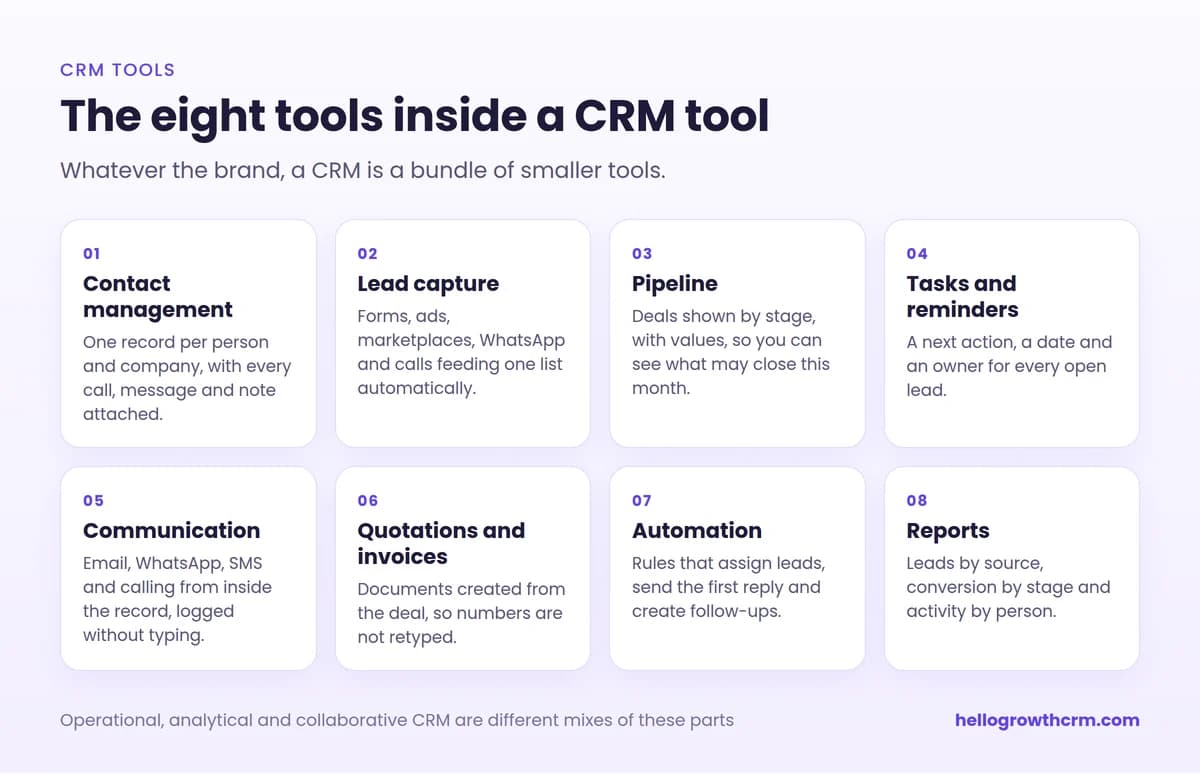
Whatever the brand, a CRM is a bundle of smaller tools. Knowing them makes any product page easier to read.

  • Contact management. One record per person and company, with every call, message and note attached.
  • Lead capture. Forms, ads, marketplaces, WhatsApp and calls feeding one list automatically.
  • Pipeline. Deals shown by stage, with values, so you can see what may close this month.
  • Tasks and reminders. A next action, a date and an owner for every open lead.
  • Communication. Email, WhatsApp, SMS and calling from inside the record, logged without typing.
  • Quotations and invoices. Documents created from the deal, so numbers are not retyped.
  • Automation. Rules that assign leads, send the first reply and create follow-ups.
  • Reports. Leads by source, conversion by stage and activity by person.

The three classic types of CRM, operational, analytical and collaborative, are different mixes of these parts. Terms you meet on vendor pages are defined in the CRM glossary.

The eight tools inside a CRM tool: contact management, lead capture, pipeline, tasks and reminders, communication, quotations and invoices, automation and reports
The smaller tools that every CRM bundles together.
10

How to choose from this list

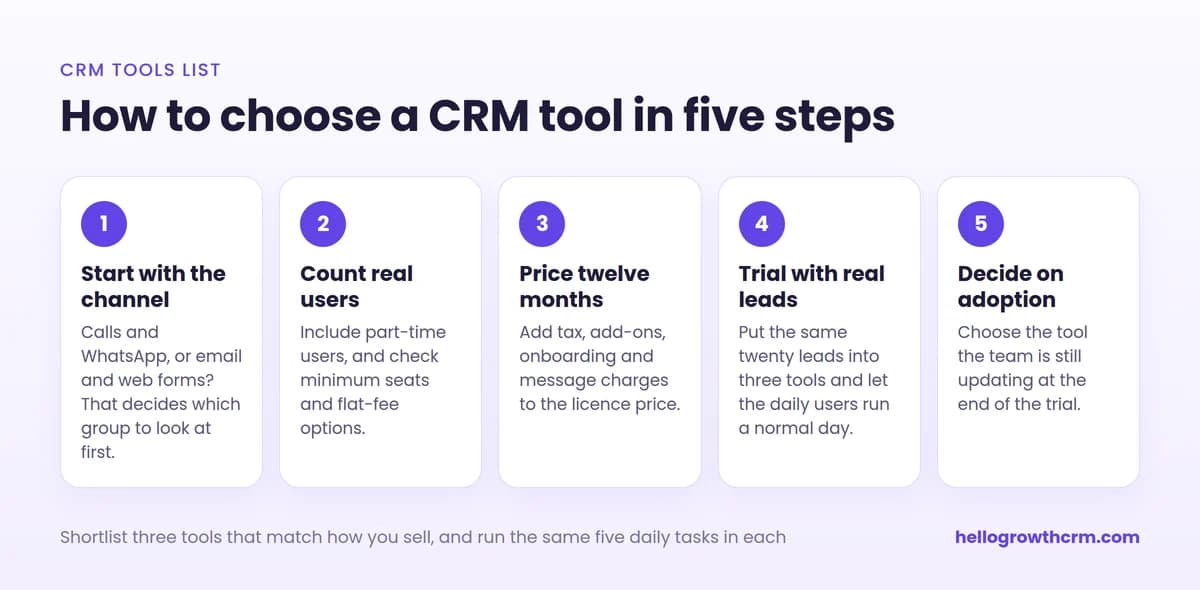
  1. Start with the channel. If most selling happens on calls and WhatsApp, begin with group four. If it happens by email and web forms, begin with group two.
  2. Count real users. Include part-time users, and check minimum seats and flat-fee options.
  3. Price twelve months. Add tax, add-ons, onboarding and message charges to the licence price.
  4. Trial with real leads. Put the same twenty leads into three tools and have the daily users run their normal day.
  5. Decide on adoption. Choose the tool the team is still updating at the end of the trial.

For a buyer's view of the Indian market, see best CRM in India and CRM software in India. If your team is mainly on the phone, the CRM guide for telecalling teams is more specific.

How to choose a CRM tool in five steps: start with the channel, count real users, price twelve months, trial with real leads, decide on adoption
Five steps from a long list to a decision.
12

How the prices on this page were checked

Every price, plan name, user limit and trial length on this page was read from the vendor's own website on 21 September 2026. They are list prices for the entry paid plan, before tax, usually on annual billing, and in the currency the page displayed to us, which is why some are in dollars and some in rupees. Vendors change prices, rename plans and show different currencies by country. Treat the figures as a guide to the order of magnitude, and open the vendor's page before you decide. Where a page did not show a figure we could read, the table says so instead of guessing.

If you represent one of these vendors and something here is out of date, tell us through the contact page and we will correct it.

13

Where HelloGrowthCRM fits

If your leads arrive on WhatsApp and the phone, your quotations need GST, and nobody on the team wants to become a CRM administrator, HelloGrowthCRM was built for that situation. There is a free plan for one user, and paid plans start at ₹899 per user per month. See India pricing, or read how the telecalling CRM works day to day.

Challenges we solve

Why CRM shortlists go wrong, and the fix

Most regret about a CRM comes from how it was chosen, not from the tool. These four mistakes are the common ones.

  • The shortlist is built from adverts and top-ten articles, so it holds the best-known tools instead of the best-fitting ones.

    Start from how you sell: on calls, on WhatsApp, by email or in the field. The groups on this page are arranged that way, so you can skip the ones that do not match.Shortlist by use case

  • Tools are compared by the number of features, and the team ends up paying for a hundred it never opens.

    Write down the five things your team must do every day, and test only those during the trial.Five daily jobs

  • The price on the website looks small, but the bill grows with minimum seats, add-ons, onboarding fees and message charges.

    Price each tool for your real team size over twelve months, including tax and anything sold as an add-on, before you compare.Twelve-month cost

  • The CRM is bought, set up once and then abandoned, because keeping it updated felt like extra work.

    Prefer the tool that records calls, chats and emails by itself, and begin with one pipeline and one report.Start small

What you get

Why teams choose HelloGrowthCRM

AI-powered CRM with the features you need to close more deals.

  • One list for every lead, whether it arrived from a web form, WhatsApp, a phone call, an ad or a spreadsheet import
  • A drag-and-drop pipeline that shows each deal by stage, and the value sitting at each stage
  • Follow-up tasks with a date and an owner, so the next step never depends on memory
  • A team WhatsApp inbox on the official Business API, with every chat saved on the customer record
  • A built-in dialer that places calls from the lead record and logs them
  • Quotations and GST invoices created from the deal, with HSN or SAC codes and tax worked out
  • Reports on lead sources, conversion by stage and activity by team member
  • Spreadsheet import, so the customer list you already have moves across in one step
  • A mobile app for updating a lead straight after a call or a visit
  • A free plan for one user, and paid plans from ₹899 per user per month, billed in rupees

HelloGrowthCRM by the numbers

$12
per user/month list price — $10/user/mo on annual billing, ₹899/user/mo in India
$0
free forever starter plan — no credit card required
14-day
trial included on paid plans
259+
live integrations, from WhatsApp to Tally and QuickBooks
500+
teams worldwide run their pipeline on HelloGrowthCRM

Frequently Asked Questions

Short answers about CRM tools, free options and how to choose.

More CRM guides to explore

Browse related HelloGrowthCRM guides and see how different teams run their pipelines.

Ready to grow?

Join small businesses that close more deals with HelloGrowthCRM.

Free Forever • No Credit Card Required

Take the next step

Free Forever • No Credit Card Required

Prefer email? Write to sales@hellogrowthcrm.com