HelloGrowthCRM software
Built for real small-business sales teams
HelloGrowthCRM helps reps qualify faster, follow up on time, and close more deals—with practical automation in one place.
- AI lead scoring and pipeline visibility
- Built-in dialer, WhatsApp, and email automation
- Sales forecasting and RevOps-ready reporting
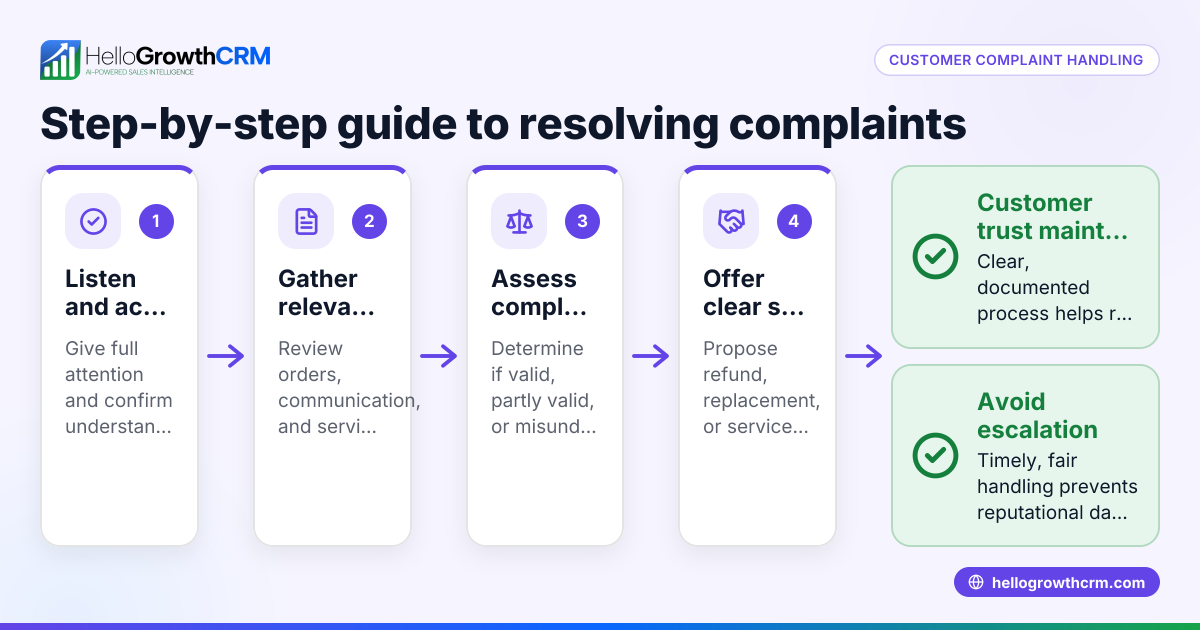
A customer complaint log template UK is essential for keeping a clear, organised record of all customer complaints your business receives. It helps ensure timely follow-up, track resolution progress, and identify recurring issues to improve customer satisfaction. This article covers why you need such a template, how to use it step-by-step, a realistic example, common pitfalls, and a brief look at how HelloGrowthCRM can assist in complaint management.
Why this comes up / what goes wrong
Small business owners often struggle to keep track of customer complaints because they rely on informal methods like WhatsApp messages, emails, or spreadsheets. This leads to missed complaints, slow responses, and lost opportunities to fix problems and retain customers. Without a standard complaint log template, data can be incomplete or inconsistent, making it hard to analyse patterns or prove compliance with consumer rights.
A customer complaint log template UK provides a clear structure for recording essential details such as complaint date, customer contact, issue description, action taken, and resolution status. This helps your team respond faster and maintain a professional record for audits or customer service reviews.
Step-by-step
- Download or create your template: Use a spreadsheet or document that includes columns for Complaint ID, Date Received, Customer Name, Contact Details, Complaint Description, Assigned Staff, Action Taken, Date Resolved, and Status. You can find free sales templates including complaint logs at sales templates.
- Record every complaint immediately: As soon as a complaint is received by phone, email, WhatsApp or in person, enter all relevant details in the log. Check that the customer contact info is accurate to enable follow-up.
- Assign responsibility: Allocate the complaint to a team member who will handle it. Record their name to ensure accountability.
- Track actions and updates: Log every step taken to resolve the complaint, including dates and outcomes. This ensures transparency and avoids duplicated efforts.
- Update resolution status: Mark complaints as resolved, pending or escalated. Regularly review unresolved complaints to avoid delays.
- Analyse complaint trends: Periodically review the log to identify common issues or areas for improvement. Use this insight to prevent future complaints.
- Store securely and back up: Keep your complaint log in a secure location with regular backups to protect customer data and comply with data protection rules.
Example (fictional figures)
A recruitment consultancy in Bristol receives a complaint on 15/04/2024 about delayed candidate feedback. They log it as follows:
Complaint ID = 001 Date Received = 15/04/2024 Customer Name = Jane Smith Contact Details = jane.smith@example.com Complaint Description = Delay in candidate feedback for job vacancy Assigned Staff = Mark Taylor Action Taken = Apologised and expedited feedback process Date Resolved = 17/04/2024 Status = Resolved
This clear record helps track the complaint and shows the business responded within 2 days.
Common mistakes
- Incomplete details: Missing customer contact or complaint description can delay resolution. Prevent this by training staff to capture full information immediately.
- No assigned handler: Complaints without a responsible person risk being ignored. Always assign a staff member.
- Failure to update status: Leaving complaints marked as unresolved without updates causes confusion. Regularly review and update the log.
- Using multiple unlinked systems: Tracking complaints across WhatsApp, email and spreadsheets separately leads to lost data. Use a single source of truth or integrated tools.
- Ignoring complaint trends: Not analysing complaint data misses chances to improve. Schedule monthly reviews.
For more tips on managing customer interactions and follow-ups, see our free sales tools and calculators.
Doing this in HelloGrowthCRM
HelloGrowthCRM offers free sales tools, templates and calculators including pipeline and follow-up cadence templates that you can download without signing up at free sales tools and calculators. After the sale, service requests and support tickets stay linked on the same customer record as the deal, making it easier to track complaints and resolutions in one place. This helps your team manage complaints efficiently and maintain a full history of customer interactions.
Frequently asked questions
What should a customer complaint log include? A complaint log should include a unique ID, date received, customer name and contact, description of the complaint, assigned staff member, actions taken, resolution date, and current status.
How often should I update the complaint log? Update the log immediately when a complaint is received and whenever there is progress or resolution. Regularly review unresolved complaints at least weekly.
Can I use Excel or Google Sheets for the complaint log? Yes, spreadsheets are a common choice for complaint logs. Ensure it is regularly backed up and accessible to all relevant team members.
How does a complaint log help my business? It ensures complaints are handled promptly, improves customer satisfaction, helps identify recurring issues, and provides evidence for compliance or audits.
Is there a free template I can use? You can download free complaint log templates and other sales templates at sales templates without needing an account.
Can HelloGrowthCRM track complaints? Yes, HelloGrowthCRM links service requests and tickets to customer records, helping you manage complaints alongside sales and follow-ups. Learn more at HelloGrowthCRM for the United Kingdom.
Key takeaways
- Use a standard customer complaint log template with all essential fields.
- Record complaints immediately and assign a responsible team member.
- Keep the log updated with actions and resolution status.
- Review complaint trends regularly to improve your service.
- Avoid scattered tracking by centralising complaint records.
- Download free complaint log and sales templates at sales templates.
Start managing customer complaints efficiently today with a clear log. Start on the Free Forever plan (200 leads, no credit card) to try HelloGrowthCRM’s tools and templates.
Ready to put this into practice?
Set up your pipeline, WhatsApp follow-ups, and AI lead scoring in minutes — free, no credit card.
Try HelloGrowthCRM freeGet CRM tips in your inbox
Join thousands of sales professionals who get weekly insights on CRM strategy, AI automation, and pipeline optimization.

The HelloGrowthCRM team publishes guides on CRM strategy, AI sales tools, and revenue operations for small business sales teams.